Openshorts
Turn long videos into viral vertical shorts and publish them to TikTok, Instagram and YouTube.
Install Openshorts
Pick your client, then add it in one click or paste the config.
~/Library/Application Support/Claude/claude_desktop_config.json{
"mcpServers": {
"openshorts": {
"command": "uvx",
"args": [
"openshorts"
]
}
}
}
Settings → Developer → Edit Config, merge this into mcpServers, then fully quit and reopen Claude Desktop.
We couldn’t confirm it starts correctly
The install command installed and started the server, which then stopped for configuration (such as an API key) that our sandbox does not have — expected for servers that connect to your account.
uvx openshortsProcess exited before answering initialize.
This is an experimental automated check and can have false negatives — missing environment variables, a slow cold install, etc. It doesn’t necessarily mean something’s wrong. Last checked .
Overview
Security & health
What it can reach and how reliably it runs — from our own checks, not the maintainer’s claims.
Recent health check succeeded.
Supply-chain signal
No high-severity advisories surfaced by our automated scan.
Scanned 15d ago via OSV.dev · openshorts (PyPI)
Adoption & maintenance
Factual signals from GitHub, npm, and our automated checks — not a rating.
From the project README
OpenShorts.app
The open-source OpusClip alternative. Turn long videos into viral 9:16 Shorts, TikToks and Reels. Self-host free (MIT) or use the hosted cloud.
| OpenShorts | OpusClip | Vizard | Klap | |
|---|---|---|---|---|
| Open source | Yes (MIT) | No | No | No |
| Self-hostable | Yes (Docker) | No | No | No |
| Free without watermark | Yes, self-hosted | No | No | No |
| API + MCP server | Yes | API | API | API |





Open source AI video platform with 3 tools in one: Clip Generator, AI Shorts (UGC videos with AI actors), and YouTube Studio.
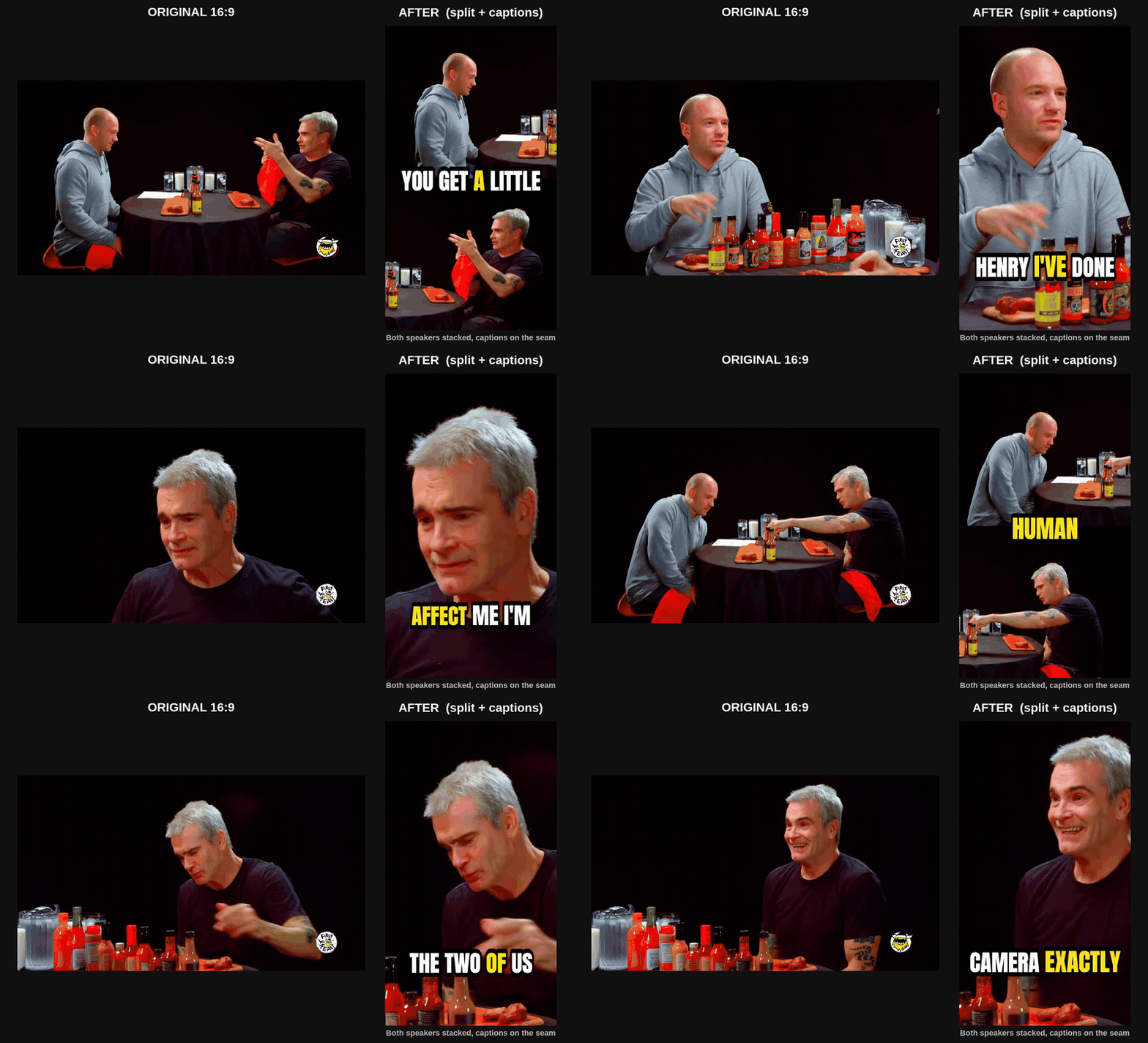
Real OpenShorts output, not a mock-up. Source: Turn the Tables with Dan and Shoshana Jordan, Heritage of Faith, licensed CC BY.
Two people on camera? OpenShorts stacks them instead of shrinking the wide shot, puts the captions on the seam where they cover nobody, and switches back to a face-tracked crop when the cut goes to one person. The AI picks the layout per video; nothing to configure.
Cloud version: don't want to run it yourself? OpenShorts Cloud is the same software on a GPU. Free plan: your first video is clipped whole up to 60 minutes, then 20 minutes a month, with a watermark and no credit card. Paid plans from $12/mo remove the watermark and add auto-posting and Autopilot (below).
Two ways to run it, same software either way:
| Self-hosted (this repo) | Hosted on openshorts.app | |
|---|---|---|
| Price | Free forever, MIT | Free plan, paid from $12/mo |
| Speed | 5 to 8 min per 8-min video on CPU | About 50s on our NVIDIA GPU |
| API keys | Bring your own Gemini, ElevenLabs, fal.ai | Gemini included, nothing to set up |
| Watermark / limits | None, ever | Watermark and 20 min/mo on the free plan, neither on paid |
| Auto-posting | With your own Upload-Post account | Paid plans: connect TikTok, Instagram, YouTube, Facebook, LinkedIn, Threads and Bluesky once, post or schedule from the app |
| Autopilot | Not included | Paid plans: every new video on your channel becomes scheduled shorts |
| Setup | Docker, 8GB+ RAM, model downloads | Sign in and paste a link |
| MCP / API for agents | Same /mcp endpoint, but only while your machine is on | Always-on endpoint at mcp.openshorts.app, API keys in one click |
| Your data | Your server | Ours |
Self-hosting is genuinely free and always will be. It costs you a machine, your own API keys and the time to keep it running. The hosted plans exist to cover that hardware and those keys.
Compared to Opus Clip, Klap, Vizard (public pricing pages, checked October 2026; full breakdown at openshorts.app/alternatives):
| Free plan | Paid from | Open source | |
|---|---|---|---|
| OpenShorts | Self-hosted: free, no watermark, no cap. Cloud: first video up to 60 min, then 20 min/mo, watermarked | $12/mo (Cloud, 100 min) | Yes, MIT |
| Opus Clip | 60 min/mo, watermarked, export within 3 days | $15/mo (Starter, 150 min), billed per minute of source | No |
| Klap | 1 video to try, no ongoing free plan | $14/mo billed yearly (100 clips), billed per clip | No |
| Vizard | 60 min/mo, 720p, watermarked | $14.50/mo billed yearly ($29 monthly), billed per minute uploaded | No |
Video: the story behind OpenShorts Cloud
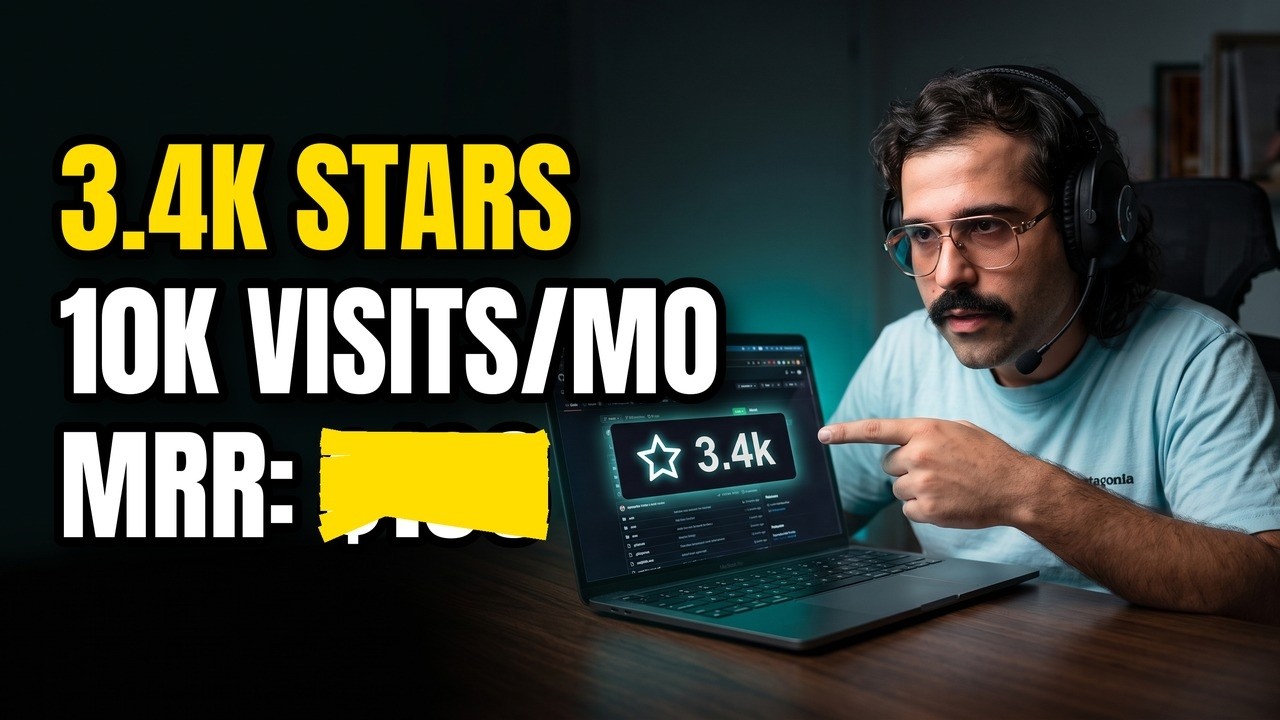
In Spanish. Click the image to watch on YouTube.
What's Inside
1. Clip Generator
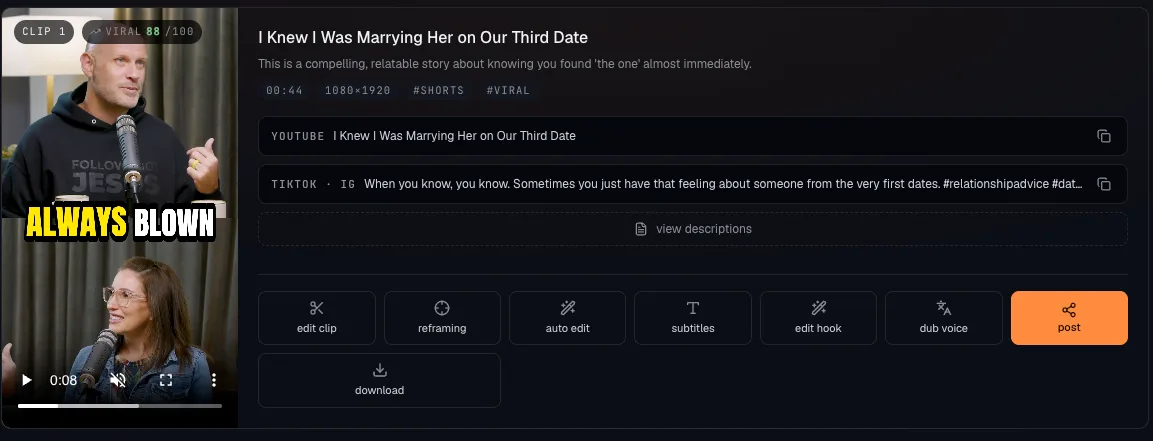
Paste a YouTube link or upload a file. OpenShorts finds the strongest moments of a podcast, webinar, stream or interview and returns finished 9:16 clips: reframed, captioned, with a hook line, a virality score and titles for each platform.
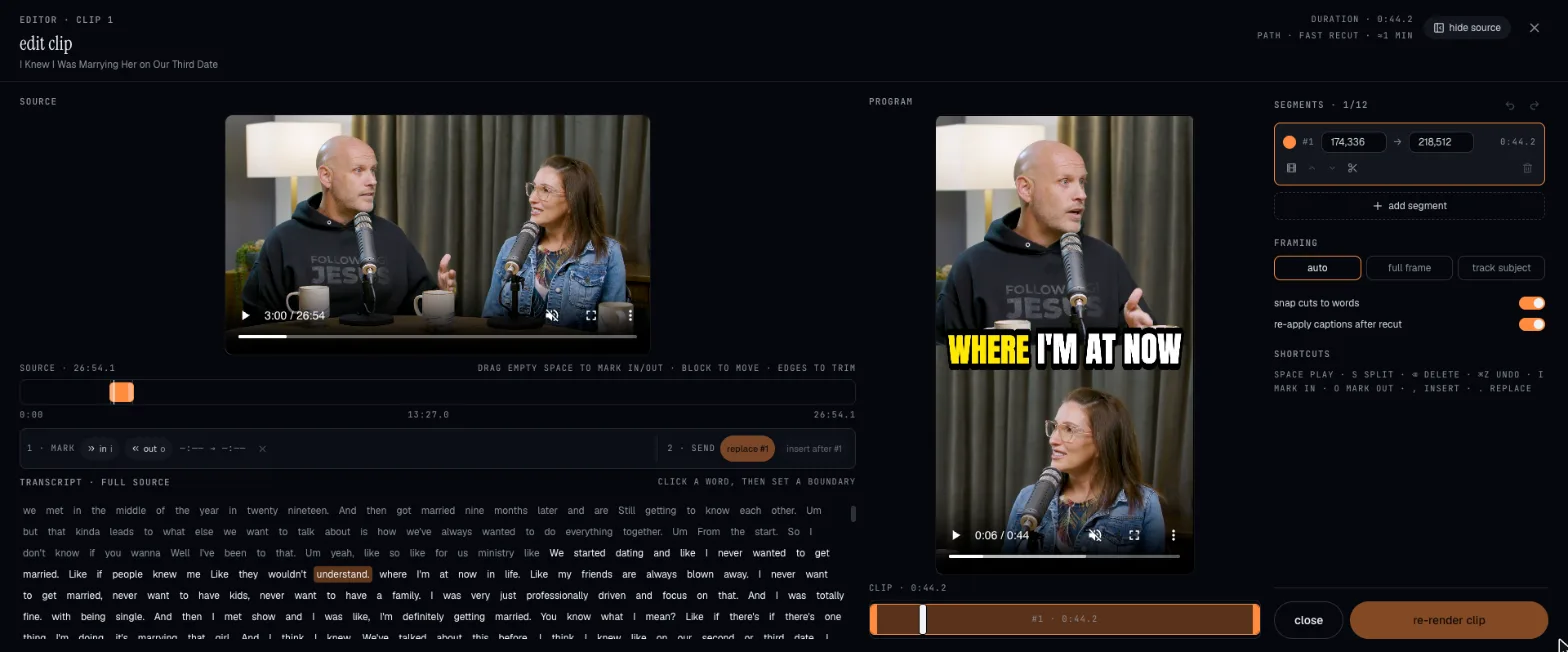
Every clip opens in a real editor: source and program monitors side by side with the full transcript. Click a word to set a cut, add segments, change the framing and re-render in seconds.
2. Autopilot (Cloud)
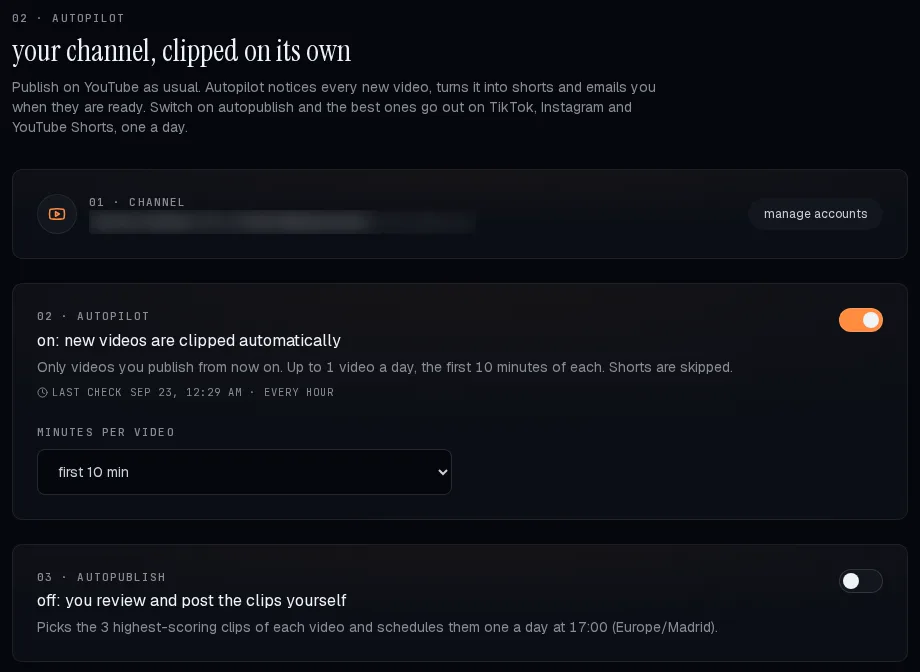
Connect your YouTube channel and publish as usual. Every new video is clipped on its own, you get an email when the clips are ready, and with autopublish on the best ones go out to your socials (TikTok, Instagram, YouTube, Facebook, LinkedIn, Threads and Bluesky), one a day at the hour you pick. Paid plans only.
3. AI Shorts (UGC Video Creator)
Generate marketing videos with AI actors for any product or business. No camera, no studio, no influencer budget. Describe your product or paste a URL.
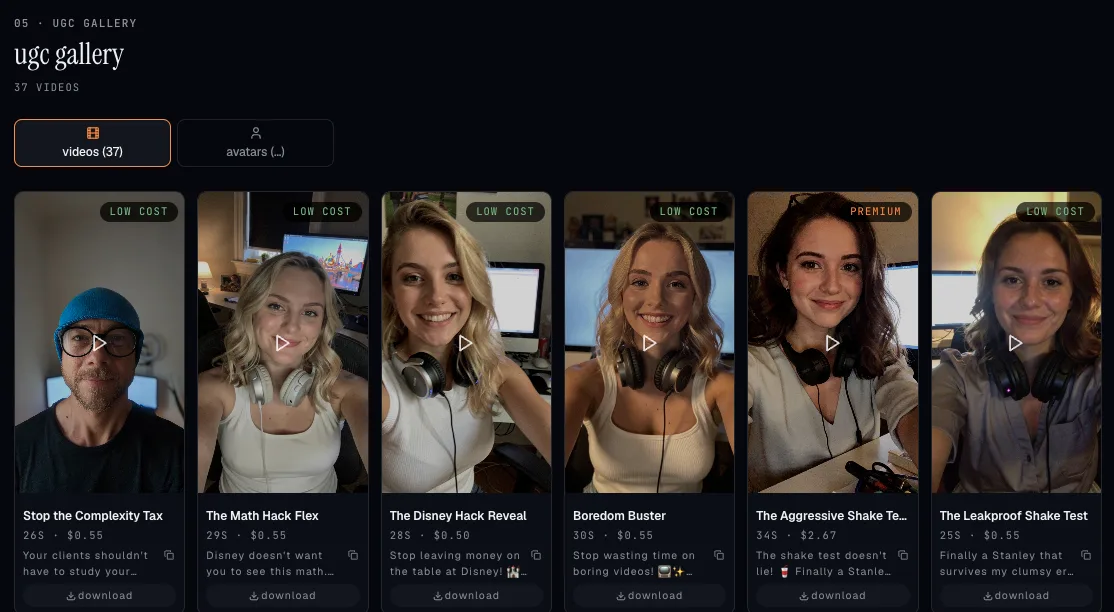
- Two cost modes: Low Cost (
$0.65/video) and Premium ($2/video) - AI actors with lip-sync, voiceover, b-roll and TikTok-style subtitles
- Pick an avatar from the shared gallery or upload your own photo
- Every video lands in the public gallery (openshorts.app/gallery) with its own SEO page
4. YouTube Studio
AI titles (10 options with a refinement chat), thumbnails with your face over a background, descriptions with chapter timestamps, and one-click publishing to YouTube.
5. Inside Claude and ChatGPT
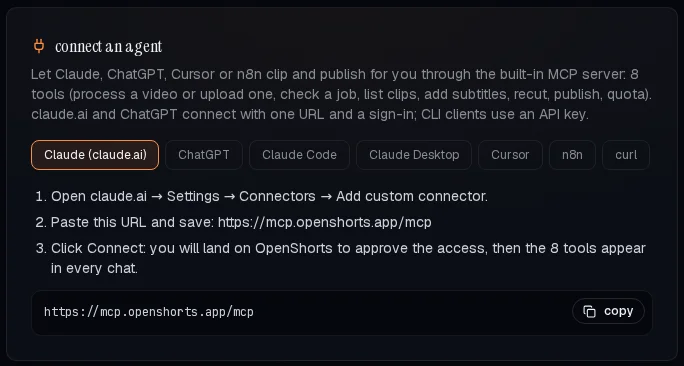
Add OpenShorts to Claude or ChatGPT with one URL and ask for clips in plain language: same pipeline, same minutes, no API key to manage. See Automate it.
Key Features
Clip Generator
- Viral Moment Detection: Google Gemini 3.1 Flash-Lite ranks the transcript and scene boundaries to pick 3-15 moments of 15-60 seconds, each with a virality score
- Runs fully local if you want: point
LLM_BASE_URLat Ollama, LM Studio, vLLM or any OpenAI-compatible server and the moment picker runs on your own model, no Google key needed (see Run without a Google key) - Smart 9:16 Reframing: per scene: TRACK (MediaPipe + YOLOv8 face tracking), GENERAL (blurred background), SPLIT (two speakers stacked, captions on the seam) and SCREENCAST (screen over presenter); the layout is picked per video by Gemini or forced from the dashboard
- Captions: faster-whisper (or Parakeet on GPU) with word-level timestamps, several caption styles, burned into the clip
- Clip editor: word-level cuts, extra segments, framing changes and fast re-renders
- Hook overlays: an opening line written from what is said in the clip, editable in text, style, font and position
- AI Voice Dubbing: ElevenLabs, 30+ languages with voice cloning (bring your own ElevenLabs key, on the Cloud too)
- AI Video Effects: Gemini-generated FFmpeg filters
Social Auto-Publishing (via Upload-Post)
- Post a clip to TikTok, Instagram, YouTube, Facebook, LinkedIn, Threads and Bluesky at once, or schedule it for any date and time
- Schedule a week: spread a batch of clips across the coming days in one go
- Post analytics: views of the clips you published from OpenShorts, in the app
- On the Cloud it is wired up on every paid plan; self-hosted, paste your own Upload-Post key
- Only want to post videos you already have, without clipping? Use Upload-Post directly: TikTok, Instagram, YouTube, LinkedIn, Facebook, X, Threads, Pinterest, Bluesky and more, with a free plan, a REST API and an MCP server
AI Shorts Pipeline
- Analyze: Scrape website URL + web research, or generate from manual description
- Script: AI writes viral scripts (hook - problem - solution - CTA format)
- Actor: Generate AI actors with Flux 2 Pro or select from shared gallery
- Voice: ElevenLabs TTS voiceover (English/Spanish, male/female)
- Video: Talking head generation (Hailuo 2.3 Fast img2video + VEED Lipsync, or Kling Avatar v2 in Premium)
- B-roll: AI-generated visuals with Ken Burns effect
- Composite: FFmpeg final assembly with subtitles and hook overlays
- Publish: Direct posting to TikTok, Instagram Reels, YouTube Shorts via Upload-Post
Infrastructure
- S3-compatible storage for clip backup and the public gallery
- SEO gallery pages served by FastAPI with JSON-LD structured data
- Async job queue with configurable concurrency, and optional NVIDIA GPU rendering (NVENC)
Who Is This For?
Reviews
No reviews yet — be the first to share how it worked for you.
Frequently Asked Questions about Openshorts
Related MCP servers
Add a badge to your READMEShow it’s listed — live SVG, Markdown or HTML.
AllMCPs Directory Badge
Showcase your server listing on GitHub or your project documentation. Embed this dynamic SVG badge to highlight official listing status and live engagement.
[](https://allmcps.com/mcp/openshorts)<a href="https://allmcps.com/mcp/openshorts"><img src="https://allmcps.com/api/badge/openshorts?style=directory" alt="Openshorts on AllMCPs" /></a>