jdbcdatabasesqlvirtuoso
Java MCP server providing generic JDBC connectivity to databases with schema, table, and query support.
Quick Install
Automated & IDE SetupCopy the AI prompt to install this server into Claude Code, Cursor, or another agent — or use 1-click editor setup below.
Not yet automatically verified
We haven't yet run this listing's install command through our automated sandbox check. This isn't a red flag — we're steadily working through the catalog.
Manual Client & Custom JSON ConfigExpand JSON ▾
Client Config & Setup
Choose your client or environment
Target File:
💡 Paste the JSON block into your client's configuration file under mcpServers, then restart the application.
Overview
Use cases
Fetch database schemas for exploration
List and filter tables by schema or name substring
Describe table columns, keys, and data types
Execute SQL queries and retrieve results in JSONL or Markdown
Run Virtuoso-specific stored procedures and SPARQL queries
Key features
Retrieve database schemas and tables
Describe detailed table metadata
Filter tables by name substring
Execute SQL queries with JSONL or Markdown output
Support Virtuoso stored procedures and SPARQL queries
Capabilities & Tool Schemas (10)
Inspect callable tools, capabilities, and parameters exposed to AI agents by MCP Server Jdbc.
jdbc_get_schemasList database schemas accessible to connected database management system (DBMS).
jdbc_get_tablesList tables associated with a selected database schema.
jdbc_describe_tableProvide the description of a table associated with a designated database schema. This includes information about column names, data types, nulls handling, autoincrement, primary key, and foreign keys.
jdbc_filter_table_namesList tables, based on a substring pattern from the `q` input field, associated with a selected database schema.
jdbc_query_databaseExecute a SQL query and return results in JSONL format.
jdbc_execute_queryExecute a SQL query and return results in JSONL format.
Documentation Overview
OpenLink MCP Server for JDBC
A lightweight Java-based MCP (Model Context Protocol) server for JDBC built with Quakrus. This server is compatible with Virtuoso DBMS and any other DBMS backend that has a JDBC driver.
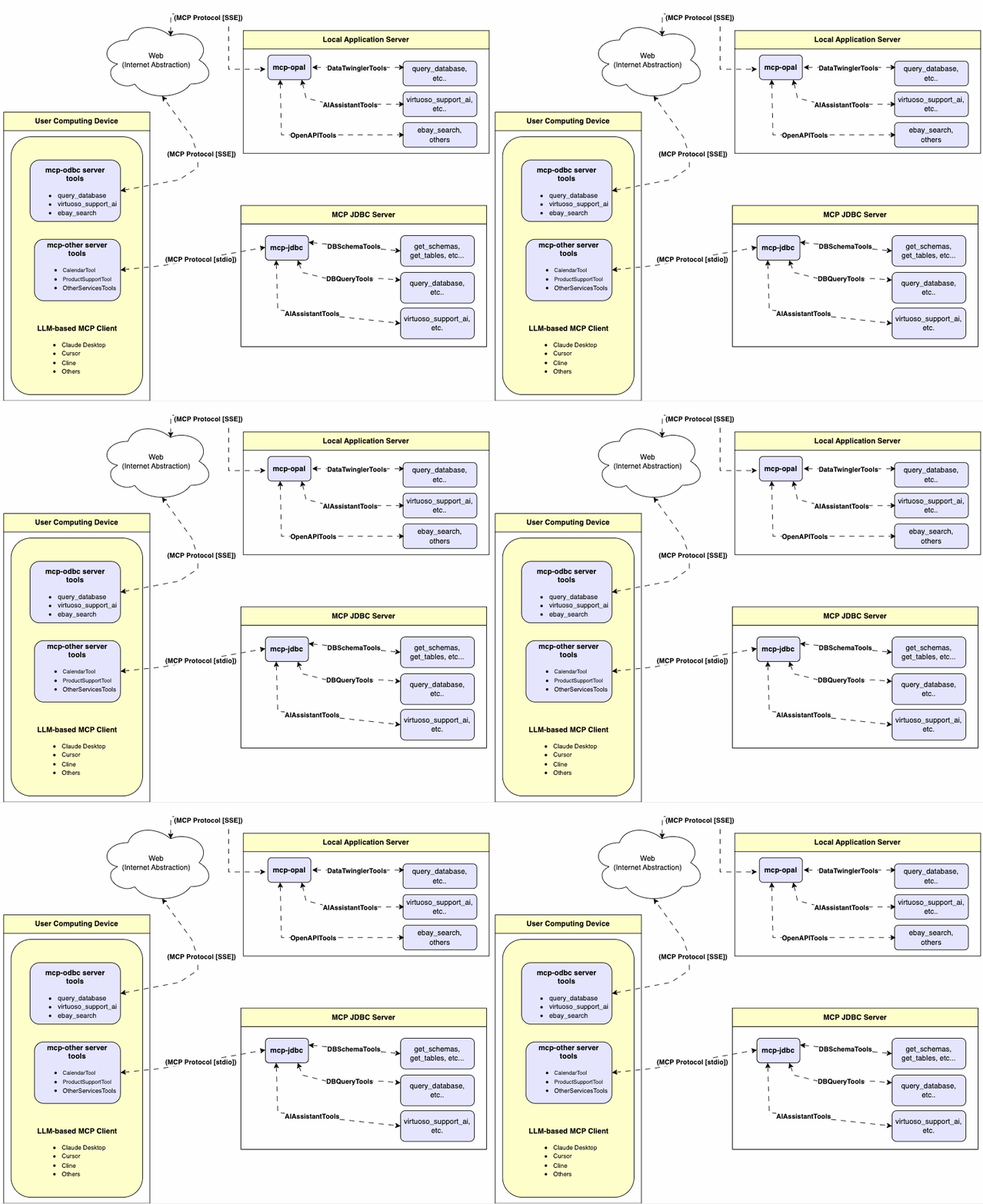
Features
- Get Schemas: Fetch and list all schema names from the connected database.
- Get Tables: Retrieve table information for specific schemas or all schemas.
- Describe Table: Generate a detailed description of table structures, including:
- Column names and data types
- Nullable attributes
- Primary and foreign keys
- Search Tables: Filter and retrieve tables based on name substrings.
- Execute Stored Procedures: A Virtuoso-specific feature! Execute stored procedures and retrieve results.
- Execute Queries:
- JSONL result format: Optimized for structured responses.
- Markdown table format: Ideal for reporting and visualization.
Prerequisites
MCP server requires Java 21 or above.
Installation
Clone this repository:
Environment Variables
Update your .env by overriding these defaults to match your preferences:
Configuration
For Claude Desktop users using Virtuoso and its JDBC driver:
Add the following to claude_desktop_config.json:
For Claude Desktop users using another JDBC driver or a combination of drivers:
Add the following, edited to suit your local environment, to claude_desktop_config.json:
Use
Tools Provided
After successful installation, the following tools will be available to MCP client applications.
Overview
| name | description |
|---|---|
jdbc_get_schemas | List database schemas accessible to connected database management system (DBMS). |
jdbc_get_tables | List tables associated with a selected database schema. |
jdbc_describe_table | Provide the description of a table associated with a designated database schema. This includes information about column names, data types, nulls handling, autoincrement, primary key, and foreign keys. |
jdbc_filter_table_names | List tables, based on a substring pattern from the q input field, associated with a selected database schema. |
jdbc_query_database | Execute a SQL query and return results in JSONL format. |
jdbc_execute_query | Execute a SQL query and return results in JSONL format. |
jdbc_execute_query_md | Execute a SQL query and return results in Markdown table format. |
jdbc_spasql_query | A Virtuoso-specific feature! Execute a SPASQL query and return results. |
jdbc_sparql_query | A Virtuoso-specific feature! Execute a SPARQL query and return results. |
jdbc_virtuoso_support_ai | A Virtuoso-specific feature! Interact with LLMs through the Virtuoso Support Assistant/Agent. |
Detailed Description
-
jdbc_get_schemas- Retrieve and return a list of all schema names from the connected database.
- Input parameters:
user(string, optional): Database username. Defaults to"demo".password(string, optional): Database password. Defaults to"demo".url(string, optional): JDBC URL connection string.
- Returns a JSON string array of schema names.
-
jdbc_get_tables- Retrieve and return a list containing information about tables in a specified schema. If no schema is provided, uses the connection's default schema.
- Input parameters:
schema(string, optional): Database schema to filter tables. Defaults to connection default.user(string, optional): Database username. Defaults to"demo".password(string, optional): Database password. Defaults to"demo".url(string, optional): JDBC URL connection string.
- Returns a JSON string containing table information (e.g.,
TABLE_CAT,TABLE_SCHEM,TABLE_NAME,TABLE_TYPE).
-
jdbc_filter_table_names- Filters and returns information about tables whose names contain a specific substring.
- Input parameters:
q(string, required): The substring to search for within table names.schema(string, optional): Database schema to filter tables. Defaults to connection default.user(string, optional): Database username. Defaults to"demo".password(string, optional): Database password. Defaults to"demo".url(string, optional): JDBC URL connection string.
- Returns a JSON string containing information for matching tables.
-
jdbc_describe_table- Retrieve and return detailed information about the columns of a specific table.
- Input parameters:
schema(string, required): The database schema name containing the table.table(string, required): The name of the table to describe.user(string, optional): Database username. Defaults to"demo".password(string, optional): Database password. Defaults to"demo".url(string, optional): JDBC URL connection string.
- Returns a JSON string describing the table's columns (e.g.,
COLUMN_NAME,TYPE_NAME,COLUMN_SIZE,IS_NULLABLE).
-
jdbc_query_database- Execute a standard SQL query and return the results in JSON format.
- Input parameters:
query(string, required): The SQL query string to execute.user(string, optional): Database username. Defaults to"demo".password(string, optional): Database password. Defaults to"demo".url(string, optional): JDBC URL connection string.
- Returns query results as a JSON string.
-
jdbc_query_database_md- Execute a standard SQL query and return the results formatted as a Markdown table.
- Input parameters:
query(string, required): The SQL query string to execute.user(string, optional): Database username. Defaults to"demo".password(string, optional): Database password. Defaults to"demo".url(string, optional): JDBC URL connection string.
- Returns query results as a Markdown table string.
-
jdbc_query_database_jsonl- Execute a standard SQL query and return the results in JSON Lines (JSONL) format (one JSON object per line).
- Input parameters:
query(string, required): The SQL query string to execute.user(string, optional): Database username. Defaults to"demo".password(string, optional): Database password. Defaults to"demo".url(string, optional): JDBC URL connection string.
- Returns query results as a JSONL string.
-
jdbc_spasql_query- A Virtuoso-specific feature!
- Execute a SPASQL (SQL/SPARQL hybrid) query return results.
- Input parameters:
query(string, required): The SPASQL query string.max_rows(number, optional): Maximum number of rows to return. Defaults to20.timeout(number, optional): Query timeout in milliseconds. Defaults to30000(i.e., 30 seconds).user(string, optional): Database username. Defaults to"demo".password(string, optional): Database password. Defaults to"demo".url(string, optional): JDBC URL connection string.
- Returns the result from the underlying stored procedure call (e.g.,
Demo.demo.execute_spasql_query).
-
jdbc_sparql_query- A Virtuoso-specific feature!
- Execute a SPARQL query and return results.
- Input parameters:
query(string, required): The SPARQL query string.format(string, optional): Desired result format. Defaults to'json'.timeout(number, optional): Query timeout in milliseconds. Defaults to30000(i.e., 30 seconds).user(string, optional): Database username. Defaults to"demo".password(string, optional): Database password. Defaults to"demo".url(string, optional): JDBC URL connection string.
- Returns the result from the underlying function call (e.g.,
"UB".dba."sparqlQuery").
-
jdbc_virtuoso_support_ai- A Virtuoso-specific feature!
- Utilizes a Virtuoso-specific AI Assistant function, passing a prompt and optional API key.
- Input parameters:
prompt(string, required): The prompt text for the AI function.api_key(string, optional): API key for the AI service. Defaults to"none".user(string, optional): Database username. Defaults to"demo".password(string, optional): Database password. Defaults to"demo".url(string, optional): JDBC URL connection string.
- Returns the result from the AI Support Assistant function call (e.g.,
DEMO.DBA.OAI_VIRTUOSO_SUPPORT_AI).
Basic Use & Troubleshooting
MCP Inspector Connecting to Virtuoso's ODBC Driver
For basic MCP client use and troubleshooting, use the MCP Inspector as follows:
-
Install the MCP Inspector:
-
Start the inspector:
Related MCP Servers
Adoption & maintenance
Factual signals from GitHub, npm, and our automated checks — not a rating.
GitHub stars
15
Stargazers on the source repository.
npm downloads
906k
Package downloads in the last 30 days.
Last commit
1y ago
Most recent push to the default branch.
Tools exposed
10
Callable tools this server registers over MCP.
Directory activity
2 views
Config copies, upvotes, and views on AllMCPs.
Reviews
No reviews yet — be the first to share how this listing worked for you.
Frequently Asked Questions about MCP Server Jdbc
AllMCPs Directory Badge
Showcase your server listing on GitHub or your project documentation. Embed this dynamic SVG badge to highlight official listing status and live engagement.
Badge Style:
Live Dynamic SVG Preview
Markdown (GitHub README)
[](https://allmcps.com/mcp/openlink-mcp-server-jdbc)HTML Embed
<a href="https://allmcps.com/mcp/openlink-mcp-server-jdbc"><img src="https://allmcps.com/api/badge/openlink-mcp-server-jdbc?style=directory" alt="MCP Server Jdbc on AllMCPs" /></a>