AllMCPs
BrowseBestCategoriesStackCompareToolsGuidesBlog Log in Submit MCP

Stay in the loop

Get new MCP servers and top picks in your inbox.

AllMCPs

The open directory for discovering and installing Model Context Protocol servers.

Explore

  • Browse servers
  • Best MCP servers
  • Categories
  • MCP clients
  • Agent prompts
  • Stack Builder
  • Compare servers
  • Tags index
  • Submit a server
  • Pricing

Learn

  • Guides hub
  • What is MCP?
  • Install guide
  • Troubleshooting
  • Security
  • Blog
  • Blog RSS

Tools

  • All tools
  • Config generator
  • Config validator
  • MCP playground
  • OpenAPI β†’ MCP
  • Badge generator

For agents

  • API docs
  • Trust & traffic
  • llms.txt β†— (opens in a new tab)
  • Catalog JSON β†— (opens in a new tab)
  • Remote MCP β†— (opens in a new tab)

Company

  • About
  • Contact
  • X (@AllMCPs) β†— (opens in a new tab)
  • GitHub β†— (opens in a new tab)
  • Terms
  • Privacy
AllMCPs VerifiedAllMCPs VerifiedFeatured on Nick LaunchesFeatured on Nick LaunchesLaunch Llama NewsletterLaunch Llama NewsletterVerified DR - allmcps.comVerified DR - allmcps.comFeatured on SaaSGrowFeatured on SaaSGrowFeatured on Twelve ToolsFeatured on Twelve ToolsFeatured on Saaspa.geFeatured on Saaspa.geFeatured on Findly.toolsFeatured on Findly.toolsFeatured on Startup FameFeatured on Startup FameFeatured on LaunchKiwiFeatured on LaunchKiwiFeatured on ScrollLaunchFeatured on ScrollLaunchFeatured on DailyPingsFeatured on DailyPingsFazier badgeFazier badgeFeatured on NewTool.siteFeatured on NewTool.siteFeatured on saasfame.comFeatured on saasfame.comDR Checker - Domain RatingDR Checker - Domain RatingListed on Turbo0Listed on Turbo0Launched on LaunchBoard - Product Launch PlatformLaunched on LaunchBoard - Product Launch PlatformList on SimilarlabsList on Similarlabshttps://codetrendy.comhttps://codetrendy.comListed on DevTool.ioFeatured on BuildlistFeatured on BuildlistAllMCPs VerifiedAllMCPs VerifiedFeatured on Nick LaunchesFeatured on Nick LaunchesLaunch Llama NewsletterLaunch Llama NewsletterVerified DR - allmcps.comVerified DR - allmcps.comFeatured on SaaSGrowFeatured on SaaSGrowFeatured on Twelve ToolsFeatured on Twelve ToolsFeatured on Saaspa.geFeatured on Saaspa.geFeatured on Findly.toolsFeatured on Findly.toolsFeatured on Startup FameFeatured on Startup FameFeatured on LaunchKiwiFeatured on LaunchKiwiFeatured on ScrollLaunchFeatured on ScrollLaunchFeatured on DailyPingsFeatured on DailyPingsFazier badgeFazier badgeFeatured on NewTool.siteFeatured on NewTool.siteFeatured on saasfame.comFeatured on saasfame.comDR Checker - Domain RatingDR Checker - Domain RatingListed on Turbo0Listed on Turbo0Launched on LaunchBoard - Product Launch PlatformLaunched on LaunchBoard - Product Launch PlatformList on SimilarlabsList on Similarlabshttps://codetrendy.comhttps://codetrendy.comListed on DevTool.ioFeatured on BuildlistFeatured on Buildlist
Β© 2026 Jackalope Digital LLC. All rights reserved.
  1. Home
  2. πŸ’» Developer Tools
  3. OpenHCS
O
Health: Not checked yetWe have not completed a health check for this listing yet.Last checked 8/11/2026, 12:09:44 AM

OpenHCS

Enrichment pendingWe haven’t run our AI enrichment pass on this listing yet, so the overview, use cases, and FAQ below may be sparse or missing. We work through the catalog over time β€” check back soon.
View RepositoryVisit Website

Inspect, author, validate, and run high-content microscopy workflows.

Quick Install

Automated & IDE Setup

Copy the AI prompt to install this server into Claude Code, Cursor, or another agent β€” or use 1-click editor setup below.

Add to CursorAdd to VS Code
Manual Client & Custom JSON ConfigExpand JSON β–Ύ

Install Config Generator

Choose your client
claude_desktop_config.json
{
  "mcpServers": {
    "openhcs": {
      "command": "npx",
      "args": [
        "-y",
        "openhcs"
      ]
    }
  }
}

πŸ’‘ Paste into ~/Library/Application Support/Claude/claude_desktop_config.json (macOS) or %APPDATA%\Claude\claude_desktop_config.json (Windows)

Install Directory Badge Claim listing AlternativesπŸ’» More in Developer Tools

Documentation Overview

OpenHCS array-processing logo

OpenHCS

Turn high-content microscopy images into reproducible measurements
One reviewable workflow across the GUI, Python, CellProfiler, and local agents

PyPI version License: MIT Python 3.11+ GPU Accelerated Documentation

OpenHCS is designed for imaging scientists and research software teams running high-content studies where many wells, sites, channels, Z planes, or time points must be analysed consistently. Source selection, processing steps, and result definitions stay together in one validated pipeline instead of being split across interface-only state, scripts, and automation.

It is a good fit when a workflow must remain reviewable across visual editing, code, and automation. The same pipeline can be edited in the desktop GUI or as Python, imported from supported CellProfiler .cppipe files, and built or reviewed through the local MCP surface.

Install

Windows installer Β· macOS installer Β· Installation options

The graphical installers set up an isolated CPU-safe desktop environment with the OpenHCS GUI, CellProfiler compatibility, local MCP server, Napari, Fiji/ImageJ, and Bio-Formats. GPU libraries remain optional.


See OpenHCS in use
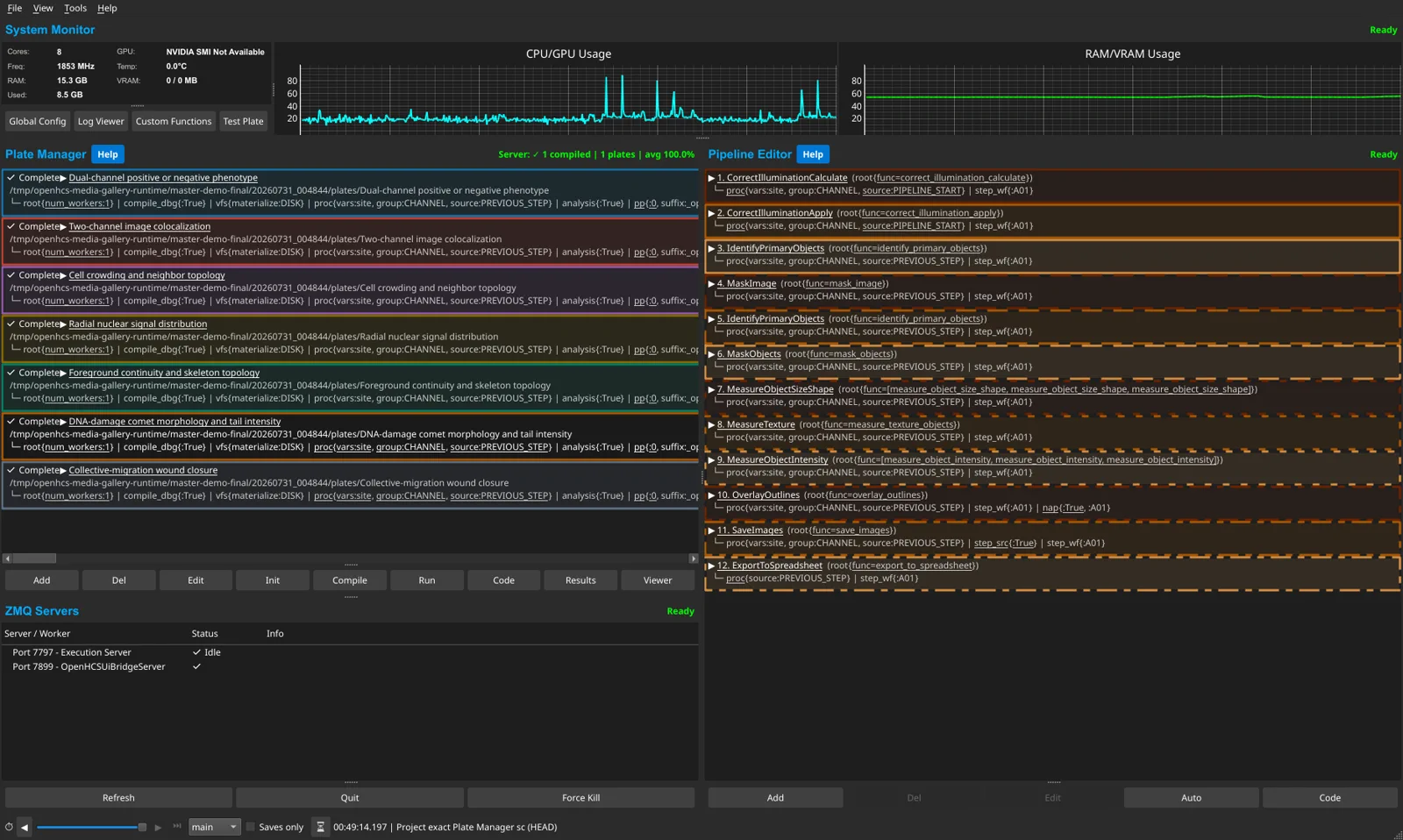
OpenHCS desktop application with several assay plates

Browse the UI and viewer gallery Β· Watch an agent build, debug, run, and inspect a workflow


OpenHCS processes large microscopy datasets with a compile-then-execute architecture. Pipelines are validated across the selected execution axes before processing starts, preventing late failures after expensive work. Design pipelines in the GUI, export to Python, edit as code, and re-import β€” switching between visual and programmatic workflows. The local MCP exposes that same workflow model to supported agents, so agent-authored pipelines remain visible, editable, and reviewable in the GUI and generated Python.

mermaid
graph LR
    subgraph Sources
        IX[ImageXpress]
        OP[Opera Phenix]
        BF[Bio-Formats]
        OM[OMERO]
    end

    subgraph OpenHCS Platform
        PD["Pipeline Designer<br/>(GUI ⇄ Code ⇄ Agent)"]
        CO["Typed Compiler<br/>(resolve + validate)"]
        EX["Bounded Worker Executor<br/>(well scheduling Β· multi-GPU)"]
        FN["Registry-Discovered Functions<br/>scikit-image Β· CuPy Β· pyclesperanto<br/>PyTorch Β· JAX Β· TF Β· CuCIM Β· custom"]
        PS["PolyStore<br/>(Memory ↔ Disk ↔ Zarr ↔ Stream)"]
    end

    subgraph Viewers
        NA[Napari]
        FJ[Fiji/ImageJ]
    end

    IX --> PD
    OP --> PD
    BF --> PD
    OM --> PD
    PD --> CO --> EX
    EX --> FN --> PS
    PS --> NA
    PS --> FJ

⚑ Key Capabilities

πŸ›‘οΈ Compile-Time Validation

Configuration is resolved once into step snapshots and a compilation session. Typed plans then validate sources, artifacts, materialization, memory contracts, and worker requirements before execution begins. Errors surface immediately, not after hours of processing.

πŸ”„ Bidirectional GUI ↔ Code

Design pipelines visually, export as executable Python, edit in your IDE, re-import to the GUI. Code generation works at any scope level β€” function patterns, individual steps, pipeline configs, full orchestrator scripts β€” any window holding objects can generate and re-import code.

🧠 Agent-Assisted Workflows

Give a supported MCP client a microscopy folder or plate and an analysis goal. It can inspect the connected execution server's functions, build and validate a typed pipeline, run it, inspect results in OpenHCS or a viewer, and revise the generated Python. A built-in code assistant can also use local Ollama or configured remote LLM endpoints.

⚑ Full Multiprocessing & Multi-GPU

Bounded worker lanes use ProcessPoolExecutor by default, with deterministic well assignment and sequential processing inside each lane. A GPU scheduler assigns devices to workers; single-worker and debugging configurations can use inline or threaded execution.

πŸ”Œ Any Python Function

Register any Python function by decorating it with @numpy, @cupy, @pyclesperanto, @torch, or another memory-type decorator. Custom functions receive contract validation, UI integration, multiprocessing-safe import identity, and the same server-owned catalog projection as built-in functions. Persisted functions live in the platform-specific OpenHCS user-data directory.

πŸ“Š Results Materialization

Callable and module artifact contracts declare semantic outputs independently of Python argument names. The artifact graph and materialization plans route images, measurements, object labels, relationships, tables, and files to their configured stores and exporters.

πŸ”¬ Process-Isolated Napari & Fiji

Stream images to Napari and Fiji/ImageJ in real time during pipeline execution. OpenHCS StreamingConfig declarations and viewer adapters own identity, display, and persistence policy. PolyStore builds generic storage and streaming payloads; ZMQRuntime supplies process-isolated transport, readiness, acknowledgments, and lifecycle.

πŸͺŸ Live Cross-Window Updates

Edit a value in GlobalPipelineConfig β€” watch it propagate in real-time to PipelineConfig and StepConfig windows. Dual-axis resolution (context hierarchy Γ— class MRO) with scope isolation per orchestrator.

🧬 CellProfiler Pipeline Import

Open .cppipe files in the desktop application or lower them from Python into ordinary PipelineConfig and FunctionStep declarations. Named images, objects, measurements, relationships, and exports use the same typed compiler and runtime as native OpenHCS pipelines. The source-backed Official30 suite continuously exercises 30 pipelines from CellProfiler examples, tutorials, and benchmark supplements under explicit equivalence policies.

πŸ€– MCP Agent Automation

Use the local stdio MCP server with ChatGPT desktop, Codex, Claude Desktop, and other supported clients, or deploy the separately secured HTTP surface. The graphical installers register detected local clients automatically. Capability profiles, schemas, knowledge, UI attachment, authoring, execution, runtime inspection, viewer review, and governed custom-function registration are projected from typed authorities rather than duplicated tool lists.


🧩 The OpenHCS Ecosystem

OpenHCS is built on 8 purpose-extracted, separately published libraries β€” each solving a general problem and all composed into one platform:

mermaid
graph TD
    OH["OpenHCS Platform<br/>(domain wiring + pipelines)"]

    OH --> OS["ObjectState<br/>(config)"]
    OH --> AB["ArrayBridge<br/>(arrays)"]
    OH --> PS["PolyStore<br/>(I/O + streaming)"]
    OH --> ZR["ZMQRuntime<br/>(exec)"]
    OH --> QR["PyQT-reactive<br/>(forms)"]

    OS --> PI["python-introspect<br/>(signatures)"]
    OH --> MR["metaclass-registry<br/>(plugins)"]
    OH --> PC["pycodify<br/>(serialization)"]
LibraryRole in OpenHCSWhat It Does
ObjectStateConfiguration frameworkLazy dataclasses with dual-axis inheritance (context hierarchy Γ— class MRO) and contextvars-based resolution
ArrayBridgeMemory type conversionUnified API across NumPy, CuPy, PyTorch, JAX, TensorFlow, pyclesperanto with DLPack zero-copy transfers
PolyStoreUnified I/O & stream payloadsGeneric storage and streaming payload primitives, backend lifecycle, virtual workspaces, atomic writes, format detection, and ROI extraction
ZMQRuntimeProcess & transport runtimeGeneric request, status, progress, cancellation, process-lifecycle, and viewer-control transport protocols
PyQT-reactiveUI form generationReact-style reactive forms from dataclasses with cross-window sync and flash animations
pycodifyCode ↔ object conversionPython source as serialization format β€” type-preserving, diffable, editable, with collision handling
python-introspectSignature analysisPure-Python function/dataclass introspection for automatic UI generation and contract analysis
metaclass-registryPlugin discoveryZero-boilerplate registry system powering microscope handler and storage backend auto-discovery

πŸ”¬ Microscope & Function Support

Image Sources

SourceSupport
ImageXpressNative plate and metadata handling
Opera PhenixNative plate and metadata handling
Bio-FormatsArbitrary folders and supported microscopy containers
OMERORemote image and metadata access
OpenHCS formatNative generated and materialized plates

Source handlers are auto-detected and extensible through metaclass-registry.

Functions β€” Automatic Discovery

Library or routeExecution memory
scikit-image and OpenHCS nativeNumPy / CPU
pyclesperantoOpenCL GPU
CuPy and cuCIMCUDA GPU
PyTorch, JAX, and TensorFlow functionsDeclared CPU/GPU arrays
User custom functionsDeclared by their memory-type decorator

The connected execution server owns the available catalog, so remote GPU and custom-function availability is reflected without a manually maintained list. ArrayBridge provides compatible memory conversion, including zero-copy paths where supported.

Processing domains: image preprocessing Β· segmentation Β· cell counting Β· stitching (MIST + Ashlar GPU) Β· neurite tracing Β· morphology Β· measurements


πŸš€ Quick Start

For most desktop users, download the Windows installer or macOS installer. Neither download requires ZIP extraction or an existing Python installation.

For a manual installation, create a virtual environment and install the same CPU-safe desktop surface as the graphical installers:

bash
# Complete CPU-safe desktop environment
python -m pip install "openhcs[gui,viz,bioformats,mcp,cellprofiler-compat]"

# Launch the application
openhcs

# Launch the local MCP server over stdio
openhcs-mcp

Smaller environments can select only the required features:

bash
# Basic installation with GUI
python -m pip install "openhcs[gui]"

# Add Napari viewer
python -m pip install "openhcs[gui,napari]"

# Add Fiji/ImageJ viewer
python -m pip install "openhcs[gui,fiji]"

# Add both viewers
python -m pip install "openhcs[gui,viz]"

# Add GPU acceleration on a compatible CUDA 12 system
python -m pip install "openhcs[gui,gpu]"

# Full installation (GUI + viewers + GPU)
python -m pip install "openhcs[gui,viz,gpu]"

# Add the local MCP server for agent clients
python -m pip install "openhcs[gui,mcp,viz]"
server.ts
# Or lower a CellProfiler pipeline into public OpenHCS declarations
from pathlib import Path

from objectstate import ensure_global_config_context
from openhcs.core.config import GlobalPipelineConfig
from openhcs.core.orchestrator.orchestrator import PipelineOrchestrator
from openhcs.interop.cellprofiler.pipeline_import import import_cellprofiler_pipeline

plate_path = Path("/data/plate").resolve()
ensure_global_config_context(GlobalPipelineConfig, GlobalPipelineConfig())
steps, pipeline_config = import_cellprofiler_pipeline(
    "analysis.cppipe",
    source_root=plate_path,
)

orchestrator = PipelineOrchestrator(
    plate_path,
    pipeline_config=pipeline_config,
).initialize()
compilation = orchestrator.compile_pipelines(steps)
execution_bundle = compilation["execution_bundle"]

The GUI and execution services consume the same list[FunctionStep], PipelineConfig, and typed execution bundle. See the API orientation for the explicit low-level execution call and progress lifecycle.

πŸ“¦ All installation options
bash
python -m pip install "openhcs"              # Headless engine
python -m pip install "openhcs[gui]"         # Desktop GUI
python -m pip install "openhcs[gui,napari]"  # GUI + Napari viewer
python -m pip install "openhcs[gui,viz]"     # GUI + Napari + Fiji
python -m pip install "openhcs[gui,viz,gpu]" # Full installation
python -m pip install "openhcs[gpu]"         # Headless + GPU
python -m pip install "openhcs[omero]"       # OMERO integration
python -m pip install -e ".[all,dev]"         # Development (all features)

The gpu extra requires a compatible CUDA 12 environment on a supported NVIDIA platform. For a CPU-only desktop installation, install openhcs[gui] without the gpu extra.

πŸ—„οΈ OMERO integration

OMERO requires zeroc-ice, whose compatible wheels are not published through the normal project metadata. Install the helper requirements before the extra:

bash
python scripts/install_omero_deps.py
pip install 'openhcs[omero]'

Equivalent requirements-file installation:

Terminal
pip install -r requirements-omero.txt
pip install 'openhcs[omero]'

Supported on Python 3.11 and 3.12. See Glencoe Software for manual installation.


πŸ“– Documentation

πŸ“˜ Read the DocsFull API docs, tutorials, guides
πŸ—οΈ ArchitectureTyped compiler Β· sources Β· artifacts Β· runtime values Β· package boundaries
πŸŽ“ Getting StartedInstallation Β· First pipeline

βš™οΈ Architecture Highlights

Resolved, typed pipeline compilation β€” catch errors before execution starts
Code
PipelineConfig + list[FunctionStep]
        ↓ resolve once
StepSnapshot + CompilationSession
        ↓ derive and validate
typed CompiledStepPlan objects
        ↓ package
CompiledExecutionBundle
        ↓ execute
runtime values + materialized artifacts

The authoring surface remains an ordered linear step list. ObjectState inheritance keeps defaulted configuration sparse, while compilation derives and exposes the exact source and artifact dependencies required for execution; the derived dependency graph is not a second workflow the user must author.

Pipelines are compiled for every selected execution axis before processing begins. Runtime workers consume the compiled bundle rather than reinterpreting mutable declaration objects. Read more β†’

Dual-Axis Configuration β€” context hierarchy Γ— class MRO

Resolution walks two axes simultaneously: the context stack (Global β†’ Pipeline β†’ Step) and the class MRO (inheritance chain). Built on contextvars for thread-safe, scope-isolated resolution. Preserves None vs concrete value distinction for proper field-level inheritance. Powered by ObjectState. Read more β†’

Bidirectional GUI ↔ Code β€” code generation at any scope level

Any window holding ObjectState objects can generate and re-import executable Python:

Code
Function patterns Β· Individual steps Β· Pipeline configs Β· Full orchestrator scripts
              ↕  generate / AST-parse back  ↕

Each scope encapsulates all lower-scope imports. Generated code is fully executable without additional setup. Edit in your IDE or external editor, save, and the GUI re-imports via AST parsing. Powered by pycodify + python-introspect. Read more β†’

Cross-Window Live Updates β€” class-level registry + Qt signals

A class-level registry tracks all active form managers. When a value changes in any config window, Qt signals propagate the change to every affected window with debounced, scope-isolated refreshes. Global β†’ Pipeline β†’ Step cascading with per-orchestrator isolation. Powered by PyQT-reactive. Read more β†’

More patterns β€” storage, viewer integration, function discovery, memory types
  • Storage and viewer streaming: PolyStore owns generic storage and streaming payload primitives; ZMQRuntime owns process, transport, readiness, acknowledgment, and lifecycle protocols; OpenHCS StreamingConfig declarations plus the Napari/Fiji adapters own viewer identity, display, and application policy.
  • Automatic Function Discovery: registry-discovered functions with contract analysis and type-safe integration via python-introspect + metaclass-registry
  • Memory Type Management: Compile-time validation of array type compatibility with zero-copy conversion via ArrayBridge
  • Custom Function Registration: Any Python function decorated with @numpy, @cupy, @pyclesperanto, etc. is auto-integrated with contracts, UI forms, and the function registry
  • Evolution-Proof UI: Type-based form generation from Python annotations β€” adapts automatically when signatures change

Full architecture docs β†’


🀝 Contributing

bash
git clone --recurse-submodules https://github.com/OpenHCSDev/OpenHCS.git
cd OpenHCS
# Install the eight local packages as described in docs/development_setup.md,
# then install OpenHCS itself:
python -m pip install -e ".[dev,gui]"
OPENHCS_CPU_ONLY=1 python -m pytest tests/unit

Contribution areas: microscope formats Β· processing functions Β· GPU backends Β· documentation


πŸ“„ License

MIT β€” see LICENSE.

πŸ™ Acknowledgments

OpenHCS evolved from EZStitcher and builds on Ashlar (stitching), MIST (phase correlation), pyclesperanto (GPU image processing), and scikit-image (image analysis).

OpenHCS's CellProfiler interoperability and parity validation build on the CellProfiler project's open-source software, documentation, and public example, tutorial, and benchmark materials. We thank the CellProfiler authors and contributors and the authors of the biological datasets they distribute. Please cite CellProfiler following its official citation guidance, including Stirling et al., CellProfiler 4: improvements in speed, utility and usability (2021).

Third-party project names and logos identify supported integrations, compatible clients, or software used by OpenHCS. They remain the property of their respective projects or owners; their appearance does not imply affiliation or endorsement.

Related MCP Servers

View all in Developer Tools View all alternatives
  • Claude Task Master logoClaude Task Master

    AI-powered task management system for AI-driven development. Features PRD parsing, task expansion, multi-provider support (Claude, OpenAI, Gemini, Perplexity, xAI), and selective tool loading for optimized context usage.

    πŸ’» Developer Tools7 views
    Compare vs Claude Task Master β†’
  • A
    Ai Netcafe

    Compare LLM cost & latency on one prompt, translate PDF keeping layout, cited research, make PPTX

    πŸ’» Developer Tools0 views
    Compare vs Ai Netcafe β†’
  • Chiplab logoChiplab

    Run, build, and validate firmware on virtual hardware from your AI agent. Hardware knowledge corpus.

    πŸ’» Developer Tools0 views
    Compare vs Chiplab β†’
  • M
    Mabl

    Author, run, and analyze mabl tests from your AI assistant.

    πŸ’» Developer Tools0 views
    Compare vs Mabl β†’

Frequently Asked Questions about OpenHCS

Add the following block to your claude_desktop_config.json under mcpServers: "mcpServers": { "openhcs": { "command": "npx", "args": ["-y", "OpenHCS"] } }

AllMCPs Directory Badge

Full Badge Customizer

Showcase your server listing on GitHub or your project documentation. Embed this dynamic SVG badge to highlight official listing status and live engagement.

Badge Style:
Live Dynamic SVG PreviewOpenHCS AllMCPs Directory Badge

Markdown (GitHub README)
[![AllMCPs](https://allmcps.com/api/badge/openhcs?style=directory)](https://allmcps.com/mcp/openhcs)
HTML Embed
<a href="https://allmcps.com/mcp/openhcs"><img src="https://allmcps.com/api/badge/openhcs?style=directory" alt="OpenHCS on AllMCPs" /></a>

Technical Specs & Signals

CategoryπŸ’»Developer Tools
More technical detailsExpand β–Ύ
TransportSTDIO
RuntimeNode.js
0/4 checks healthy over the last 6h
Views0
Unique ViewsTotal visits recorded for this listing page on AllMCPs.
Installs0
Installs & Copy ActionsTotal times users copied install commands or configuration snippets for this server.
27Quality signal: Emerging Β· 27/100How this signal is calculated β–Ύ
Server availabilityNot measured

Not scored for repo-hosted servers β€” we can't reach the running server, only its GitHub page. Hosted MCP endpoints are health-checked live.

Verified ownership8/20
Documentation & tools11/30
Adoption & activity1/15
Community engagement0/10

A guidance signal from public completeness & health data β€” not a user rating. New listings start lower and rise as they add docs, get verified, and grow adoption. Signals we can't observe for a listing are skipped, not counted against it.

β˜… FeaturedMoxie Docs MCP logo

Moxie Docs MCP

MCP & Agent Skills for Automated Documentation, and codebase conventions + context

Explore Server β†’

Own this project?

This directory is pre-filled from public sources. Claim via GitHub README, site badge, or DNS TXT to get the verified badge.

Free dofollow backlink: after claiming, verify your product site and place a dofollow AllMCPs badge β€” we recheck it stays live.

Claim & get free dofollow

Share & Embed

Add our SVG badge (dark/light directory styles) or embeddable widget to your site.

Explore more

More in πŸ’» Developer Tools β†’Best MCP servers for Developers β†’Alternatives to OpenHCS β†’Install in Claude DesktopInstall in CursorInstall in VS Code