Open ReverseLab
An AI workspace for target-based reverse engineering
Desktop workspaces · red / blue / both · Parallel Goals · Knowledge base · MCP
English · 简体中文
Build the desktop preview · Desktop guide · Website & docs · Knowledge base



Sponsors
 | Claude, GPT, Gemini, Grok and DeepSeek with one key, up to 99% off official prices. 100% genuine models, every model verifiable, with 1,000+ redundant routes and automatic failover. Access 200+ models from 16 brands for AI reverse engineering and MCP workflows. |
 | Sponsored account for error monitoring and performance tracing across the project toolchain. |
Sponsor details and ways to support the project: SPONSORS.md
Desktop
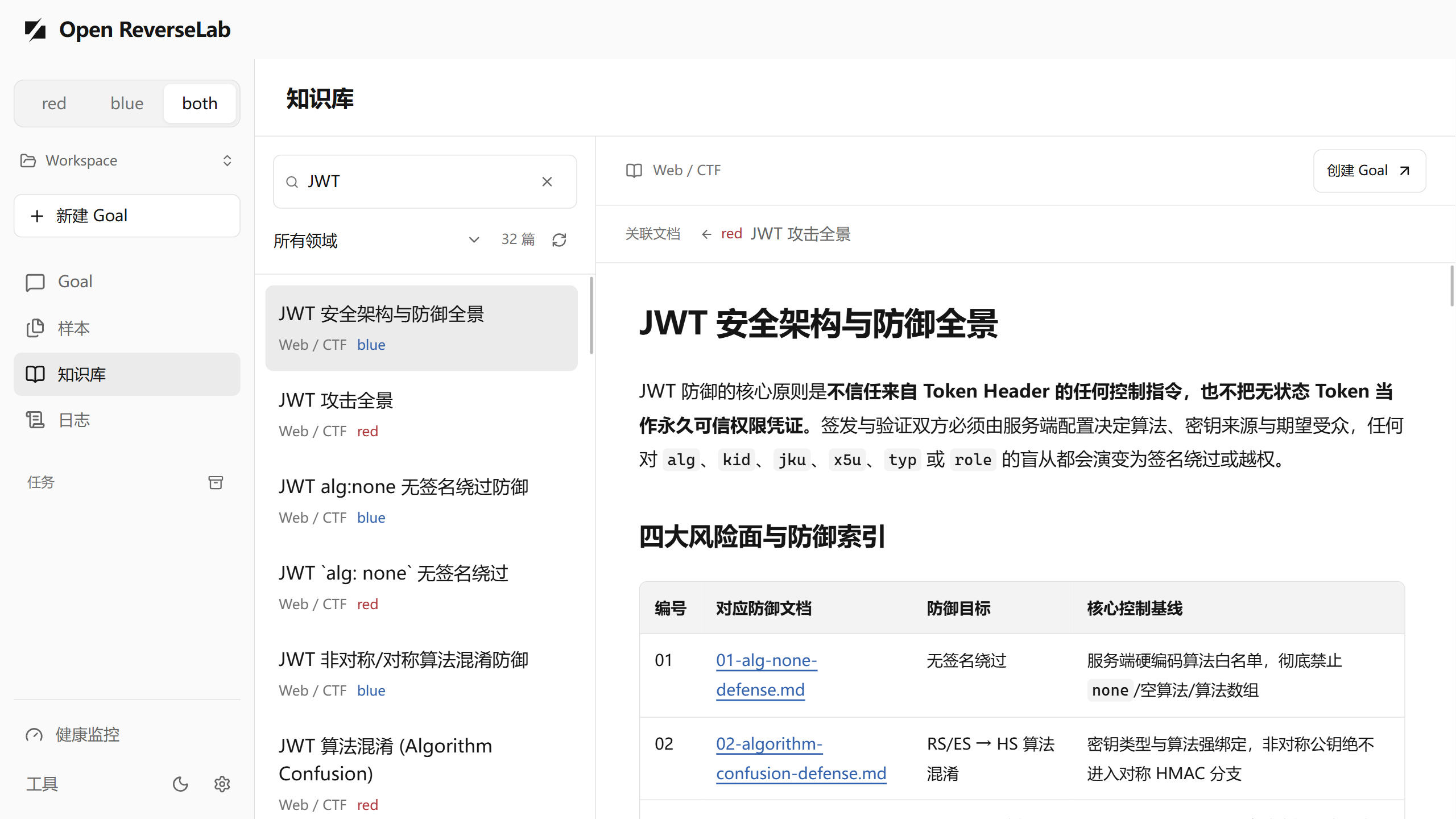
Select red / blue / both in the upper-left corner, choose a workspace, and enter a file, directory, or URL target with a Goal. The live canvas shows execution branches; activity, logs, reports, and health views retain the evidence behind the result.
- Independent strategies.
redandblueuse separate analysis policies.bothruns the branches in parallel and joins their results. - Concurrent Goals. Goals and ready actions run concurrently without an application-level count limit. Switching views, tasks, or workspaces does not redirect a running task's output.
- Managed workspaces. First launch creates a default workspace. Open or create others, import samples, and keep original and working copies separate.
- Goal control. Goals have no time or token limit by default. Set either limit when needed, stop a run, or add instructions while it is running. Verification results and failed attempts remain in the execution history.
- Knowledge and usability. Browse defense articles and paired references, switch light/dark themes, and retain unsent drafts, reading positions, and filters during navigation.
Preview status and setup
The desktop is being prepared for v2.0.0-beta.1; its installer has not been published. Use the source build to try the current preview. Published downloads will be listed on Releases.
- Install Python 3.10 or newer and make the
pythoncommand available on PATH. Windows also needs the Microsoft Edge WebView2 runtime. - Build and launch Open ReverseLab from the repository. Keep personal workspaces outside the source and installation directories.
- Open Settings and configure an OpenAI-compatible chat-completions endpoint and model, then enter a target and objective. SHA256 verification can run locally without a model.
Windows x64 is the desktop packaging target. Python and third-party tools such as Ghidra, Frida, and x64dbg are installed separately. macOS/Linux support the source-based CLI/MCP workflow; native desktop packages for those platforms are not currently provided. See application updates for the installed-build update mechanism.
Cross-branch coordination and completion checks are still under validation. Review the recorded evidence before relying on a result, and set a run limit when trying unfamiliar tasks.
The desktop currently executes bounded Python observations. MCP tool references in KB articles do not automatically become desktop adapters for debuggers, devices, or hardening tools. Workspace files stay on disk, while model-assisted runs send task context and selected evidence to the endpoint you configure. Python actions run with the current user's permissions. See the desktop guide for configuration, data handling, and limits.
Knowledge base and MCP
The knowledge base covers Web/CTF, Android/APK, Windows/PE, and general topics such as cryptography and protocols. Articles carry track: red | blue | both; both articles are shared. Related attack and defense articles are linked through index metadata and defends references. The current catalog is the source of truth; not every article has a one-to-one counterpart.
| Area | Knowledge entry | Tool examples |
|---|---|---|
| Web / CTF | Web knowledge | kb_router, http_probe, run_ctf_tool |
| Android / APK | APK knowledge | android_app_baseline, android_crypto_unpack_recipe |
| Windows / PE | PE knowledge | triage_pe, ghidra_headless_analyze, sample_full_workup |
| General | Cross-domain knowledge | solve_crypto_from_evidence, rizin_* |
CLI/MCP track selection defaults to blue; select red or both explicitly through REVERSELAB_MODE, --track, or the MCP track tools. Desktop selection is scoped to its Goals and does not rewrite another client's environment.
python scripts/misc/kb_router.py "JWT" --track blue
python scripts/misc/desktop_kb.py list --track both
CLI and AI-agent setup
Clone the repository, then use START_HERE.bat / START_HERE.cmd on Windows or ./START_HERE.sh on macOS/Linux. These are setup and MCP checks, not the desktop launcher. The reports are written under reports/misc/.
git clone https://github.com/LING71671/open-reverselab.git
cd open-reverselab
Open this directory in your AI client and read AI-USAGE.md. The context chain is CLAUDE.md → AGENTS.md → AI-USAGE.md → boards/<board>/AI-USAGE.md. For guided installation, use the English or Chinese prompt. MCP clients need uv and the dependencies in tools/skills/mcp/ReverseLabToolsMCP.
uv sync --project tools/skills/mcp/ReverseLabToolsMCP
uv run --project tools/skills/mcp/ReverseLabToolsMCP python scripts/misc/mcp_smoke_check.py --write-report
python scripts/misc/lab_healthcheck.py
python scripts/misc/ai_toolcheck.py --board misc
Install only the tool groups needed for the task. Windows provides scripts/misc/install_tools.ps1 -CTF, -Android, -Windows, and -Common; POSIX wrappers are generated by scripts/misc/bootstrap.sh. See START.md and tools/README.md.
Build the desktop
With Node 22+, pnpm, Python, Rust, and the platform Tauri prerequisites installed:
cd desktop
pnpm install --frozen-lockfile
pnpm tauri dev
# Or create a production executable:
pnpm tauri build --no-bundle
pnpm dev is the browser preview. See development, architecture, Agent contracts, error codes, and release instructions.
Data and repository layout
| Location | Purpose |
|---|---|
desktop/ | Desktop UI, queue, execution engine, and Tauri host |
kb/ | Reusable techniques and defense references |
scripts/, tools/, templates/ | Automation, adapters, and templates |
boards/ | Task routing for external AI clients |
site/ | Documentation-site source |
Selected workspace's .reverselab/ | Desktop originals/work copies, Goal records, exports, and reports |
Repository cases/, samples/, notes/, exports/, reports/ | Local CLI analysis artifacts; excluded from publication |
Desktop data defaults to ~/.open-reverselab/workspaces/Default. The host environment snapshot is separate at ~/.open-reverselab/env/env.md. Neither belongs in a public commit. See workspace storage.
Contributing and publication
Read Contributing, Security, and Publication. Publish general implementations and synthetic examples; keep real targets, samples, credentials, and case evidence private. Before submitting, run python scripts/misc/public_release_check.py and the checks relevant to the changed module. Release history is in CHANGELOG.md.
Star History
Disclaimer
By accessing or using this project, you agree to be bound by the full disclaimer — covering all versions and branches, all users (direct and indirect), all derivatives, legal compliance across all jurisdictions (including export controls and data protection laws), authorized purposes only, prohibited uses, no warranty, limitation of liability, mandatory disclaimer retention in derivatives, AI/ML training protections, and more.
:page_facing_up: Full legal text: DISCLAIMER.md · 中文版
License
Apache-2.0. See LICENSE. By contributing, you agree your contributions are licensed under the same terms.