Onepassword Agent MCP README
The full upstream README, mirrored here for reference. Install config, tool schemas, adoption signals, and an original overview live on the Onepassword Agent MCP listing page.

1Password Agent MCP
Local MCP access to approved 1Password items and profile data for AI agents.
npm package · setup guide · security model · uninstall guide
Agents receive encrypted local handles, not plaintext 1Password secrets. At the moment of copy or paste, the MCP resolves the selected field locally through the 1Password CLI and sends it to the OS clipboard or active app.
The repo contains no personal 1Password data. Every install connects to that user's own 1Password CLI and local approval policy.
Not affiliated with or endorsed by 1Password.
How It Works
- Create a dedicated 1Password vault named
MCPVAULT. - Copy or move selected logins, passwords, API credentials, credit cards, secure notes, or other supported items from your normal vaults into
MCPVAULT. - Approve exact
MCPVAULTfields for specific websites. - Connect Claude Code, Codex, GitHub Copilot, or another MCP client.
- The agent can paste approved fields without seeing the plaintext in its response.
The MCP tools only expose approved fields from the configured agent vault. The local profile-data section can also expose user-entered values such as email, phone, address, name, and company.
Quick Start
Install from npm:
Run the friendly installer. It detects supported MCP clients, shows what it found, and asks before changing their user configuration. On macOS it separately offers the optional visible menu-bar shortcut:
Or install from GitHub:
Prefer explicit commands? Check your setup and connect clients manually:
Connect every detected MCP client with one command:
Start the local console:
Open:
Full walkthrough: docs/USER_GUIDE.md
Uninstall guide: docs/UNINSTALL.md
Does It Always Run?
No. Installing the npm package itself adds commands only. It does not install a launch agent, daemon, background service, startup item, browser extension, or hidden resident process.
onepassword-agent-mcp adminruns the local approval console only while that terminal process is alive.onepassword-agent-mcp mcpis a stdio MCP server. MCP clients such as Claude Code, Codex, or VS Code launch it as a child process when they need it.onepassword-agent-mcp setup ... --applyonly writes MCP client configuration. Existing JSON files are backed up before a merge.- The optional macOS menu-bar companion is installed only when you explicitly choose it. Its icon is visible whenever it is running.
- Launch at login is a separate choice and is off by default. Even when enabled, the visible menu-bar app does not start the admin server until you choose Open Admin Console.
- Restarting the computer does not auto-start this project unless you enabled the optional menu-bar login item or another app starts an MCP client that then launches the stdio server.
- Persistent local state is limited to approvals and the local encryption key in
~/.onepassword-mcp.
You can see this explanation any time:
Optional Mac Menu Bar
On macOS, the guided installer can add a clearly labeled 1P item to the menu bar. You can also enable it later under Mac Menu Bar Shortcut in the local admin page.
The companion is built locally from the readable Swift source in native/MenuBarApp.swift. No opaque app binary is shipped in the npm package. The generated app uses the project's teal shield logo, is placed at ~/Applications/1Password Agent MCP.app, and never asks for administrator access.
Manual controls:
Use menubar remove to close the visible shortcut without uninstalling it, and menubar launch to show it again. Use menubar install after uninstalling it. The local admin page offers the same installation controls under Mac Menu Bar Shortcut while the admin console is running.
The menu contains Open Admin Console, Stop Admin Console, Launch Menu Bar at Login, Remove From Menu Bar, and Uninstall Menu Bar Shortcut. Open Admin Console starts the console when needed and then opens it, so there is no separate Start action. Remove From Menu Bar only closes the visible helper; it stays installed and can be reopened. Uninstall Menu Bar Shortcut removes the helper and its login item after confirmation. Neither action changes MCP client configuration, local approvals, MCPVAULT, or 1Password items.
The admin console itself has explicit process controls:
Requirements
- Node.js 20+
- 1Password CLI (
op) - 1Password desktop app integration, or an
OP_SERVICE_ACCOUNT_TOKEN - An MCP client that supports local stdio servers
macOS:
Enable the 1Password desktop integration:
- Open 1Password.
- Go to Settings > Developer.
- Turn on Integrate with 1Password CLI.
- When your agent or terminal asks for access, approve only clients you trust.
The Local Console
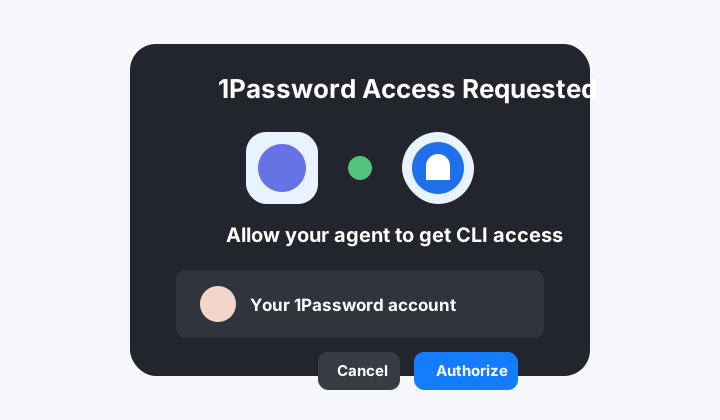
The console is a simple left-to-right vault flow:
- Agent Vault Setup checks whether
MCPVAULTexists and can create it. - Choose From 1Password searches your normal vaults and can filter by item type.
- Approve Agent Items is the right-side
MCPVAULTarea. Drag an item from the left list onto it, then choose Copy or Move. - Copied items are grouped into simple checklists for logins, API keys, credit cards, notes, and other fields already in
MCPVAULT. - Allowed For Agents is the final allow list MCP clients can use.
- Profile Data For Agents stores profile values agents may read directly, such as email, phone, address, name, or company.
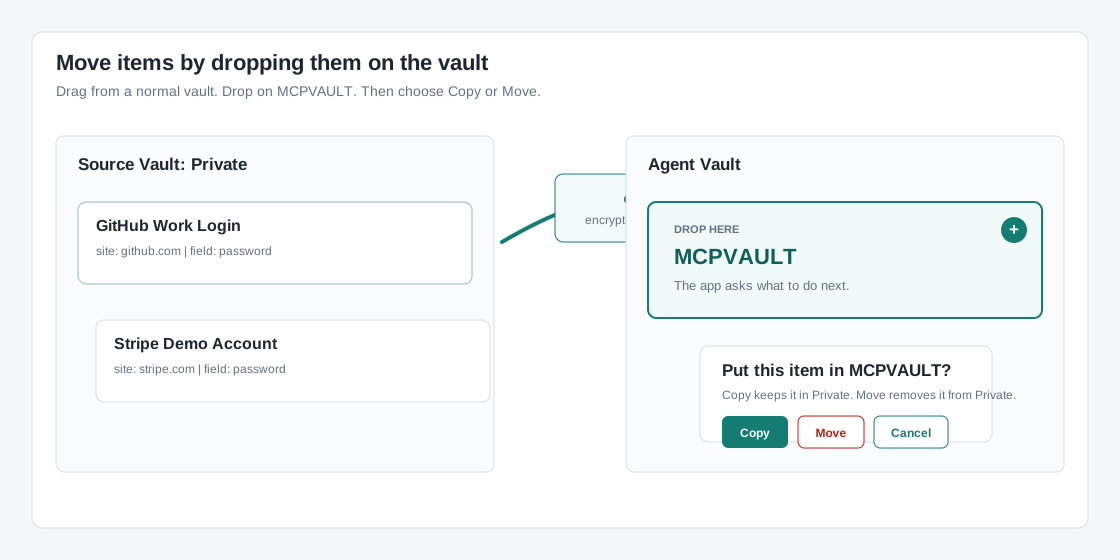
Copy is the safe default. Copy now uses 1Password's revealed JSON clone pipe so the destination item keeps the original fields. Move is available, but 1Password creates a new item in the destination vault and deletes the original item from the source vault.
After copying, nothing is shared with agents yet. In All Fields, copied items stay compact so the page remains easy to scan. Click Review Details on an item, tick only the details the agent may use, then click Approve Selected. Credit cards show normal checkout details separately from sensitive details like CVV or PIN. Blank allowed-sites fields mean the approved item may be used on all URLs. Items in MCPVAULT can also be deleted from the approval console after a confirmation prompt.
When agents are allowed to create new credentials, those items are saved into MCPVAULT first. In Approve Agent Items, open the saved item and use Save this item to another vault to copy or move it into a normal 1Password vault. Copy keeps the agent-vault version. Move removes it from MCPVAULT and removes local approvals for that copied item.
Client Setup
The setup CLI prints a dry run by default. It detects Claude Code, Claude Desktop, Codex, VS Code, Xcode coding agents, and Raycast AI when they are installed:
Apply setup to every detected client:
The command uses absolute executable paths so GUI apps do not depend on Terminal's PATH. Claude Desktop and VS Code JSON are merged with timestamped backups. Xcode's private Codex and Claude configuration folders are handled separately because Xcode does not use the normal CLI configuration.
Raycast stores MCP configuration in app-managed storage and does not expose a supported external config writer. The CLI opens Raycast's official Import Servers screen; review the prepared entry and confirm it once in Raycast. This is the only interactive client-specific step.
Claude Code
Equivalent command:
Codex
Equivalent command:
GitHub Copilot In VS Code
Equivalent VS Code command:
Workspace fallback at .vscode/mcp.json:
Claude Desktop
The CLI safely merges the server into Claude Desktop's user JSON and preserves all other settings.
Xcode
This configures the isolated Codex and Claude Agent environments used only inside Xcode.
Raycast AI
Raycast opens its native import screen for the final confirmation. Raycast asks before MCP tool calls by default.
ChatGPT Desktop
ChatGPT Desktop is intentionally not included in local setup. ChatGPT currently connects to remote MCP servers rather than arbitrary local stdio commands. Do not expose this password bridge through a public tunnel merely to connect it.
Other MCP Clients
Print generic MCP JSON:
Generic config:
Stop And Uninstall
Stop the local approval console by pressing Ctrl-C in the terminal running:
Disconnect MCP clients:
The uninstall command removes its entries from Claude Code, Claude Desktop, Codex, VS Code, and Xcode where present, then removes the optional menu-bar app/login item. Raycast opens Manage Servers for an explicit removal because its settings are app-managed. Other client settings and all 1Password data remain untouched.
Remove the global npm package:
Optional: delete this app's local approvals and encryption key:
This deletes ~/.onepassword-mcp. It does not delete 1Password vaults or items. Delete MCPVAULT inside 1Password only if you intentionally want to remove that vault.
MCP Tools
onepassword_status: check CLI,MCPVAULT, local approvals, profile data, and settings.find_secrets_for_site: return approved encrypted handles for a website.list_approved_secrets: list approved handles and allowed sites.copy_secret: resolve a handle and copy the selected field to the clipboard.paste_secret: resolve a handle, copy it, paste into the active app, and return no plaintext.clear_secret_clipboard: clear the clipboard.save_secret_item: save a new login, password, API credential, secure note, or credit card intoMCPVAULTwhen the local save setting is enabled.get_profile_data: return user-defined profile data allowed for the current site.find_passwords_for_site,list_approved_passwords,copy_password,paste_password, andclear_password_clipboard: compatibility aliases.admin_ui_info: return the approval console URL.
Security Model
Protected:
- Passwords are not stored by this project.
- MCP copy/paste tools never return plaintext 1Password secret fields.
- Handles and stored 1Password secret references are encrypted locally.
- Disabled or deleted approvals invalidate old handles.
- Allowed-site checks run again at copy and paste time.
- The MCP server only lists and resolves approvals from the configured agent vault.
- Agent-created items are opt-in, and are saved only into the configured agent vault.
Still sensitive:
- The OS clipboard briefly contains the plaintext field value.
- The active app receives the field value when paste is triggered.
- A local process with clipboard access may observe copied secrets.
- With desktop CLI integration, the local 1Password CLI session may have broader vault access than the MCP exposes.
get_profile_datareturns plaintext profile values you explicitly added in the admin UI.
For the strictest boundary, use a 1Password service account scoped only to MCPVAULT.
Read docs/SECURITY.md before using this with powerful browser-control agents.
Local State
Default state location:
Use a different state directory:
Use a different agent vault name:
Headless service-account example:
Do not commit service account tokens.
Troubleshooting
Run:
Common fixes:
opmissing: install the 1Password CLI.- 1Password auth failure: enable desktop CLI integration or set
OP_SERVICE_ACCOUNT_TOKEN. MCPVAULTmissing: start the admin console and click Create MCPVAULT.- Copilot setup cannot find
code: install the VS Code shell command or use.vscode/mcp.json. - Admin UI not running: run
onepassword-agent-mcp admin.
Development
Clone the repo:
Run checks:
Run locally:
Maintainer releases are automated through GitHub Actions with short-lived OIDC credentials. See docs/RELEASING.md; local npm publish and repeated device authorization are not part of the release process.
License
MIT
Save verification and retries
save_secret_item reports created, verified, itemId, vaultId, and
operationId. Success requires a readback that matches the intended title,
category, destination, websites, and field values. Secret values are compared
locally and are never included in the result. The optional approvalStatus
is separate: an item can be saved and verified while its approval still needs
review in the admin UI.
Reuse the same requestId and input after an interrupted save. If omitted,
identical item contents in the same destination are deduplicated. Supply a new
requestId only to intentionally create another item. Recovery uses a unique
opmcp-… item tag and a local operation record, never a title match. If a previous
operation cannot be reconciled, the tool reports an unresolved result instead
of silently creating another item. An approval revoked by the user is never
reinstated by a save retry.
On macOS and Linux, JSON crosses an OS pipe with no plaintext temporary files or secret values in command arguments. The runner preserves the terminal session for 1Password authorization and cleans up its child process group on timeout or cancellation. Copy reads and verifies supported JSON fields, including concealed values. Items containing attachments, documents, or passkeys must be copied using the 1Password app.
Restart existing MCP clients and the admin console after updating so every writer uses the current policy locking and save verification code. Existing settings, approvals, and the encryption key are retained.
Regression and live testing
The final command tests all five categories using real CLI dry runs. Unlock 1Password and authorize CLI access when prompted. To additionally test actual MCP saves, exact readback, retry deduplication, and copy, run:
This requires the saved agent-creation setting. It creates uniquely tagged
synthetic fixtures in the configured agent vault, verifies them, then moves
those exact fixtures to Recently Deleted. It uses isolated local policy state.
If verification or cleanup fails, it prints the recovery state directory and
retains it for inspection. doctor checks CLI authorization, destination
visibility, local creation permission, and console liveness; it does not
perform save/copy validation.