Memory for AI agents that tracks beliefs over time and surfaces contradictions
Quick Install
Automated & IDE SetupCopy the AI prompt to install this server into Claude Code, Cursor, or another agent — or use 1-click editor setup below.
Manual Client & Custom JSON ConfigExpand JSON ▾
Client Config & Setup
Choose your client or environment
Target File:
💡 Paste the JSON block into your client's configuration file under mcpServers, then restart the application.
Documentation Overview
OMEM




The system of record for what an AI agent believed and did. Append-only, with the evidence under every belief, both sides of every contradiction kept, and a named human behind every risky action. So when an agent acts and someone asks "why did it do that", you answer with a record instead of an investigation.
OMEM sits where a memory layer sits and does a different job. Instead of dumping text into a vector store and hoping for the best, it tracks what each agent believes over time, keeps the evidence under every belief, and handles contradictions explicitly, so an agent can reason about what it knows, when it learned it, and why it holds.
And it does not start from nothing. Installs that choose to pool what they work out about people in general, as counts that name nobody, and a young install borrows that intuition on day one instead of spending six months earning it. What you contribute is counts; what you get back is everyone else's. A borrowed pattern is born weaker than one you learned yourself, and still yields the moment a person's own evidence disagrees, so the general never overrides the individual.
The bank is empty today. No installation has contributed yet, which means the first ones decide what it learns, and it is worth knowing that a corpus of regularities about people can carry the biases of whoever filled it. The mining rule was rebuilt so that a pattern has to beat the base rate rather than ride it (Working Paper No. 1); whether the contributing population is representative is a separate question and an open one.
It runs locally with no external services and no dependencies to install.
Or deploy a private server in one click:

The blueprint provisions one small service with a persistent disk, password
auth on (the first signup is the operator account), and a generated master
key. Fly.io works too: fly launch --copy-config with the included
fly.toml.
Docs: infrastructure.omem-cloud.com · Quickstart · Security · Contributing
Shipping agents to clients? The audit trail and the approval gate are the point: what a client's security review asks for, and a small number of hands-on design-partner pilots are open.
Want to see the whole pattern run before reading another word? refund-desk is the reference integration: a support agent that moves money, with receipts. One file, runs in a minute, asserts every claim it makes.
That is scripts/demo_reasoning.py, abridged. Every line is an
asserted behaviour that runs in CI, so this picture cannot quietly stop being true.
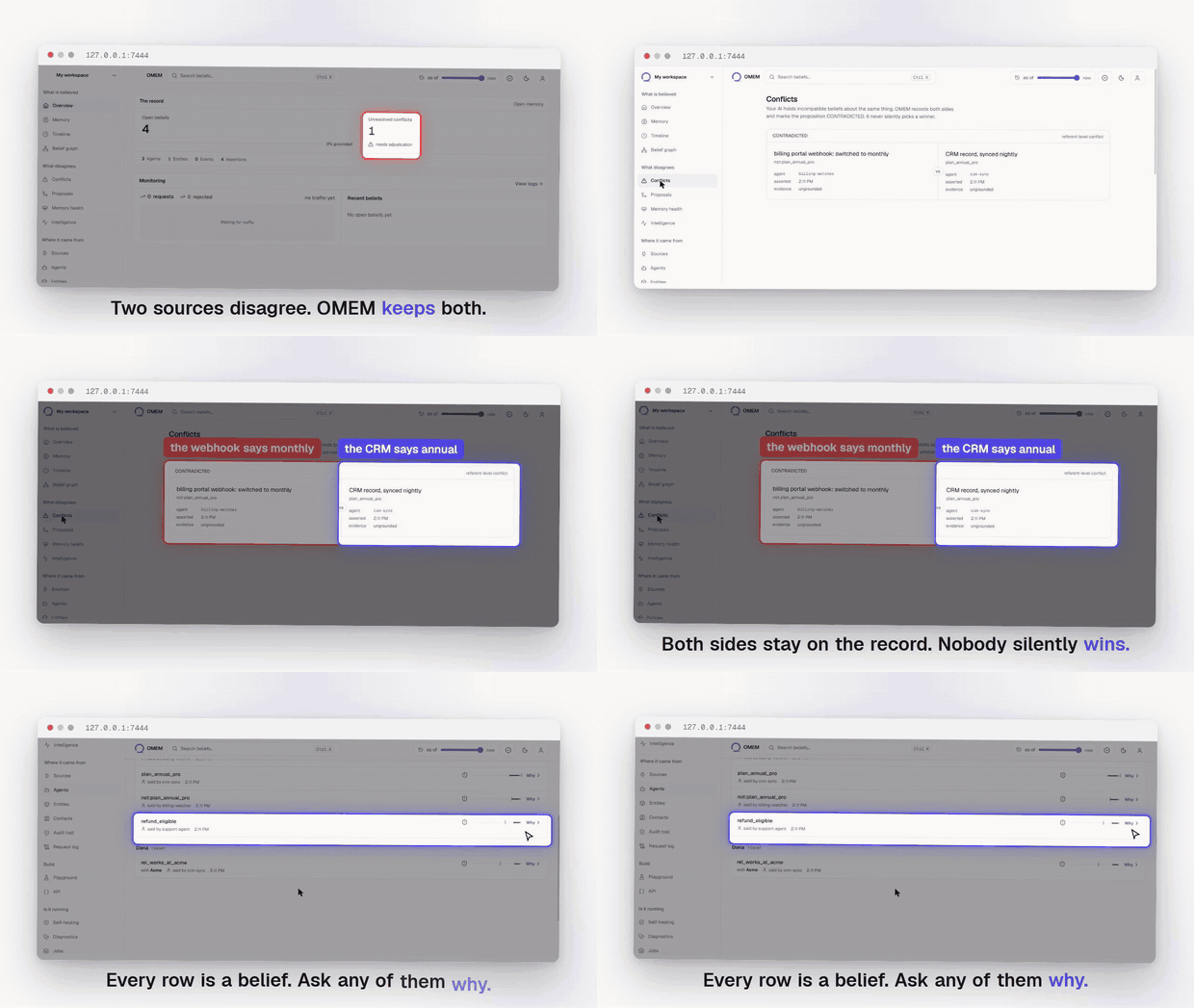
Two sources disagree. Neither is overwritten. See the whole thing running.
What makes it different
Most agent memory is a list of facts. When two facts conflict, one silently overwrites the other and the history is gone. OMEM keeps both, tracks which one is currently believed, and can tell you why. A few things it does that a plain vector store does not:
- Belief state over time. Every fact has a state (believed, contradicted, unknown) that the engine computes from the evidence, not a static row.
- Contradiction handling. Conflicting information is surfaced, not lost.
Claims named
Xandnot:Xare treated as opposed automatically; for anything else,mem.contradict("prefers_annual", "prefers_monthly")says so once. OMEM never decides two claims disagree by reading them, because that judgment is what would stop the same question having the same answer a year later. - Provenance. Ask why something is believed and get the chain that led there.
- Cross-agent memory. Memory is private to an agent by default; you choose what to share with a team or the whole project.
- Semantic recall. Finds relevant memories even when the wording differs
from how they were stored. Works offline with a dependency-free embedding;
set
OMEM_EMBED_MODELto use your provider's real embedding model, with cached vectors and automatic fallback if the provider is down. - A learning loop. Memories that prove useful rank higher over time.
- Self-healing that refuses. OMEM records failures and runs repairs under policy, and will not run a repair nobody authorised. A model can propose a plan; only actions registered in code execute, and risk class comes from OMEM's registry rather than from the plan claiming its own. See Self-healing.
Quick start
You need Python 3.9 or newer. No other dependencies.
Option 1: install from PyPI (server included).
Upgrading from an earlier version? pip install --upgrade omem-infrastructure.
Plain pip install on a package you already have reports "Requirement already
satisfied" and does nothing, which is a quiet way to keep running the version
you were trying to leave. python -c "import omem; print(omem.__version__)"
says what you actually have.
That starts the server on http://127.0.0.1:8787 and, on first run, prints a project id and an API key: no signup call, no dashboard visit, nothing to configure. Paste them straight in:
QUICKSTART.md takes that to a contradiction and a provenance chain in about five minutes, which is where the difference from a vector store actually shows.
Option 2: run from this repo.
Same server, same first-run project id and key, started from source. Setup takes about a minute either way. Two differences worth knowing:
- The database lands in a different place. From source it is
server/data/omem.db;omem-serverwrites./omem-data/omem.dbin whatever directory you ran it from.OMEM_DBoverrides either. - The dashboard needs building once. The wheel ships a built copy; a clone
does not, so the server prints "dashboard not bundled" until you run
cd web && OMEM_STATIC=1 npm run build. The API is identical either way.
Option 3: Docker.
API on 8787, dashboard on 3000, data in the named volume. The ports are
published to loopback on purpose: the container runs in local mode, which has
no passwords, so reachability is the access control. Putting it on a network
means setting OMEM_AUTH=password and OMEM_MASTER_KEY first, and
docker-compose.yml in this repo shows that shape.
Self-healing
OMEM records what breaks and repairs it under policy. This is infrastructure for your agents, not something OMEM does to itself: you register a component and the hooks it can be repaired with, and OMEM owns the memory, the safety boundary and the lifecycle.
The part that matters is what it refuses. A model may propose a repair plan; OMEM decides what is permitted. Only action types registered in code can execute, risk class comes from that registry and never from the plan, high-risk actions need explicit approval, and a repair is not successful until it verifies.
Nothing ran. The plan is kept with the reason each action was permitted or refused, so the refusal is a record rather than a silence. Error text and model output are data here, and neither can name an action into existence.
Related MCP Servers
Reviews
No reviews yet — be the first to share how this listing worked for you.
Frequently Asked Questions about OMEM
AllMCPs Directory Badge
Showcase your server listing on GitHub or your project documentation. Embed this dynamic SVG badge to highlight official listing status and live engagement.
Badge Style:
Live Dynamic SVG Preview
Markdown (GitHub README)
[](https://allmcps.com/mcp/omem)HTML Embed
<a href="https://allmcps.com/mcp/omem"><img src="https://allmcps.com/api/badge/omem?style=directory" alt="OMEM on AllMCPs" /></a>Technical Specs & Signals
CategoryKnowledge & Memory
27Quality signal: Emerging · 27/100How this signal is calculated ▾
Server availabilityNot measured
Not scored for repo-hosted servers — we can't reach the running server, only its GitHub page. Hosted MCP endpoints are health-checked live.
Verified ownership8/20
Documentation & tools11/30
Adoption & activity1/15
Community engagement0/10
A guidance signal from public completeness & health data — not a user rating. New listings start lower and rise as they add docs, get verified, and grow adoption. Signals we can't observe for a listing are skipped, not counted against it.
Own this project?
This directory is pre-filled from public sources. Claim via GitHub README, site badge, or DNS TXT to unlock edit access and the Official badge — proof is checked automatically, then reviewed by our team.
Free dofollow backlink: add your website and place the AllMCPs badge on it — no claim needed. We detect it automatically and keep it verified as long as the badge stays live.
Claim & get free dofollowShare & Embed
Add our SVG badge (dark/light directory styles) or embeddable widget to your site.