Portfolio analytics via the okama library: backtests, Monte Carlo, efficient frontier, PNG charts
Quick Install
Automated & IDE SetupCopy the AI prompt to install this server into Claude Code, Cursor, or another agent — or use 1-click editor setup below.
Not yet automatically verified
We haven't yet run this listing's install command through our automated sandbox check. This isn't a red flag — we're steadily working through the catalog.
Manual Client & Custom JSON ConfigExpand JSON ▾
Client Config & Setup
Choose your client or environment
Target File:
💡 Paste the JSON block into your client's configuration file under mcpServers, then restart the application.
Documentation Overview
okama-mcp




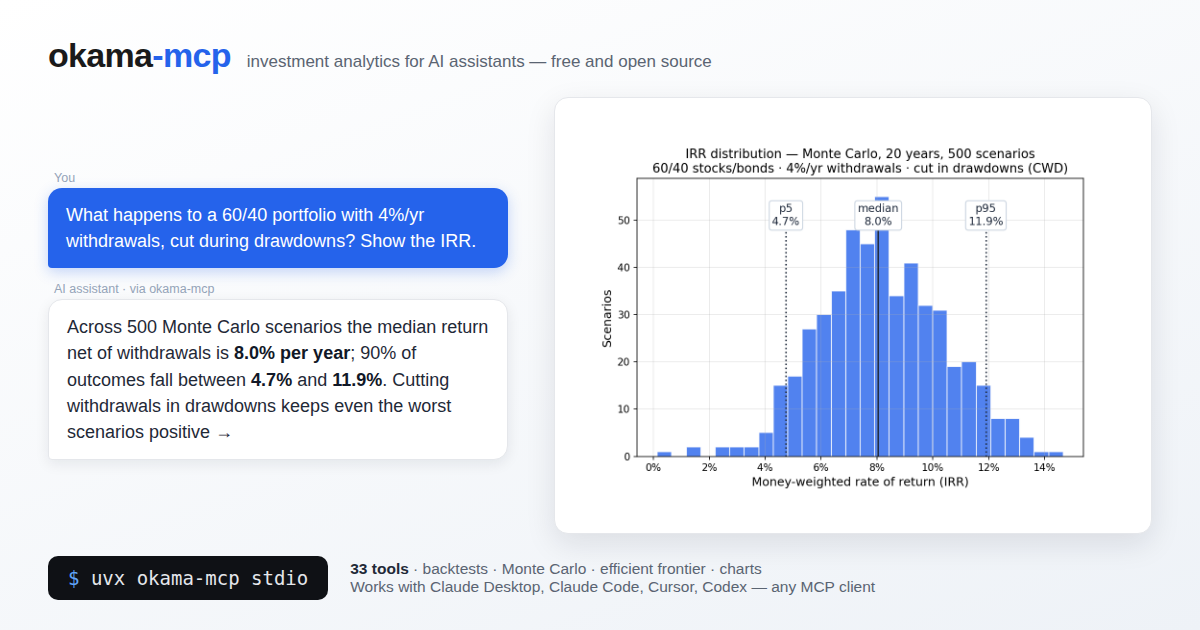
MCP (Model Context Protocol) server that exposes the okama investment portfolio toolkit to AI assistants — Claude Desktop, Claude Code, Cursor, Codex, and any other MCP-compatible client.
With okama-mcp installed, you can ask an AI things like:
"Backtest a portfolio of 30% gold and 70% real estate over the last 15 years."
"Run a Monte Carlo retirement forecast on that portfolio, withdrawing $1,000/month indexed to inflation, over 25 years."
"What's the tangency portfolio of SPY, BND, and GLD with a 3% risk-free rate?"
…and the AI uses the MCP tools to call okama directly — no Python code needed.
Built on FastMCP. Single codebase, two transports:
stdio (for local clients) and streamable-http (for self-hosting).
okama-mcp is free and open source — no hosted service, no registration; you run it
yourself, locally or on your own server.
Install
Requires Python ≥ 3.11 (same floor as okama itself); okama ≥ 2.2.0 is installed automatically.
The easiest way — no clone, no venv — is uv or pipx:
Plain pip works too:
[!WARNING] With pip, prefer a dedicated virtual environment: on most modern Linux distros the system Python is marked externally managed (PEP 668), so
pip installoutside a venv fails, and a shared environment risks dependency conflicts. In your MCP client config, pointcommandat the absolute path of theokama-mcpscript inside the venv — GUI clients don't see your shellPATH.uvxandpipxavoid all of this by isolating the install automatically.
To work on the code, install from source instead:
Run
When running from a source checkout, prefix each command with poetry run.
Connect a client
Claude Desktop
Edit ~/Library/Application Support/Claude/claude_desktop_config.json (macOS) or
%APPDATA%\Claude\claude_desktop_config.json (Windows):
Restart Claude Desktop; the server appears in the tools menu.
Claude Code
To make the server available in every project (works from any directory):
Developers running from a source checkout can use claude mcp add okama -- poetry run okama-mcp stdio from the project root instead.
Or commit a .mcp.json at the project root so the whole team picks it up:
Cursor
Add the server to .cursor/mcp.json in your project (or ~/.cursor/mcp.json to make
it global):
Codex (CLI & Desktop)
Add the server with one command:
Or declare it in ~/.codex/config.toml (or a project-scoped .codex/config.toml
in trusted projects):
The Codex CLI, desktop app, and IDE extension share this configuration — set it up once and it works in all three.
Self-hosting (streamable HTTP)
Run okama-mcp on your own server and share it across your MCP clients:
(From source: poetry run okama-mcp http ...)
Then point your MCP client at http://<your-server>:8765/mcp. For a production
setup put nginx + TLS in front; ready-made examples live in deploy/:
deploy/systemd/okama-mcp.service— systemd unit (hardened, runs as a dedicated user)deploy/nginx/self-hosted.conf— nginx vhost: TLS, SSE-friendly proxying of/mcp
The server is open by design — free to run, no registration. If your instance must not be public, restrict access at the nginx level (allow-list, VPN, or HTTP basic auth).
Tool catalog
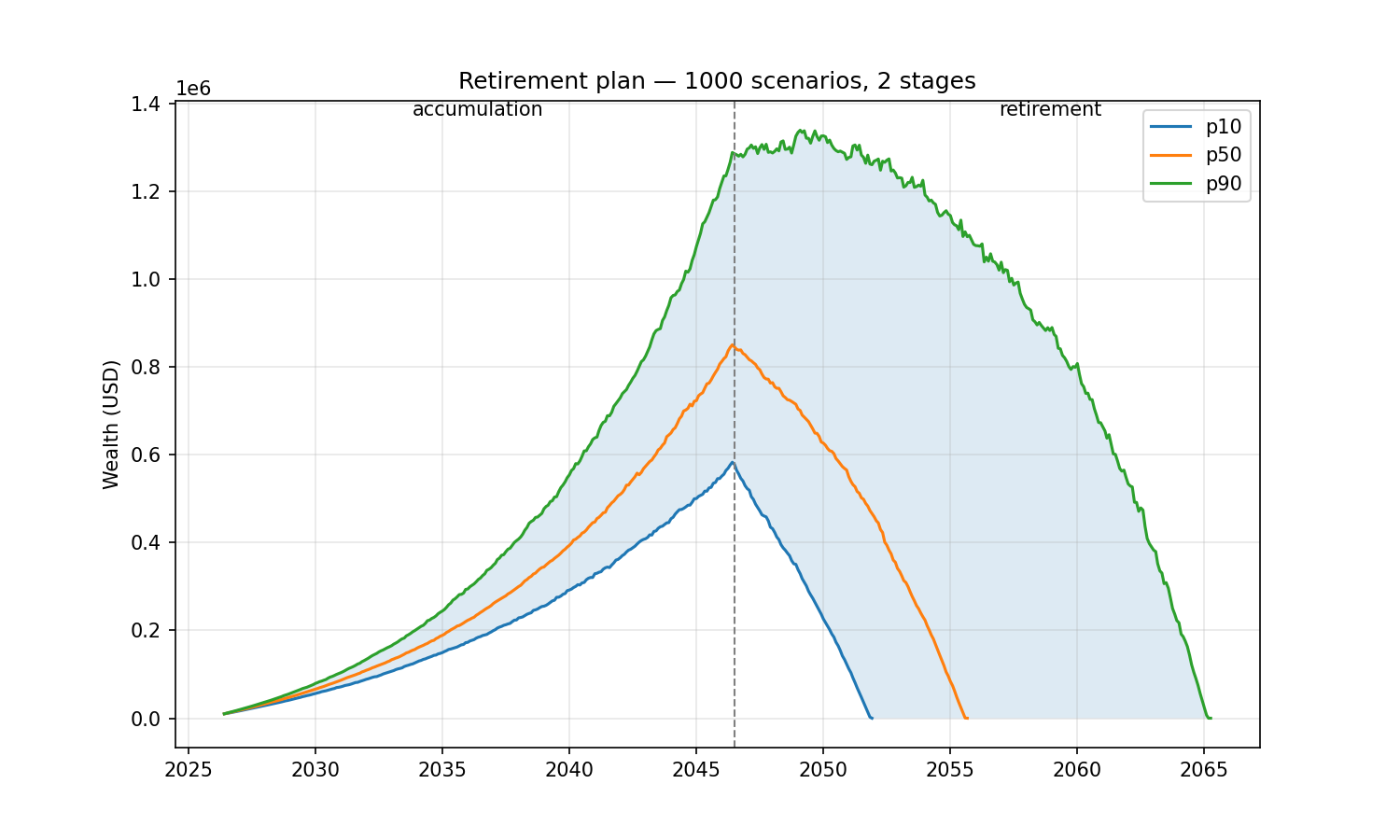
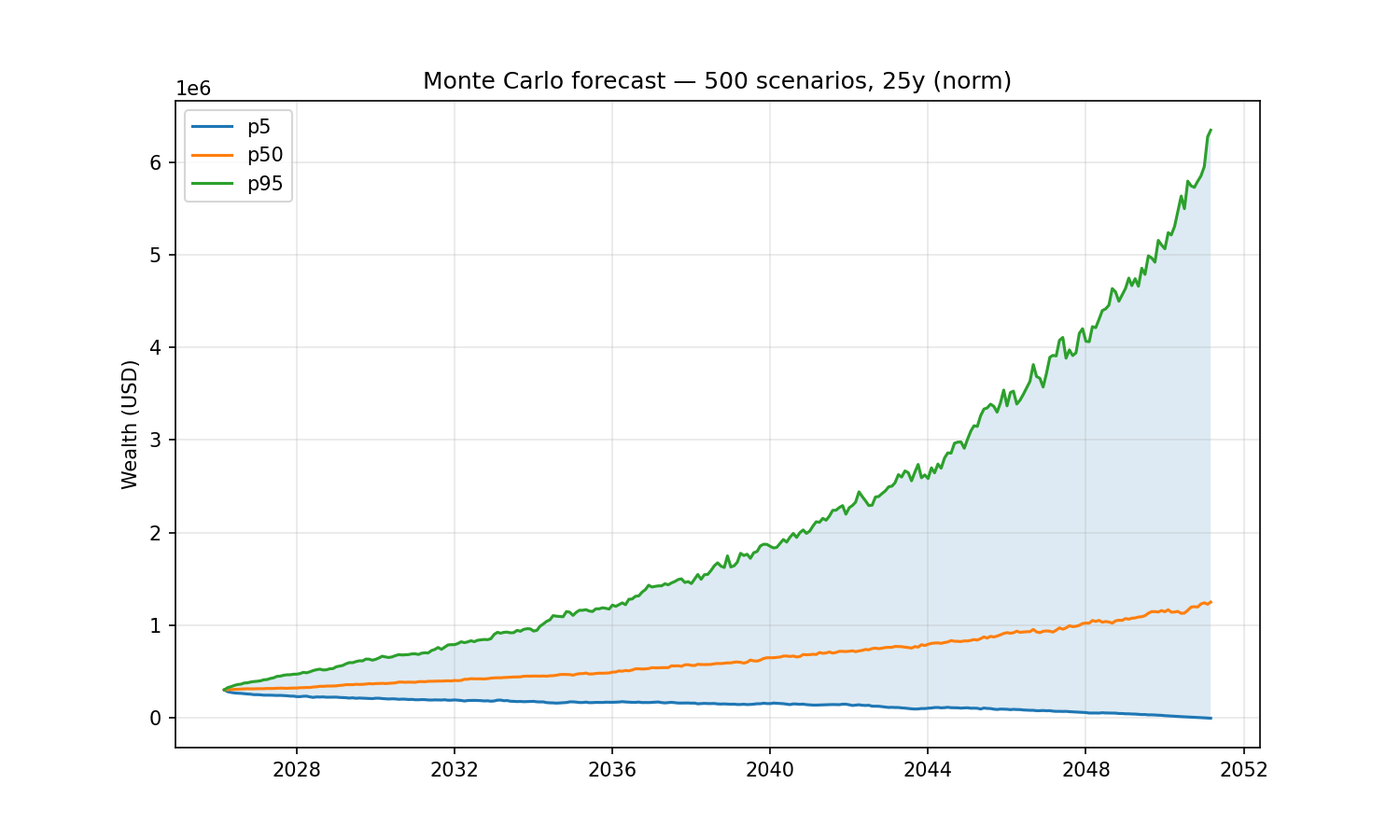
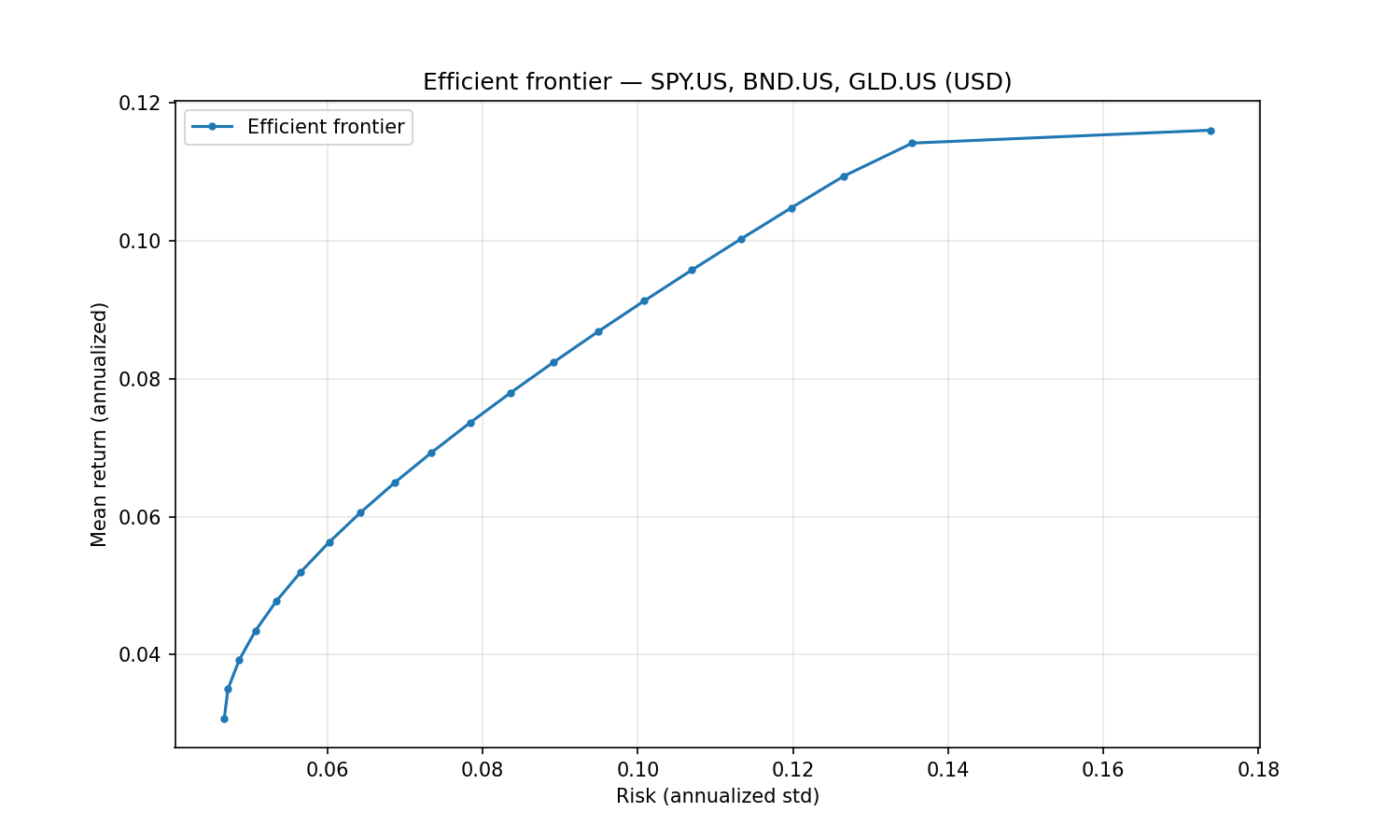
A multi-stage financial plan (contribute $1,000/month for 20 years into a 70/30 SPY/AGG portfolio, then withdraw $6,000/month indexed to inflation for 25 years), a Monte Carlo retirement forecast (30% gold / 70% real estate, withdrawing $1,000/month indexed to inflation over 25 years) and the efficient frontier of SPY/BND/GLD:
All tools are stateless — pass the full portfolio specification with every call.
The server caches expensive okama objects (Portfolio, EfficientFrontier) by content
hash, so repeated calls on the same spec are fast.
Nested portfolios. Wherever a list of assets is accepted — the assets field of
PortfolioSpec/FrontierSpec, or the portfolios argument on the comparison tools —
an entry may be a ticker string or a nested portfolio object (the same spec shape).
This lets you treat a whole portfolio as a single component: e.g. compare a 60/40
portfolio against gold, or put a sub-portfolio on the efficient frontier.
Search & metadata
| Tool | Purpose |
|---|---|
search_assets(query="", namespace?, asset_type?, oldest_first?, limit=50) | Free-text search by name / local name / ticker / ISIN. Filter by okama type and sort by first_date; for example, namespace="MOEX", asset_type="ETF", oldest_first=true, limit=5 finds the five oldest MOEX-listed BPIFs. |
list_namespaces(kind="all"|"assets"|"macro") | Show the available okama namespaces. |
get_asset_info(symbol) | Metadata for one symbol — name, country, currency, type, date range. |
Single asset & comparisons
| Tool | Purpose |
|---|---|
get_asset_history(symbol, kind, first_date?, last_date?) | Time series for one asset. kind ∈ {close_monthly, close_daily, adj_close, ror, dividends}. |
compare_assets(symbols, ccy, ..., portfolios?, rf_return?, t_return?) | Side-by-side statistics (describe() table: CAGR, risk, drawdowns by period) plus Sharpe & Sortino per asset. |
get_correlations(symbols, ccy, ..., portfolios?) | Correlation matrix of monthly returns. |
get_rolling_risk(symbols, ccy, window_months=12, ..., portfolios?) | Rolling annualized risk per asset. |
get_asset_returns(symbols, ccy, ..., portfolios?, period?, real=False) | Return metrics per asset: CAGR, cumulative return, mean / real mean return, monthly geometric mean, annual returns table. |
get_rolling_returns(symbols, ccy, window_months=12, real=False, ..., portfolios?) | Rolling CAGR and rolling cumulative return per asset. |
get_benchmark_metrics(benchmark, symbols, ccy, ..., portfolios?, rolling_window?) | Beta, correlation, annualized tracking difference and tracking error of each asset vs a benchmark/index. |
get_dividend_info(symbols, ccy, ...) | LTM dividend yield, 5y mean yield, paying/growing streaks per asset. |
Portfolio backtest
| Tool | Purpose |
|---|---|
analyze_portfolio(portfolio, rf_return=0, t_return=0) | Headline metrics (CAGR, annual mean/risk, Sharpe, Sortino) + full describe() for a PortfolioSpec. |
get_portfolio_drawdowns(portfolio) | Drawdown time series + max drawdown / recovery period. |
get_portfolio_var_cvar(portfolio, time_frame=12, level=1) | Historical Value at Risk and CVaR. |
get_portfolio_wealth_index(portfolio, full=False) | Wealth-index series (cumulative growth of 1000). |
get_rolling_cagr(portfolio, window_months=12, real=False) | Rolling CAGR time series (optionally inflation-adjusted). |
get_cagr_probability(portfolio, years, cagr_target) | Historical probability of CAGR below a target (e.g. of a loss) over N-year periods. |
Monte Carlo DCF
| Tool | Purpose |
|---|---|
monte_carlo_forecast(portfolio, mc, cashflow) | Forward simulation with one of five cash-flow strategies (indexation, percentage, time_series, vanguard, cut_if_drawdown). Returns percentile wealth bands, terminal-wealth stats, survival metrics. Includes the money-weighted IRR distribution (percentiles + mean). |
get_portfolio_irr(portfolio, cashflow) | Historical money-weighted return (IRR) for a contribution/withdrawal plan. |
find_the_largest_withdrawals_size(portfolio, mc, cashflow, goal, ...) | Largest sustainable withdrawal (Monte Carlo) for a goal: keep real purchasing power, keep nominal balance, or survive N years. |
get_monte_carlo_cash_flow(portfolio, mc, cashflow, discounting?) | Monte Carlo distribution of future cash flows over time (percentile bands). |
Related MCP Servers
Reviews
No reviews yet — be the first to share how this listing worked for you.
Frequently Asked Questions about Okama MCP
AllMCPs Directory Badge
Showcase your server listing on GitHub or your project documentation. Embed this dynamic SVG badge to highlight official listing status and live engagement.
Badge Style:
Live Dynamic SVG Preview
Markdown (GitHub README)
[](https://allmcps.com/mcp/okama-mcp)HTML Embed
<a href="https://allmcps.com/mcp/okama-mcp"><img src="https://allmcps.com/api/badge/okama-mcp?style=directory" alt="Okama MCP on AllMCPs" /></a>Technical Specs & Signals
CategoryDeveloper Tools
37Quality signal: Fair · 37/100How this signal is calculated ▾
Server availabilityNot measured
Not scored for repo-hosted servers — we can't reach the running server, only its GitHub page. Hosted MCP endpoints are health-checked live.
Verified ownership10/20
Documentation & tools16/30
Adoption & activity2/15
Community engagement0/10
A guidance signal from public completeness & health data — not a user rating. New listings start lower and rise as they add docs, get verified, and grow adoption. Signals we can't observe for a listing are skipped, not counted against it.
Own this project?
This directory is pre-filled from public sources. Claim via GitHub README, site badge, or DNS TXT to unlock edit access and the Official badge — proof is checked automatically, then reviewed by our team.
Free dofollow backlink: add your website and place the AllMCPs badge on it — no claim needed. We detect it automatically and keep it verified as long as the badge stays live.
Claim & get free dofollowShare & Embed
Add our SVG badge (dark/light directory styles) or embeddable widget to your site.