Sailing passage planner for any coast, with high-precision tides on the French Atlantic.
Quick Install
Automated & IDE SetupCopy the AI prompt to install this server into Claude Code, Cursor, or another agent — or use 1-click editor setup below.
Manual Client & Custom JSON ConfigExpand JSON ▾
Client Config & Setup
Remote HTTPChoose your client or environment
Target File:
💡 Paste the JSON block into your client's configuration file under mcpServers, then restart the application.
Documentation Overview
OhMyWind ⛵
Talk to your LLM. Cast off with confidence.
OhMyWind turns any MCP-capable assistant (Claude, Le Chat, Cursor, Goose, Zed, Continue) into a sailing planner. Ask in plain language, anywhere in the world: get a per-leg ETA, a 1‑5 complexity score, and a deep-link to the full plan. On the French Atlantic coast it goes further, swapping the global current model for the SHOM Atlas C2D and MARC PREVIMER atlases. Free, keyless, open source.

ohmywind.fr · MCP endpoint · AGPL-3.0 + trademark
[!WARNING] Decision-support tool, not a navigation instrument. OhMyWind does not replace the official marine forecast from your national weather service, up-to-date charts, or the skipper's judgement. Forecast models are sometimes wrong: you remain responsible for your passage.
Try it in 30 seconds
1. Open your MCP client and add the endpoint:
2. Ask, in your own words:
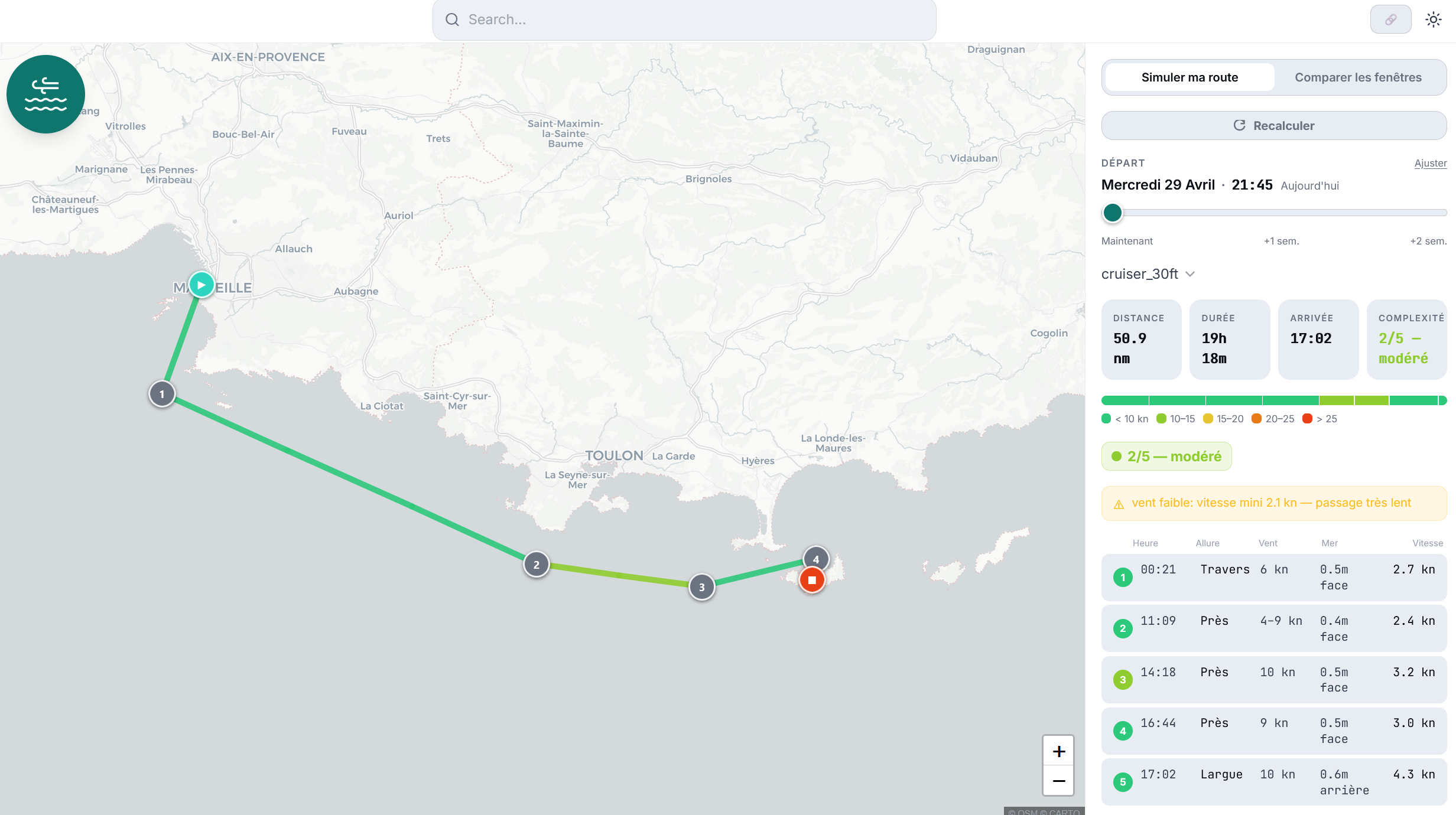
"Demain matin, Marseille → Porquerolles, sur un Sun Odyssey 36. Bonne idée ? Combien de temps et c'est tendu comment ?"
3. Your assistant calls the OhMyWind tools and answers in plain language. On hosts that support the MCP Apps spec (Claude, Claude Desktop, ChatGPT, VS Code Copilot, Goose, Postman, MCPJam) you also get a live, interactive widget: the ohmywind.fr plan view rendered inline. On hosts that don't (Cursor, Le Chat, terminal), the assistant hands you the same plan as an ohmywind.fr deep-link. No account. No API key. No credit card.
First time with MCP? It takes 2 minutes. Pick your client on modelcontextprotocol.io/clients, then follow the remote-server quickstart. Claude Desktop users can start with the user quickstart. In Le Chat, add it under Connectors → Add connector → Custom MCP connector and paste the endpoint above.
If your client only speaks stdio
Some hosts cannot reach a remote MCP server directly yet. Bridge it with
mcp-remote, which runs locally
and forwards to the endpoint:
Nothing else to configure: no account, no API key, no OAuth, no credit card. A client that asks you for credentials is guessing rather than reading the server, and you can leave those fields empty.
Ask it something real
Three prompts, each exercising a different tool:
- "Quels bateaux tu connais ? J'ai un First 27." maps your boat to a polar archetype. The assistant chooses from the descriptions; there is no server-side lookup table.
- "Le vent au cap Sicié samedi après-midi ?" returns wind and sea at one point, AROME first, in knots.
- "Meilleur créneau cette semaine pour Marseille → Porquerolles ?" walks every hourly departure up to 14 days out and compares them in one call.
Why OhMyWind
| 🆓 Free, keyless | Wind & sea via Open-Meteo (CC BY 4.0). No account, no API key. |
| 🌍 Works anywhere | Global models (ECMWF, GFS) cover any coast. Over France, AROME 1.3 km takes over and catches thermals, mistral, tramontane. |
| ⛵ Boat-aware | Seven archetypes from 20 ft trailer-cruisers to bluewater 50-footers, real polars, an efficiency parameter for trim and crew level. |
| 🗓️ Window-aware | One call sweeps a 14-day departure range and lets your LLM pick the calmest weekend slot, no math by hand. |
| 🔌 Client-agnostic | One HTTP MCP endpoint. Works in Claude Desktop, Le Chat, Cursor, Goose, Zed, Continue, … |
| 🖼️ Rich on supporting hosts | On Claude / ChatGPT / VS Code Copilot / Goose, an interactive widget renders inline via MCP Apps. Other hosts fall back to a clean text summary + deep-link. |
| 🛠️ Open source, AGPL | Self-host on Fly, Modal, or your own VPS: mcp-core is deployment-agnostic. The HF Space is one wrapper among many. Fork it under your own name and icons, see TRADEMARK.md. |
What the LLM sees
Four MCP tools, all async, all keyless:
| Tool | What it does |
|---|---|
list_boat_archetypes | Seven descriptive archetypes; the LLM maps "Sun Odyssey 36" → cruiser_30ft itself. |
get_marine_forecast | Wind + sea around a point/window, multi-model. |
plan_passage | End-to-end: per-leg timing + 1‑5 complexity + ohmywind.fr deep-link, in one call. Pass latest_departure to compare every hourly window up to 14 days out, and the LLM picks the calmest slot. |
read_me | Returns OhMyWind's calculation methodology. Call it when the user asks how things are computed. |
plan_passage declares an MCP Apps UI resource (ui://openwind/plan-passage)
on its _meta. Hosts that support MCP Apps
render the live ohmywind.fr/plan?… view in a sandboxed iframe automatically,
with no host-specific CSS and no vendor lock-in. Hosts without MCP Apps support
silently get the structured payload + the openwind_url deep-link.
Architecture
api and mcp-core both stay deployment-agnostic, and neither depends on the
other: the API serves without an MCP server behind it, and the MCP tools run
over stdio with no HTTP at all. Re-deploying on Fly, Modal, or a VPS is a
different Dockerfile and an entry point that calls create_app() and
build_server(). See docs/architecture.md.
Run locally
V1 scope
Wind, sea (Hs max), per-leg ETA, 1–5 complexity. Tides and currents ignored
on the Med (negligible). No automatic routing optimisation: the LLM and the
human stay in the loop. Roadmap and scope decisions live in a plan/ directory kept
local to the working copy, not published here.
Calculation method
Defaults below are what the MCP server uses unless overridden by tool parameters.
Implementation: packages/data-adapters/src/openwind_data/routing/passage.py.
Polar speed model
- 7 archetypes (
cruiser_20ft,cruiser_25ft,cruiser_30ft,cruiser_40ft,cruiser_50ft,racer_cruiser,catamaran_40ft), each with an ORC-style polar inpackages/data-adapters/src/openwind_data/routing/polars/. - Lookup is bilinear interpolation in (TWS, TWA), clamped at grid edges.
- TWA is symmetric
[0°, 180°]only, no port/starboard distinction.
Boat speed adjustments
- Efficiency factor (default 0.75). ORC polars are theoretical maxima. Real cruising loses ~25% (sail trim, comfort margins, helmsman, untracked currents). Override per call:
0.85racing,0.75cruising,0.65loaded family cruising,0.55heavy seas / fouled hull. - VMG / tacking correction. When the route's TWA is below the boat's optimal upwind angle (typically ~42-48°), the simulator assumes the sailor tacks. Effective speed toward destination is
polar(optimal_TWA) × cos(optimal_TWA − route_TWA). At dead upwind this reduces topolar(opt) × cos(opt) ≈ polar / √2; at TWA=20° with opt=45° the reduction is onlycos(25°) ≈ 0.91. - Wave derate (opt-in).
max(0.5, 1 − 0.05 × Hs^1.75 × cos²(TWA/2)). Disabled by default; sea state feeds the warning bar rather than slowing the boat. - Minimum boat speed. 0.5 kn floor, prevents division blow-up in extreme stalls.
Timing
- Single-pass approximation. A 6 kn heuristic estimates segment mid-times, then real polar speeds are computed at each mid-time's actual wind. No convergence iteration. Bias is bounded by the Mediterranean's multi-hour wind correlation length.
- Routes are split into ~10 nm sub-segments by default for per-segment weather sampling. Drop to 5 nm for tight coastal work; raise to 20 nm for long offshore legs.
Compare-windows mode
Related MCP Servers
Adoption & maintenance
Factual signals from GitHub, npm, and our automated checks — not a rating.
GitHub stars
10
Stargazers on the source repository.
Last commit
9d ago
Most recent push to the default branch.
Reviews
No reviews yet — be the first to share how this listing worked for you.
Frequently Asked Questions about OhMyWind
AllMCPs Directory Badge
Showcase your server listing on GitHub or your project documentation. Embed this dynamic SVG badge to highlight official listing status and live engagement.
Badge Style:
Live Dynamic SVG Preview
Markdown (GitHub README)
[](https://allmcps.com/mcp/ohmywind)HTML Embed
<a href="https://allmcps.com/mcp/ohmywind"><img src="https://allmcps.com/api/badge/ohmywind?style=directory" alt="OhMyWind on AllMCPs" /></a>