AllMCPs
BrowseBestCategoriesStackCompareToolsGuidesBlog
Log in Submit MCP

Stay in the loop

Get new MCP servers and top picks in your inbox.

AllMCPs

The open directory for discovering and installing Model Context Protocol servers.

AllMCPs on GitHub (opens in a new tab)
Launched onTiny Startupstinystartups.com
Explore
  • Browse servers
  • Best MCP servers
  • Categories
  • MCP clients
  • Agent prompts
  • Stack Builder
  • Compare servers
  • Random discovery New
  • Submit a server
  • Pricing & Boost Boost
Learn
  • Guides hub
  • What is MCP?
  • Install guide
  • Build an MCP server
  • Deploy an MCP server
  • Security guide
  • Troubleshooting
  • MCP for SEO & AEO
  • Protocol versioning
  • Blog & updates
Tools
  • All developer tools
  • Config generator
  • Config validator
  • Config auditor
  • MCP playground
  • Token calculator
  • OpenAPI β†’ MCP
  • Badge generator
For agents
  • REST API docs
  • Trust & traffic Live
  • Remote MCP server SSE β†— (opens in a new tab)
  • llms.txt β†— (opens in a new tab)
  • Catalog JSON β†— (opens in a new tab)
Company
  • About
  • Advertise Sponsor
  • Contact
  • GitHub β†— (opens in a new tab)
  • Terms
  • Privacy
AllMCPs VerifiedAllMCPs VerifiedFeatured on Nick LaunchesFeatured on Nick LaunchesLaunch Llama NewsletterLaunch Llama NewsletterVerified DR - allmcps.comVerified DR - allmcps.comFeatured on SaaSGrowFeatured on SaaSGrowFeatured on Twelve ToolsFeatured on Twelve ToolsFeatured on Saaspa.geFeatured on Saaspa.geFeatured on Findly.toolsFeatured on Findly.toolsFeatured on Startup FameFeatured on Startup FameFeatured on LaunchKiwiFeatured on LaunchKiwiFeatured on ScrollLaunchFeatured on ScrollLaunchFeatured on DailyPingsFeatured on DailyPingsFazier badgeFazier badgeFeatured on NewTool.siteFeatured on NewTool.siteFeatured on saasfame.comFeatured on saasfame.comDR Checker - Domain RatingDR Checker - Domain RatingListed on Turbo0Listed on Turbo0Launched on LaunchBoard - Product Launch PlatformLaunched on LaunchBoard - Product Launch PlatformList on SimilarlabsList on Similarlabshttps://codetrendy.comhttps://codetrendy.comListed on DevTool.ioFeatured on BuildlistFeatured on BuildlistLaunched on Tiny StartupsFeatured on ShowMeBestAIFeatured on ShowMeBestAIFind us on LaunchZoneFind us on LaunchZoneAllMCPs VerifiedAllMCPs VerifiedFeatured on Nick LaunchesFeatured on Nick LaunchesLaunch Llama NewsletterLaunch Llama NewsletterVerified DR - allmcps.comVerified DR - allmcps.comFeatured on SaaSGrowFeatured on SaaSGrowFeatured on Twelve ToolsFeatured on Twelve ToolsFeatured on Saaspa.geFeatured on Saaspa.geFeatured on Findly.toolsFeatured on Findly.toolsFeatured on Startup FameFeatured on Startup FameFeatured on LaunchKiwiFeatured on LaunchKiwiFeatured on ScrollLaunchFeatured on ScrollLaunchFeatured on DailyPingsFeatured on DailyPingsFazier badgeFazier badgeFeatured on NewTool.siteFeatured on NewTool.siteFeatured on saasfame.comFeatured on saasfame.comDR Checker - Domain RatingDR Checker - Domain RatingListed on Turbo0Listed on Turbo0Launched on LaunchBoard - Product Launch PlatformLaunched on LaunchBoard - Product Launch PlatformList on SimilarlabsList on Similarlabshttps://codetrendy.comhttps://codetrendy.comListed on DevTool.ioFeatured on BuildlistFeatured on BuildlistLaunched on Tiny StartupsFeatured on ShowMeBestAIFeatured on ShowMeBestAIFind us on LaunchZoneFind us on LaunchZone
Β© 2026 Jackalope Digital LLC. All rights reserved.
  1. Home
  2. πŸ’» Developer Tools
  3. Oh My Posh Configurator
Oh My Posh Configurator logo
Health: ActiveRecent health check succeeded.Last checked 9/7/2026, 8:42:28 PM

Oh My Posh Configurator

User RatingsBe the first to rate and review this MCP server! Enrichment pendingWe haven’t run our AI enrichment pass on this listing yet, so the overview, use cases, and FAQ below may be sparse or missing. We work through the catalog over time β€” check back soon.
View Repository132 GitHub StarsTotal stargazers on GitHub for the source repository (132 stars).Visit Website

MCP server for creating, validating, and exporting Oh My Posh terminal prompt configurations.

Quick Install

Automated & IDE Setup

Copy the AI prompt to install this server into Claude Code, Cursor, or another agent β€” or use 1-click editor setup below.

One-click editor setup isn’t available for this listing yet β€” we don’t have a confirmed install command, and we’d rather show nothing than point your editor at the wrong package or host. Follow the project’s own setup instructions, linked above.

Manual Client & Custom JSON ConfigExpand JSON β–Ύ
No confirmed setup config for this listing yet. We only publish a config block when the install details come from the project itself β€” its README, its docs, or a verified owner. We haven’t found those for Oh My Posh Configurator, and we’d rather show nothing than a guess you’d paste into your client. Follow the project’s own setup instructions for the current steps.
Install Directory Badge Claim listing AlternativesπŸ’» More in Developer Tools

Documentation Overview

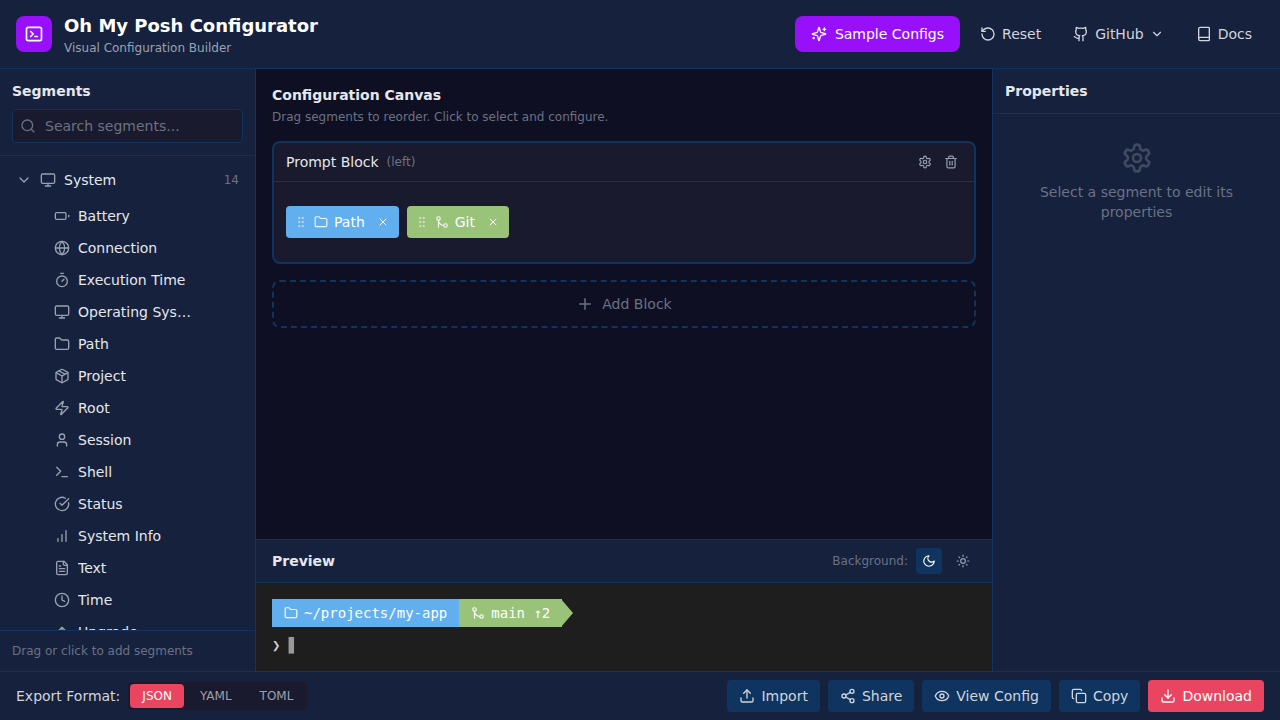
Oh My Posh Visual Configurator ✨

Oh My Posh Configurator License Live Demo

Design beautiful terminal prompts without touching configuration files

πŸš€ Launch App β€’ πŸ“– Documentation β€’ πŸ’¬ Discussions

Oh My Posh Visual Configurator


🎯 What is Oh My Posh Configurator?

The Oh My Posh Visual Configurator is a modern, intuitive web application that lets you design and customize your terminal prompt visually. No more manual JSON editing or trial-and-error configurationβ€”just drag, drop, customize, and export!

Perfect for developers, DevOps engineers, and anyone who wants a beautiful, informative terminal prompt for PowerShell, Bash, Zsh, Fish, or any shell supported by Oh My Posh.

✨ Features

  • 🎨 103+ Segments: Browse comprehensive segment library organized in 8 categories with detailed properties and options
  • πŸ–±οΈ Drag & Drop Interface: Intuitive visual editor with real-time updates
  • ⚑ Live Preview: See your prompt instantly with sample data and powerline/diamond styles
  • πŸŽ›οΈ Full Customization: Configure colors, templates, styles, and alignment with inline documentation
  • πŸš€ Progressive Disclosure: Advanced features hidden by default with settings dialog to show/hide complexity as needed
  • 🎯 Smart Defaults: Auto-applied cache settings, intelligent feature detection on import
  • πŸ’‘ Command Tooltips: Configure command-triggered custom prompts (e.g., show git status when typing git)
  • πŸ“š Segment Documentation: Built-in properties and options reference for every segment
  • πŸ“¦ Import & Export: Support for JSON, YAML, and TOML formats
  • πŸ’Ύ Auto-Save: Never lose your work with automatic browser storage
  • 🎯 Sample Configs: Start quickly with 6 pre-built professional templates
  • πŸ‘₯ Community Themes: Browse and share community-contributed configurations
  • 🀝 Easy Sharing: Submit your own themes via GitHub PR with built-in tools
  • 🌐 100% Client-Side: Your configurations never leave your browser
  • πŸ“± Responsive Design: Works on desktop, tablet, and mobile devices
  • 🎨 Smart Color Schemes: Category-based default colors for quick setup
  • πŸ€– MCP Server: Use AI assistants like Claude to create and manage configurations through natural language (Learn more)

πŸ—‚οΈ Segment Categories

  • System: Path, OS, Shell, Session, Battery, Time, Execution Time, Status, and more
  • Version Control: Git, Mercurial, SVN, Fossil, Plastic SCM, Sapling, Jujutsu
  • Languages: Node.js, Python, Go, Rust, Java, .NET, PHP, Ruby, Swift, and 20+ more
  • Cloud & Infrastructure: AWS, Azure, GCP, Kubernetes, Terraform, Docker, Pulumi
  • CLI Tools: NPM, Yarn, PNPM, Angular, React, Flutter, and many more
  • Web: IP Address, Weather, HTTP requests
  • Music: Spotify, YouTube Music, Last.fm
  • Health: Nightscout, Strava, Withings

πŸš€ Getting Started

🌐 Use Online (Recommended)

No installation required! Visit the hosted version:

πŸ‘‰ https://configurator.ohmyposh.dev/

πŸ’» Local Development

bash
# Clone the repository
git clone https://github.com/jamesmontemagno/ohmyposh-configurator.git
cd ohmyposh-configurator

# Install dependencies
npm install

# Start development server
npm run dev

# Build for production (includes JSON minification)
npm run build

# Preview production build locally
npm run preview

πŸ”§ Development Scripts

  • npm run dev: Start Vite development server
  • npm run build: Build for production and minify all JSON assets
  • npm run build:mcp: Build the MCP server
  • npm run mcp: Run the MCP server
  • npm run preview: Serve the production build from dist/
  • npm run minify: Manually minify JSON files in the public/ directory
  • npm run format:json: Expand/format JSON files in public/ for easier editing
  • npm run validate: Validate all configuration files and manifests
  • npm run lint: Run ESLint check
  • npm run test: Run tests

πŸ€– MCP Server (AI-Powered Configuration)

Want to create Oh My Posh configurations using natural language with AI assistants? The Oh My Posh Configurator includes a Model Context Protocol (MCP) server that works with VS Code and GitHub Copilot.


Install in VS Code Install in VS Code Insiders Install in Visual Studio

Quick Setup for VS Code:

  1. Add to your workspace .vscode/mcp.json:

    config.json
    {
      "servers": {
        "ohmyposh-configurator": {
          "type": "stdio",
          "command": "node",
          "args": ["/path/to/ohmyposh-configurator/dist/mcp/index.js"]
        }
      }
    }
    
  2. Build the MCP server:

    Terminal
    npm run build:mcp
    
  3. Open GitHub Copilot Chat in VS Code and start creating prompts with AI!

Example Requests:

  • "Create me a developer prompt with git and Python"
  • "Add caching to all language segments"
  • "Apply the Dracula color theme"
  • "Help optimize my slow prompt"

πŸ“– Full MCP Server Documentation

πŸ“– Usage

Quick Start Guide

  1. 🎯 Choose a Starting Point

    • Start from scratch, or
    • Load a sample configuration, or
    • Browse community themes, or
    • Import your existing Oh My Posh config
  2. βž• Add Segments

    • Browse categories in the left sidebar
    • Click segments to add them to your prompt
    • Or drag them directly to desired positions
  3. 🎨 Customize

    • Click any segment to edit properties
    • Adjust colors, styles, and templates
    • Configure powerline, diamond, or plain styles
  4. πŸ‘€ Preview

    • See changes instantly in the preview panel
    • Toggle between dark and light backgrounds
    • View powerline arrows and diamond shapes
  5. πŸ’Ύ Export or Share

    • Choose your format: JSON, YAML, or TOML
    • Download and use with Oh My Posh
    • Or share your creation with the community!

🀝 Contributing Your Theme

Love your configuration? Share it with the community!

  1. Click the "Share" button in the header
  2. Fill in your theme details (name, description, author, tags)
  3. Select "Open Submission Issue" and submit the prefilled GitHub issue
  4. A maintainer reviews your theme and automatically generates a draft pull request when approved
  5. See your theme in the Community collection!

See CONTRIBUTING.md for detailed instructions.

πŸ”§ Using Your Configuration

After downloading your configuration file, follow the Oh My Posh installation guide to use it with your shell:

bash
# PowerShell
oh-my-posh init pwsh --config ~/your-theme.json | Invoke-Expression

# Bash
eval "$(oh-my-posh init bash --config ~/your-theme.json)"

# Zsh
eval "$(oh-my-posh init zsh --config ~/your-theme.json)"

πŸ› οΈ Technology Stack

  • βš›οΈ Framework: React 19 with TypeScript
  • ⚑ Build Tool: Vite 6.4
  • 🎨 Styling: Tailwind CSS 4.1
  • πŸ–±οΈ Drag & Drop: @dnd-kit (sortable lists and cross-container support)
  • πŸ’Ύ State Management: Zustand with localStorage persistence
  • 🎯 Icons: Custom Nerd Font icon library (200+ icons) with unique IDs
  • πŸ“ Config Parsing: js-yaml, @iarna/toml
  • πŸ“¦ Data Loading: Dynamic JSON-based lazy loading with request-deduplication and caching

⚑ Performance & Optimization

  • JSON Minification: All JSON metadata and configuration files are automatically minified during the production build to reduce payload size.
  • Smart Caching: The application implements a request-deduplication and caching layer for all JSON assets. Each file is fetched exactly once, even if requested by multiple components simultaneously.
  • Lazy Loading: Segment metadata is loaded on-demand by category, keeping the initial bundle size small.

πŸ—οΈ Project Structure

Read the full README β†’View source on GitHub β†’

Related MCP Servers

View all in Developer Tools View all alternatives
  • Claude Task Master logoClaude Task Master

    AI-powered task management system for AI-driven development. Features PRD parsing, task expansion, multi-provider support (Claude, OpenAI, Gemini, Perplexity, xAI), and selective tool loading for optimized context usage.

    πŸ’» Developer Tools8 views
    Compare vs Claude Task Master β†’
  • Skill of Skills logoSkill of Skills

    Quality-ranked, cross-platform directory of AI coding skills, plugins and MCP servers.

    πŸ’» Developer Tools2 views
    Compare vs Skill of Skills β†’
  • R
    Ruv Swarm

    Neural network swarm orchestration with WebAssembly acceleration and MCP integration

    πŸ’» Developer Tools2 views
    Compare vs Ruv Swarm β†’
  • Valet logoValet

    Get share links, publish and manage websites, artifacts and agents. No account needed.

    πŸ’» Developer Tools2 views
    Compare vs Valet β†’

Reviews

No reviews yet β€” be the first to share how this listing worked for you.

Frequently Asked Questions about Oh My Posh Configurator

We don't have a confirmed install command for Oh My Posh Configurator yet, so we don't publish a generated one β€” a guessed package name would point at the wrong package or none at all. Follow the project's own README or setup instructions (https://github.com/jamesmontemagno/ohmyposh-configurator) for the current steps.

AllMCPs Directory Badge

Full Badge Customizer

Showcase your server listing on GitHub or your project documentation. Embed this dynamic SVG badge to highlight official listing status and live engagement.

Badge Style:
Live Dynamic SVG PreviewOh My Posh Configurator AllMCPs Directory Badge

Markdown (GitHub README)
[![AllMCPs](https://allmcps.com/api/badge/oh-my-posh-configurator?style=directory)](https://allmcps.com/mcp/oh-my-posh-configurator)
HTML Embed
<a href="https://allmcps.com/mcp/oh-my-posh-configurator"><img src="https://allmcps.com/api/badge/oh-my-posh-configurator?style=directory" alt="Oh My Posh Configurator on AllMCPs" /></a>

Technical Specs & Signals

CategoryπŸ’»Developer Tools
More technical detailsExpand β–Ύ
TransportSTDIO
RuntimeNode.js
Last updatedSep 7, 2026
Views0
Unique ViewsTotal visits recorded for this listing page on AllMCPs.
Installs0
Installs & Copy ActionsTotal times users copied install commands or configuration snippets for this server.
GitHub stars132
GitHub Star CountTotal stargazers on GitHub representing community popularity (132 stars).
35Quality signal: Fair Β· 35/100How this signal is calculated β–Ύ
Server availabilityNot measured

Not scored for repo-hosted servers β€” we can't reach the running server, only its GitHub page. Hosted MCP endpoints are health-checked live.

Verified ownership10/20
Documentation & tools11/30
Adoption & activity5/15
Community engagement0/10

A guidance signal from public completeness & health data β€” not a user rating. New listings start lower and rise as they add docs, get verified, and grow adoption. Signals we can't observe for a listing are skipped, not counted against it.

β˜… Spotlight Slot

Feature Your MCP Server

Get maximum visibility for your server across our directory, search results, and detail pages.

Spotlight Your Server

Own this project?

This directory is pre-filled from public sources. Claim via GitHub README, site badge, or DNS TXT to unlock edit access and the Official badge β€” proof is checked automatically, then reviewed by our team.

Free dofollow backlink: add your website and place the AllMCPs badge on it β€” no claim needed. We detect it automatically and keep it verified as long as the badge stays live.

Claim & get free dofollow

Share & Embed

Add our SVG badge (dark/light directory styles) or embeddable widget to your site.

Explore more

More in πŸ’» Developer Tools β†’Best MCP servers for Developers β†’Alternatives to Oh My Posh Configurator β†’Install in Claude DesktopInstall in CursorInstall in VS Code