AllMCPs
BrowseBestCategoriesStackCompareToolsGuidesBlog Log in Submit MCP

Stay in the loop

Get new MCP servers and top picks in your inbox.

AllMCPs

The open directory for discovering and installing Model Context Protocol servers.

Explore

  • Browse servers
  • Best MCP servers
  • Categories
  • MCP clients
  • Agent prompts
  • Stack Builder
  • Compare servers
  • Tags index
  • Submit a server
  • Pricing

Learn

  • Guides hub
  • What is MCP?
  • Install guide
  • Troubleshooting
  • Security
  • Blog
  • Blog RSS

Tools

  • All tools
  • Config generator
  • Config validator
  • MCP playground
  • OpenAPI β†’ MCP
  • Badge generator

For agents

  • API docs
  • Trust & traffic
  • llms.txt β†— (opens in a new tab)
  • Catalog JSON β†— (opens in a new tab)
  • Remote MCP β†— (opens in a new tab)

Company

  • About
  • Contact
  • X (@AllMCPs) β†— (opens in a new tab)
  • GitHub β†— (opens in a new tab)
  • Terms
  • Privacy
AllMCPs VerifiedAllMCPs VerifiedFeatured on Nick LaunchesFeatured on Nick LaunchesLaunch Llama NewsletterLaunch Llama NewsletterVerified DR - allmcps.comVerified DR - allmcps.comFeatured on SaaSGrowFeatured on SaaSGrowFeatured on Twelve ToolsFeatured on Twelve ToolsFeatured on Saaspa.geFeatured on Saaspa.geFeatured on Findly.toolsFeatured on Findly.toolsFeatured on Startup FameFeatured on Startup FameFeatured on LaunchKiwiFeatured on LaunchKiwiFeatured on ScrollLaunchFeatured on ScrollLaunchFeatured on DailyPingsFeatured on DailyPingsFazier badgeFazier badgeFeatured on NewTool.siteFeatured on NewTool.siteFeatured on saasfame.comFeatured on saasfame.comDR Checker - Domain RatingDR Checker - Domain RatingListed on Turbo0Listed on Turbo0Launched on LaunchBoard - Product Launch PlatformLaunched on LaunchBoard - Product Launch PlatformList on SimilarlabsList on Similarlabshttps://codetrendy.comhttps://codetrendy.comListed on DevTool.ioFeatured on BuildlistFeatured on BuildlistAllMCPs VerifiedAllMCPs VerifiedFeatured on Nick LaunchesFeatured on Nick LaunchesLaunch Llama NewsletterLaunch Llama NewsletterVerified DR - allmcps.comVerified DR - allmcps.comFeatured on SaaSGrowFeatured on SaaSGrowFeatured on Twelve ToolsFeatured on Twelve ToolsFeatured on Saaspa.geFeatured on Saaspa.geFeatured on Findly.toolsFeatured on Findly.toolsFeatured on Startup FameFeatured on Startup FameFeatured on LaunchKiwiFeatured on LaunchKiwiFeatured on ScrollLaunchFeatured on ScrollLaunchFeatured on DailyPingsFeatured on DailyPingsFazier badgeFazier badgeFeatured on NewTool.siteFeatured on NewTool.siteFeatured on saasfame.comFeatured on saasfame.comDR Checker - Domain RatingDR Checker - Domain RatingListed on Turbo0Listed on Turbo0Launched on LaunchBoard - Product Launch PlatformLaunched on LaunchBoard - Product Launch PlatformList on SimilarlabsList on Similarlabshttps://codetrendy.comhttps://codetrendy.comListed on DevTool.ioFeatured on BuildlistFeatured on Buildlist
Β© 2026 Jackalope Digital LLC. All rights reserved.
  1. Home
  2. πŸŽ₯ Multimedia Process
  3. Ocular Audio Mcp
O
Health: Not checked yetWe have not completed a health check for this listing yet.Last checked 8/11/2026, 12:11:47 AM

Ocular Audio Mcp

Enrichment pendingWe haven’t run our AI enrichment pass on this listing yet, so the overview, use cases, and FAQ below may be sparse or missing. We work through the catalog over time β€” check back soon.
View Repository

MCP server for video transcripts, screenshots, and OCR on YouTube and web videos.

Quick Install

Automated & IDE Setup

Copy the AI prompt to install this server into Claude Code, Cursor, or another agent β€” or use 1-click editor setup below.

Add to CursorAdd to VS Code
Manual Client & Custom JSON ConfigExpand JSON β–Ύ

Install Config Generator

Choose your client
claude_desktop_config.json
{
  "mcpServers": {
    "ocular-audio-mcp": {
      "command": "npx",
      "args": [
        "-y",
        "ocular-audio-mcp"
      ]
    }
  }
}

πŸ’‘ Paste into ~/Library/Application Support/Claude/claude_desktop_config.json (macOS) or %APPDATA%\Claude\claude_desktop_config.json (Windows)

Install Directory Badge Claim listing AlternativesπŸŽ₯ More in Multimedia Process

Documentation Overview

OcularAudio MCP
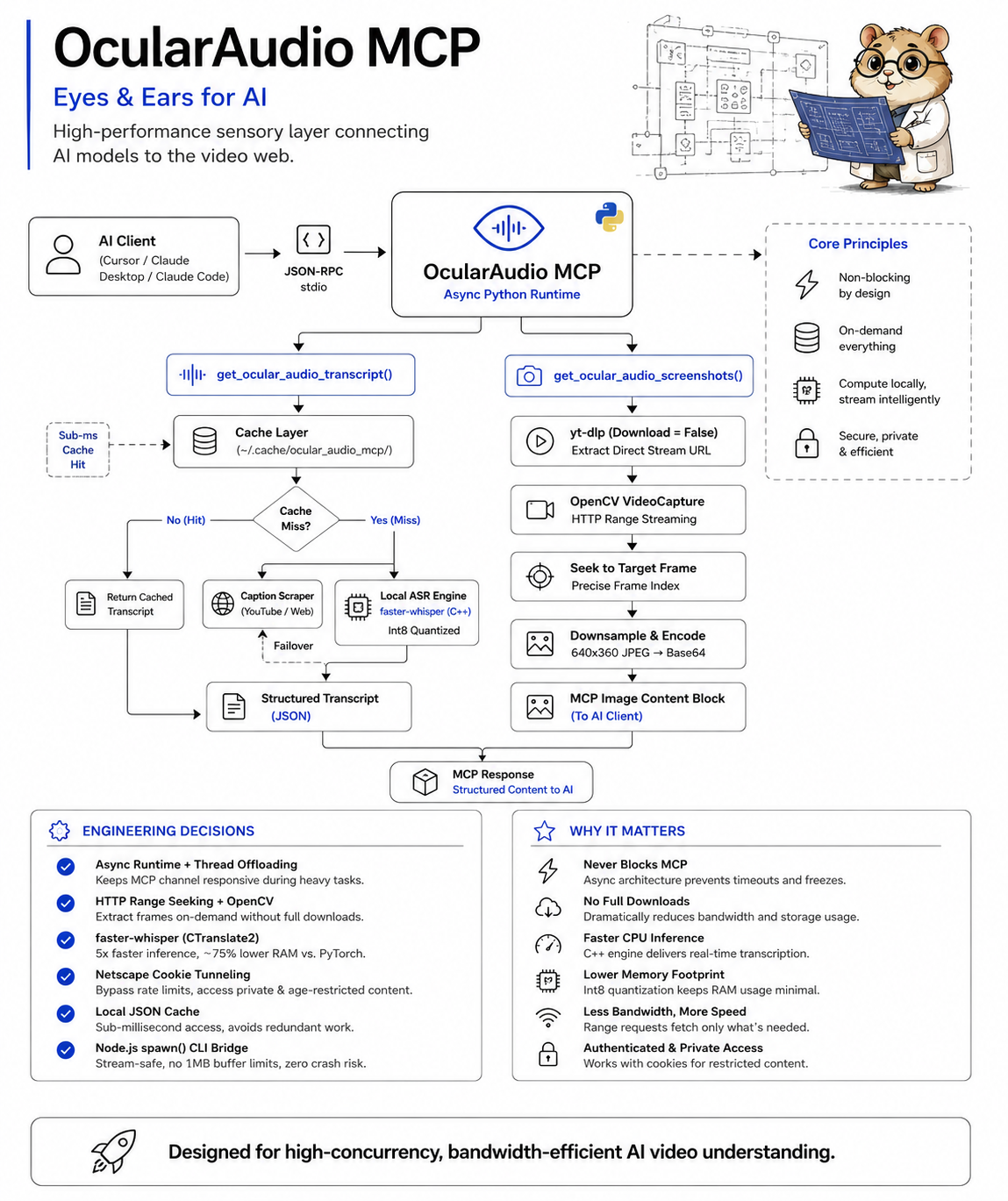
OcularAudio MCP

An asynchronous Model Context Protocol (MCP) server that gives AI models "eyes and ears" to process web videos. It extracts transcripts and captures screenshots from YouTube and other video platforms.

Features

  • Hybrid transcript extraction: Fetches YouTube captions instantly, falls back to local Whisper ASR
  • On-demand video screenshots: Captures frames at any timestamp without downloading the full video
  • OCR on screenshots: Extract visible text from frames using Tesseract (optional, --ocr flag)
  • Cookie authentication: Supports age-restricted and private videos via cookies.txt
  • Local caching: Processed videos are cached for instant subsequent lookups
  • Async architecture: Non-blocking design keeps MCP clients responsive
  • Flexible output: Clipboard, stdout, file, or JSON β€” your choice

Benchmark

See BENCHMARK.md for performance benchmarks and a deep competitive analysis against all major video transcript, screenshot, and OCR tools in the MCP and CLI ecosystem.

Requirements

  • Python 3.9+ (required for list[int] type hints)
  • FFmpeg (required by yt-dlp and OpenCV)
  • Node.js 18+ (only for the CLI wrapper)
  • Tesseract (optional, only for --ocr flag)

Installation

1. Install system dependencies

macOS:

bash
brew install ffmpeg python3
# Optional (for OCR):
brew install tesseract

Windows:

bash
choco install ffmpeg python
# Optional (for OCR):
choco install tesseract

Linux:

bash
sudo apt update && sudo apt install ffmpeg python3 python3-pip
# Optional (for OCR):
sudo apt install tesseract-ocr

2. Install Python packages

Terminal
pip install -r requirements.txt

Or manually:

Terminal
pip install mcp youtube-transcript-api yt-dlp opencv-python-headless faster-whisper requests pytesseract

3. Install Node.js CLI (optional)

Terminal
npm install

Usage

Option A: MCP Server (Recommended)

The MCP server gives AI models direct access to video transcripts and screenshots.

Quick Install β€” No installation needed. Just add the config to your MCP client below.

Claude Desktop

config.json
{
  "mcpServers": {
    "ocular-audio-mcp": {
      "command": "npx",
      "args": ["ocular-audio-mcp"]
    }
  }
}

Config: ~/Library/Application Support/Claude/claude_desktop_config.json (macOS) or %APPDATA%\Claude\claude_desktop_config.json (Windows)

Cursor

config.json
{
  "mcpServers": {
    "ocular-audio-mcp": {
      "command": "npx",
      "args": ["ocular-audio-mcp"]
    }
  }
}

Config: .cursor/mcp.json (project) or ~/.cursor/mcp.json (global)

Claude Code

Terminal
claude mcp add ocular-audio-mcp -- npx ocular-audio-mcp

Codex CLI (OpenAI)

bash
codex mcp add ocular-audio-mcp -- npx ocular-audio-mcp

Gemini CLI

bash
gemini mcp add ocular-audio-mcp npx ocular-audio-mcp --scope user

Windsurf

config.json
{
  "mcpServers": {
    "ocular-audio-mcp": {
      "command": "npx",
      "args": ["ocular-audio-mcp"]
    }
  }
}

Config: ~/.codeium/windsurf/mcp_config.json

Zed

config.json
{
  "context_servers": {
    "ocular-audio-mcp": {
      "command": "npx",
      "args": ["ocular-audio-mcp"]
    }
  }
}

Config: ~/.config/zed/settings.json

VS Code (GitHub Copilot)

config.json
{
  "servers": {
    "ocular-audio-mcp": {
      "type": "stdio",
      "command": "npx",
      "args": ["ocular-audio-mcp"]
    }
  }
}

Config: .vscode/mcp.json

OpenCode

config.json
{
  "mcpServers": {
    "ocular-audio-mcp": {
      "command": "npx",
      "args": ["ocular-audio-mcp"]
    }
  }
}

Config: ~/.opencode/config.json

Cline (VS Code Extension)

config.json
{
  "mcpServers": {
    "ocular-audio-mcp": {
      "command": "npx",
      "args": ["ocular-audio-mcp"]
    }
  }
}

Local Development (from source)

config.json
{
  "mcpServers": {
    "ocular-audio-mcp": {
      "command": "python",
      "args": ["/path/to/ocular_audio_mcp.py"]
    }
  }
}

Option B: CLI

Terminal
npx ocular-audio "https://www.youtube.com/watch?v=dQw4w9WgXcQ"

By default, the transcript is printed to stdout and copied to your clipboard. Paste it into Claude Web, ChatGPT, or any AI chat.

CLI Options

FlagDescription
-h, --helpShow help message
-v, --versionShow version number
--stdoutPrint transcript to stdout only (no clipboard, no file)
--no-clipboardSkip clipboard copy
--output <file>Write context to a specific file path
--jsonOutput raw JSON (metadata + transcript) for programmatic use
--detail <level>Screenshot capture mode: overview, balanced, deep, auto (default: auto)
--ocrExtract text from screenshots using Tesseract OCR
--forceBypass cache and re-process the video
--verboseShow detailed progress information
--quietSuppress summary and status messages
--checkCheck system dependencies (Python, FFmpeg, Whisper, Tesseract)
--list-cachedList all cached videos with titles
--cache-infoShow cache statistics (count, size, oldest/newest)
--clear-cacheDelete all cached transcripts and screenshots

Examples

bash
# Basic usage β€” prints to stdout + copies to clipboard
npx ocular-audio "https://www.youtube.com/watch?v=dQw4w9WgXcQ"

# Stdout only β€” great for piping to other tools
npx ocular-audio --stdout "https://www.youtube.com/watch?v=dQw4w9WgXcQ" | head -50

# Write to a specific file
npx ocular-audio --output transcript.txt "https://www.youtube.com/watch?v=dQw4w9WgXcQ"

# Raw JSON for programmatic consumption
npx ocular-audio --json "https://www.youtube.com/watch?v=dQw4w9WgXcQ" | jq .metadata.title

# Transcript only, no screenshots
npx ocular-audio --detail overview "https://www.youtube.com/watch?v=dQw4w9WgXcQ"

# Maximum screenshots
npx ocular-audio --detail deep "https://www.youtube.com/watch?v=dQw4w9WgXcQ"

# No clipboard copy, just print to terminal
npx ocular-audio --no-clipboard "https://www.youtube.com/watch?v=dQw4w9WgXcQ"

# Screenshots with OCR β€” extract visible text from frames
npx ocular-audio --ocr "https://www.youtube.com/watch?v=dQw4w9WgXcQ"

# JSON output with OCR
npx ocular-audio --json --ocr "https://www.youtube.com/watch?v=dQw4w9WgXcQ"

# Force re-process (bypass cache)
npx ocular-audio --force "https://www.youtube.com/watch?v=dQw4w9WgXcQ"

# Verbose mode β€” see all progress details
npx ocular-audio --verbose "https://www.youtube.com/watch?v=dQw4w9WgXcQ"

# Quiet mode β€” minimal output
npx ocular-audio --quiet --stdout "https://www.youtube.com/watch?v=dQw4w9WgXcQ"

# Check system capabilities
npx ocular-audio --check

# List cached videos
npx ocular-audio --list-cached

# Show cache stats
npx ocular-audio --cache-info

# Clear all cached data
npx ocular-audio --clear-cache

Cookie Setup (for age-restricted/private videos)

YouTube may block transcript access for age-restricted or private videos. To fix this, export your browser cookies:

  1. Install a browser extension like "Get cookies.txt LOCALLY" (Chrome/Firefox)
  2. Go to youtube.com while logged in
  3. Export cookies to a file named cookies.txt
  4. Place the file in one of these locations:
    • ~/.cache/ocular_audio_mcp/cookies.txt
    • ~/.config/ocular_audio_mcp/cookies.txt
    • ./cookies.txt (in the project directory)

The server will automatically detect and use the cookies file.

MCP Tools

get_ocular_audio_capabilities

Returns system capabilities and dependency status. Use this to check what features are available.

Parameters: None

Returns: System info including Python version, FFmpeg, Whisper, Tesseract, OpenCV, and cookie status.

get_ocular_audio_metadata

Extracts only video metadata (title, creator, duration, views, chapters) without transcript. Much faster than getting the full transcript.

Parameters:

  • url (string): Video URL

get_ocular_audio_transcript

Extracts the complete transcript, video chapters, and metadata from a video.

Parameters:

  • url (string): Video URL
  • use_local_whisper (boolean, default: true): Enable Whisper fallback if captions unavailable

get_ocular_audio_chapters

Extracts only video chapters with timestamps. Returns chapter titles with start times in [MM:SS] format.

Parameters:

  • url (string): Video URL

get_ocular_audio_video_screenshots

Captures screenshots at specific timestamps.

Parameters:

  • url (string): Video URL
  • timestamps_secs (array of integers): Timestamps to capture (e.g., [45, 120, 300])
  • enable_ocr (boolean, default: false): If true, run OCR on each captured frame to extract visible text

get_ocular_audio_video_context

Extracts transcript, metadata, and intelligent screenshots in one call. Automatically analyzes the transcript to find visually important moments and captures screenshots at those timestamps.

Parameters:

  • url (string): Video URL
  • detail_level (string, default: "auto"): Controls screenshot capture mode:
    • "auto" - Adapts to video length and content importance
    • "overview" - Transcript and metadata only, no screenshots (fastest)
    • "balanced" - Screenshots only at visually important moments (strong signals)
    • "deep" - Screenshots at every visually significant moment (all signals)
  • use_local_whisper (boolean, default: true): Enable Whisper fallback if captions unavailable
  • enable_ocr (boolean, default: false): If true, run OCR on captured screenshots to extract visible text

list_ocular_audio_cache

Lists all cached videos with their metadata (title, uploader, duration, when cached).

Parameters: None

clear_ocular_audio_cache

Clears cached video data.

Parameters:

  • video_id (string, optional): Video ID to clear specific video. If empty, clears all cache.

Cache Management

Processed videos are cached in ~/.cache/ocular_audio_mcp/ for 7 days. Use the CLI flags to manage the cache:

Terminal
npx ocular-audio --list-cached     # See what's cached
npx ocular-audio --cache-info      # Storage stats
npx ocular-audio --clear-cache     # Wipe everything

Or manually:

bash
rm -rf ~/.cache/ocular_audio_mcp/*.json

Troubleshooting

"No local ASR engines found"

Install a Whisper engine:

Terminal
pip install faster-whisper

"Audio track download failed"

  • Check your network connection
  • For age-restricted videos, add a cookies.txt file (see Cookie Setup above)
  • Ensure FFmpeg is installed: ffmpeg -version

"Failed to extract a playable video stream"

  • The video may be private or geo-blocked
  • Try adding cookies.txt
  • Check if the video is still available

Python not found on Windows

Ensure Python is in your PATH. Try:

bash
python --version

If not found, reinstall Python from python.org and check "Add Python to PATH" during installation.

MCP server not connecting

  • Verify the path in your MCP client config is correct
  • Test the server manually: python /path/to/ocular_audio_mcp.py
  • Check that all dependencies are installed: pip list | grep -E "mcp|whisper|yt-dlp"

License

MIT

Related MCP Servers

View all in Multimedia Process View all alternatives
  • Y
    YtBulkTranscript

    Fetch YouTube video transcripts individually or in bulk via get_transcript and get_bulk_transcripts.

    πŸŽ₯ Multimedia Process0 views
    Compare vs YtBulkTranscript β†’
  • Claude Real Video logoClaude Real Video

    Let any LLM actually watch a video: scene-aware keyframes plus a timestamped transcript, local.

    πŸŽ₯ Multimedia Process1 views
    Compare vs Claude Real Video β†’
  • S
    Scribefy

    Search YouTube, get video metadata, and extract timestamped transcripts for AI workflows.

    πŸŽ₯ Multimedia Process0 views
    Compare vs Scribefy β†’
  • S
    Switch

    Generate, manage and explore your Switch AI image and video library, scoped to your account.

    πŸŽ₯ Multimedia Process0 views
    Compare vs Switch β†’

Frequently Asked Questions about Ocular Audio Mcp

Add the following block to your claude_desktop_config.json under mcpServers: "mcpServers": { "ocular-audio-mcp": { "command": "npx", "args": ["-y", "ocular-audio-mcp"] } }

AllMCPs Directory Badge

Full Badge Customizer

Showcase your server listing on GitHub or your project documentation. Embed this dynamic SVG badge to highlight official listing status and live engagement.

Badge Style:
Live Dynamic SVG PreviewOcular Audio Mcp AllMCPs Directory Badge

Markdown (GitHub README)
[![AllMCPs](https://allmcps.com/api/badge/ocular-audio-mcp?style=directory)](https://allmcps.com/mcp/ocular-audio-mcp)
HTML Embed
<a href="https://allmcps.com/mcp/ocular-audio-mcp"><img src="https://allmcps.com/api/badge/ocular-audio-mcp?style=directory" alt="Ocular Audio Mcp on AllMCPs" /></a>

Technical Specs & Signals

CategoryπŸŽ₯Multimedia Process
More technical detailsExpand β–Ύ
TransportSTDIO
RuntimeNode.js
Views0
Unique ViewsTotal visits recorded for this listing page on AllMCPs.
Installs0
Installs & Copy ActionsTotal times users copied install commands or configuration snippets for this server.
27Quality signal: Emerging Β· 27/100How this signal is calculated β–Ύ
Server availabilityNot measured

Not scored for repo-hosted servers β€” we can't reach the running server, only its GitHub page. Hosted MCP endpoints are health-checked live.

Verified ownership8/20
Documentation & tools11/30
Adoption & activity1/15
Community engagement0/10

A guidance signal from public completeness & health data β€” not a user rating. New listings start lower and rise as they add docs, get verified, and grow adoption. Signals we can't observe for a listing are skipped, not counted against it.

β˜… FeaturedAllMCPs Server logo

AllMCPs Server

The official MCP server for AllMCPs.com - submit and manage tools directly from your AI. The open directory for MCP servers. Connect Claude, Cursor, Windsurf, and AI agents to databases, tools, files, and APIs. Explore 3,181+ servers. AllMCPs is the premier, open directory for discovering, evaluating, and installing Model Context Protocol (MCP) servers to equip AI agents and LLMs with real-world superpowers.

Explore Server β†’

Own this project?

This directory is pre-filled from public sources. Claim via GitHub README, site badge, or DNS TXT to get the verified badge and attach your website.

Free dofollow backlink: after claiming, verify your product site and place a dofollow AllMCPs badge β€” we recheck it stays live.

Claim & get free dofollow

Share & Embed

Add our SVG badge (dark/light directory styles) or embeddable widget to your site.

Explore more

More in πŸŽ₯ Multimedia Process β†’Best MCP servers for Multimedia & Media Processing β†’Alternatives to Ocular Audio Mcp β†’Install in Claude DesktopInstall in CursorInstall in VS Code
