Guardrailed fleet ops for AI agents: multi-cluster Kubernetes via OCM with policy, approval, audit.
Quick Install
Automated & IDE SetupCopy the AI prompt to install this server into Claude Code, Cursor, or another agent — or use 1-click editor setup below.
Not yet automatically verified
We haven't yet run this listing's install command through our automated sandbox check. This isn't a red flag — we're steadily working through the catalog.
Manual Client & Custom JSON ConfigExpand JSON ▾
Client Config & Setup
Choose your client or environment
Target File:
💡 Paste the JSON block into your client's configuration file under mcpServers, then restart the application.
Documentation Overview

🛡️ ocm-mcp-server
📖 Read the docs site → ocm-mcp-server.github.io
Star us ❤️ → 
AgentOps for Kubernetes fleets, done safely.
An MCP server that lets AI agents operate a multi-cluster Kubernetes fleet through an Open Cluster Management hub, with policy, approval, and audit between the model and your clusters.
The agent never holds a kubeconfig. Every write is policy-checked, human-approved, and traced.











📦 Get it · ✨ Why · 🔌 Connect your agent · 🧭 Architecture · 🧰 Toolsets · 🛠️ Tools · 💬 Prompts · 🔭 Observability · 🚀 Quickstart · 📖 Wiki · 📚 Docs
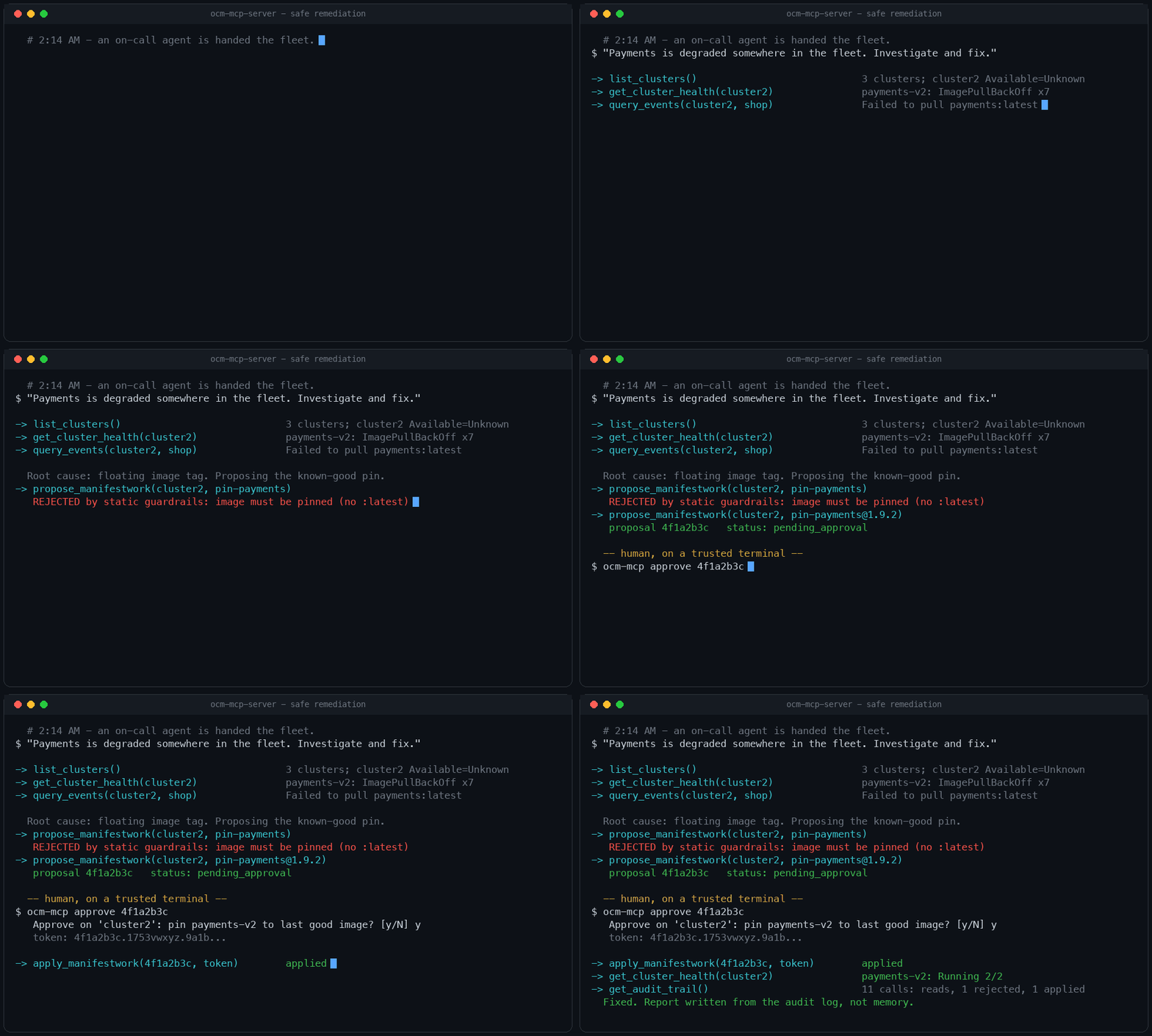
The whole safe-remediation loop: investigate with free reads, propose a change, get rejected by the guardrails and correct it, wait for a human-signed token, apply, verify, and report from the audit log.
Where to get it, and how it's vetted
- 📦 PyPI -
ocm-mcp-server-pip install ocm-mcp-server(or run directly withuvx ocm-mcp-server). Every release is published straight from CI via OIDC trusted publishing - no long-lived tokens anywhere. - 🗂️ Official MCP Registry - listed as
io.github.ocm-mcp-server/ocm-mcp-server, so any MCP client or platform that browses the registry can discover and auto-configure this server (package, transport, and required env vars are all in the listing); the registry validates the listing against this repo and the PyPI package. - 🐳 Container image on GHCR -
docker run ghcr.io/ocm-mcp-server/ocm-mcp-server(kubeconfig mount shown in the deployment guide); built in CI with an SBOM and SLSA provenance attached, vulnerability-gated with Trivy, and signed keyless with Cosign so you can verify what you run. - 🛡️ OpenSSF Scorecard - the repo's supply-chain security posture (pinned dependencies, branch protection, signed releases, ...) is scored automatically every week and published for anyone to inspect.
Why this exists
Your team runs many Kubernetes clusters. Sooner or later somebody asks the question: can an AI agent take the 2 a.m. page?
The quickest way to find out is to hand a model kubectl with cluster-admin and watch.
In production that experiment ends badly, for three separate reasons:
- The model is non-deterministic. The same alert can produce a careful diagnosis one
run and a
kubectl deletethe next. - The credentials are real. There is no dry run between the model's decision and your production cluster.
- There is no record. When something breaks, you cannot reconstruct what the agent did, in what order, or on whose authority.
This project starts from a different observation: fleets already have a control point that
humans trust every day, the multi-cluster hub. Open Cluster Management (a CNCF project)
gives every fleet an inventory (ManagedCluster), a scheduler (Placement), and a delivery
channel (ManifestWork). ocm-mcp-server exposes that hub to agents as a small set of
typed MCP tools, and puts four independent layers
between the model and your clusters:
| # | Layer | Enforced by | What it stops |
|---|---|---|---|
| 1 | Static checks | this server, before anything else | privileged pods, host access, system namespaces, unpinned images, disallowed kinds |
| 2 | Policy admission | Kyverno dry-run on the hub | anything your org's policies reject, evaluated inside the ManifestWork envelope |
| 3 | Human approval | Ed25519 token signed by ocm-mcp approve on a trusted terminal; the server needs only the public verifier key | any change reaching a cluster without a person consenting to that exact content and operation (one-time token, bound to content + operation + issuer/audience + expiry) |
| 4 | Least-privilege RBAC | Kubernetes | everything else; no Secrets, no exec, no deletes outside its own ManifestWorks |
None of these layers live in the system prompt, so none of them can be talked out of.
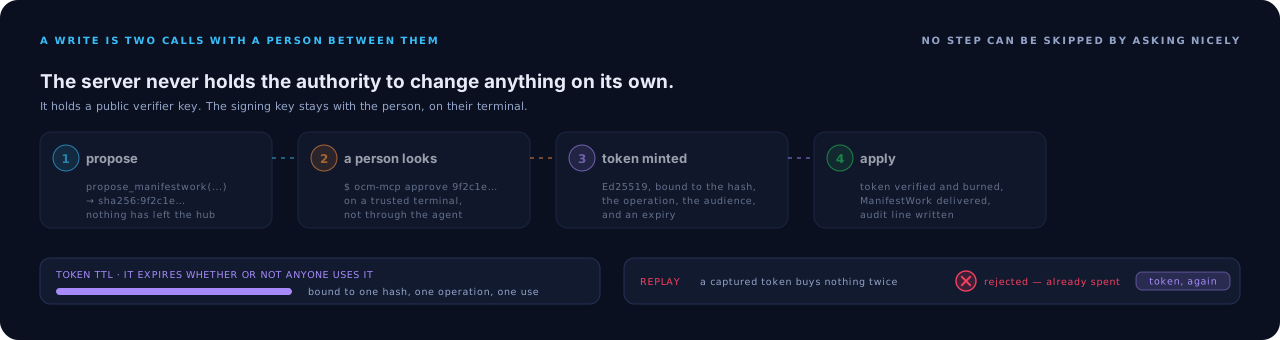
A write is two calls with a person between them. The token is bound to one content hash and one operation, it expires on its own, and offered a second time it is refused.
Related MCP Servers
Reviews
No reviews yet — be the first to share how this listing worked for you.
Frequently Asked Questions about Ocm MCP Server
AllMCPs Directory Badge
Showcase your server listing on GitHub or your project documentation. Embed this dynamic SVG badge to highlight official listing status and live engagement.
Badge Style:
Live Dynamic SVG Preview
Markdown (GitHub README)
[](https://allmcps.com/mcp/ocm-mcp-server)HTML Embed
<a href="https://allmcps.com/mcp/ocm-mcp-server"><img src="https://allmcps.com/api/badge/ocm-mcp-server?style=directory" alt="Ocm MCP Server on AllMCPs" /></a>Technical Specs & Signals
CategoryCloud Platforms
40Quality signal: Fair · 40/100How this signal is calculated ▾
Server availabilityNot measured
Not scored for repo-hosted servers — we can't reach the running server, only its GitHub page. Hosted MCP endpoints are health-checked live.
Verified ownership10/20
Documentation & tools16/30
Adoption & activity4/15
Community engagement0/10
A guidance signal from public completeness & health data — not a user rating. New listings start lower and rise as they add docs, get verified, and grow adoption. Signals we can't observe for a listing are skipped, not counted against it.
Own this project?
This directory is pre-filled from public sources. Claim via GitHub README, site badge, or DNS TXT to unlock edit access and the Official badge — proof is checked automatically, then reviewed by our team.
Free dofollow backlink: add your website and place the AllMCPs badge on it — no claim needed. We detect it automatically and keep it verified as long as the badge stays live.
Claim & get free dofollowShare & Embed
Add our SVG badge (dark/light directory styles) or embeddable widget to your site.