AllMCPs
BrowseBestCategoriesStackCompareToolsGuidesBlog
Log in Submit MCP

Stay in the loop

Get new MCP servers and top picks in your inbox.

AllMCPs

The open directory for discovering and installing Model Context Protocol servers.

AllMCPs on GitHub (opens in a new tab)
Launched onTiny Startupstinystartups.com
Explore
  • Browse servers
  • Best MCP servers
  • Categories
  • MCP clients
  • Agent prompts
  • Stack Builder
  • Compare servers
  • Random discovery New
  • Submit a server
  • Pricing & Boost Boost
Learn
  • Guides hub
  • What is MCP?
  • Install guide
  • Build an MCP server
  • Deploy an MCP server
  • Security guide
  • Troubleshooting
  • MCP for SEO & AEO
  • Protocol versioning
  • Blog & updates
Tools
  • All developer tools
  • Config generator
  • Config validator
  • Config auditor
  • MCP playground
  • Token calculator
  • OpenAPI → MCP
  • Badge generator
For agents
  • REST API docs
  • Trust & traffic Live
  • Remote MCP server SSE ↗ (opens in a new tab)
  • llms.txt ↗ (opens in a new tab)
  • Catalog JSON ↗ (opens in a new tab)
Company
  • About
  • Advertise Sponsor
  • Contact
  • GitHub ↗ (opens in a new tab)
  • Terms
  • Privacy
AllMCPs VerifiedAllMCPs VerifiedFeatured on Nick LaunchesFeatured on Nick LaunchesLaunch Llama NewsletterLaunch Llama NewsletterVerified DR - allmcps.comVerified DR - allmcps.comFeatured on SaaSGrowFeatured on SaaSGrowFeatured on Twelve ToolsFeatured on Twelve ToolsFeatured on Saaspa.geFeatured on Saaspa.geFeatured on Findly.toolsFeatured on Findly.toolsFeatured on Startup FameFeatured on Startup FameFeatured on LaunchKiwiFeatured on LaunchKiwiFeatured on ScrollLaunchFeatured on ScrollLaunchFeatured on DailyPingsFeatured on DailyPingsFazier badgeFazier badgeFeatured on NewTool.siteFeatured on NewTool.siteFeatured on saasfame.comFeatured on saasfame.comDR Checker - Domain RatingDR Checker - Domain RatingListed on Turbo0Listed on Turbo0Launched on LaunchBoard - Product Launch PlatformLaunched on LaunchBoard - Product Launch PlatformList on SimilarlabsList on Similarlabshttps://codetrendy.comhttps://codetrendy.comListed on DevTool.ioFeatured on BuildlistFeatured on BuildlistLaunched on Tiny StartupsFeatured on ShowMeBestAIFeatured on ShowMeBestAIFind us on LaunchZoneFind us on LaunchZoneAllMCPs VerifiedAllMCPs VerifiedFeatured on Nick LaunchesFeatured on Nick LaunchesLaunch Llama NewsletterLaunch Llama NewsletterVerified DR - allmcps.comVerified DR - allmcps.comFeatured on SaaSGrowFeatured on SaaSGrowFeatured on Twelve ToolsFeatured on Twelve ToolsFeatured on Saaspa.geFeatured on Saaspa.geFeatured on Findly.toolsFeatured on Findly.toolsFeatured on Startup FameFeatured on Startup FameFeatured on LaunchKiwiFeatured on LaunchKiwiFeatured on ScrollLaunchFeatured on ScrollLaunchFeatured on DailyPingsFeatured on DailyPingsFazier badgeFazier badgeFeatured on NewTool.siteFeatured on NewTool.siteFeatured on saasfame.comFeatured on saasfame.comDR Checker - Domain RatingDR Checker - Domain RatingListed on Turbo0Listed on Turbo0Launched on LaunchBoard - Product Launch PlatformLaunched on LaunchBoard - Product Launch PlatformList on SimilarlabsList on Similarlabshttps://codetrendy.comhttps://codetrendy.comListed on DevTool.ioFeatured on BuildlistFeatured on BuildlistLaunched on Tiny StartupsFeatured on ShowMeBestAIFeatured on ShowMeBestAIFind us on LaunchZoneFind us on LaunchZone
© 2026 Jackalope Digital LLC. All rights reserved.
  1. Home
  2. 🧠 Knowledge & Memory
  3. Obsidian Vault MCP
Obsidian Vault MCP logo
Health: ActiveRecent health check succeeded.Last checked 9/7/2026, 9:19:18 PM

Obsidian Vault MCP

User RatingsBe the first to rate and review this MCP server! Enrichment pendingWe haven’t run our AI enrichment pass on this listing yet, so the overview, use cases, and FAQ below may be sparse or missing. We work through the catalog over time — check back soon.
View Repository80 GitHub StarsTotal stargazers on GitHub for the source repository (80 stars).Visit Website

Local Zotero, MinerU, Obsidian literature workflow with transactional Analysis notes.

Quick Install

Automated & IDE Setup

Copy the AI prompt to install this server into Claude Code, Cursor, or another agent — or use 1-click editor setup below.

Add to CursorAdd to VS Code
Not yet automatically verified

We haven't yet run this listing's install command through our automated sandbox check. This isn't a red flag — we're steadily working through the catalog.

Manual Client & Custom JSON ConfigExpand JSON ▾

Client Config & Setup

Choose your client or environment
Target File:~/Library/Application Support/Claude/claude_desktop_config.json
claude_desktop_config.json
{
  "mcpServers": {
    "obsidian-vault-mcp": {
      "command": "uvx",
      "args": [
        "--from"
      ]
    }
  }
}

💡 Paste the JSON block into your client's configuration file under mcpServers, then restart the application.

Install Directory Badge Claim listing Alternatives🧠 More in Knowledge & Memory

Documentation Overview

Obsidian Vault MCP

面向科研文献工作流的本地 MCP 服务:以 Zotero 管理来源,以 MinerU 提取全文,以 Obsidian 沉淀文献、Wiki 与结构化 Analysis,并通过 Skills 让 AI Agent 按可追溯流程工作。

English · 完整安装教程 · 开发文档 · 更新日志 · 贡献者

架构

text
用户自然语言任务
        ↓
7 个科研 Skills:识别意图、规划步骤、约束证据与输出
        ↓
31 个 MCP Tools:版本契约、查询、导入、解析、检索、校验与事务写入
        ↓
Zotero Desktop ── PDF ── MinerU ── Obsidian Vault
                                      ├─ Literature 主笔记
                                      ├─ PDF 与全文 Markdown
                                      ├─ Index / Literature.base
                                      ├─ Wiki
                                      └─ 五类 Analysis / Analysis.base

项目不绑定大模型供应商。MCP Tools 负责确定性的本地数据操作,Skills 负责把工具编排成可复用的科研工作流。

核心功能

  • 稳定文献身份:以 Zotero 父条目 zoteroKey 作为主键。
  • Zotero 导入与同步:支持单篇、Collection、notes、annotations、BibTeX、存储附件和链接附件。
  • MinerU 全文解析:将 PDF 规范化为 Markdown,每篇文献使用独立图片目录和相对链接。
  • Obsidian 文献库:自动维护 Literature/index.md、Literature/Literature.base、主笔记、PDF、全文和 Wiki。
  • 结构化研究层:支持 full_read、literature_review、passage_qa、figure_qa、concept 五类 Analysis。
  • 统一数据库视图:Literature/Analysis/Analysis.base 提供 9 个视图。
  • 科研 Skills:内置 paper-qa、full-read、passage-qa、figure-qa、compare-papers、literature-review、concept-learning。
  • 安全写入:支持 dry-run、staging、锁、备份、原子替换、事务预览和回滚。
  • 版本可验证:literature_version 返回当前版本、31 个工具、7 个 Skills 和五类 Analysis。
  • 多客户端接入:支持 Codex、Claude Code、OpenCode、Pi、Hermes 和 WorkBuddy。

效果展示

文献目录
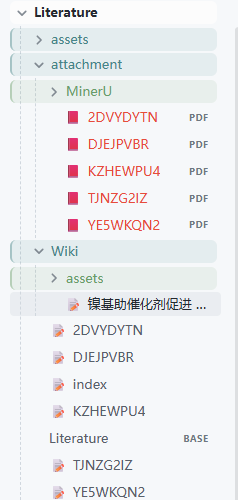
Obsidian 文献目录

Literature Index

Literature Index

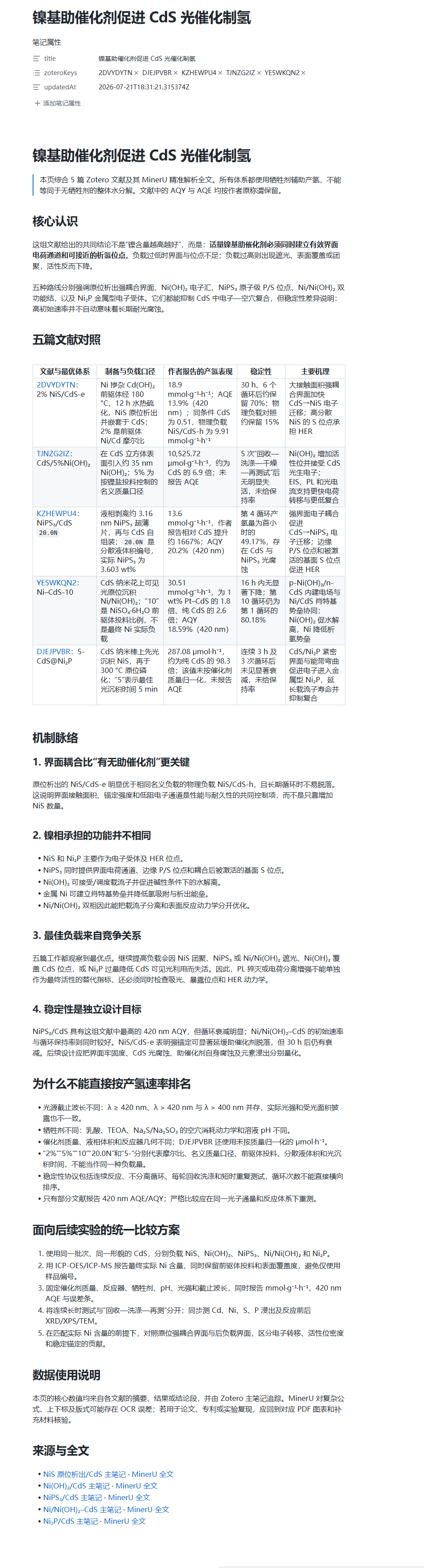
多篇文献形成的可追溯 Wiki

展开效果图 可追溯 Wiki 综合页面
安装

3.0.2 已正式发布,要求 Python 3.10+。以下公开安装命令现已可用。

uv(推荐)

powershell
uv tool install "zotero-obsidian-mcp==3.0.2"
obsidian-vault-mcp --help

无需持久安装:

powershell
uvx --from "zotero-obsidian-mcp==3.0.2" obsidian-vault-mcp doctor --vault-path "<VAULT_PATH>"

pipx / pip

powershell
pipx install "zotero-obsidian-mcp==3.0.2"
# 或
python -m pip install "zotero-obsidian-mcp==3.0.2"

MCP Registry

text
io.github.luffysolution-svg/obsidian-vault-mcp

等价的 stdio 配置:

config.json
{
  "mcpServers": {
    "obsidian-literature": {
      "command": "uvx",
      "args": [
        "--from",
        "zotero-obsidian-mcp==3.0.2",
        "obsidian-vault-mcp",
        "serve",
        "--transport",
        "stdio"
      ],
      "env": {
        "OBSIDIAN_VAULT_PATH": "<VAULT_PATH>"
      }
    }
  }
}

首次配置

目标目录必须是已由 Obsidian 打开过的 Vault,并包含 .obsidian/。

powershell
obsidian-vault-mcp config init --vault-path "<VAULT_PATH>" --dry-run
obsidian-vault-mcp config init --vault-path "<VAULT_PATH>"
obsidian-vault-mcp config validate --vault-path "<VAULT_PATH>"
obsidian-vault-mcp doctor --vault-path "<VAULT_PATH>"
obsidian-vault-mcp call literature_version --json '{}'

启动 Zotero Desktop 并启用本地 API:

server.ts
obsidian-vault-mcp call zotero_search_items --json '{"query":"photocatalysis"}'
obsidian-vault-mcp import item ABCD1234 --vault-path "<VAULT_PATH>" --dry-run
obsidian-vault-mcp import item ABCD1234 --vault-path "<VAULT_PATH>"

链接附件配置:

config.json
{
  "zotero": {
    "linkedAttachmentBaseDir": "<ZOTERO_LINKED_ATTACHMENT_BASE_DIR>"
  }
}

MinerU 解析:

powershell
obsidian-vault-mcp mineru parse ABCD1234 --vault-path "<VAULT_PATH>" --dry-run
obsidian-vault-mcp mineru parse ABCD1234 --vault-path "<VAULT_PATH>"

规范产物:

text
Literature/attachment/MinerU/ABCD1234.md
Literature/attachment/MinerU/image/ABCD1234/ABCD1234-fig01.png

Agent 与插件安装

powershell
obsidian-vault-mcp agent install codex --dry-run
obsidian-vault-mcp agent install codex

客户端名称可替换为 claude、opencode、pi、hermes 或 workbuddy。

客户端安装内容
Codex原生 marketplace 插件、MCP 和 7 Skills
Claude Code原生 marketplace 插件、MCP 和 7 Skills
OpenCode项目本地 MCP 和 7 Skills
Pi薄 TypeScript Extension
HermesMCP 配置
WorkBuddyMCP 配置

GitHub Release 中的离线插件包:

text
obsidian-vault-mcp-3.0.2-plugins.zip

Skills

Skill工作流
paper-qa单篇快速问答,默认不写入 Vault
full-read单篇完整精读并保存 full_read
passage-qa定位具体段落、方法、数据或结论
figure-qa解读图、表、Scheme 和方程
compare-papers对用户选定论文建立可比性矩阵
literature-review对文献池进行主题化综述
concept-learning跨文献建立概念模型

正式工具面

分组数量
版本、系统与配置5
Zotero6
导入与同步4
MinerU3
导航与校验3
Analysis5
Wiki3
事务2
合计31

发布一致性

3.0.2 必须同时出现在 Python 包、运行时 __version__、MCP Registry server.json、Codex/Claude 插件清单、Pi 包、Git Tag v3.0.2、GitHub Release 和 PyPI 中。Release workflow 会校验版本、Tag 和产物身份,构建 wheel、sdist、插件 ZIP,执行测试与 handshake,并生成 SHA256SUMS。

安全边界

  • 所有写操作先 dry-run,再提交并保存 transactionId。
  • 不要提交 Vault 绝对路径、Zotero 数据目录、MinerU token 或其他凭据。
  • MinerU 可能把 PDF 发送到外部服务,使用前确认授权和组织政策。
  • 推荐本地 stdio;SSE/HTTP 必须放在可信认证边界之后。
  • 事务备份不替代独立的 Vault 备份。

贡献者

感谢 方珸 / Lym Fang (@LimFang) 提出 Zotero 链接附件兼容方案。完整记录见 CONTRIBUTORS.md。

Read the full README →View source on GitHub →

Related MCP Servers

View all in Knowledge & Memory View all alternatives
  • Moxie Docs MCP logoMoxie Docs MCP
    ★ Featured

    MCP & Agent Skills for Automated Documentation, and codebase conventions + context

    🧠 Knowledge & Memory21 views
    Compare vs Moxie Docs MCP →
  • Scrivener MCP logoScrivener MCP

    Connect Scrivener 3 writing projects to Claude and other AI assistants. 47 tools for document management, writing analysis, semantic search, character/plot memory, and content enhancement. Progressive skill loading, relationship engine with HMS triplets, and JS fallback for offline semantic search. npm i -g scrivener-mcp

    🧠 Knowledge & Memory16 views
    Compare vs Scrivener MCP →
  • MCP Obsidian Via Rest logoMCP Obsidian Via Rest

    MCP Server for Obsidian Vault Access via Local REST API

    🧠 Knowledge & Memory1 views
    Compare vs MCP Obsidian Via Rest →
  • Freshvault logoFreshvault

    Local semantic search over your Obsidian vault - always fresh, never reindex.

    🧠 Knowledge & Memory1 views
    Compare vs Freshvault →

Reviews

No reviews yet — be the first to share how this listing worked for you.

Frequently Asked Questions about Obsidian Vault MCP

Add the following block to your claude_desktop_config.json under mcpServers: "mcpServers": { "obsidian-vault-mcp": { "command": "npx", "args": ["-y", "Obsidian Vault MCP"] } }

AllMCPs Directory Badge

Full Badge Customizer

Showcase your server listing on GitHub or your project documentation. Embed this dynamic SVG badge to highlight official listing status and live engagement.

Badge Style:
Live Dynamic SVG PreviewObsidian Vault MCP AllMCPs Directory Badge

Markdown (GitHub README)
[![AllMCPs](https://allmcps.com/api/badge/obsidian-vault-mcp?style=directory)](https://allmcps.com/mcp/obsidian-vault-mcp)
HTML Embed
<a href="https://allmcps.com/mcp/obsidian-vault-mcp"><img src="https://allmcps.com/api/badge/obsidian-vault-mcp?style=directory" alt="Obsidian Vault MCP on AllMCPs" /></a>

Technical Specs & Signals

Category🧠Knowledge & Memory
More technical detailsExpand ▾
TransportSTDIO
RuntimePython
Last updatedSep 7, 2026
Views0
Unique ViewsTotal visits recorded for this listing page on AllMCPs.
Installs0
Installs & Copy ActionsTotal times users copied install commands or configuration snippets for this server.
GitHub stars80
GitHub Star CountTotal stargazers on GitHub representing community popularity (80 stars).
41Quality signal: Fair · 41/100How this signal is calculated ▾
Server availabilityNot measured

Not scored for repo-hosted servers — we can't reach the running server, only its GitHub page. Hosted MCP endpoints are health-checked live.

Verified ownership10/20
Documentation & tools16/30
Adoption & activity5/15
Community engagement0/10

A guidance signal from public completeness & health data — not a user rating. New listings start lower and rise as they add docs, get verified, and grow adoption. Signals we can't observe for a listing are skipped, not counted against it.

★ Spotlight Slot

Feature Your MCP Server

Get maximum visibility for your server across our directory, search results, and detail pages.

Spotlight Your Server

Own this project?

This directory is pre-filled from public sources. Claim via GitHub README, site badge, or DNS TXT to unlock edit access and the Official badge — proof is checked automatically, then reviewed by our team.

Free dofollow backlink: add your website and place the AllMCPs badge on it — no claim needed. We detect it automatically and keep it verified as long as the badge stays live.

Claim & get free dofollow

Share & Embed

Add our SVG badge (dark/light directory styles) or embeddable widget to your site.

Explore more

More in 🧠 Knowledge & Memory →Best MCP servers for Memory & Knowledge →Alternatives to Obsidian Vault MCP →Install in Claude DesktopInstall in CursorInstall in VS Code