Obsidian Hybrid Search


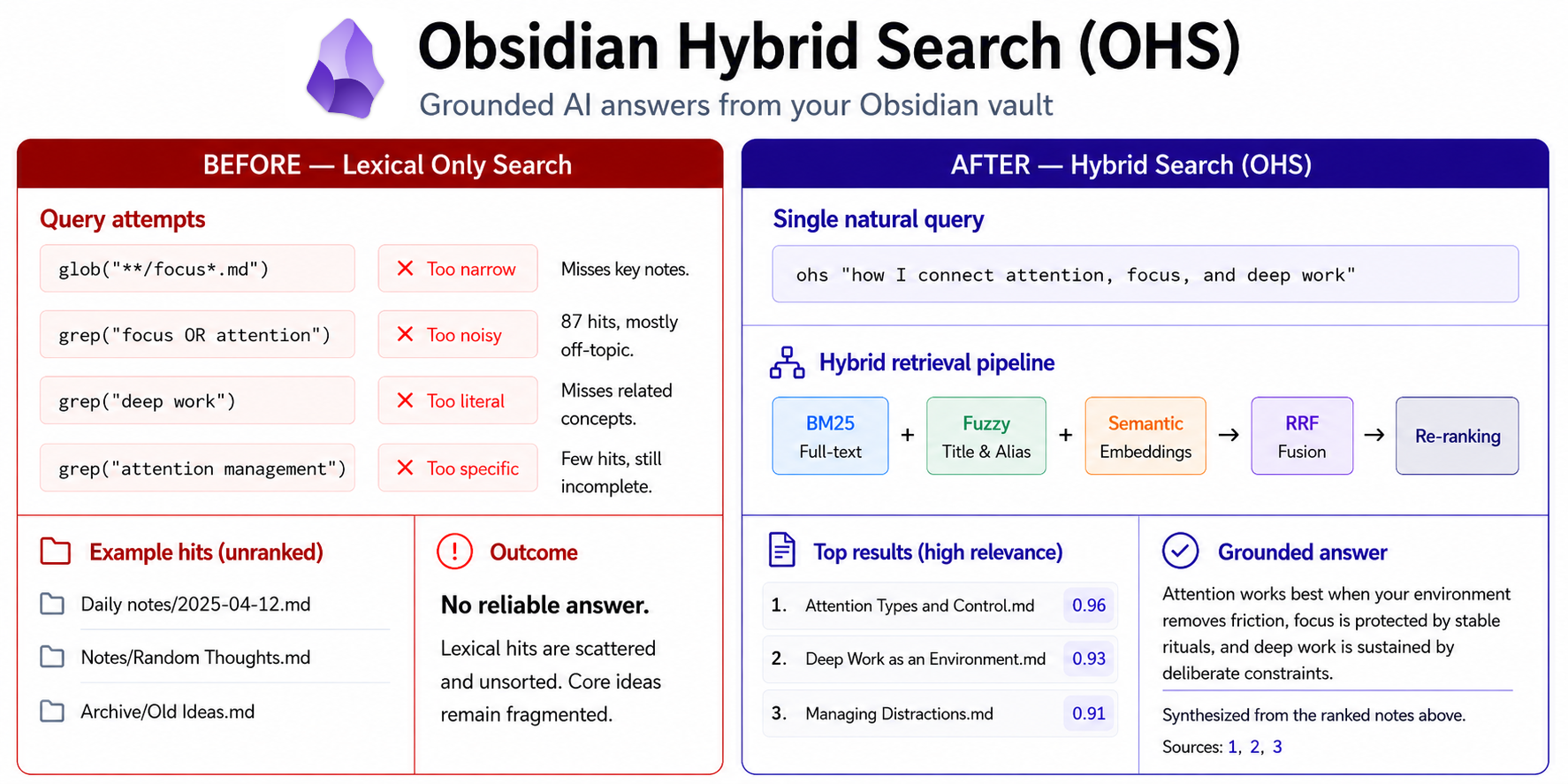
Your Obsidian vault already contains your best thinking. Obsidian Hybrid Search makes that thinking easier to find, reuse, and bring into AI-assisted work.
It gives your vault one retrieval engine and three practical ways to use it. The native Obsidian plugin gives you fast search, previews, similar notes, link discovery, and graph views while you write. The MCP server lets AI agents search and read your notes as tool calls. The CLI gives power users the same engine for indexing, filtering, reranking, reading, and scripting.
The search understands how real vaults are built. It combines semantic search, BM25 full text, fuzzy title and alias matching, tags, folders, frontmatter, wikilinks, backlinks, and similar-note lookup. You can search by idea, phrase, title, relationship, or metadata without remembering the exact words you wrote.
That turns Obsidian into a stronger personal knowledge system and a better starting point for AI work. Agents can begin from your own notes, pull cited context from source files, follow related material, and work with knowledge you already trust. OHS runs locally by default with SQLite, FTS5, sqlite-vec, RRF ranking, and optional OpenAI-compatible embedding APIs.
Search quality
Evaluated on the Obsidian Help vault (171 notes, 58 queries, local model):
| OHS (this project) | qmd | |
|---|---|---|
| nDCG@5 | 0.733 | 0.659 |
| MRR | 0.788 | 0.665 |
| Hit@1 | 0.724 | 0.500 |
| Avg query time | 571 ms ¹ | 754 ms ² |
| Model download | ~117 MB | ~2.2 GB |
¹ CPU (Apple Silicon), hybrid mode, no rerank. ² GPU (Apple Silicon Metal), LLM query expansion + reranking.
OHS uses Xenova/multilingual-e5-small. How to reproduce → · Full benchmark →
Real knowledge-vault benchmark
OHS is also evaluated on Andy Matuschak’s public evergreen notes, converted into an Obsidian vault with title-based note filenames, source URLs in frontmatter, local attachments, and 5,000+ internal note links across 1,357 notes.
The curated golden set includes 78 hand-judged queries across known-item lookup, paraphrases, quote fragments, ambiguous topics, citation lookup, and multi-note evidence.
Using the default local embedding model, OHS performs strongly on this dense note network.
| Metric | Value |
|---|---|
| nDCG@5 | 0.722 |
| nDCG@10 | 0.753 |
| MRR | 0.874 |
| Hit@1 | 0.795 |
| Hit@5 | 0.974 |
| Recall@10 | 0.972 |
| AllRel@10 | 0.949 |
The benchmark exercises retrieval over a highly connected real-world knowledge vault, including queries that do not simply repeat note titles.
Result JSON · Reproduce and interpret →
Large memory benchmark
To test retrieval on a larger public dataset,
LongMemEval-S
was converted into a 22,419-note Obsidian-style vault with 470 retrieval
queries. Using baai/bge-m3 embeddings, OHS ranked the answer-bearing notes
strongly:
| Metric | Value |
|---|---|
| nDCG@5 | 0.895 |
| MRR | 0.920 |
| Hit@1 | 0.889 |
| Hit@5 | 0.968 |
| Recall@10 | 0.950 |
| AllRel@10 | 0.904 |
For this benchmark, each query uses the LongMemEval-provided haystack as its search scope. That makes the result reproducible and easy to inspect query by query, while still exercising retrieval over a large generated memory vault.
Result JSON · Reproduce and interpret →
Features
- Hybrid search
- BM25 + fuzzy title + semantic embeddings, fused with RRF
- Alias search
- notes with
aliases:in frontmatter are indexed and searchable by any alias; alias matches are boosted in BM25 (weight 5×) and fuzzy title scoring
- notes with
- Four search modes
hybrid,semantic,fulltext,title(for text queries)
- Similar note lookup
- pass
--pathto find semantically related notes using stored chunk embeddings, with a title + content fallback
- pass
- Graph traversal
--path --relatedshows linked notes at configurable depth; filter by--direction outgoing|backlinks|both
- Links & backlinks
- every result includes outgoing links and backlinks
- Scope filtering
- restrict to subfolder(s); supports multiple values and exclusions (
-notes/dev/)
- restrict to subfolder(s); supports multiple values and exclusions (
- Tag filtering
- filter by tag(s); supports multiple values and exclusions (
-category/cs)
- filter by tag(s); supports multiple values and exclusions (
- Snippet control
--snippet-lengthsets the context window; empty snippets always fall back to note content
- Extended output
--extendedadds a TAGS/ALIASES column to the CLI table showing frontmatter tags (#tag) and aliases
- Incremental indexing
- only re-indexes changed files; watches for edits in real time
- Multi-query fan-out
- pass multiple queries at once (
ohs "q1" "q2"orqueries[]in MCP); results are merged via RRF, so a note that ranks well in any one query floats to the top; useful when the note may use different vocabulary than the query
- pass multiple queries at once (
- Cross-encoder reranking
--rerankre-scores results withgte-multilingual-reranker-base(ONNX int8, ~341 MB download once); improves precision for conceptual and multilingual queries; applied after multi-query merge
- Local embeddings
- works offline via
@huggingface/transformers(no API key required); default model: Xenova/multilingual-e5-small, 100+ languages
- works offline via
- Remote embeddings
- OpenAI-compatible API (OpenRouter, Ollama, etc.)
- Note reading
readfetches one or more notes by vault-relative path; returns full content with title, aliases, tags, links, and backlinks; on path miss returns top-3 fuzzy suggestions
- Ignore patterns
- exclude folders, extensions, or specific files
- Obsidian plugin
- native search modal inside Obsidian powered by the same CLI; see obsidian-hybrid-search-plugin
Installation
npm install -g obsidian-hybrid-search
CLI usage
Quick start
The recommended setup is to set OBSIDIAN_VAULT_PATH once in ~/.zshrc or ~/.bashrc. This lets you run the CLI from any directory.
export OBSIDIAN_VAULT_PATH="/path/to/your/vault"
Open a new terminal and index the vault once.
ohs reindex
You can now search from any directory.
ohs "zettelkasten"
Run from a vault
Alternatively, run the CLI without an environment variable from any directory inside your vault. It finds the vault root by walking up to the nearest .obsidian/ folder.
cd /path/to/your/vault
ohs reindex
ohs "zettelkasten"
From outside the vault, set OBSIDIAN_VAULT_PATH or pass --db /path/to/vault/.obsidian-hybrid-search.db explicitly.
Optional remote embeddings
By default, the CLI uses the local Xenova/multilingual-e5-small model. It works offline without an API key, downloads about 117 MB on first use, and supports more than 100 languages.
To use a remote API, add its settings to your shell profile.
export OPENAI_API_KEY="sk-..."

# Override the default API base for another provider
# export OPENAI_BASE_URL="https://openrouter.ai/api/v1"  # OpenRouter
# export OPENAI_BASE_URL="http://localhost:11434/v1"     # Ollama (no key needed)
# export OPENAI_BASE_URL="http://localhost:1234/v1"      # LM Studio (no key needed)

# Override the default text-embedding-3-small model
# export OPENAI_EMBEDDING_MODEL="text-embedding-3-small"
Search modes
The CLI supports four search modes called hybrid, fulltext, semantic, and title, plus graph traversal for linked notes. The commands below show how to use them, apply filters, rerank results, and control the output.
# Hybrid search (default)
ohs "zettelkasten atomic notes"

# Fulltext BM25 search
ohs "permanent notes" --mode fulltext

# Fuzzy title search (fast, typo-tolerant)
ohs "zettleksten" --mode title

# Semantic / vector search
ohs "how to build a knowledge graph" --mode semantic

# Limit results and set a score threshold
ohs "productivity systems" --limit 5 --threshold 0.3

# Restrict to a subfolder
ohs "daily review" --scope notes/periodic/
ohs "daily review" --folder notes/periodic/    # alias for --scope

# Restrict to multiple subfolders (OR)
ohs "productivity" --scope notes/pkm/ --scope notes/2024/

# Exclude a subfolder
ohs "programming" --scope notes/ --scope -notes/archive/

# Filter by tag
ohs "productivity" --tag pkm
ohs "machine learning" --tag note/basic/primary

# Filter by multiple tags (AND include, exclude with -)
ohs "learning" --tag pkm --tag work

# Filter by frontmatter / properties (exact match, case-insensitive)
ohs "notes" --frontmatter status:todo
ohs "notes" --prop priority:high          # --prop is alias for --frontmatter

# Filter by multiple frontmatter fields (AND)
ohs "notes" --frontmatter status:todo --frontmatter priority:high

# Exclude by frontmatter value
ohs "notes" --frontmatter -status:done

# Filter-only mode: no query, just filters (returns all matching notes sorted by title)
ohs --frontmatter status:todo
ohs --folder notes/2024/
ohs --tag pkm
ohs --frontmatter status:done --tag archived

# Unlimited results in filter-only mode (default limit is 10)
ohs --folder notes/ --limit 0

# Find semantically similar notes
ohs --path notes/pkm/zettelkasten.md

# Graph traversal: show notes linked to/from this note
# Results show depth: -1/-2 = backlinks, 0 = source, +1/+2 = outgoing links
ohs --path notes/pkm/zettelkasten.md --related
ohs --path notes/pkm/zettelkasten.md --related --depth 2

# Only outgoing links (what this note references)
ohs --path notes/pkm/zettelkasten.md --related --direction outgoing

# Only backlinks (who references this note)
ohs --path notes/pkm/zettelkasten.md --related --direction backlinks

# Traverse standard Markdown note links instead of Obsidian wikilinks
ohs --path notes/pkm/zettelkasten.md --related --link-type markdown

# Traverse both wikilinks and standard Markdown note links
ohs --path notes/pkm/zettelkasten.md --related --link-type all

# Longer context around each link
ohs --path notes/pkm/zettelkasten.md --related --snippet-length 500

# Rerank results with a cross-encoder model (improves precision, ~1-3s extra latency)
# Downloads gte-multilingual-reranker-base ONNX (~341 MB) on first use, cached in ~/.cache/huggingface/
ohs "zettelkasten atomic notes" --rerank

# Show tags and aliases alongside results
ohs "zettelkasten" --extended

# JSON output (for scripting)
ohs "spaced repetition" --json

# Output only paths (one per line) — useful for piping into read
ohs --frontmatter id:OHS-4 --only-paths
ohs read ${(f)"$(ohs search --frontmatter status:todo --only-paths)"}  # zsh: read all matching notes

# Output absolute filesystem paths
ohs "zettelkasten" --only-absolute-paths

# Open results in Obsidian (each in a new tab)
ohs "zettelkasten" --open

# Reindex the vault
ohs reindex
ohs reindex --threads 4  # Limit local CPU inference to 4 threads

# Force full reindex
ohs reindex --force

# Reindex a single file
ohs reindex notes/pkm/zettelkasten.md

# Retry only the notes whose chunks failed to embed
ohs reindex --errors

# Show indexing status
ohs status

# Show recent indexing activity
ohs status --recent

# Show chunks that failed to embed
ohs status --errors

# Read a note by path (outputs body content without frontmatter)
ohs read notes/pkm/zettelkasten.md

# Read raw file from vault (with frontmatter, like cat)
ohs read notes/pkm/zettelkasten.md --raw

# Read multiple notes (separator between each)
ohs read notes/pkm/zettelkasten.md notes/pkm/evergreen-notes.md

# Cap content length
ohs read notes/pkm/zettelkasten.md --snippet-length 2000

# Structured output with all metadata
ohs read notes/pkm/zettelkasten.md --json
Shell aliases
Add to your ~/.zshrc or ~/.bashrc for quick access:
alias ohss='ohs --mode semantic'
alias ohst='ohs --mode title'
alias ohsf='ohs --mode fulltext'
alias ohsr='ohs read'
alias ohsi='ohs reindex'
alias ohsst='ohs status'
Then reload (source ~/.zshrc) and use:
ohs "zettelkasten"                        # hybrid search
ohss "how to build a knowledge graph"     # semantic
ohst "zettelkasten"                       # fuzzy title (typo-tolerant)
ohsf "permanent notes"                    # fulltext BM25
ohsr "notes/pkm/zettelkasten.md"          # read note by path
ohsi                                      # reindex vault
ohsst                                     # show status
ohsst --recent                            # show recent indexing activity
ohsst --errors                            # show chunks that failed to embed
Output example
Hybrid search returns a table with scores and snippets. Scores are color-coded by relevance:
| Score | Color | Meaning |
|---|---|---|
| 0.8 – 1.0 | green | Highly relevant |
| 0.5 – 0.8 | yellow | Moderately relevant |
| 0.2 – 0.5 | plain | Somewhat relevant |
| 0.0 – 0.2 | dim | Low relevance |
┌───────┬───────────────────────────────┬────────────────────────────────────────────┐
│ SCORE │ PATH                          │ SNIPPET                                    │
├───────┼───────────────────────────────┼────────────────────────────────────────────┤
│  0.98 │ notes/pkm/zettelkasten.md     │ A note-taking method developed by Niklas   │
│       │                               │ Luhmann. Each note contains one atomic...  │
├───────┼───────────────────────────────┼────────────────────────────────────────────┤
│  0.72 │ notes/pkm/evergreen-notes.md  │ Evergreen notes are written to evolve over │
│       │                               │ time. Unlike fleeting notes, they are...   │
└───────┴───────────────────────────────┴────────────────────────────────────────────┘
With --extended, a TAGS/ALIASES column is added. Tags are prefixed with #, aliases are shown as-is:
┌───────┬───────────────────────────────┬──────────────────┬──────────────────────────────┐
│ SCORE │ PATH                          │ TAGS/ALIASES     │ SNIPPET                      │
├───────┼───────────────────────────────┼──────────────────┼──────────────────────────────┤
│  0.98 │ notes/pkm/zettelkasten.md     │ #pkm             │ A note-taking method...      │
│       │                               │ ЗК               │                              │
│       │                               │ slip-box         │                              │
├───────┼───────────────────────────────┼──────────────────┼──────────────────────────────┤
│  0.72 │ notes/pkm/evergreen-notes.md  │ #pkm             │ Evergreen notes are written  │
│       │                               │ #writing         │ to evolve over time...       │
└───────┴───────────────────────────────┴──────────────────┴──────────────────────────────┘
Title mode omits the snippet column automatically.
MCP server
Most AI assistants operate without access to your personal knowledge and can only work with what you paste into the conversation. Adding this server gives any MCP-compatible assistant a persistent, searchable index of your entire vault. It becomes a tool call, not a copy-paste session: the assistant queries your notes the same way it calls any other tool, gets ranked results with snippets and links, and can navigate your knowledge graph on request.
Add to your MCP config (.mcp.json, claude_desktop_config.json, or equivalent for your client).
Minimal config (local embeddings, no API key)
Uses the built-in Xenova/multilingual-e5-small model. It works fully offline and supports 100+ languages. Downloads ~117 MB on first run.
{
  "mcpServers": {
    "obsidian-hybrid-search": {
      "command": "npx",
      "args": ["-y", "-p", "obsidian-hybrid-search@latest", "obsidian-hybrid-search-mcp"],
      "env": {
        "OBSIDIAN_VAULT_PATH": "/path/to/your/vault"
      }
    }
  }
}
Full config (OpenRouter)
{
  "mcpServers": {
    "obsidian-hybrid-search": {
      "command": "npx",
      "args": ["-y", "-p", "obsidian-hybrid-search@latest", "obsidian-hybrid-search-mcp"],
      "env": {
        "OBSIDIAN_VAULT_PATH": "/path/to/your/vault",
        "OBSIDIAN_PREFIX": "myvault_",
        "OBSIDIAN_RESPECT_GITIGNORE": "true",
        "OBSIDIAN_IGNORE_PATTERNS": ".obsidian/**,templates/**,*.canvas",
        "OBSIDIAN_INCLUDE_PATTERNS": "private/notes/**",
        "OPENAI_API_KEY": "sk-or-v1-...",
        "OPENAI_BASE_URL": "https://openrouter.ai/api/v1",
        "OPENAI_EMBEDDING_MODEL": "openai/text-embedding-3-small"
      }
    }
  }
}
Note: On first run,
npxwill install the package automatically. Ignore patterns are persisted in the database and restored on every subsequent startup even if the env var is missing.
Shared HTTP server
Use this when multiple MCP clients should share one long-lived search/indexing process.
Start or reuse the background server:
OBSIDIAN_VAULT_PATH="/path/to/your/vault" ohs serve
serve starts the MCP server over HTTP by default; serve --http is the explicit equivalent. The command prints the server URL, PID, log path, and a client config snippet. The default bind address is 127.0.0.1:3939.
Then add this to a URL-based MCP client config (.mcp.json, claude_desktop_config.json, or equivalent):
{
  "mcpServers": {
    "obsidian-hybrid-search": {
      "url": "http://127.0.0.1:3939/mcp"
    }
  }
}
Manage the server:
ohs serve status
ohs serve stop
ohs serve --foreground
ohs serve --http --foreground
HTTP mode uses stateless MCP Streamable HTTP. It does not issue or validate Mcp-Session-Id, so an MCP client can continue making tool calls after the daemon restarts even if it still sends a stale session header. This mode is intended for the server's request/response tools and does not provide persistent SSE streams, server-initiated notifications, or SSE resume.
If port 3939 is already in use, the command exits with an error instead of choosing another port automatically. Use --port for separate vaults.
When binding beyond localhost, allow every hostname or address that MCP clients will use.
ohs serve \
  --host 0.0.0.0 \
  --allowed-host 192.168.1.20:3939 \
  --allowed-host notes.example.com:3939
Repeat --allowed-host for multiple values. You can also set a comma-separated list with OBSIDIAN_MCP_ALLOWED_HOSTS. The --allow-any-host option disables Host-header protection for trusted networks.
Available MCP tools
| Tool | Description |
|---|---|
search | Search the vault. Use query for text search (mode: hybrid/semantic/fulltext/title) or path for semantic similarity. Combine path with related: true for graph traversal. Pass queries[] for multi-query fan-out (parallel search, RRF merge). Supports scope, tag, limit, threshold, depth, direction, snippet_length, rerank |
read | Fetch one or more notes by vault-relative path. Returns full content, title, aliases, tags, links, and backlinks. On path miss: returns found: false with top-3 fuzzy suggestions. Accepts a single path or an array. Use snippet_length to cap content size |
reindex | Reindex the vault or a specific file |
status | Show total notes, indexed count, last indexed time |
Set OBSIDIAN_PREFIX to add a prefix to every tool name. For example, myvault_ produces myvault_search and myvault_read. The prefix is empty by default.
Configuration
| Environment variable | Default | Description |
|---|---|---|
OBSIDIAN_VAULT_PATH | Required for MCP; CLI auto-detects | Absolute path to your vault |
OBSIDIAN_PREFIX | "" | Optional MCP tool prefix, e.g. myvault_ → myvault_search, myvault_read |
OBSIDIAN_IGNORE_PATTERNS | .obsidian/**,templates/**,*.canvas | Comma-separated ignore patterns |
OBSIDIAN_RESPECT_GITIGNORE | true | Read root and nested .gitignore files; set to false to disable |
OBSIDIAN_INCLUDE_PATTERNS | "" | Comma-separated patterns to re-include notes ignored only by .gitignore |
OBSIDIAN_CONTENT_IGNORE_PATTERNS | "" | Comma-separated regex rules for note body text to leave out of search, e.g. /%%[\s\S]*?%%/g. Original files and read stay unchanged. |
OPENAI_API_KEY | None | API key; omit to use local model embeddings or keyless servers (Ollama, LM Studio) |
OPENAI_BASE_URL | https://api.openai.com/v1 | API base URL |
OPENAI_EMBEDDING_MODEL | text-embedding-3-small | Embedding model name |
Ignore patterns
- Use
folder/**to ignore a directory and all its contents. - Use
*.canvasto ignore files by extension. - Use
exact/path.mdto ignore a specific file. - Use
**/node_modules/**to ignore a directory at any depth.
Root and nested .gitignore files are respected by default. Set OBSIDIAN_RESPECT_GITIGNORE=false to disable this behavior. Use OBSIDIAN_INCLUDE_PATTERNS to re-include Markdown notes that are ignored only by .gitignore. Include patterns do not override OBSIDIAN_IGNORE_PATTERNS or internal exclusions.
The database stores the ignore configuration and restores it when the server restarts, even if the environment variable is missing.
How it works
- Indexing splits notes by headings with a sliding-window fallback, creates embeddings, and stores the results in SQLite with FTS5 and
sqlite-vec. - Search runs BM25, fuzzy trigram title and alias search, and vector KNN search in parallel. BM25 uses weights of 10× for titles, 5× for aliases, and 1× for content. RRF then gives semantic and BM25 results a weight of 1.5× each, exact alias matches 2×, and partial fuzzy matches 0.25×. The final scores range from 0 to 1, where higher scores mean greater relevance.
- Links are resolved from wikilinks such as
[[note]], mapped to note paths, and stored. Every search result includeslinksandbacklinksarrays. - Watcher uses
chokidarto detect file changes and update the index in the background.
License
MIT