



Connect AI agents to any API, anywhere. Securely. Open-source Agent Connectivity Gateway.
NyxID lets your AI agents (Claude Code, Cursor, n8n) reach any API you have, public or private, and handles all the credentials so your agent never sees a raw key.
flowchart LR
    subgraph Agents["AI Agents"]
        CC[Claude Code]
        CU[Cursor]
        N8[n8n]
    end

    subgraph NyxID["NyxID Gateway"]
        AUTH[OIDC and API Key Auth]
        PROXY[Credential Injection Proxy]
        MCP[MCP Tool Wrapping]
    end

    subgraph Connectivity["Private Reach"]
        NODE[Credential Node]
    end

    subgraph Targets["Connected Services"]
        PUB[Public APIs]
        INT[Internal APIs]
        LOC[Localhost Services]
    end

    CC --> AUTH
    CU --> AUTH
    N8 --> AUTH

    AUTH --> PROXY
    PROXY --> MCP
    PROXY -->|Direct proxy| PUB
    PROXY -->|Private network| INT
    PROXY -->|NAT traversal| NODE
    NODE --> LOC

    classDef agents fill:#eef2ff,stroke:#4f46e5,color:#111827,stroke-width:1.5px;
    classDef gateway fill:#111827,stroke:#22d3ee,color:#ffffff,stroke-width:2px;
    classDef tooling fill:#e0f2fe,stroke:#0284c7,color:#0f172a,stroke-width:1.5px;
    classDef node fill:#fef3c7,stroke:#f59e0b,color:#111827,stroke-width:1.5px;
    classDef targets fill:#ecfeff,stroke:#14b8a6,color:#0f172a,stroke-width:1.5px;

    class CC,CU,N8 agents;
    class AUTH,PROXY gateway;
    class MCP tooling;
    class NODE node;
    class PUB,INT,LOC targets;
NyxID proxies requests, injects credentials automatically, punches through NAT (Network Address Translation) to reach your local services, and wraps any REST API as MCP (Model Context Protocol) tools.
Administrators can configure shared credentials, access, endpoint rules, and billing from either services or linked providers. See Service configuration and vendor retirement. They can also give a role read-only access to platform-wide usage reports, for example with the seeded Usage Viewer role, without granting other admin access. See Admin usage. Admins and operators can open Usage → NyxBot for cost and billing, token traffic, and top billing accounts split by model, alongside active-session counts, turn outcomes, and reply feedback. See NyxBot model usage for exact values, attribution, and historical coverage, and NyxBot activity for activity definitions.
Feature flag access can be delegated to any user or group with
feature-flag-operator (create flags and manage their own) or
feature-flag-admin (manage all flags, including built-ins). Both roles use
Admin → Feature Flags. See feature flag management.
What NyxID Does
-
Allocate repeatable credits — admin Credits supports exact one-time or recurring allocations, optional shared-total service ceilings, and reclaim of each allocation's unspent remainder. Existing free-unit allowances stay separate. New policy authoring is off until all billing writers are upgraded; see credit allocation accounting and rollout.
-
Connect phone and speech services to NyxBot — service adapters add Telnyx/Twilio inbound calls and SMS plus ElevenLabs Custom LLM, with declared capabilities, verified connections and specialist tools. The feature is disabled by default; shared-platform Telnyx voice is unavailable.
-
Manage Oracle pool ownership and retirement — transfer a pool between your account and organizations you manage while preserving its identity, or delete an idle pool through the API and CLI. See Oracle pool lifecycle for credential renewal and coordinated rollout requirements. Available in the first tagged release containing these changes.
-
Speak to NyxBot and specialists — voice calls show live captions and audio activity in the composer. Dictation offers click-to-toggle or hold-to-talk capture, microphone selection, and transcript review before insertion into a draft. Platform audio requires enabled voice features, a configured provider and tariff, and sufficient funding; microphone access is requested when capture is activated. See voice and dictation.
-
Display source images in NyxBot — supported Notion reads return image references that NyxBot can retain as encrypted chat attachments and deliver through supported channels. The shared retrieval tool rechecks source access; see source resources and image display.
See It in Action
The web app checks for frontend updates every ten minutes. Assistant updates apply on safe chat or view switches; every frontend build still pending after 15 minutes shows a refresh reminder, including on Nyxbot pages. See deployment behavior.
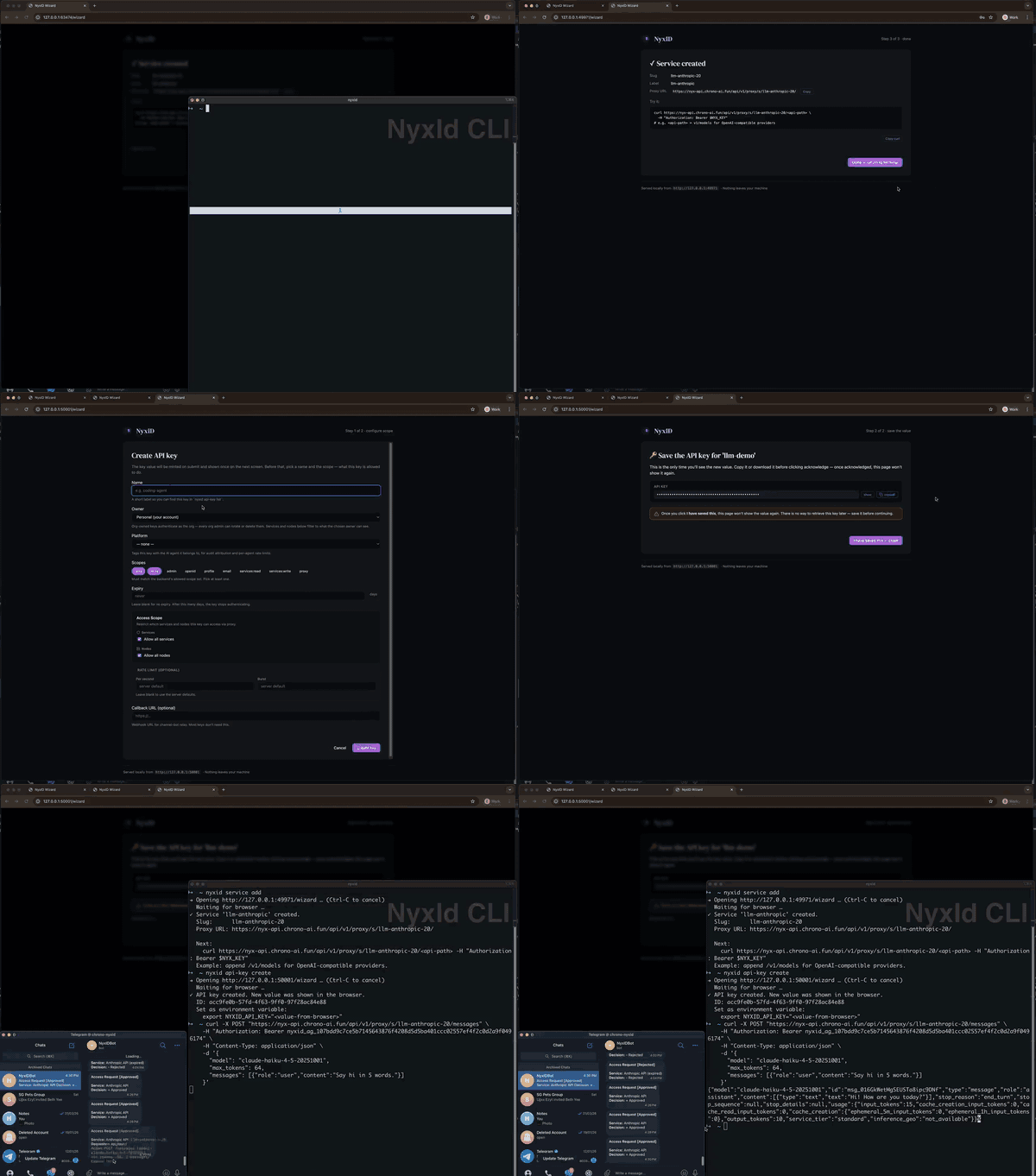
The end-to-end loop is short: connect a service to NyxID once, then any AI agent pointed at your NyxID MCP endpoint can use it — without ever seeing the raw API key.
- Add a service in the web console — paste your OpenAI (or Anthropic, GitHub, etc.) key once; NyxID stores it encrypted.
- Wire up your AI tool —
claude mcp add --transport http --scope user nyxid http://localhost:3001/mcp(or one-click install for Cursor inSettings→MCP). - Use it — Claude Code, Cursor, or any MCP client can now call the service through NyxID. The agent sees the response; never the key.
Why NyxID
Other tools solve parts of this — NyxID combines credential injection, NAT traversal, and MCP tooling in one open-source gateway:
| NyxID | 1Password Universal Autofill | Cloudflare Tunnel | Keycloak | |
|---|---|---|---|---|
| Open source | Yes | No | No | Yes |
| NAT traversal to localhost | Yes (nyxid node) | No | Yes (no credentials) | No |
| Credential injection | Yes (any API) | Partner integrations | No | No |
| REST to MCP auto-wrap | Yes | No | No | No |
| Per-agent isolation | Yes | No | No | No |
| OIDC / OAuth 2.0 | Yes | No | No | Yes |
Use Cases
- Give Claude Code access to your private APIs without sharing keys
- Expose internal microservices to AI agents through a single MCP endpoint
- Secure AI agent access to self-hosted tools (Grafana, Jenkins, n8n) behind your firewall
Getting Started
NyxID is used in two phases — install the nyxid CLI client, then pick a workflow. The CLI logs into either the hosted service or a self-hosted backend and can create the Agent Key your workflow needs.
1. Install NyxID
The default "install NyxID" path installs the lightweight nyxid CLI. It is user-scoped, needs no Docker, and does not start a backend server.
Just need the client? Install the CLI. Running your own backend? Self-host with Docker.
bash -c "$(curl -fsSL https://raw.githubusercontent.com/ChronoAIProject/NyxID/main/skills/nyxid/scripts/install.sh)"
After the CLI is installed, choose where it should log in:
| Hosted | Self-host | |
|---|---|---|
| What it is | We run the NyxID backend for you in the cloud | You run the NyxID backend on your own machine |
| Best for | Getting started quickly, no server setup | Full control, private networks, offline use |
| Status | Open sign-up | Open — anyone can run it |
Driving NyxID from an AI coding agent? Hand it this single line at any point — it tells the agent to install the
nyxidCLI plus the Nyx skill files:Install nyx skills from https://github.com/ChronoAIProject/NyxID/blob/main/skills/INSTALL.mdThe agent reads
skills/INSTALL.mdend-to-end. It should use the CLI installer by default and only run the Docker backend setup if you explicitly ask to self-host.
Prefer a plugin install? The Claude Code and Codex plugins connect your agent to NyxID's hosted MCP server and bundle an MCP-first NyxID skill; they need no CLI. The last command opens NyxID sign-in. When you approve the app, choose the services it may use (or all services). Connect a service afterwards to expose its tools.
Claude Code
claude plugin marketplace add ChronoAIProject/NyxID
claude plugin install nyxid@nyxid
claude mcp login plugin:nyxid:nyxid
Codex
codex plugin marketplace add ChronoAIProject/NyxID
codex plugin add nyxid@nyxid
codex mcp login nyxid
claude mcp loginneeds Claude Code 2.1.284 or later; on older versions run/mcpinside Claude Code to sign in. The same Claude marketplace also offersnyxid-cli@nyxid, the CLI edition that bundles every skill inskills/(it calls thenyxidCLI installed above). Cursor: seeintegrations/cursor-plugin/. Maintainers: seedocs/PLUGINS.md.
Hosted (Recommended)
Start using NyxID in under a minute — no Docker, no setup.
- Open nyx.chrono-ai.fun/register in a new tab (Cmd/Ctrl-click, or right-click → Open Link in New Tab) so you can keep this checklist open.
- Sign up with Google, GitHub, or Apple
- Open
AI Services, add and connect your first external service, and run the API Usage verification curl - After the service is verified, wire your AI tool to NyxID's MCP endpoint
The full click-through flow is in Add your first AI Service.
Self-Host
Run your own NyxID backend on your machine. This is the optional server-side path and sets up three Docker containers (database, backend, frontend) — takes about 2 minutes.
Prerequisites: Docker and a bash shell. macOS and Linux already have one — Windows users, see docs/WINDOWS_SETUP.md before going further. Docker is required only for this backend path. Full prereqs and disk budgets are in SETUP.md.
AI-Assisted (Recommended)
If you have Claude Code, Cursor, or any AI coding assistant open, paste the prompt below into it only when you explicitly want a self-hosted backend. It will drive the entire self-host flow for you — preflight, clone, env generation, Docker stack, health check, CLI login, first credential, and MCP config.
Click to expand the full AI-assisted self-host prompt
I want to self-host the NyxID backend on this machine (the repo is https://github.com/ChronoAIProject/NyxID). This is the Docker server path, not the default CLI install. Walk me through the full setup interactively. If anything fails or I'd prefer to follow the manual steps myself, the full step-by-step with troubleshooting is at https://github.com/ChronoAIProject/NyxID/blob/main/docs/SETUP.md. If I'm on Windows, confirm I'm running from a WSL Ubuntu shell (not native PowerShell or CMD) before proceeding — see https://github.com/ChronoAIProject/NyxID/blob/main/docs/WINDOWS_SETUP.md.
- Confirm Docker is installed and running before touching anything (check
git,docker,openssl,curl,docker composev2, anddocker info).- Before cloning or generating anything, check whether NyxID install STATE is present — look for a
./NyxID/.env.devfile OR any Docker volume matchingnyx*_mongodb_data(rundocker volume ls --format '{{.Name}}' | grep -E 'nyx.*_mongodb_data$'— this catches the defaultnyxid_mongodb_dataplus any variant from a renamed checkout). A bare./NyxIDdirectory alone does NOT count as "installed" —uninstall.shleaves the source tree in place, so the directory can exist with no state. If install state is present, stop and tell me the quickstart is a first-time-only install. Ask whether I want to (a) uninstall first — if./NyxIDexists, runcd NyxID && ./scripts/uninstall.sh --yes && cd ..; if only the stale Docker volume is orphaned (checkout was manually deleted earlier), rundocker volume ls --format '{{.Name}}' | grep -E 'nyx.*_mongodb_data$' | xargs -r docker volume rmdirectly. Either path wipes the volume, containers, and (for the script path).env.dev/keys — destroys all NyxID accounts and encrypted credentials. Or (b) keep my existing install and stop here — I can verify it's still running withcurl -sf http://localhost:3001/health. Do not proceed to step 3 until I answer.
Manual Setup
Prefer to run the optional backend setup yourself, or need the full troubleshooting guide? Follow docs/SETUP.md (macOS, Linux, or Windows via WSL).
It covers:
- System preflight check — Step 1
- One paste-block install — Step 2
- Register your account — Step 3
- CLI install or verification
- Uninstall & reinstall, orphan volume recovery, and SCRAM failure troubleshooting
Once NyxID is running and you've registered at http://localhost:3000, continue to 2. Pick a workflow.
For production deployment (TLS, custom domain, email verification), see docs/DEPLOYMENT.md.
2. Pick a workflow
With a NyxID account, pick the workflow that matches what you want to build and use the identity its guide requires. Each is a step-by-step procedure that ends with a working integration; the guides are independent and can be completed in any order.
| Quickstart | Outcome | NyxID capability |
|---|---|---|
| Run NyxBot from your terminal | Submit prompts from text, files, or stdin; inspect, wait for, and cancel durable work using a first-party owner login. The CLI runs locally and uses your hosted or self-hosted NyxID instance. | Owner CLI and invocation API; requires server admission enabled |
| n8n: Daily AI News Digest with One NyxID Credential | An n8n workflow pulls an RSS feed, summarizes each article with Gemini, and posts to Telegram — using one Header Auth credential in n8n while NyxID stores the upstream Gemini and Telegram secrets. | Per-service credential injection |
| Per-Agent Keys for Claude Code and Codex | Two coding agents on one machine, each scoped to a distinct service and credential, attributed independently in the audit log. | Agent isolation, scoped Agent Keys |
| Reach a Localhost API from a Cloud-Hosted Agent | A private-host API is reachable from a cloud agent without VPN, port forwarding, or a tunneling service. | Credential Node, outbound-only NAT traversal |
| Wrap a REST API as MCP Tools | An OpenAPI spec is exposed as typed MCP tools to Claude Code / Cursor / VS Code / Codex with no MCP server code. | OpenAPI → MCP auto-wrap |
| Use Supabase as an AI Agent Database |
For a per-interface reference walkthrough that ends with
HTTP/1.1 200from your first proxied call (Web UI · CLI · AI-driven · Direct API), see the Connecting AI Services hub.
Connecting AI Services (interface reference)
Pick a workflow in Getting Started is organized by use case. For an interface-oriented reference that ends with a verified proxy call (HTTP/1.1 200) using your preferred entry point — Web UI, CLI, AI-driven (MCP), or Direct API — see docs/connecting-services/. The hub distinguishes external service credentials from NyxID Agent Keys and links to one walkthrough per interface.
Resources
| Topic | Link | Description |
|---|---|---|
| Quickstarts | docs/quickstarts/ | End-to-end recipes — n8n, per-agent keys, node proxy, MCP wrapping |
| Connecting AI Services | docs/connecting-services/ | Add your first (or Nth) AI Service — Web UI / CLI / AI-driven / Direct API |
| Setup | docs/SETUP.md | Optional self-hosted backend + troubleshooting (macOS, Linux, Windows via WSL) |
| Nyxbot Onboarding | docs/NYXBOT_ONBOARDING.md | Onboarding entry, existing integrations, and pending backend contracts |
| NyxBot CLI and API | docs/chat/09-owner-cli-api.md | Owner commands, invocation lifecycle, security boundaries, and rollout |
| Deployment | docs/DEPLOYMENT.md | Start here for production setup |
| AI Agent Playbook | docs/AI_AGENT_PLAYBOOK.md | Start here for agent integration |
| Architecture | docs/ARCHITECTURE.md | System design and data flows |
Contributing
We welcome contributions. See CONTRIBUTING.md.