AllMCPs
BrowseBestCategoriesStackCompareToolsGuidesBlog
Log in Submit MCP

Stay in the loop

Get new MCP servers and top picks in your inbox.

AllMCPs

The open directory for discovering and installing Model Context Protocol servers.

AllMCPs on GitHub (opens in a new tab)
Launched onTiny Startupstinystartups.com
Explore
  • Browse servers
  • Best MCP servers
  • Categories
  • MCP clients
  • Agent prompts
  • Stack Builder
  • Compare servers
  • Random discovery New
  • Submit a server
  • Pricing & Boost Boost
Learn
  • Guides hub
  • What is MCP?
  • Install guide
  • Build an MCP server
  • Deploy an MCP server
  • Security guide
  • Troubleshooting
  • MCP for SEO & AEO
  • Protocol versioning
  • Blog & updates
Tools
  • All developer tools
  • Config generator
  • Config validator
  • Config auditor
  • MCP playground
  • Token calculator
  • OpenAPI β†’ MCP
  • Badge generator
For agents
  • REST API docs
  • Trust & traffic Live
  • Remote MCP server SSE β†— (opens in a new tab)
  • llms.txt β†— (opens in a new tab)
  • Catalog JSON β†— (opens in a new tab)
Company
  • About
  • Advertise Sponsor
  • Contact
  • GitHub β†— (opens in a new tab)
  • Terms
  • Privacy
AllMCPs VerifiedAllMCPs VerifiedFeatured on Nick LaunchesFeatured on Nick LaunchesLaunch Llama NewsletterLaunch Llama NewsletterVerified DR - allmcps.comVerified DR - allmcps.comFeatured on SaaSGrowFeatured on SaaSGrowFeatured on Twelve ToolsFeatured on Twelve ToolsFeatured on Saaspa.geFeatured on Saaspa.geFeatured on Findly.toolsFeatured on Findly.toolsFeatured on Startup FameFeatured on Startup FameFeatured on LaunchKiwiFeatured on LaunchKiwiFeatured on ScrollLaunchFeatured on ScrollLaunchFeatured on DailyPingsFeatured on DailyPingsFazier badgeFazier badgeFeatured on NewTool.siteFeatured on NewTool.siteFeatured on saasfame.comFeatured on saasfame.comDR Checker - Domain RatingDR Checker - Domain RatingListed on Turbo0Listed on Turbo0Launched on LaunchBoard - Product Launch PlatformLaunched on LaunchBoard - Product Launch PlatformList on SimilarlabsList on Similarlabshttps://codetrendy.comhttps://codetrendy.comListed on DevTool.ioFeatured on BuildlistFeatured on BuildlistLaunched on Tiny StartupsFeatured on ShowMeBestAIFeatured on ShowMeBestAIFind us on LaunchZoneFind us on LaunchZoneAllMCPs VerifiedAllMCPs VerifiedFeatured on Nick LaunchesFeatured on Nick LaunchesLaunch Llama NewsletterLaunch Llama NewsletterVerified DR - allmcps.comVerified DR - allmcps.comFeatured on SaaSGrowFeatured on SaaSGrowFeatured on Twelve ToolsFeatured on Twelve ToolsFeatured on Saaspa.geFeatured on Saaspa.geFeatured on Findly.toolsFeatured on Findly.toolsFeatured on Startup FameFeatured on Startup FameFeatured on LaunchKiwiFeatured on LaunchKiwiFeatured on ScrollLaunchFeatured on ScrollLaunchFeatured on DailyPingsFeatured on DailyPingsFazier badgeFazier badgeFeatured on NewTool.siteFeatured on NewTool.siteFeatured on saasfame.comFeatured on saasfame.comDR Checker - Domain RatingDR Checker - Domain RatingListed on Turbo0Listed on Turbo0Launched on LaunchBoard - Product Launch PlatformLaunched on LaunchBoard - Product Launch PlatformList on SimilarlabsList on Similarlabshttps://codetrendy.comhttps://codetrendy.comListed on DevTool.ioFeatured on BuildlistFeatured on BuildlistLaunched on Tiny StartupsFeatured on ShowMeBestAIFeatured on ShowMeBestAIFind us on LaunchZoneFind us on LaunchZone
Β© 2026 Jackalope Digital LLC. All rights reserved.
  1. Home
  2. πŸ’» Developer Tools
  3. Nowline
N
Health: Not checked yetWe have not completed a health check for this listing yet.No health check has run yet.

Nowline

User RatingsBe the first to rate and review this MCP server! Enrichment pendingWe haven’t run our AI enrichment pass on this listing yet, so the overview, use cases, and FAQ below may be sparse or missing. We work through the catalog over time β€” check back soon.
View Repository

Create and edit your roadmaps in a plain-text format.

Quick Install

Automated & IDE Setup

Copy the AI prompt to install this server into Claude Code, Cursor, or another agent β€” or use 1-click editor setup below.

Add to CursorAdd to VS Code
Manual Client & Custom JSON ConfigExpand JSON β–Ύ

Client Config & Setup

Choose your client or environment
Target File:~/Library/Application Support/Claude/claude_desktop_config.json
claude_desktop_config.json
{
  "mcpServers": {
    "nowline": {
      "command": "npx",
      "args": [
        "-y",
        "nowline"
      ]
    }
  }
}

πŸ’‘ Paste the JSON block into your client's configuration file under mcpServers, then restart the application.

Install Directory Badge Claim listing AlternativesπŸ’» More in Developer Tools

Documentation Overview

Nowline

Roadmaps as code. For everyone.
Human readable roadmaps, built for AI.
Plain .nowline text files. Version-controlled. Render to SVG, PNG, PDF, HTML, Mermaid, XLSX, and MS Project XML.


What is Nowline?

Nowline is a text-first DSL for describing product and engineering roadmaps β€” human readable and machine readable. You write plain .nowline text files β€” indented, keyword-driven, diff-friendly β€” and tooling renders them as timelines, validates them, and composes them.

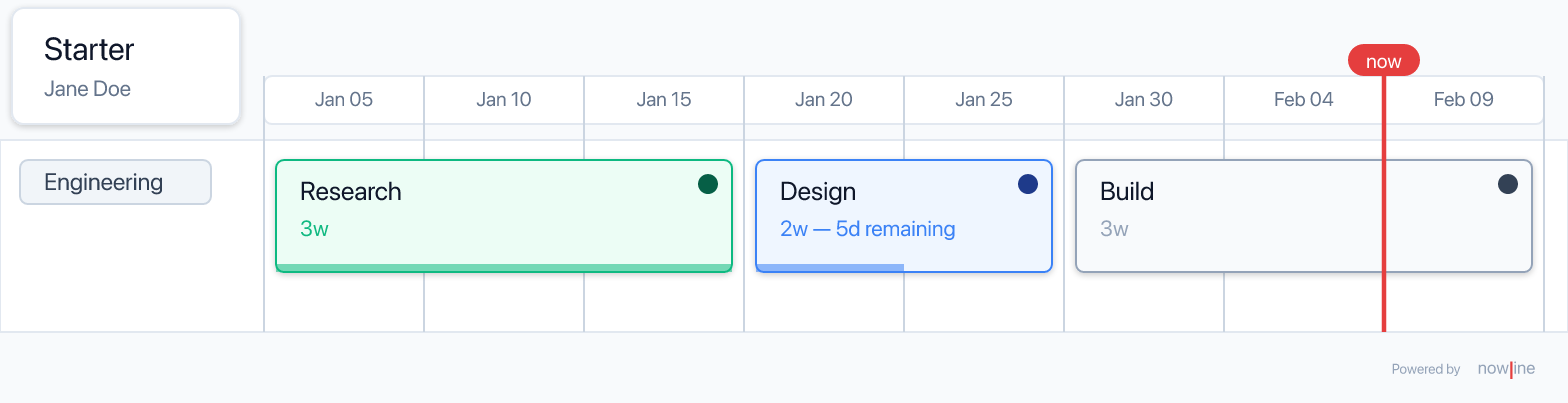
examples/minimal.nowline:

nowline
nowline v1

roadmap minimal "Starter" start:2026-01-05 scale:2w author:"Jane Doe"

swimlane engineering "Engineering"
  item research "Research"  duration:3w status:done
  item design   "Design"    duration:2w status:in-progress remaining:5d
  item build    "Build"     duration:3w status:planned

Renders to:

Minimal roadmap rendered with light theme and now-line on 2026-02-09

Why Nowline?

  • Text, not a Gantt chart. Version-controlled, diffable, reviewable in a PR.
  • Indentation, not XML. Roadmaps read like outlines, because that's how people think about them.
  • Strict enough to catch mistakes. 30+ validation rules, clear error messages with line and column numbers.
  • Composable. include other files with explicit merge / ignore / isolate semantics.

Quick start

Install the CLI from your package manager:

bash
brew trust lolay/tap                                 # macOS / Linux / WSL (one-time)
brew install lolay/tap/nowline

Debian/Ubuntu and Windows users can grab the latest .deb or .exe from GitHub Releases. See packages/cli/README.md for the full install matrix (including man nowline setup).

Toolchain

Two-tier Node policy: Node β‰₯ 22 to consume @nowline/* packages (engines.node on every published package), Node 26 (.nvmrc) to develop. CI tests both versions on every PR. See Toolchain & Supported Versions for the full policy and bump procedure.

Render your first roadmap:

bash
nowline examples/minimal.nowline                     # writes ./minimal.svg
nowline --version

Or scaffold a brand-new file from a template:

bash
nowline --init my-project                            # ./my-project.nowline
nowline --init my-project -t teams                   # ./my-project.nowline (teams template)

For the VS Code / Cursor / VSCodium extension, search Nowline on the VS Code Marketplace or Open VSX.

0.x versioning. nowline is on 0.x.y while we settle the embed surface and IDE expansion. Public APIs may change between minor versions; full SemVer guarantees apply once we ship 1.0. See specs/releasing.md for the version contract.

To run from a checkout for local development (pnpm install && pnpm build), see CONTRIBUTING.md.

Use the CLI

nowline is verbless: rendering is the default. Other operations are flags on the same command.

Render (default)

bash
nowline roadmap.nowline                          # writes ./roadmap.svg
nowline roadmap.nowline -f png                   # writes ./roadmap.png
nowline roadmap.nowline -f pdf                   # writes ./roadmap.pdf
nowline roadmap.nowline -f html                  # writes ./roadmap.html
nowline roadmap.nowline -f mermaid               # writes ./roadmap.md
nowline roadmap.nowline -f xlsx                  # writes ./roadmap.xlsx
nowline roadmap.nowline -f msproj                # writes ./roadmap.xml
nowline roadmap.nowline -o roadmap.pdf           # format inferred from extension
nowline roadmap.nowline -o -                     # SVG to stdout
nowline roadmap.nowline --theme dark --now 2026-03-15
nowline roadmap.nowline --now - --asset-root ./brand --no-links --strict
nowline roadmap.nowline -f pdf --page-size a4 --orientation landscape --margin 0.5in
cat roadmap.nowline | nowline -                  # stdin β†’ ./roadmap.svg

The render pipeline is @nowline/core parse β†’ @nowline/layout layout β†’ @nowline/renderer SVG β†’ format-specific exporter. Output is byte-for-byte deterministic for the same input, theme, and --now. A single nowline binary ships every format β€” see packages/cli/README.md for install details.

Validate (--dry-run)

Run the full pipeline (parse + validate + layout + format) without writing. Exits 0 on success, 1 if any errors are emitted.

bash
nowline roadmap.nowline --dry-run
nowline roadmap.nowline -n                          # short alias
cat roadmap.nowline | nowline - --dry-run           # read stdin
nowline roadmap.nowline -n --diagnostic-format json # machine-readable output

Convert text ↔ JSON

Convert is just -f json (or -f nowline to go the other way). Input format is inferred from the extension; --input-format overrides for unusual filenames.

bash
nowline roadmap.nowline -f json -o roadmap.json    # text β†’ JSON
nowline roadmap.json -f nowline -o roadmap.nowline # JSON β†’ text (canonical)
nowline roadmap.nowline -f json -o - | jq '.ast.roadmapDecl.name'

The emitted JSON carries a top-level "$nowlineSchema": "1" so downstream tools can detect schema changes. Comments are not preserved across round-trips β€” see packages/cli/README.md for the canonical printer rules.

Serve (--serve)

Run a live-reload preview in the browser. Great while authoring.

bash
nowline roadmap.nowline --serve                    # http://127.0.0.1:4318
nowline roadmap.nowline --serve -p 4400 -t dark --open
nowline roadmap.nowline --serve -o latest.svg      # rewrite latest.svg on each rebuild

The server re-parses, re-validates, re-lays-out, and re-renders on every file change; connected clients refresh automatically via Server-Sent Events. Validation errors are displayed as an overlay on top of the most recent successful render.

Init (--init)

Scaffold a new .nowline file in cwd. The positional argument is the project name, not a file path. .nowline is auto-appended.

bash
nowline --init                              # ./roadmap.nowline (default name)
nowline --init my-project                   # ./my-project.nowline
nowline --init my-plan.nowline              # ./my-plan.nowline (literal)
nowline --init my-project --template=teams  # use the teams template

minimal, teams, and product correspond to the files under examples/. Existing files are silently overwritten.

Exit codes

CodeMeaning
0Success
1Validation error (parse failure, invalid reference)
2Usage error (missing input, bad flags, unsupported format, file not found, binary→TTY refusal)
3Output error (cannot write to destination)

Manual

After any package-manager install (brew install lolay/tap/nowline, npm install -g @nowline/cli, or the .deb from GitHub Releases), man nowline shows the CLI manual and man 5 nowline shows the full DSL reference. Both man pages also ship as standalone assets on every GitHub Release β€” see packages/cli/man/ for the mdoc sources.

Language at a glance

File structure

nowline
nowline v1                        // 1. version directive (optional, must be first)

include "shared/teams.nowline"    // 2. includes
include "brand.nowline" config:isolate

config                            // 3. config section (optional)
scale
  name: weeks
style enterprise
  bg: blue
  fg: navy

roadmap r "My Roadmap"            // 4. roadmap section

swimlane platform
  item x "Work item" duration:1w status:done

Entities

KeywordPurpose
roadmapThe top-level roadmap declaration. At most one per file.
swimlaneA horizontal lane of work.
itemA unit of work inside a swimlane.
parallelA block whose children run concurrently.
groupA logical grouping of items, rendered together.
anchorA named date on the timeline.
milestoneA point-in-time marker that depends on work.
footnoteA callout anchored to one or more entities.
person, teamOwnership references.
style, label, status, duration, scale, calendar, defaultConfig and declaration entries.

Properties

nowline
item auth "Auth refactor"
  duration: 2w              // duration literal: d, w, m, q, y
  status: in-progress       // builtin or custom from config
  owner: sam                // id reference (person or team)
  after: kickoff            // dependency (single)
  after: [kickoff, approvals] // dependency (list)
  remaining: 30%             // percentage
  labels: [security, p0]     // list of label ids
  link: https://…            // URL (bare, no quotes)

Roadmap start date

A roadmap may carry an optional start:YYYY-MM-DD that anchors the timeline baseline:

nowline
roadmap platform-2026 "Platform 2026" start:2026-01-06

Read the full README β†’View source on GitHub β†’

Related MCP Servers

View all in Developer Tools View all alternatives
  • PraisonAI logoPraisonAI

    AI Agents Framework with Self Reflection and MCP support

    πŸ’» Developer Tools1 views
    Compare vs PraisonAI β†’
  • Labelhead Artist Momentum logoLabelhead Artist Momentum

    Trending hip-hop artist momentum scores across four cultural dimensions.

    πŸ’» Developer Tools0 views
    Compare vs Labelhead Artist Momentum β†’
  • Formio MCP logoFormio MCP

    Create and manage Form.io forms, resources, actions, roles, and projects from your AI agent.

    πŸ’» Developer Tools2 views
    Compare vs Formio MCP β†’
  • Mjucius Cozi MCP logoMjucius Cozi MCP

    Manage your family's calendars and lists in Cozi. View, create, and update appointments; organize…

    πŸ’» Developer Tools1 views
    Compare vs Mjucius Cozi MCP β†’

Reviews

No reviews yet β€” be the first to share how this listing worked for you.

Frequently Asked Questions about Nowline

Add the following block to your claude_desktop_config.json under mcpServers: "mcpServers": { "nowline": { "command": "npx", "args": ["-y", "nowline"] } }

AllMCPs Directory Badge

Full Badge Customizer

Showcase your server listing on GitHub or your project documentation. Embed this dynamic SVG badge to highlight official listing status and live engagement.

Badge Style:
Live Dynamic SVG PreviewNowline AllMCPs Directory Badge

Markdown (GitHub README)
[![AllMCPs](https://allmcps.com/api/badge/nowline?style=directory)](https://allmcps.com/mcp/nowline)
HTML Embed
<a href="https://allmcps.com/mcp/nowline"><img src="https://allmcps.com/api/badge/nowline?style=directory" alt="Nowline on AllMCPs" /></a>

Technical Specs & Signals

CategoryπŸ’»Developer Tools
More technical detailsExpand β–Ύ
TransportSTDIO
RuntimeNode.js
Last updatedSep 7, 2026
Views0
Unique ViewsTotal visits recorded for this listing page on AllMCPs.
Installs0
Installs & Copy ActionsTotal times users copied install commands or configuration snippets for this server.
25Quality signal: Emerging Β· 25/100How this signal is calculated β–Ύ
Server availabilityNot measured

Not scored for repo-hosted servers β€” we can't reach the running server, only its GitHub page. Hosted MCP endpoints are health-checked live.

Verified ownership8/20
Documentation & tools10/30
Adoption & activity1/15
Community engagement0/10

A guidance signal from public completeness & health data β€” not a user rating. New listings start lower and rise as they add docs, get verified, and grow adoption. Signals we can't observe for a listing are skipped, not counted against it.

β˜… FeaturedAllMCPs Server logo

AllMCPs Server

The official MCP server for AllMCPs.com - submit and manage tools directly from your AI. The open directory for MCP servers. Connect Claude, Cursor, Windsurf, and AI agents to databases, tools, files, and APIs. Explore 10,000+ servers. AllMCPs is the premier, open directory for discovering, evaluating, and installing Model Context Protocol (MCP) servers to equip AI agents and LLMs with real-world superpowers.

Explore Server β†’

Own this project?

This directory is pre-filled from public sources. Claim via GitHub README, site badge, or DNS TXT to unlock edit access and the Official badge and attach your website β€” proof is checked automatically, then reviewed by our team.

Free dofollow backlink: add your website and place the AllMCPs badge on it β€” no claim needed. We detect it automatically and keep it verified as long as the badge stays live.

Claim & get free dofollow

Share & Embed

Add our SVG badge (dark/light directory styles) or embeddable widget to your site.

Explore more

More in πŸ’» Developer Tools β†’Best MCP servers for Developers β†’Alternatives to Nowline β†’Install in Claude DesktopInstall in CursorInstall in VS Code