



Notion Arena
The component registry for Notion.
shadcn/ui's model: browse, configure, copy, own, install from code — applied to Notion dashboards.












🎯 What is Notion Arena?
Notion Arena is a machine-readable component registry for Notion — 203 pre-built components you can drop into any Notion page:
| 192 Widgets (Embed + HTML Block) | 11 Native Recipes (Notion API) | |
|---|---|---|
| What | Self-contained HTML files that run inside Notion | Database schemas, views, formulas, automations installed via API |
| Delivery | <iframe> embed or upload HTML file | POST /api/install with your token |
| Network | Required (embed) / None (HTML block) | None at runtime |
| Data | Browser-local only | Lives in your Notion workspace |
| Team sync | ❌ No | ✅ Yes |
| Updates | Auto (embed) / Manual (HTML) | Re-run install |
| Min plan | Free | Free / Plus / Business |
Notion is a trademark of Notion Labs Inc. This is an independent project and is not affiliated with or endorsed by Notion.
🎨 Popular Widgets Showcase

| Widget | Category | Description |
|---|---|---|
 Pomodoro Timer Pomodoro Timer | Time | Work/break cycles with progress ring, session counter, chime |
| KPI Strip | Dashboards | 4 metric tiles with sparklines, deltas, target rings |
| Habit Grid | Trackers | GitHub-style heatmap, streaks, 5-level intensity |
 Flip Clock Flip Clock | Dashboards | Split-flap clock, timezone, 12/24h, Notion typography |
| Meeting Notes OS | Docs | Template with agenda, notes, decisions, action items |
| Goal Ring | Dashboards |
📦 All 192 Widgets (click to expand)
| Category | Count | Examples |
|---|---|---|
 Time Time | 12 | Pomodoro, Breathing, Stopwatch, Countdown, Month Calendar, Date Calculator, Flip Clock, World Clock, Count-Up, Interval Timer, White Noise, Sunrise/Sunset, Sleep Duration, Family Calendar, Study Session Log, Daily Planner, Routine Checklist, Workout Tracker |
 Dashboards Dashboards | 9 | KPI Strip, Goal Ring, Year Progress, Moon Phase, Flip Clock, World Clock, Weekly Status Report, Sunrise/Sunset, Count-Up, Countdown, Month Calendar, Date Calculator, Stopwatch, Breathing Timer |
 Trackers Trackers | 26 | Habit Grid, Water Tracker, Mood Tracker, Routine Checklist, Workout Tracker, Sleep Duration, Plant Care Log, Pet Care Checklist, Volunteer Hours Log, Media Watchlist, Reading Progress, Savings Goal, Net Worth Snapshot, Expense Tracker, Portfolio Tracker, Debt Payoff Tracker, Subscription Tracker, Billable Time Tracker, Attendance Register, Collection Catalog, Gear Database, Household Inventory Log, Car Maintenance and Trip Log, Warranty and Service Log, Game Collection Catalog, Wish List and Collector Log, Healthcare Supply Inventory, Family Contacts Directory |
 Planning Planning | 37 | Mini Kanban, Eisenhower Matrix, Gantt Timeline, Weekly Planner, Trip Itinerary, Meal Planner, Grocery List, Packing List, Chore Checklist, Home Maintenance Log, Product Roadmap, Sprint Retrospective, User Story Map, OKR Weekly Check-in, Daily Planner, Wedding Seating Planner, Event Run of Show, Milestone Tracker, Incident Log, QA Test Run Log, Event Guest List, Travel Itinerary Planner |
 Business Business |
⚙️ Native Recipes (11)

| Recipe | Tier | Creates | Plan |
|---|---|---|---|
| CRM Pipeline |  Pro Pro | 3 DBs, 6 formulas, 5 views, 2 templates, 3 automations | Plus |
| Sprint Tracker | Pro | 2 DBs, 4 formulas, 4 views, 1 template | Plus |
| OKR System |  Free Free | 2 DBs, 5 formulas, 3 views, 1 template | Plus |
| Meeting Notes OS | Free | 2 DBs, 1 template, 2 buttons, 4 views, 2 automations | Free |
| Content Calendar | Free | 2 DBs, 3 formulas, 5 views, 1 recurring template | Plus |
| Invoice Generator | Pro | 3 DBs, 6 formulas, 1 template, 1 button, 3 views | Plus |
| PARA Life OS | Pro | 5 DBs, 7 relations, 6 views, 3 templates, 1 dashboard | Plus |
| Habit OS (native) | Pro | 2 DBs, 5 formulas, 4 views, 1 button, 1 recurring | Plus |
🤖 For AI Agents — MCP + Skill
Plug Notion Arena directly into your AI agent — Claude Code, Cursor, Windsurf, Claude Desktop.
MCP Server
Gives your agent tools to list/search/configure/plan-install all 203 components:
# Claude Code (project scope)
claude mcp add --scope project notion-arena -- npx -y notion-arena-mcp

# Or pinned version
npx -y notion-arena-mcp@0.2.2

# Cursor — .cursor/mcp.json
# Claude Desktop — claude_desktop_config.json
# See docs/AGENT_SETUP.md for all clients
Skill
Teaches your agent the Notion Arena workflow, delivery channels, widget contract:
# Via skills.sh (Vercel) — cross-agent
npx skills add SynergyFlowLabs/notion-arena --skill notion-arena

# Via Claude Code plugin marketplace
/plugin marketplace add SynergyFlowLabs/notion-arena
/plugin install notion-arena@notion-arena-marketplace

# Manual
cp -r skills/notion-arena .claude/skills/notion-arena
Once both are installed, just ask:
"Find me a pomodoro timer for Notion" "Add a CRM pipeline to my Notion" "I need a habit tracker that works offline"
Your agent will use search_components, get_component, build_embed_url, plan_install automatically.
MCP Tools: list_components, search_components, get_component, get_widget_schema, build_embed_url, plan_install, get_registry_item, get_install_guide, get_categories, get_site_info
Skill: skills/notion-arena/SKILL.md + .claude/skills/notion-arena/SKILL.md + .claude-plugin/plugin.json + .claude-plugin/marketplace.json
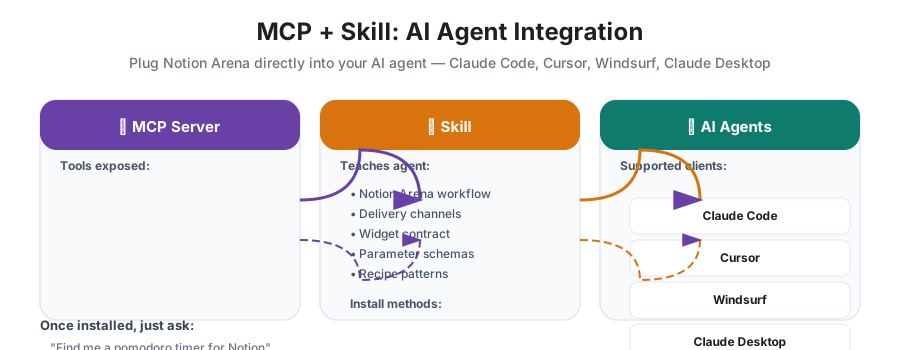
See docs/AGENT_SETUP.md for MCP+Skill setup and docs/DEPLOY_AND_PUBLISH.md for free deployment (Vercel) + publishing MCP to npm & registry and Skill to skills.sh & plugin marketplace.
🏗️ Three Delivery Channels — Visualized
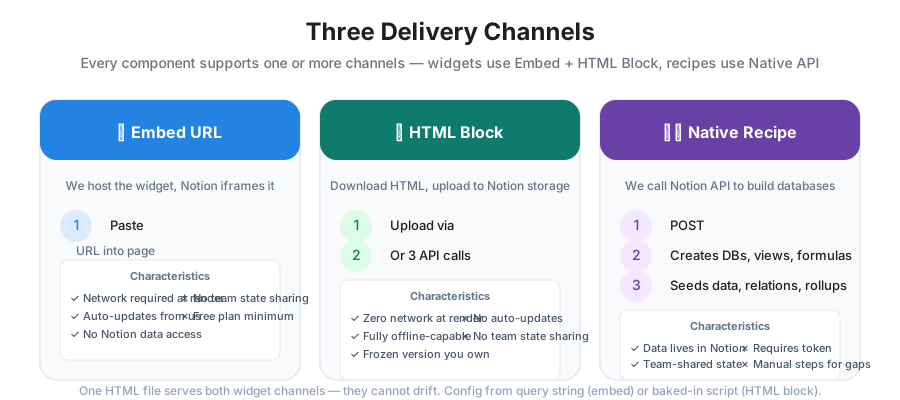
| Embed URL | HTML Block | Native Recipe | |
|---|---|---|---|
| What it is | We host the widget, Notion iframes it | You upload the file to Notion's storage | We call the Notion API |
| Install | /embed → paste | /html → upload, or 3 API calls | POST /api/install |
| Network at render | Required | None | None |
| Reads your Notion data | No | No | It is the data |
| State shared with team | No | No | Yes |
| Gets our updates | Automatically | No. Frozen | n/a |
| Min. plan | Free | Free | Free |
One HTML file serves both widget channels, so they cannot drift. Configuration comes from the query string on the hosted path and from a baked-in
<script id="bk-config">on the downloaded path, because a sandboxed block has no URL.
📋 Widget Contract — The 4 Rules
Every widget in public/widgets/ implements the same four rules. See /docs/authoring for the full guide and checklist.

| Rule | Description |
|---|---|
| 1. Zero External Requests | No CDN, no webfont, no fetch(), no @import. The sandbox has no network — a remote asset is a blank block. |
| 2. Two Config Sources | Baked-in bk-config script tag (priority 1), then URLSearchParams (priority 2). Only declared parameters survive; unknown keys dropped by buildConfig(). |
| 3. Theme & Accent on Every Widget | theme=auto|light|dark sets data-theme on <html> and follows prefers-color-scheme when auto; accent writes --accent, with derived shades via color-mix(in oklab, …). |
| 4. Namespaced State | Widgets that save browser state use notion-arena.<slug>.v1 and wrap storage access in try/catch. State stays in one browser, never syncs — shared trackers belong in native recipes. |
Plus: body { overflow: hidden } with .wrap managing its own scroll (one scrollbar, not two), a prefers-reduced-motion escape hatch, and clipboard exports that always also console.log the payload as a fallback.
🏃 Running It Locally
# Install dependencies
npm install

# Restore 13 design/dev skills into .agents/skills/
npx skills experimental_install -y

# Start dev server
npm run dev          # http://localhost:3000
Requirements: Node 22+, Next.js 16 (Turbopack), React 19, Tailwind v4, TypeScript.
# Type-check
npx tsc --noEmit

# Widget contract checks (offline HTML validation)
npm run check:widgets

# Contrast audit
npm run audit:contrast

# Production build
npm run build

# MCP server
npm run generate:mcp-catalog  # 143 components → mcp/src/data/catalog.json
npm run build:mcp             # build notion-arena-mcp
npm run dev:mcp               # run MCP server with tsx (stdio)
Set NEXT_PUBLIC_SITE_URL in production to https://notionarena.vercel.app so registry manifests emit absolute URLs for the right host. Without it, URLs are derived from the request's forwarded host, falling back to https://notionarena.vercel.app (or http://localhost:3000 in local dev).
📁 Project Layout
public/widgets/*.html      the products: 192 self-contained HTML files
lib/catalog.ts             source of truth for all 203 components
lib/types.ts               component/param types + the 8 categories
lib/widget.ts              config coercion, injection, HTML rendering  (server)
lib/widget-url.ts          URL builders                                (browser-safe)
lib/notion/schema.ts       Notion API payload builders
lib/notion/installer.ts    executes plans against @notionhq/client
lib/recipes/               11 recipe declarations + planInstall()
lib/registry.ts            shadcn-compatible manifest generation
components/                site UI, catalog browser, configurator, docs prose
app/embed/[slug]/          framed, configured widget HTML
app/api/widget/[slug]/     the same HTML as a download
app/r/[name]/              registry: index.json, schema.json, {name}.json
app/api/install/           plan | embed | html-block | api
docs/RESEARCH.md           the research behind all of it
skills/notion-arena/       AI agent skill (workflow, channels, contract)
mcp/                       MCP server (tools for agents)
📦 The Registry (shadcn-compatible)
GET /r/index.json          the whole catalog
GET /r/{name}.json         one item, HTML or recipe JSON inline
GET /r/schema.json         JSON Schema of every widget's parameters
// mcp config / components.json
{ "registries": { "@notion-arena": "https://notionarena.vercel.app/r/{name}.json" } }
# see exactly what an install will do: no credentials, touches nothing
curl -X POST localhost:3000/api/install \
  -H 'content-type: application/json' \
  -d '{"component":"crm-pipeline","mode":"plan"}'

# then run it
curl -X POST localhost:3000/api/install \
  -H 'content-type: application/json' \
  -d '{"component":"crm-pipeline","mode":"api",
       "token":"'"$NOTION_TOKEN"'","parentPageId":"'"$PAGE_ID"'"}'
mode: "plan" requiring no token is deliberate: review the request sequence before authorising any write to your workspace.
⚠️ Two Things Worth Knowing
A widget cannot read or write your Notion data. Notion's HTML block sandbox has no network access and no bridge to its parent page. Widgets may keep user-entered personal state in this browser, but that state is not Notion data and is not shared. If a workflow needs workspace records, collaboration, permissions, or an audit trail, use a native database or recipe.
Relations force a two-pass install. Since Notion split databases from data sources, a relation property targets a data_source_id that does not exist until the target database has been created and read back. planInstall() therefore emits: create databases with base properties → read back each data source id → patch in relations → patch in rollups → patch in formulas → views → seed rows → pages → block bodies in chunks of 100.
Recipes also declare what they cannot do. Four real API gaps (no button block type, no automation endpoint, no recurring-template endpoint, no synced-block duplicates) appear as manual[] steps, each citing the limitation. A manual step whose reason is "it's easier by hand" is rejected.
🤝 Contributing
We welcome contributions! Whether it's a new widget, a native recipe, a bug fix, documentation, or an idea — here's how to contribute.

Quick Start for Contributors
- Open an Issue — Discuss your idea first. Check for duplicates. Get maintainer feedback.
- Fork & Clone — Create your branch:
git checkout -b feat/my-widget - Develop — Follow the widget contract (see checklist below)
- Test — Run all checks locally
- Pull Request — Clear title, link issue, screenshots/GIFs, update CHANGELOG
- Review — Maintainer review, CI checks, widget contract audit
- Merge — Auto-deploy to Vercel, MCP catalog regenerates, available immediately
Widget Authoring Checklist
Every widget must pass all checks before merge — see scripts/check-widgets.mjs.

Adding a New Widget
- Create
public/widgets/my-widget.html(single HTML file, self-contained) - Add entry to
lib/catalog.tswith all required fields:{ slug: "my-widget", name: "My Widget", emoji: "🎯", tagline: "One-line hook", description: "Full paragraph explaining what it does and why.", category: "time", // time | dashboards | trackers | planning | business | docs | visuals | automations kind: "widget", tier: "free", // free | pro tags: ["tag1", "tag2"], color: "blue", // red | orange | yellow | green | blue | purple | pink | brown | gray params: [ { key: "param1", label: "Label", type: "number", default: 10, min: 1, max: 100 }, { key: "theme", label: "Theme", type: "select", default: "auto", options: [...] }, { key: "accent", label: "Accent", type: "color", default: "#2383e2" }, ], features: ["Feature 1", "Feature 2"], useCases: ["Use case 1", "Use case 2"], capabilities: { interactive: true, offlineSafe: true, persistsLocally: false, writesToNotion: false, needsNetwork: false, }, } - Run
npm run check:widgetsandnpm run typecheck - Test in Notion (embed + HTML block)
- Submit PR
Adding a Native Recipe
- Create recipe in
lib/recipes/my-recipe.tsexportingplanInstall()and schema - Add entry to
lib/catalog.tswithkind: "native"andrecipe: "my-recipe" - Run
npm run generate:mcp-catalogandnpm run build:mcp - Test with
mode: "plan"thenmode: "api" - Submit PR
Code Style
- TypeScript strict mode — no
any, explicit types - Tailwind v4 — utility-first, no custom CSS unless necessary
- React 19 — server components by default,
'use client'only when needed - Conventional Commits —
feat:,fix:,docs:,chore:,refactor:
📜 Honesty Policy
- No fabricated install counts, star counts, or customer logos
- Badges are qualitative (
new,popular,staff-pick) and derived from the catalog - Market numbers appear only where cited
- Capability claims are booleans in the catalog (
interactive,offlineSafe,persistsLocally,writesToNotion,needsNetwork) exposed in the registry so an agent can filter on them instead of reading prose
📄 License
MIT License — see LICENSE for details.
Components you download are yours: modify them, host them, ship them in templates you sell. Free components carry no attribution requirement. See /legal/terms.
🔗 Links
- Live Site: https://notionarena.vercel.app
- MCP Package: https://www.npmjs.com/package/notion-arena-mcp
- MCP Registry: https://registry.modelcontextprotocol.io
- Documentation: https://notionarena.vercel.app/docs
- Research:
docs/RESEARCH.md - Agent Setup:
docs/AGENT_SETUP.md - Deploy & Publish:
docs/DEPLOY_AND_PUBLISH.md - Contributing:
CONTRIBUTING.md - Changelog:
CHANGELOG.md
Made with ❤️ by SynergyFlow Labs and contributors



 Docs
Docs Visuals
 Automations