No Crd
Dynamic pod spawner & proxy for ephemeral AI agent workspaces on Kubernetes without CRDs
Install No Crd
Pick your client, then add it in one click or paste the config.
~/Library/Application Support/Claude/claude_desktop_config.json{
"mcpServers": {
"no-crd": {
"command": "npx",
"args": [
"-y",
"@nogoo9/no-crd"
]
}
}
}
Settings → Developer → Edit Config, merge this into mcpServers, then fully quit and reopen Claude Desktop.
We couldn’t confirm it starts correctly
We ran the install command but it didn't respond within our test window — this can mean a slow first-time install rather than a real problem.
npx -y @nogoo9/no-crdNo response to initialize.
This is an experimental automated check and can have false negatives — missing environment variables, a slow cold install, etc. It doesn’t necessarily mean something’s wrong. Last checked 6d ago.
Overview
Security & health
What it can reach and how reliably it runs — from our own checks, not the maintainer’s claims.
Recent health check succeeded.
Supply-chain signal
No high-severity advisories surfaced by our automated scan.
Scanned 11d ago via OSV.dev · @nogoo9/no-crd (npm)
Adoption & maintenance
Factual signals from GitHub, npm, and our automated checks — not a rating.
From the project README
@nogoo9/no-crd
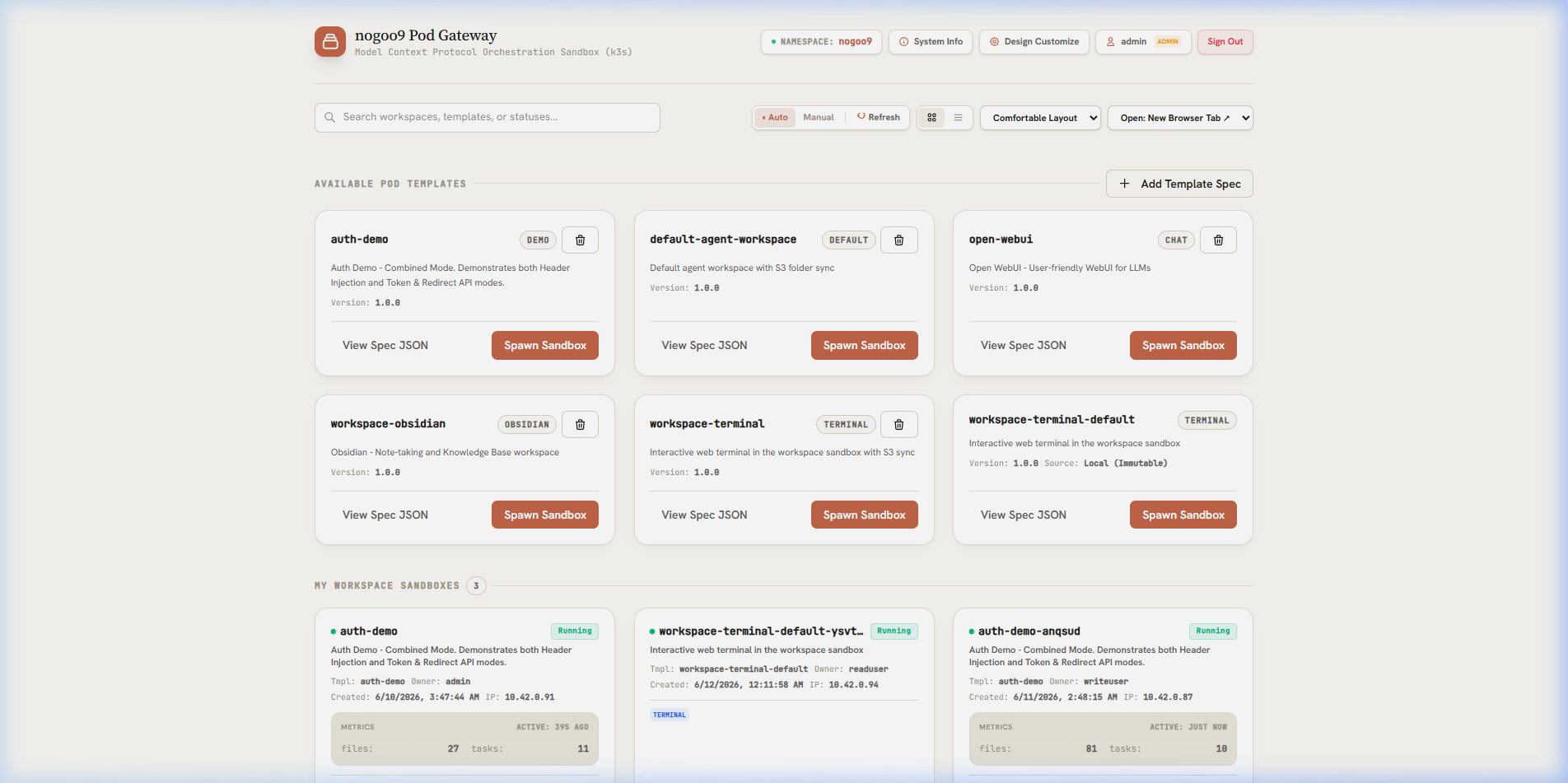
Agent-Driven, On-Demand Pod Orchestration in Kubernetes — Without Custom Resource Definitions.












@nogoo9/no-crd is a lightweight, cross-runtime Model Context Protocol (MCP) server that empowers AI agents and APIs to dynamically spawn, route to, and manage ephemeral containerized sandboxes on standard Kubernetes (k8s/k3s) clusters — without requiring Custom Resource Definitions (CRDs), cluster-level operators, or elevated RBAC permissions.
It provides JupyterHub-like dynamic pod lifecycle management but is completely agnostic to actual workloads and supports multi-runtime execution under Bun, Deno, and Node.js.
📚 For detailed guides, API reference, and configuration options, visit the public Documentation Website or access the built-in documentation served directly at /docs/ (e.g. http://localhost:3000/docs/) when running the server.
🗺️ Choose Your Path
To get started with @nogoo9/no-crd, select the track that matches your goals:
- Track A: AI Agent & MCP Users $\rightarrow$ MCP Client Setup Guide
- Best for: Connecting
no-crdto Cursor, Claude Desktop, Cline, or Roo Code to let your agent manage pods.
- Best for: Connecting
- Track B: Platform & Service Deployers $\rightarrow$ SSO & Routing Deployment Guide
- Best for: Deploying a multi-tenant sandbox service in your Kubernetes cluster with Keycloak OIDC, stateless cookies, and reverse proxy routing.
- Track C: SDK & Code Contributors $\rightarrow$ SDK & Contributor Guide
- Best for: Programmatically controlling pods via the TypeScript SDK or contributing to the core runtime codebase.
🚀 Key Features
- No CRDs Required: Runs directly against core Kubernetes resources (Pods, ConfigMaps, ServiceAccounts). Highly portable, secure, and compatible with restricted/managed environments (EKS, GKE, K3s).
- Agent Sandbox Spawner: Specialized spawner tools that automate workspace provisioning with context validation, init containers, IAM roles, pre-stop hooks, and lifecycle sync.
- ConfigMap-Based Templates: Store, version, and load reusable pod templates stored as standard Kubernetes ConfigMaps.
- Local Filesystem Templates: Bake YAML/JSON pod templates into Docker images or mount them from host paths — with built-in defaults shipped in the package.
- Isomorphic Multi-Runtime SDK: Imports seamlessly as a composable programmatic SDK or MCP server running under Node.js, Bun, or Deno.
- Workspace Routing Proxy (Experimental): Built-in reverse proxy routing that dynamically pipes traffic to running container IPs with secure user token ownership verification, path-scoped session cookies (
nocr_tokenandnocr_sess), and automatic HMAC-signed session management for short-lived token resilience. - Experimental JWT Authentication: Built-in OAuth token validation engine supporting HS256, RS256, ES256, JWKS endpoints, and OAuth 2.0 Token Introspection (RFC 7662).
- Embedded Web UI App: Exposes an interactive web-based Pod Manager interface featuring a light/dark theme toggle, client-side PKCE OIDC login with proactive silent token refresh, and workspace file preview rendering (supporting HTML sandboxed iframes and custom Markdown rendering).
⚡ Quick Start
Run Standalone via NPX (No Installation)
# Option 1: Start HTTP/SSE server on port 3000
npx @nogoo9/no-crd --transport http --port 3000

# Option 2: Run over standard input/output (stdio) for local IDE agents
npx @nogoo9/no-crd --transport stdio --mode cluster
Install Globally
npm install -g @nogoo9/no-crd
nocrd9 --transport stdio --mode cluster
Run via Docker
docker run -d -p 3000:3000 \
  -v "$HOME/.kube/config:/app/.kube/config:ro" \
  -e KUBECONFIG=/app/.kube/config \
  ghcr.io/nogoo9/no-crd:latest
⚙️ Configuration & Environment Variables
The server and command-line utility are configurable using CLI options or environment variables. Below is the quick reference table of all settings:
🔌 Server Configuration
| CLI Option | Environment Variable | Default | Allowed Values | Description |
|---|---|---|---|---|
-t, --transport | TRANSPORT | http | http, stdio, both | Server transport mode. both fires up both transports simultaneously. |
-p, --port | PORT | 3000 | Number | HTTP server port for SSE transport. |
-H, --host | HOST | 0.0.0.0 | String | Host interface to bind the HTTP/SSE server to. |
--base-url | BASE_URL | "" | Path string | Base URL path prefix for hosting behind a reverse proxy (e.g. /gateway/no-crd). |
| - | STATELESS | false | true, false | Enable stateless request handling (no session affinity). |
-l, --log-level | LOG_LEVEL | info | debug, info, warning, error, fatal | Logging verbosity filter. |
| - | LOG_FILE | nogoo9-mcp.log | String | Output file path for file logging. |
| - | RATE_LIMIT_MAX | 100 | Number | Maximum requests allowed per window for rate limited routes. |
| - | RATE_LIMIT_WINDOW | 60000 | Number | Time window in milliseconds for rate limited routes. |
--proxy-timeout | PROXY_TIMEOUT | 120000 | Number | Timeout in milliseconds for the routing proxy upstream requests. |
--proxy-keep-alive | PROXY_KEEP_ALIVE | true | true, false | Enable TCP keep-alive for the routing proxy upstream requests. |
🔒 TLS Configuration
| CLI Option | Environment Variable | Default | Allowed Values | Description |
|---|---|---|---|---|
--tls-cert | TLS_CERT | - | Path string | Path to TLS certificate file to enable HTTPS. |
--tls-key | TLS_KEY | - | Path string | Path to TLS private key file to enable HTTPS. |
--tls-ca | TLS_CA | - | Path string | Path to TLS CA certificate file for HTTPS client/verification. |
| - | NODE_TLS_REJECT_UNAUTHORIZED | true | 0 (false), 1 (true) | Set to 0 to bypass TLS verification (for development/testing only). |
🌐 CORS Configuration
| CLI Option | Environment Variable | Default | Allowed Values | Description |
|---|---|---|---|---|
--cors-origin | CORS_ALLOWED_ORIGIN, CORS_ORIGIN | * | String | CORS Allowed Origin header. |
--cors-methods | CORS_ALLOWED_METHODS, CORS_METHODS | GET, POST, OPTIONS | String | CORS Allowed Methods header. |
--cors-headers | CORS_ALLOWED_HEADERS, CORS_HEADERS | Content-Type, Authorization, mcp-protocol-version, mcp-session-id | String | CORS Allowed Headers header. |
--cors-allow-credentials | CORS_ALLOW_CREDENTIALS, CORS_CREDENTIALS | false | true, false | Enable CORS Access-Control-Allow-Credentials header. |
--cors-expose-headers | CORS_EXPOSED_HEADERS, CORS_EXPOSED | mcp-session-id, x-refreshed-token | String | Custom CORS Access-Control-Expose-Headers header. |
--cors-max-age | CORS_MAX_AGE | - | Number | Custom CORS Access-Control-Max-Age header in seconds. |
☸️ Kubernetes Configuration
Reviews
No reviews yet — be the first to share how it worked for you.
Frequently Asked Questions about No Crd
Related MCP servers
Add a badge to your READMEShow it’s listed — live SVG, Markdown or HTML.
AllMCPs Directory Badge
Showcase your server listing on GitHub or your project documentation. Embed this dynamic SVG badge to highlight official listing status and live engagement.
[](https://allmcps.com/mcp/no-crd)<a href="https://allmcps.com/mcp/no-crd"><img src="https://allmcps.com/api/badge/no-crd?style=directory" alt="No Crd on AllMCPs" /></a>