Create, run, and analyze NetLogo agent-based models through natural conversation
Quick Install
Automated & IDE SetupCopy the AI prompt to install this server into Claude Code, Cursor, or another agent — or use 1-click editor setup below.
Not yet automatically verified
We haven't yet run this listing's install command through our automated sandbox check. This isn't a red flag — we're steadily working through the catalog.
Manual Client & Custom JSON ConfigExpand JSON ▾
Client Config & Setup
Choose your client or environment
Target File:
💡 Paste the JSON block into your client's configuration file under mcpServers, then restart the application.
Documentation Overview



The first MCP (Model Context Protocol) server for NetLogo — enabling AI assistants to create, run, and analyze agent-based models through natural conversation.
Works with: Claude Code, Claude Desktop, Cursor, Windsurf, VS Code (Copilot), Cline, Continue, Roo Code, Zed, OpenCode, Codex — any tool that supports MCP.
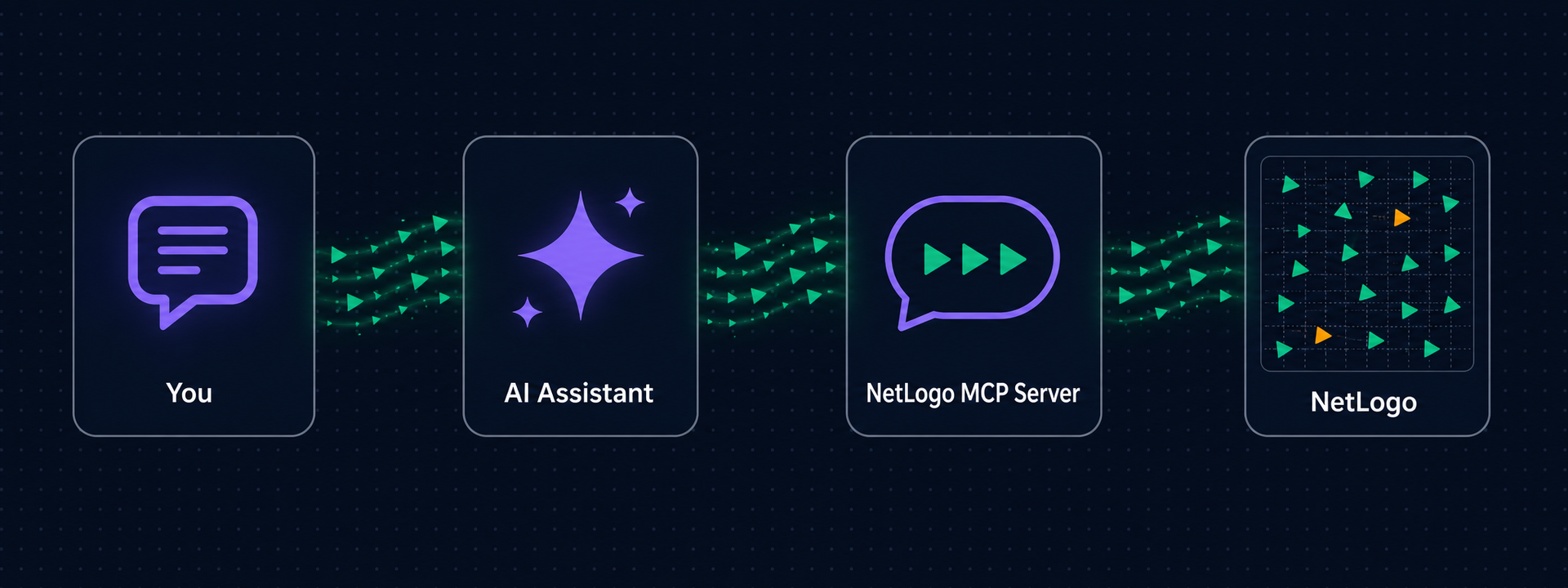
Why NetLogo MCP?
As an AI student taking an Agent-Based Modeling course, I searched for an MCP server to control NetLogo — nothing existed. So I built one.
Instead of manually writing NetLogo code, clicking buttons, and tweaking sliders, you tell your AI assistant what you want in plain English:
"Create a predator-prey model with 100 sheep and 20 wolves. Run it for 500 ticks and show me the population dynamics."
The AI writes the code, runs the simulation, and shows you the results — all through conversation.
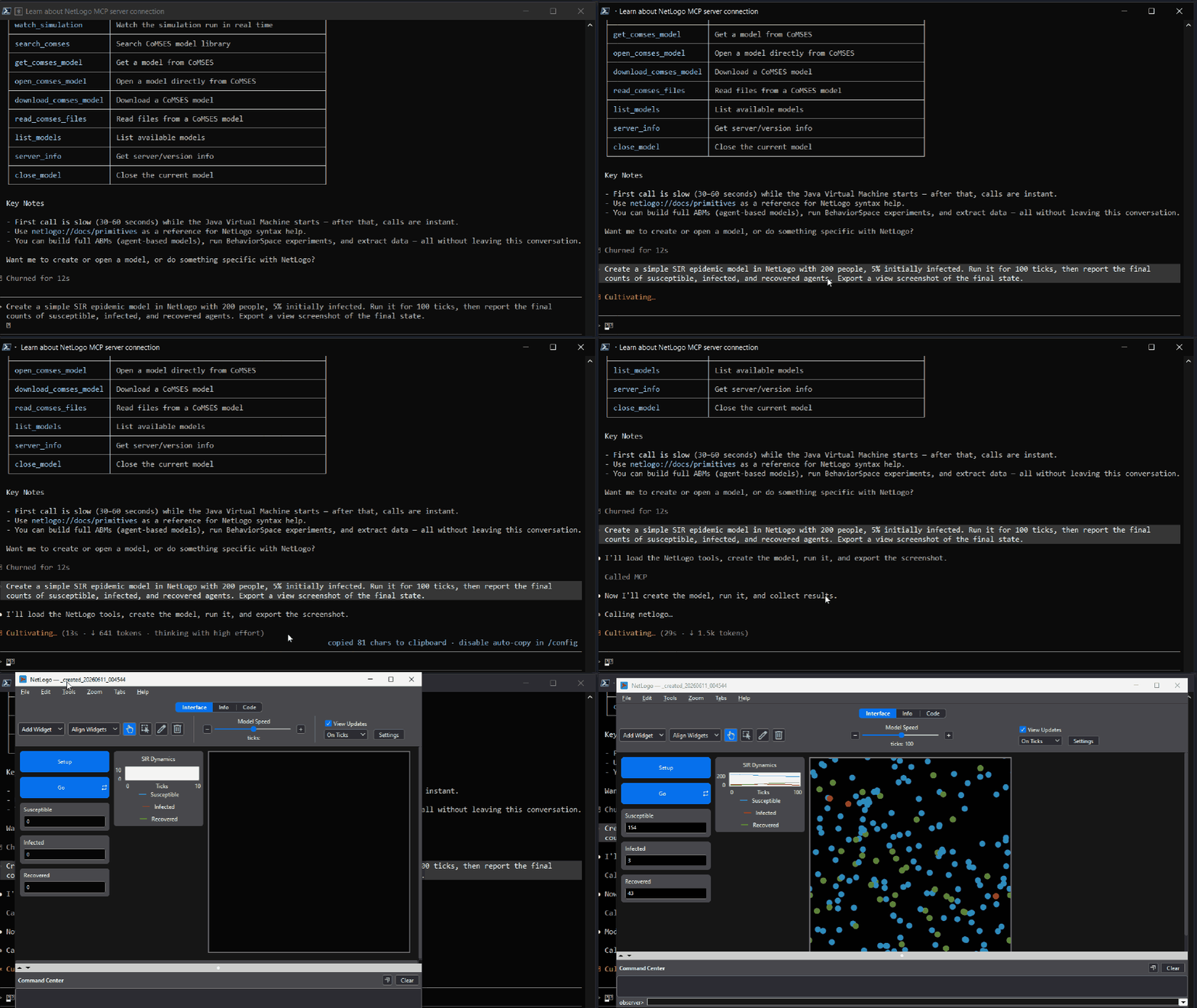
By default a real NetLogo window opens (on first use) so you can watch your simulations run live. Headless mode is available for CI or servers.
Features
- Create models from code — with real interface widgets: sliders, switches, buttons, monitors
- Run simulations and collect tick-by-tick data as markdown tables
- Run BehaviorSpace experiments — parallel parameter sweeps via the headless launcher
- Export the view as PNG — visible inline in chat
- Inspect everything — world state, agent samples, patch grids for heatmaps
- CoMSES Net integration — search and safely run models from the largest peer-reviewed ABM library
- Built-in references — NetLogo primitives, programming guide, and 6→7 transition guide as MCP resources
- Lazy startup — the NetLogo window only opens when you actually use a tool, not when your AI client connects
See docs/TOOLS.md for the full reference of all 25 tools, widget schema, and prompts.
Prerequisites
| Requirement | Install via terminal? | How |
|---|---|---|
| Python 3.10+ | Yes | Windows: winget install Python.Python.3.12 · macOS: brew install python@3.12 · Linux: sudo apt install python3.12 |
| Java JDK 11+ | Yes | Windows: winget install EclipseAdoptium.Temurin.21.JDK · macOS: brew install --cask temurin · Linux: sudo apt install openjdk-21-jdk |
| NetLogo 7.0+ | No — manual | Download from ccl.northwestern.edu/netlogo |
Only NetLogo requires manual download. Everything else can be installed via terminal, and the Zero-Config Setup prompt below handles those automatically.
Zero-Config Setup (Recommended)
If you're using an AI coding tool, copy the prompt below into your chat. The AI will detect your OS, find your NetLogo and Java installations, clone the repo, install dependencies, configure your MCP client, and tell you how to use it.
Click to copy the setup prompt
Manual Installation
Then add the server to your MCP client. For Claude Code, add to your project's .mcp.json:
Restart Claude Code and verify with /mcp.
Tip: prefer project-scope config (
.mcp.jsonin one project) over global config — a global entry loads the server in every session of every project.
Using Cursor, Windsurf, VS Code, Cline, Continue, Roo Code, Zed, OpenCode, Codex, or Claude Desktop? See docs/CLIENTS.md for exact config for all 11 clients. All configuration options (GUI/headless mode, directories, limits) are in docs/CONFIGURATION.md.
Developing or contributing? Clone the repo and install editable instead:
Docker
The image bakes in NetLogo (headless) with its bundled JRE — no host install needed:
MCP client config:
Docker runs headless only (no GUI mode). Add -v ./exports:/data/exports to keep exported views and worlds on the host.
Quick Start
Once connected, try these prompts in any MCP client:
The first model tool call takes 30-60 seconds while the JVM starts — the NetLogo window appears when it's ready. Don't click stop. Every call after that is instant.
Troubleshooting
| Problem | Solution |
|---|---|
NETLOGO_HOME is not set | Set the environment variable to your NetLogo install directory |
JAVA_HOME is not set | Set it to your JDK directory (not JRE) |
| JVM crashes on startup | Make sure JAVA_HOME points to JDK 11+, not an older version |
No model is loaded | Call open_model or create_model before using other tools |
| First model call hangs for 30-60s | Normal — JVM is warming up. Don't click stop. |
| NetLogo window opens when my AI client starts | You have NETLOGO_EAGER_START=true set, or an old version — by default the window only opens on first tool use |
| Server won't connect | Run netlogo-mcp manually in terminal to see error output |
Documentation
Related MCP Servers
Adoption & maintenance
Factual signals from GitHub, npm, and our automated checks — not a rating.
GitHub stars
26
Stargazers on the source repository.
Last commit
1mo ago
Most recent push to the default branch.
Reviews
No reviews yet — be the first to share how this listing worked for you.
Frequently Asked Questions about NetLogo MCP
AllMCPs Directory Badge
Showcase your server listing on GitHub or your project documentation. Embed this dynamic SVG badge to highlight official listing status and live engagement.
Badge Style:
Live Dynamic SVG Preview
Markdown (GitHub README)
[](https://allmcps.com/mcp/netlogo-mcp)HTML Embed
<a href="https://allmcps.com/mcp/netlogo-mcp"><img src="https://allmcps.com/api/badge/netlogo-mcp?style=directory" alt="NetLogo MCP on AllMCPs" /></a>Technical Specs & Signals
CategoryDeveloper Tools
11/13 checks healthy over the last 45d
40Quality signal: Fair · 40/100How this signal is calculated ▾
Server availabilityNot measured
Not scored for repo-hosted servers — we can't reach the running server, only its GitHub page. Hosted MCP endpoints are health-checked live.
Verified ownership10/20
Documentation & tools15/30
Adoption & activity5/15
Community engagement0/10
A guidance signal from public completeness & health data — not a user rating. New listings start lower and rise as they add docs, get verified, and grow adoption. Signals we can't observe for a listing are skipped, not counted against it.
Supply-chain signal
No high-severity advisories surfaced by our automated scan.
Critical 0High 0Medium 0Low 0
Scanned 2d ago via OSV.dev · netlogo-mcp (PyPI)
Own this project?
This directory is pre-filled from public sources. Claim via GitHub README, site badge, or DNS TXT to unlock edit access and the Official badge — proof is checked automatically, then reviewed by our team.
Free dofollow backlink: add your website and place the AllMCPs badge on it — no claim needed. We detect it automatically and keep it verified as long as the badge stays live.
Claim & get free dofollowShare & Embed
Add our SVG badge (dark/light directory styles) or embeddable widget to your site.