AllMCPs
BrowseBestCategoriesStackCompareToolsGuidesBlog Log in Submit MCP

Stay in the loop

Get new MCP servers and top picks in your inbox.

AllMCPs

The open directory for discovering and installing Model Context Protocol servers.

Explore

  • Browse servers
  • Best MCP servers
  • Categories
  • MCP clients
  • Agent prompts
  • Stack Builder
  • Compare servers
  • Tags index
  • Submit a server
  • Pricing

Learn

  • Guides hub
  • What is MCP?
  • Install guide
  • Troubleshooting
  • Security
  • Blog
  • Blog RSS

Tools

  • All tools
  • Config generator
  • Config validator
  • MCP playground
  • OpenAPI β†’ MCP
  • Badge generator

For agents

  • API docs
  • Trust & traffic
  • llms.txt β†— (opens in a new tab)
  • Catalog JSON β†— (opens in a new tab)
  • Remote MCP β†— (opens in a new tab)

Company

  • About
  • Contact
  • X (@AllMCPs) β†— (opens in a new tab)
  • GitHub β†— (opens in a new tab)
  • Terms
  • Privacy
AllMCPs VerifiedAllMCPs VerifiedFeatured on Nick LaunchesFeatured on Nick LaunchesLaunch Llama NewsletterLaunch Llama NewsletterVerified DR - allmcps.comVerified DR - allmcps.comFeatured on SaaSGrowFeatured on SaaSGrowFeatured on Twelve ToolsFeatured on Twelve ToolsFeatured on Saaspa.geFeatured on Saaspa.geFeatured on Findly.toolsFeatured on Findly.toolsFeatured on Startup FameFeatured on Startup FameFeatured on LaunchKiwiFeatured on LaunchKiwiFeatured on ScrollLaunchFeatured on ScrollLaunchFeatured on DailyPingsFeatured on DailyPingsFazier badgeFazier badgeFeatured on NewTool.siteFeatured on NewTool.siteFeatured on saasfame.comFeatured on saasfame.comDR Checker - Domain RatingDR Checker - Domain RatingListed on Turbo0Listed on Turbo0Launched on LaunchBoard - Product Launch PlatformLaunched on LaunchBoard - Product Launch PlatformList on SimilarlabsList on Similarlabshttps://codetrendy.comhttps://codetrendy.comListed on DevTool.ioFeatured on BuildlistFeatured on BuildlistAllMCPs VerifiedAllMCPs VerifiedFeatured on Nick LaunchesFeatured on Nick LaunchesLaunch Llama NewsletterLaunch Llama NewsletterVerified DR - allmcps.comVerified DR - allmcps.comFeatured on SaaSGrowFeatured on SaaSGrowFeatured on Twelve ToolsFeatured on Twelve ToolsFeatured on Saaspa.geFeatured on Saaspa.geFeatured on Findly.toolsFeatured on Findly.toolsFeatured on Startup FameFeatured on Startup FameFeatured on LaunchKiwiFeatured on LaunchKiwiFeatured on ScrollLaunchFeatured on ScrollLaunchFeatured on DailyPingsFeatured on DailyPingsFazier badgeFazier badgeFeatured on NewTool.siteFeatured on NewTool.siteFeatured on saasfame.comFeatured on saasfame.comDR Checker - Domain RatingDR Checker - Domain RatingListed on Turbo0Listed on Turbo0Launched on LaunchBoard - Product Launch PlatformLaunched on LaunchBoard - Product Launch PlatformList on SimilarlabsList on Similarlabshttps://codetrendy.comhttps://codetrendy.comListed on DevTool.ioFeatured on BuildlistFeatured on Buildlist
Β© 2026 Jackalope Digital LLC. All rights reserved.
  1. Home
  2. πŸ’» Developer Tools
  3. Mup
M
Health: Not checked yetWe have not completed a health check for this listing yet.Last checked 8/11/2026, 12:12:04 AM

Mup

Enrichment pendingWe haven’t run our AI enrichment pass on this listing yet, so the overview, use cases, and FAQ below may be sparse or missing. We work through the catalog over time β€” check back soon.
View Repository

MCP server that turns HTML MUP panels into interactive UI tools for LLMs.

Quick Install

Automated & IDE Setup

Copy the AI prompt to install this server into Claude Code, Cursor, or another agent β€” or use 1-click editor setup below.

Add to CursorAdd to VS Code
Manual Client & Custom JSON ConfigExpand JSON β–Ύ

Install Config Generator

Choose your client
claude_desktop_config.json
{
  "mcpServers": {
    "mup": {
      "command": "npx",
      "args": [
        "-y",
        "mup"
      ]
    }
  }
}

πŸ’‘ Paste into ~/Library/Application Support/Claude/claude_desktop_config.json (macOS) or %APPDATA%\Claude\claude_desktop_config.json (Windows)

Install Directory Badge Claim listing AlternativesπŸ’» More in Developer Tools

Documentation Overview

MUP β€” Model UI Protocol

GitHub Stars License: MIT

繁體中文

Bring interactive UI into LLM chat β€” so anyone can experience agentic AI, not just developers.

Current version: 0.2.11 | Protocol: mup/2026-03-17

Demos

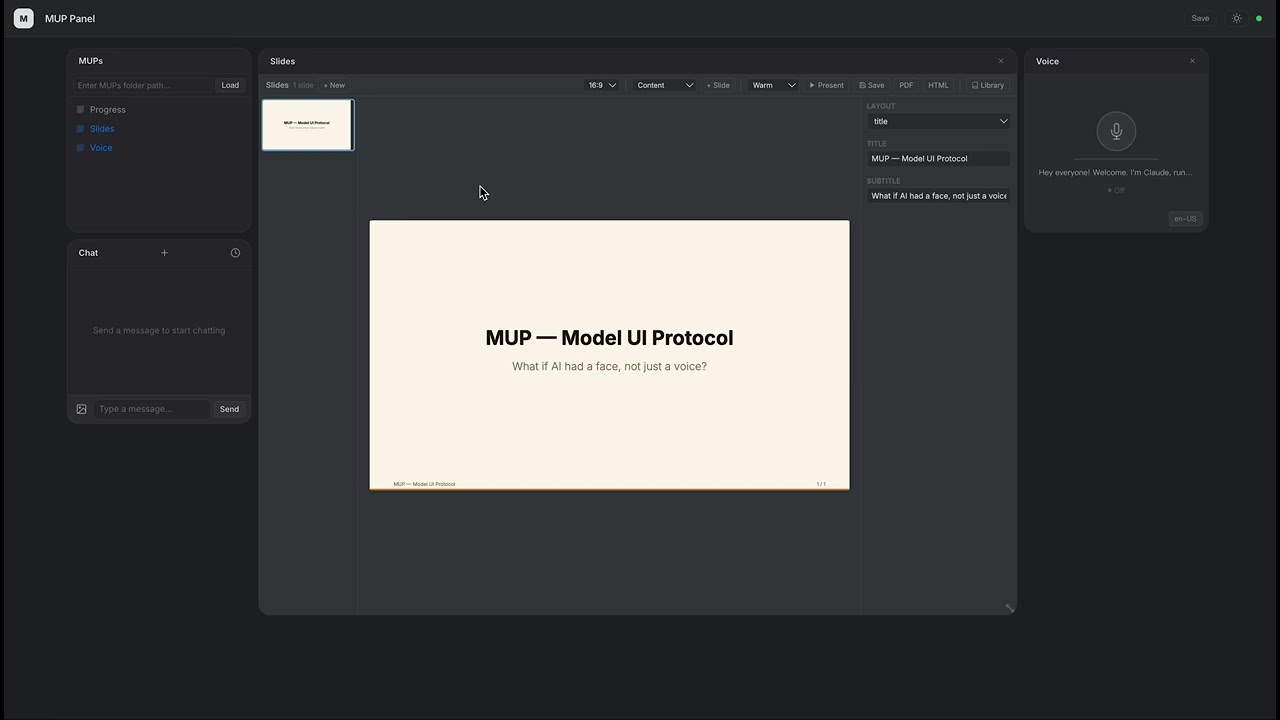
Slides β€” AI builds a presentation live

Slides Demo

Claude creates a full slide deck with charts, tables, and themes β€” all through function calls.

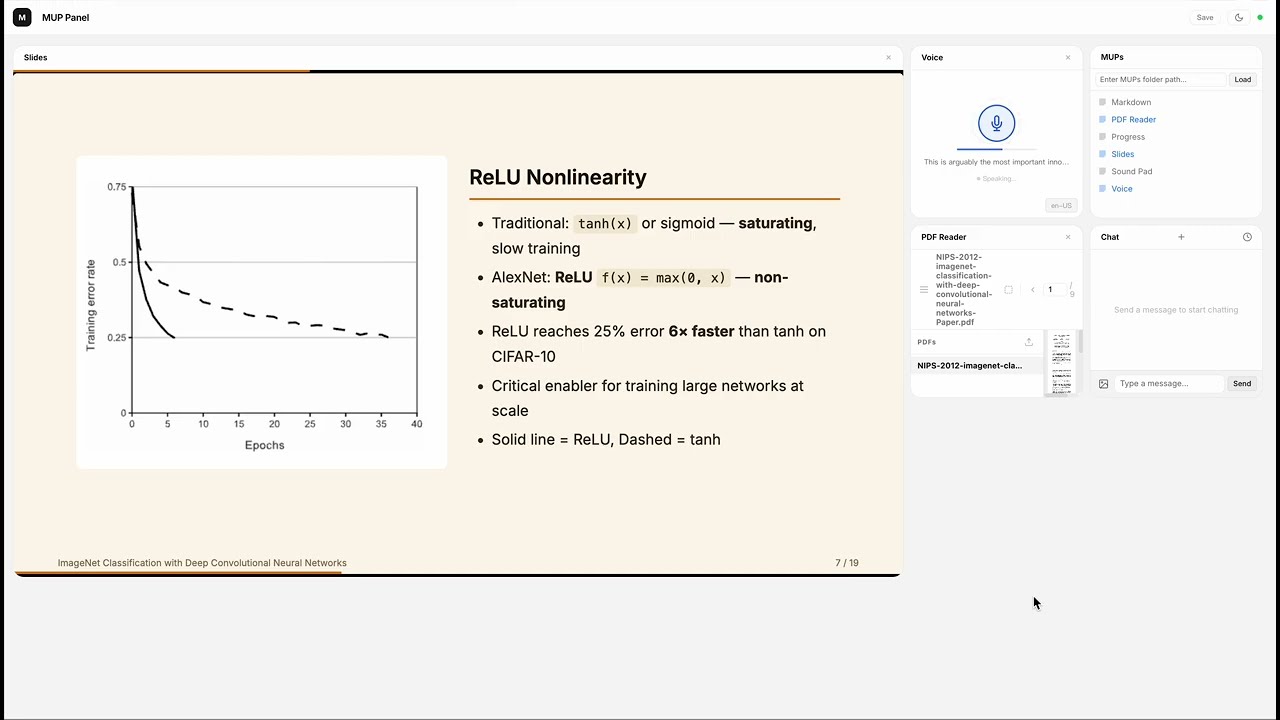
PDF to Presentation β€” AI reads a paper and presents it

PDF to Presentation Demo

Claude reads the AlexNet paper from a PDF, takes Markdown notes, captures figures with human-AI collaboration, builds a 19-slide presentation with charts and tables, then presents it slide by slide in the new in-panel reading mode β€” all narrated live.

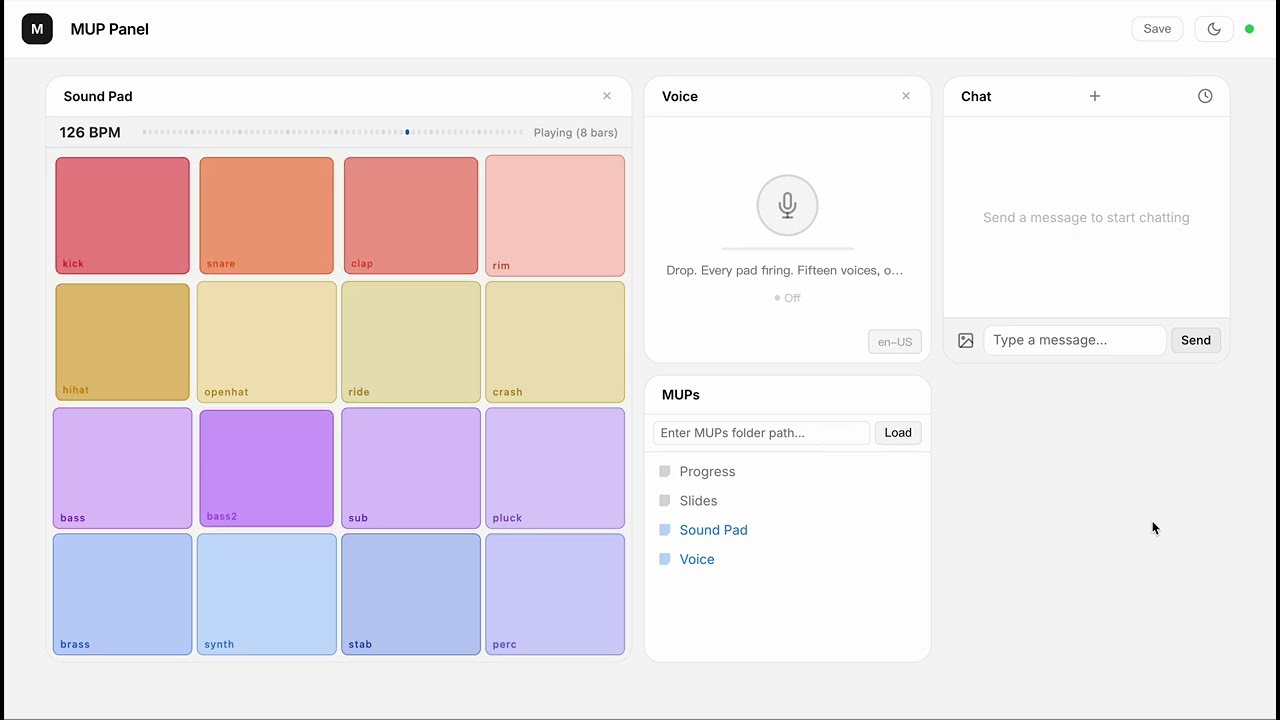
Sound Pad β€” AI composes a track from scratch

Sound Pad Demo

16 browser-synthesized instruments, zero samples. Claude composes an electro swing track layer by layer, with event-driven narration synced to each section transition.


What is MUP?

A MUP is an interactive UI component that lives inside an LLM chat interface.

It bundles a visual interface with callable functions. The user operates it by clicking buttons; the LLM operates it through function calls. Both sides see each other's actions in real time.

The simplest MUP is a single .html file β€” no build step, no framework, no SDK.

Why?

Agentic AI is powerful, but today it's trapped behind text commands and developer tools. Most people never get to experience it.

MUP changes this. It puts clickable, visual UI right inside the chat β€” so anyone can use agentic capabilities without writing a single prompt.

Traditional ChatWith MUP
User interactionType text commandsClick buttons, drag sliders, see live visuals
Tool resultsHidden from user, only the LLM sees themVisible and interactive for both sides
Who can use itPower users who know the right promptsAnyone

Key Ideas

  • Shared functions. A function can be called by the LLM (as a tool) or triggered by the user (via UI). Both sides operate on the same state through the same code.
  • LLM as orchestrator. MUPs don't talk to each other. The LLM reads outputs and decides what to do next.
  • Just HTML. Write a manifest, register your functions, done. Ship a single file.

Available MUPs

  • Chat β€” Built-in, always available
  • Slides β€” Presentation editor with charts, tables, themes, reading mode, and export (demo)
  • PDF Reader β€” PDF viewer with page text extraction and region selection/capture
  • Markdown β€” Markdown workspace with annotations and document management
  • Sound Pad β€” 16-pad synthesizer with sequencer, per-track volume, and event system (demo)
  • Chord Pad β€” Music theory keyboard with 5 synth voices, chord progressions, and melody playback
  • Diagram β€” Auto-layouted node-and-edge diagrams (flowcharts, mind maps, architectures) with multiple layout algorithms
  • Star Map β€” Location-based interactive star map with constellations, ecliptic, and Milky Way
  • Voice β€” Speech synthesis and recognition (Jarvis mode)
  • Notes β€” Sticky-note workspace with groups, styles, and export
  • Pixel Art β€” Pixel canvas with shapes, ASCII patterns, fills, and PNG export
  • Timer β€” Countdown timer / stopwatch with event-driven completion
  • Progress β€” Task progress tracking
  • More examples in archive/examples/ (games, productivity, etc.)

Focused Development

For iteratively building a single MUP with Claude (edit .html β†’ Chrome hot reloads β†’ user interacts β†’ channel pushes back to Claude β†’ repeat), see mup-mini-mcp-server β€” a scaffolding-style sibling that loads exactly one MUP and provides only the plumbing: hot reload, WebSocket bridge, and channel push. No catalog, no grid, no extras.

Docs

  • Spec β€” Protocol definition: manifest, functions, lifecycle, error handling
  • Design Philosophy β€” Why MUP is designed this way, and what we intentionally left out
  • Examples β€” Example MUPs with walkthroughs

Install

npm (recommended)

Terminal
npm install -g mup-mcp-server

Or run directly:

Terminal
npx mup-mcp-server --mups-dir ./my-mups

Also available on the MCP Server Registry.

From source

bash
git clone https://github.com/Ricky610329/mup.git
cd mup/mup-mcp-server
npm install && npm run build

Getting Started

With Claude Code (recommended)

Terminal
claude mcp add --transport stdio --scope user mup -- npx mup-mcp-server

Restart Claude Code. A browser window opens at http://localhost:3200. Use the MUPs panel to load a folder of MUP .html files, or start with the built-in Chat widget.

Real-time channel mode

MUPs can push interactions directly into Claude's conversation via channel notifications. To enable:

Terminal
claude --dangerously-load-development-channels server:mup

This lets MUPs deliver user actions to Claude in real time. Without this flag, all MUP features still work β€” interactions are just delivered via polling instead of push.

With Claude Desktop

Add to your claude_desktop_config.json:

config.json
{
  "mcpServers": {
    "mup": {
      "command": "npx",
      "args": ["mup-mcp-server"]
    }
  }
}

Quick Example

html
<script type="application/mup-manifest">
{
  "name": "Counter",
  "description": "A counter. User clicks +/-, LLM can set or read the value.",
  "functions": [
    {
      "name": "setCount",
      "description": "Set the counter to a specific value",
      "inputSchema": {
        "type": "object",
        "properties": { "value": { "type": "number" } },
        "required": ["value"]
      }
    },
    {
      "name": "getCount",
      "description": "Get the current counter value",
      "inputSchema": { "type": "object", "properties": {} }
    }
  ]
}
</script>

Drop this into a MUP-compatible host, and it works.

Architecture

Code
β”Œβ”€β”€β”€β”€β”€β”€β”€β”€β”€β”€β”€β”€β”€β”€β”€β”€β”€β”€β”€β”€β”€β”€β”€β”€β”€β”€β”€β”€β”€β”€β”€β”€β”€β”€β”€β”€β”€β”€β”€β”€β”€β”€β”
β”‚             MUP (.html file)             β”‚
β”‚        manifest + UI + functions         β”‚
β””β”€β”€β”€β”€β”€β”€β”€β”€β”€β”€β”€β”€β”€β”€β”€β”€β”€β”€β”¬β”€β”€β”€β”€β”€β”€β”€β”€β”€β”€β”€β”€β”€β”€β”€β”€β”€β”€β”€β”€β”€β”€β”€β”˜
                   β”‚ loaded by
                   β–Ό
            β”Œβ”€β”€β”€β”€β”€β”€β”€β”€β”€β”€β”€β”€β”€β”€β”
            β”‚  MCP Server  β”‚
            β”‚ (Claude Code β”‚
            β”‚  / Desktop)  β”‚
            β””β”€β”€β”€β”€β”€β”€β”¬β”€β”€β”€β”€β”€β”€β”€β”˜
                   β”‚ WebSocket
                   β–Ό
      β”Œβ”€β”€β”€β”€β”€β”€β”€β”€β”€β”€β”€β”€β”€β”€β”€β”€β”€β”€β”€β”€β”€β”€β”€β”€β”€β”€β”€β”€β”€β”
      β”‚        Browser Panel        β”‚
      β”‚  (MUP grid + Chat widget   β”‚
      β”‚   + workspace manager)     β”‚
      β””β”€β”€β”€β”€β”€β”€β”€β”€β”€β”€β”€β”€β”€β”€β”€β”€β”€β”€β”€β”€β”€β”€β”€β”€β”€β”€β”€β”€β”€β”˜

Star History

Star History Chart

License

MIT

Related MCP Servers

View all in Developer Tools View all alternatives
  • A
    Ai Netcafe

    Compare LLM cost & latency on one prompt, translate PDF keeping layout, cited research, make PPTX

    πŸ’» Developer Tools0 views
    Compare vs Ai Netcafe β†’
  • Claude Task Master logoClaude Task Master

    AI-powered task management system for AI-driven development. Features PRD parsing, task expansion, multi-provider support (Claude, OpenAI, Gemini, Perplexity, xAI), and selective tool loading for optimized context usage.

    πŸ’» Developer Tools7 views
    Compare vs Claude Task Master β†’
  • W
    Windows MCP

    An MCP Server for computer-use in Windows OS

    πŸ’» Developer Tools1 views
    Compare vs Windows MCP β†’
  • C
    Cli

    Slide decks locally: templates, checks, HTML to editable PowerPoint, .pptx rescue. No AI inside.

    πŸ’» Developer Tools0 views
    Compare vs Cli β†’

Frequently Asked Questions about Mup

Add the following block to your claude_desktop_config.json under mcpServers: "mcpServers": { "mup": { "command": "npx", "args": ["-y", "mup"] } }

AllMCPs Directory Badge

Full Badge Customizer

Showcase your server listing on GitHub or your project documentation. Embed this dynamic SVG badge to highlight official listing status and live engagement.

Badge Style:
Live Dynamic SVG PreviewMup AllMCPs Directory Badge

Markdown (GitHub README)
[![AllMCPs](https://allmcps.com/api/badge/mup?style=directory)](https://allmcps.com/mcp/mup)
HTML Embed
<a href="https://allmcps.com/mcp/mup"><img src="https://allmcps.com/api/badge/mup?style=directory" alt="Mup on AllMCPs" /></a>

Technical Specs & Signals

CategoryπŸ’»Developer Tools
More technical detailsExpand β–Ύ
TransportSTDIO
RuntimeNode.js
0/4 checks healthy over the last 6h
Views0
Unique ViewsTotal visits recorded for this listing page on AllMCPs.
Installs0
Installs & Copy ActionsTotal times users copied install commands or configuration snippets for this server.
npm downloads90,469/mo
Monthly npm DownloadsAverage monthly package installs recorded from npm registry statistics.
32Quality signal: Emerging Β· 32/100How this signal is calculated β–Ύ
Server availabilityNot measured

Not scored for repo-hosted servers β€” we can't reach the running server, only its GitHub page. Hosted MCP endpoints are health-checked live.

Verified ownership8/20
Documentation & tools11/30
Adoption & activity5/15
Community engagement0/10

A guidance signal from public completeness & health data β€” not a user rating. New listings start lower and rise as they add docs, get verified, and grow adoption. Signals we can't observe for a listing are skipped, not counted against it.

β˜… FeaturedMoxie Docs MCP logo

Moxie Docs MCP

MCP & Agent Skills for Automated Documentation, and codebase conventions + context

Explore Server β†’

Own this project?

This directory is pre-filled from public sources. Claim via GitHub README, site badge, or DNS TXT to get the verified badge and attach your website.

Free dofollow backlink: after claiming, verify your product site and place a dofollow AllMCPs badge β€” we recheck it stays live.

Claim & get free dofollow

Share & Embed

Add our SVG badge (dark/light directory styles) or embeddable widget to your site.

Explore more

More in πŸ’» Developer Tools β†’Best MCP servers for Developers β†’Alternatives to Mup β†’Install in Claude DesktopInstall in CursorInstall in VS Code