Mukoko News vs Ncp
A side-by-side look at the Mukoko News and Ncp MCP servers: transport, auth, tools, quality signals, and the config to install either one in Claude, Cursor, Windsurf or VS Code.
Verdict: choose Mukoko News for aggregators work over a hosted endpoint; choose Ncp for aggregators as a local process. You can also run both side by side in one mcpServers block.
Which MCP server should you choose?
 Choose Mukoko News when
- You need dedicated capabilities in the Aggregators domain.
- You prefer a remote HTTP/SSE transport.
- You want tools like
get_briefing, track_story, get_location_news.
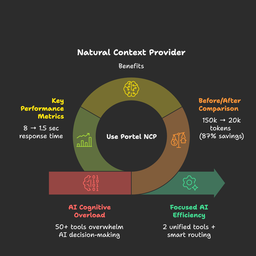 Choose Ncp when
- You need dedicated capabilities in the Aggregators domain.
- You prefer a local stdio subprocess transport.
- Its auth model fits you: No auth required.
- You want tools like
sequentialthinking.
Feature & specification comparison
Rows where the two servers differ are marked.
| Spec | ||
|---|---|---|
| Category | Aggregators | Aggregators |
| Quality signal | 59/100 · Good | 69/100 · Great |
| Install command | Confirmed | Confirmed |
| Transport | Remote HTTP/SSE | Local subprocess (stdio) |
| Auth | Not declared | No auth required |
| Pricing | Not declared | Free |
| Required env vars | None listed | None listed |
| Verified owner | Community listing | Community listing |
| GitHub stars | 2 | 100 |
| Directory activity | 3 views 0 installs 0 upvotes | 4 views 0 installs 0 upvotes |
| Tools | 16 | 1 |
| Full listing | View Mukoko News | View Ncp |
Tools & capabilities
Mukoko News tools 16
get_briefingAnswer "What's happening in [place/topic]?" — top story, recent articles, and trending topics in one call. Accepts country codes (ZW, KE), region names (East Africa, Southern Africa), category topics (politics, business), or omit focus for a pan-African overview. Returns short excerpts with word counts and app links only — call get_article with an article id to read a full article body inline.track_storyFollow the development of a news story over time. Returns articles in chronological order showing how a story evolved. Use since to control the lookback window.get_location_newsNews from a specific place in Africa. Accepts country codes, country names, region names, or city names.compare_locationsCompare news coverage between 2–4 African countries or regions side by side.get_source_viewSee how a specific news source is covering a topic.find_storiesSearch articles by keyword, tag, category, or country. Results carry short excerpts, word counts, and app links only — call get_article with a result's id to read the full article body inline.get_articleRead a single article by ID or slug. Returns the full article body inline as markdown (truncated at ~8000 characters with a link to continue in the app) plus source metadata and the Mukoko app URL. Use this after a list tool (get_briefing, find_stories, …) to read an article without leaving the conversation.list_categoriesList all news categories with article counts.list_sourcesList active news sources. Optionally filter by country code.get_statsPlatform statistics: total articles, active sources, and today's output.get_my_feedPersonalised news feed based on the authenticated user's article likes and saves. Requires Authorization: Bearer <WorkOS access token>.get_trending_analyticsOpen analytics: trending topics, categories, keywords, and sources for any location or period. Part of Mukoko's open data policy.- +4 more on the listing page
Ncp tools 1
sequentialthinkingA detailed tool for dynamic and reflective problem-solving through thoughts. This tool helps analyze problems through a flexible thinking process that can adapt and evolve. Each thought can build on, question, or revise previous insights as understanding deepens. When to use this tool: - Breaking down complex problems into steps - Planning and design with room for revision - Analysis that might need course correction - Problems where the full scope might not be clear initially - Problems that require a multi-step solution - Tasks that need to maintain context over multiple steps - Situations where irrelevant information needs to be filtered out Key features: - You can adjust total_thoughts up or down as you progress - You can question or revise previous thoughts - You can add more thoughts even after reaching what seemed like the end - You can express uncertainty and explore alternative approaches - Not every thought needs to build linearly - you can branch or backtrack - Generates a solution hypothesis - Verifies the hypothesis based on the Chain of Thought steps - Repeats the process until satisfied - Provides a correct answer Parameters explained: - thought: Your current thinking step, which can include: * Regular analytical steps * Revisions of previous thoughts * Questions about previous decisions * Realizations about needing more analysis * Changes in approach * Hypothesis generation * Hypothesis verification - nextThoughtNeeded: True if you need more thinking, even if at what seemed like the end - thoughtNumber: Current number in sequence (can go beyond initial total if needed) - totalThoughts: Current estimate of thoughts needed (can be adjusted up/down) - isRevision: A boolean indicating if this thought revises previous thinking - revisesThought: If is_revision is true, which thought number is being reconsidered - branchFromThought: If branching, which thought number is the branching point - branchId: Identifier for the current branch (if any) - needsMoreThoughts: If reaching end but realizing more thoughts needed You should: 1. Start with an initial estimate of needed thoughts, but be ready to adjust 2. Feel free to question or revise previous thoughts 3. Don't hesitate to add more thoughts if needed, even at the "end" 4. Express uncertainty when present 5. Mark thoughts that revise previous thinking or branch into new paths 6. Ignore information that is irrelevant to the current step 7. Generate a solution hypothesis when appropriate 8. Verify the hypothesis based on the Chain of Thought steps 9. Repeat the process until satisfied with the solution 10. Provide a single, ideally correct answer as the final output 11. Only set nextThoughtNeeded to false when truly done and a satisfactory answer is reached
Ready-to-paste client configs
Paste either block (or both) into your client config, e.g. claude_desktop_config.json or ~/.cursor/mcp.json. We only show a config when the install command is confirmed.
Mukoko News
{
  "mcpServers": {
    "mukoko-news": {
      "url": "https://news.mukoko.dev/mcp"
    }
  }
}
Ncp
{
  "mcpServers": {
    "portel-dev-ncp": {
      "command": "npx",
      "args": [
        "-y",
        "@portel/ncp"
      ]
    }
  }
}
Frequently asked questions
Mukoko News is categorized under Aggregators and uses a remote HTTP/SSE transport. Ncp belongs to Aggregators and uses a local stdio subprocess. Pick Mukoko News for aggregators work and Ncp for aggregators.
Copy the mcpServers block from the config section on this page into your client's config (for example claude_desktop_config.json or ~/.cursor/mcp.json), then fully restart the client.
Mukoko News has no declared pricing — check the project's own site. Ncp is listed as free. Auth: no auth required. If a server needs environment variables such as API keys, define them under the env key in your client's MCP config.
Yes. MCP clients support multiple servers: add mukoko-news and portel-dev-ncp as separate keys in the same mcpServers object, and your assistant will call tools from either one.
On AllMCPs, Mukoko News has a quality signal of 59/100 (Good) with 3 views, 0 installs and 2 GitHub stars. Ncp has 69/100 (Great) with 4 views, 0 installs and 100 GitHub stars.