Mq Bridge App README
The full upstream README, mirrored here for reference. Install config, tool schemas, adoption signals, and an original overview live on the Mq Bridge App listing page.
mq-bridge-app
This repository has moved
mq-bridge-appnow lives inside themq-bridgerepository, alongside the engine it runs on:
Source mq-bridge/apps/mq-bridge-appDocumentation https://marcomq.github.io/mq-bridge/ Issues & releases https://github.com/marcomq/mq-bridge Nothing about installing or running the app changed. The crate is still
mq-bridge-app, the binaries are stillmq-bridge-appandmqb, the Docker image is stillghcr.io/marcomq/mq-bridge-app, the Homebrew formula and cask keep their names, and the MCP server is stillio.github.marcomq/mq-bridge-app. Only the source location moved.This repository is kept read-only for its history, issues, and past releases. Anything from v0.4.9 onward is released from
mq-bridge.






crossing streams
mq-bridge-app is a fast, single-command ETL and data-movement tool built in Rust — and, on top of the same engine, a multi-protocol bridge and traffic workbench for messaging.
It ships in three forms that share one engine and one config format: a desktop app (visual workbench), a CLI / server (headless bridge and one-line copy), and a library (embed the engine in Rust, Python, or Node.js). Design a route once, run it anywhere — no rewrite in between.
Supported integration types include Kafka, RabbitMQ (AMQP), NATS, AWS SQS, MQTT, IBM MQ (optional), HTTP, gRPC, ZeroMQ, MongoDB, sqlx (MySQL, MariaDB, PostgreSQL), and filesystem endpoints.
📖 All documentation lives in the documentation book — installation, quick start, tutorials, cookbook, connector reference, CLI, MCP, and performance tuning. This README is only a short overview; the book is the single source of truth.
A quick taste
At its core is a zero-config copy command that moves data between databases, queues, and files in a single line of bash — no YAML, no pipeline definition, no code:
The scheme selects the endpoint and query parameters configure it, so any source→sink pair (Postgres, MySQL, MariaDB, SQLite, NATS, Redis, MongoDB, files, …) is just one URL each. And it's quick.
Use --resume when the source has a safe native position (for example a Kafka
consumer group, MongoDB change-stream cursor, Postgres CDC slot, or an explicitly
configured SQL cursor). The legacy --from ... --to ... spelling remains supported.
→ Quick start · Connectors · Performance tuning
The three ways to run it
Test connections and dial in a route in the Postman-inspired UI, export the JSON/YAML, then run that config as a service or from library code. One engine, one config format.
| Form | What it is | Quick install |
|---|---|---|
| Desktop app (UI) | The visual workbench — build/test routes, run request/response traffic, inspect message history | brew install --cask marcomq/tap/mq-bridge |
| CLI / server | Headless binary: a one-line copy, a drain-then-exit batch job, or a long-lived bridge (can also serve the same UI in a browser) | brew install marcomq/tap/mq-bridge-app |
| Library | The engine embedded in your own code — native Rust, Python, or Node.js bindings | cargo add / pip / npm |
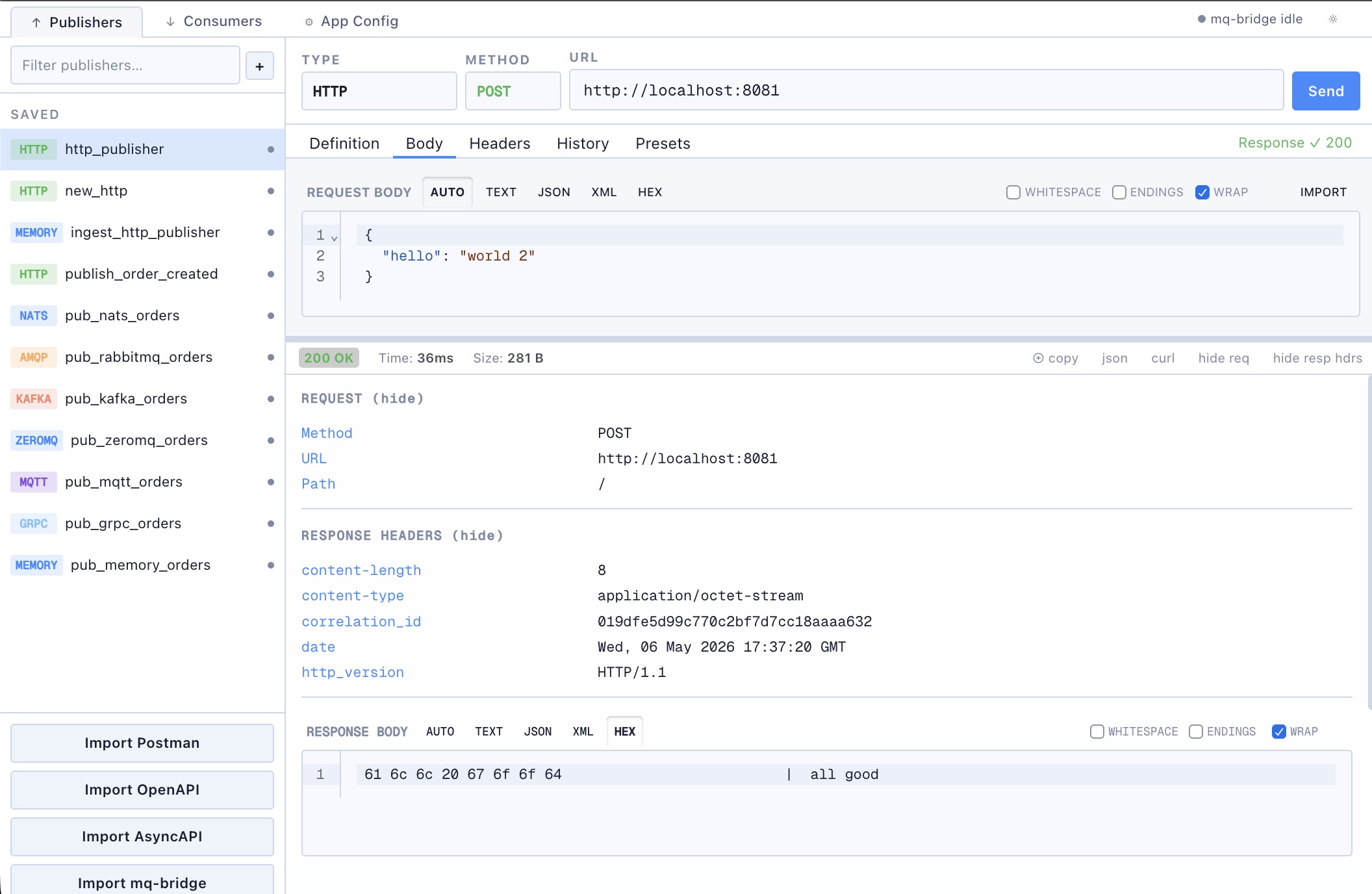
Learn each form in the book: the three ways to run it · the desktop / web UI · CLI commands · MCP server · library bindings.
Install
brew is the quickest path on macOS and Linux:
On Windows, install the CLI with cargo binstall mq-bridge-app, or download the desktop installer / CLI from the Releases page. Also available via cargo install mq-bridge-app (from source) and the Docker image ghcr.io/marcomq/mq-bridge-app:latest.
→ Every install method and platform (including the IBM MQ build and Docker) is in the Install guide; to compile from source see Building.
Use it from an AI agent
The same binary is an MCP server, so an agent can move data without the rows passing through its context:
- MCP Registry name:
mcp-name: io.github.marcomq/mq-bridge-app
→ Tools, transports, and the token-cost measurement: MCP server.
Features
- Multi-protocol bridging — Kafka, IBM MQ, NATS, AMQP (RabbitMQ), MQTT, AWS SQS, gRPC, ZeroMQ, MongoDB, sqlx (MySQL/MariaDB/PostgreSQL), HTTP, and files. Act as an HTTP server and client, with full request-response support.
- Middleware chains — retries, dead-letter queues, deduplication, rate limiting, buffering, transforms, weak-join correlation, and more, wrapping any endpoint.
- Built-in web UI — Svelte-based management for publishers, consumers, routes, runtime status, presets, and imports; the same UI the CLI serves in a browser.
- Native plugins — load an endpoint or middleware this binary never compiled (Pulsar, an in-house transport) from a shared library, via
plugins:in the config or--plugin <path>, and use it by name in routes. No special build needed; plugin paths are read only at startup, so adding one means editing the trusted startup configuration and restarting: Native plugins. - Observability — structured JSON logging and a Prometheus metrics endpoint.
- Flexible configuration — hierarchical files (YAML/JSON/TOML) plus environment variables, suited to Container/Kubernetes.
- Security & storage — config security modes (plain / extracted secrets / encrypted config / persistent encrypted history), encryption at rest, and local-first operation.
- High performance — Rust + Tokio: low latency, high concurrency, small memory footprint.
Why not just an API client?
mq-bridge-app's UI overlaps with API clients like Postman, Bruno, Insomnia, and Hoppscotch, but its center of gravity is different: message bridging, runtime operation, and long-lived route management rather than just request composition. Exact feature sets vary by product and edition; this captures the difference in emphasis.
| Capability | mq-bridge | Postman | Bruno | Insomnia | Hoppscotch |
|---|---|---|---|---|---|
| Basic HTTP/API requests | ✓ | ✓ | ✓ | ✓ | ✓ |
| Scripting | — | ✓ | ✓ | ✓ | ✓ |
| Cookie jar | Not yet | ✓ | ✓ | ✓ | ~ |
| Multipart forms | — | ✓ | ✓ | ✓ | ✓ |
| Hex-level payload debugging | ✓ | — | — | — | — |
| Broker pub/sub workflow | ✓ | MQTT | — | — | MQTT |
| Long-lived consumers/routes | ✓ | — | — | — | — |
| Bridge traffic between protocols | ✓ | — | — | — | — |
| Replay messages | ✓ | ~ | — | — | ~ |
| Local-first workspace | ✓ | ~ | ✓ | ✓ | ~ |
| Git-friendly config | ✓ | ~ | ✓ | ✓ | ~ |
| Cloud sync by default | — | ✓ | — | Optional | Optional |
| AI / agent features | — | ✓ | — | ~ | ~ |
| Encrypted config | ✓ | ~ | ~ | ~ | ~ |
Use Postman/Bruno when your main job is crafting and sharing API requests; use mq-bridge-app when you need to connect systems, move messages between protocols, inspect live traffic, and manage bridge-style runtime configuration.
Performance
A CSV → JSONL conversion hit 1,133,786 rows/s; the same job through an MCP tool call ran at 1,176,489 rows/s while costing an agent a flat ~381 tokens regardless of row count, because the rows never enter the model's context.
On a Kafka → file relay using mq-bridge-app's default file format and no transform, the same engine was up to 65% faster than Sea Streamer; the native file-format caveats are detailed in the linked benchmark documentation.
→ Full numbers, methodology, and knobs: Performance tuning and benches/etl/README.md.
Test on nats / kafka / postgres ....
For testing, docker-compose files are available for supported backends:
How it's built
mq-bridge-app uses the mq-bridge engine on itself — the management UI is served through the engine's own HTTP-request/response routing, and the UI form is generated from the Rust config schema (no hand-written form code). See How the app is built.
Status
Active development. Originally the reference implementation and testbed for the mq-bridge engine. The UI/Tauri layer is a working demo rather than a reference implementation — test before relying on it in production.
License
MIT — see LICENSE.