Find academic papers across major sources like arXiv, PubMed, bioRxiv, and more. Download PDFs whe…
Quick Install
Automated & IDE SetupCopy the AI prompt to install this server into Claude Code, Cursor, or another agent — or use 1-click editor setup below.
One-click editor setup isn’t available for this listing yet — we don’t have a confirmed install command, and we’d rather show nothing than point your editor at the wrong package or host. Follow the project’s own setup instructions, linked above.
Manual Client & Custom JSON ConfigExpand JSON ▾
No confirmed setup config for this listing yet. We only publish a config block when the install details come from the project itself — its README, its docs, or a verified owner. We haven’t found those for morosss-sdfsdf, and we’d rather show nothing than a guess you’d paste into your client. Follow the project’s own setup instructions for the current steps.
Documentation Overview
Paper Search MCP
A Model Context Protocol (MCP) server for searching and downloading academic papers from multiple sources, including arXiv, PubMed, bioRxiv, and Sci-Hub (optional). Designed for seamless integration with large language models like Claude Desktop.


Table of Contents
Overview
paper-search-mcp is a Python-based MCP server that enables users to search and download academic papers from various platforms. It provides tools for searching papers (e.g., search_arxiv) and downloading PDFs (e.g., download_arxiv), making it ideal for researchers and AI-driven workflows. Built with the MCP Python SDK, it integrates seamlessly with LLM clients like Claude Desktop.
Features
- Multi-Source Support: Search and download papers from arXiv, PubMed, bioRxiv, medRxiv, Google Scholar, IACR ePrint Archive, Semantic Scholar.
- Standardized Output: Papers are returned in a consistent dictionary format via the
Paperclass. - Asynchronous Tools: Efficiently handles network requests using
httpx. - MCP Integration: Compatible with MCP clients for LLM context enhancement.
- Extensible Design: Easily add new academic platforms by extending the
academic_platformsmodule.
Installation
paper-search-mcp can be installed using uv or pip. Below are two approaches: a quick start for immediate use and a detailed setup for development.
Installing via Smithery
To install paper-search-mcp for Claude Desktop automatically via Smithery:
Quick Start
For users who want to quickly run the server:
-
Install Package:
-
Configure Claude Desktop: Add this configuration to
~/Library/Application Support/Claude/claude_desktop_config.json(Mac) or%APPDATA%\Claude\claude_desktop_config.json(Windows):Note: Replace
/path/to/your/paper-search-mcpwith your actual installation path.
For Development
For developers who want to modify the code or contribute:
-
Setup Environment:
-
Install Dependencies:
Contributing
We welcome contributions! Here's how to get started:
-
Fork the Repository: Click "Fork" on GitHub.
-
Clone and Set Up:
-
Make Changes:
- Add new platforms in
academic_platforms/. - Update tests in
tests/.
- Add new platforms in
-
Submit a Pull Request: Push changes and create a PR on GitHub.
Demo
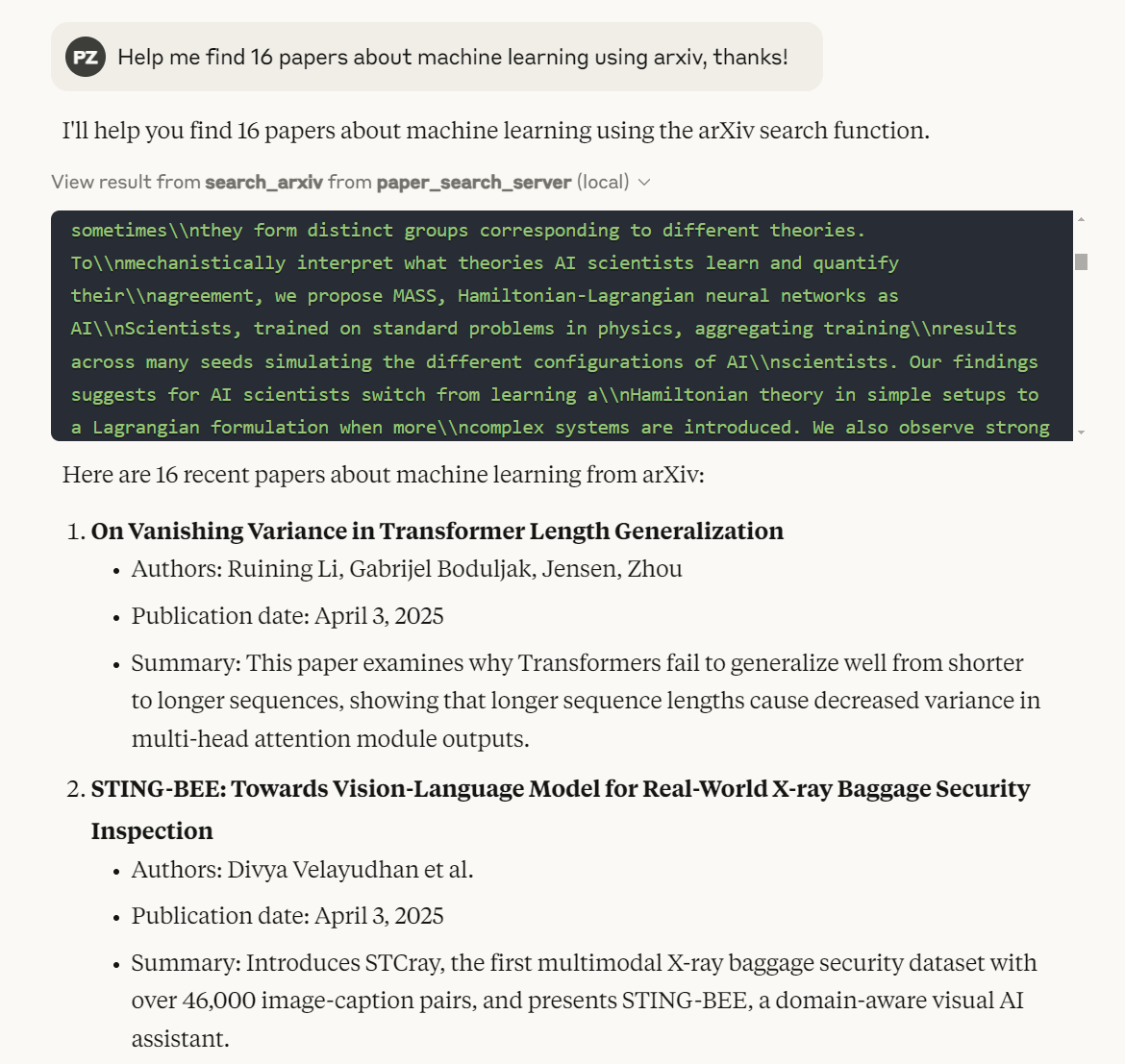
TODO
Planned Academic Platforms
- [√] arXiv
- [√] PubMed
- [√] bioRxiv
- [√] medRxiv
- [√] Google Scholar
- [√] IACR ePrint Archive
- [√] Semantic Scholar
- PubMed Central (PMC)
- Science Direct
- Springer Link
- IEEE Xplore
- ACM Digital Library
- Web of Science
- Scopus
- JSTOR
- ResearchGate
- CORE
- Microsoft Academic
License
This project is licensed under the MIT License. See the LICENSE file for details.
Happy researching with paper-search-mcp! If you encounter issues, open a GitHub issue.
Related MCP Servers
Adoption & maintenance
Factual signals from GitHub, npm, and our automated checks — not a rating.
Last commit
1y ago
Most recent push to the default branch.
Directory activity
1 views
Config copies, upvotes, and views on AllMCPs.
Reviews
No reviews yet — be the first to share how this listing worked for you.
Frequently Asked Questions about Morosss Sdfsdf
AllMCPs Directory Badge
Showcase your server listing on GitHub or your project documentation. Embed this dynamic SVG badge to highlight official listing status and live engagement.
Badge Style:
Live Dynamic SVG Preview
Markdown (GitHub README)
[](https://allmcps.com/mcp/morosss-sdfsdf)HTML Embed
<a href="https://allmcps.com/mcp/morosss-sdfsdf"><img src="https://allmcps.com/api/badge/morosss-sdfsdf?style=directory" alt="Morosss Sdfsdf on AllMCPs" /></a>