MCP server exposing the MITRE ATT&CK framework via the official MCP Python SDK.
Quick Install
Automated & IDE SetupCopy the AI prompt to install this server into Claude Code, Cursor, or another agent — or use 1-click editor setup below.
Not yet automatically verified
We haven't yet run this listing's install command through our automated sandbox check. This isn't a red flag — we're steadily working through the catalog.
Manual Client & Custom JSON ConfigExpand JSON ▾
Client Config & Setup
Choose your client or environment
Target File:
💡 Paste the JSON block into your client's configuration file under mcpServers, then restart the application.
Documentation Overview
mitre-mcp: MITRE ATT&CK MCP Server



Production-ready Model Context Protocol (MCP) server that exposes the MITRE ATT&CK® framework to LLMs, AI assistants, and automation workflows. Built with the official MCP Python SDK and mitreattack-python library for secure, high-performance access to adversary tactics, techniques, groups, software, and mitigations.
Available in the MCP Registry (search for io.github.luongnv89/mitre-mcp).
Highlights
- LLM-native experience – Seamless integration with Claude, Windsurf, Cursor, and any MCP-compatible client
- Secure-by-default – Validated inputs, TLS verification, disk-space checks, and structured error handling
- High performance – O(1) technique lookups using pre-built indices (80-95% faster than scanning)
- Flexible deployment – stdio for local clients or HTTP server for web-based integrations
Table of Contents
- Features
- Available MCP Tools
- Quick Start
- Web Frontend
- Documentation
- Configuration
- Performance
- Programmatic API
- Development
- Troubleshooting
- FAQ
- License
Features
- Comprehensive MITRE ATT&CK Coverage - All techniques, tactics, groups, software, and mitigations
- Multi-Domain Support - Enterprise, Mobile, and ICS ATT&CK domains
- Intelligent Caching - Automatic caching with configurable expiry (default: 24 hours)
- Performance Optimized - O(1) lookups using pre-built indices (80-95% faster)
- Dual Transport Modes - stdio for local clients, HTTP for web integrations
- CORS-Enabled HTTP Server - Async notifications and cross-origin request support
- Comprehensive Testing - 114 tests with 66% code coverage
- Pre-commit Quality Checks - Automated formatting, linting, type checking, and security scanning
- Input Validation - Secure-by-default with validated inputs and sanitized responses
- Programmatic API - Python and Node.js clients (see API-INTEGRATION.md)
Available MCP Tools
| Tool Name | Description |
|---|---|
get_techniques | List all techniques with filtering options |
get_technique_by_id | Look up specific technique by ID (e.g., T1055) |
get_techniques_by_tactic | Get techniques for a specific tactic (e.g., persistence) |
get_tactics | List all tactical categories |
get_groups | List all threat actor groups |
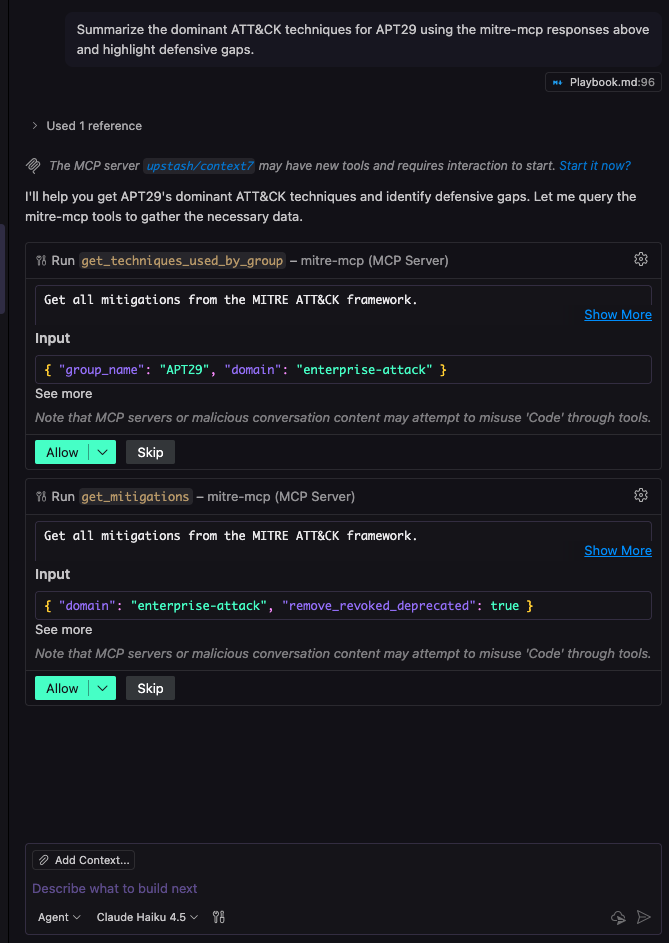
get_techniques_used_by_group | Get techniques used by a specific group (e.g., APT29) |
get_software | List malware and tools with filtering |
get_mitigations | List all security mitigations |
get_techniques_mitigated_by_mitigation | Get techniques addressed by a specific mitigation |
Quick Start
Installation
- Create and activate a virtual environment:
- Install from PyPI:
- Verify installation:
HTTP Mode (Recommended)
Start the server:
Expected output:
Configure your MCP client:
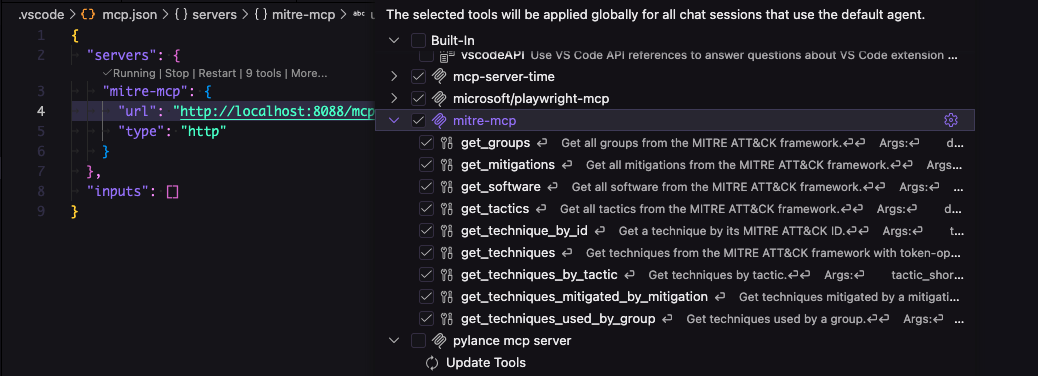
Add this JSON to your client's configuration file:
Configuration file locations:
- macOS (Claude Desktop):
~/Library/Application Support/Claude/claude_desktop_config.json - Windows (Claude Desktop):
%APPDATA%\Claude\claude_desktop_config.json - Linux (Claude Desktop):
~/.config/Claude/claude_desktop_config.json - VSCode: Configure in your MCP extension settings
Custom host and port:
Then use http://your-server-ip:8080/mcp in your client configuration.
Why HTTP mode?
- Multiple clients can connect simultaneously
- Better concurrency and async support
- Easier debugging with HTTP tools
- CORS support for web-based clients
- No path configuration needed
stdio Mode (Alternative)
For local-only clients that require stdio transport:
Client configuration:
Note: Use absolute paths. HTTP mode is recommended for most use cases.
Force Data Download
Force a fresh download of MITRE ATT&CK data:
Example Screenshots
VSCode Configuration:
Tool Invocation:
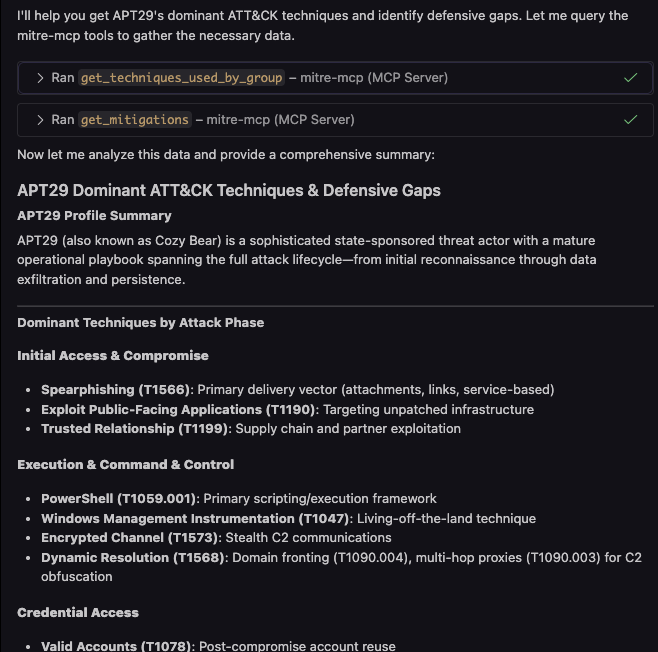
Results:
Web Frontend
A modern React-based web interface is available in the frontend/ directory for interactive exploration of MITRE ATT&CK through a chat interface.
Features:
- Clean, minimal design with black/white/gray aesthetic
- Interactive chatbox powered by LangGraphJS
- Pre-built scenario playbooks for common security workflows
- Real-time query processing with the MCP server
Quick Start:
Then open http://localhost:5173 in your browser.
Prerequisites:
- Node.js 18+ installed
- MCP server running:
mitre-mcp --http --port 8000
For more details, see the frontend/README.md documentation.
Documentation
We provide three comprehensive guides tailored to different use cases:
1. Beginner's Guide
Beginner-Playbook.md - For those new to MITRE ATT&CK or cybersecurity
Ideal for:
- Non-technical users
- Security awareness training
- Basic threat intelligence
- General cybersecurity education
2. Advanced Playbook
Playbook.md - For security professionals using MCP clients
Ideal for:
- Security analysts
- Threat hunters
- Incident responders
- Security engineers
Includes 10 ready-to-use scenarios:
- Threat Intelligence
- Detection Engineering
- Threat Hunting
- Red Teaming
- Security Assessment
- Incident Response
- Security Operations
- Security Training
- Vendor Evaluation
- Risk Management
3. API Integration Guide
API-INTEGRATION.md - For developers building automation and custom integrations
Ideal for:
- Backend developers
- Automation engineers
- Data pipeline developers
- Custom tooling projects
Includes:
- Complete Python and Node.js client implementations
- Protocol requirements and examples
- Testing and debugging tools
- Common integration patterns
Configuration
Environment Variables
Set before starting mitre-mcp to customize behavior:
Related MCP Servers
Reviews
No reviews yet — be the first to share how this listing worked for you.
Frequently Asked Questions about MITRE ATT&CK
AllMCPs Directory Badge
Showcase your server listing on GitHub or your project documentation. Embed this dynamic SVG badge to highlight official listing status and live engagement.
Badge Style:
Live Dynamic SVG Preview
Markdown (GitHub README)
[](https://allmcps.com/mcp/mitre-att-ck)HTML Embed
<a href="https://allmcps.com/mcp/mitre-att-ck"><img src="https://allmcps.com/api/badge/mitre-att-ck?style=directory" alt="MITRE ATT&CK on AllMCPs" /></a>Technical Specs & Signals
CategoryDeveloper Tools
37Quality signal: Fair · 37/100How this signal is calculated ▾
Server availabilityNot measured
Not scored for repo-hosted servers — we can't reach the running server, only its GitHub page. Hosted MCP endpoints are health-checked live.
Verified ownership10/20
Documentation & tools15/30
Adoption & activity3/15
Community engagement0/10
A guidance signal from public completeness & health data — not a user rating. New listings start lower and rise as they add docs, get verified, and grow adoption. Signals we can't observe for a listing are skipped, not counted against it.
Own this project?
This directory is pre-filled from public sources. Claim via GitHub README, site badge, or DNS TXT to unlock edit access and the Official badge — proof is checked automatically, then reviewed by our team.
Free dofollow backlink: add your website and place the AllMCPs badge on it — no claim needed. We detect it automatically and keep it verified as long as the badge stays live.
Claim & get free dofollowShare & Embed
Add our SVG badge (dark/light directory styles) or embeddable widget to your site.