Official Microsoft MCP Server to query Microsoft Entra data using natural language
Quick Install
Automated & IDE SetupCopy the AI prompt to install this server into Claude Code, Cursor, or another agent — or use 1-click editor setup below.
Manual Client & Custom JSON ConfigExpand JSON ▾
Client Config & Setup
Remote HTTPChoose your client or environment
Target File:
💡 Paste the JSON block into your client's configuration file under mcpServers, then restart the application.
Documentation Overview
 Microsoft MCP Server for Enterprise
⚠️ If Visual Studio Code displays the error
Error getting token from server metadata: Error: Cannot force new registration for a non-dynamic authentication provider., change"microsoft-authentication.implementation"from"msal"to"msal-no-broker"in your Settings.
Overview
Built on the open Model Context Protocol, the public preview of Microsoft MCP Server for Enterprise lets AI agents access Microsoft Entra data by converting natural language queries into Microsoft Graph API calls. Developers and IT administrators use it to query Microsoft Entra data from their AI-powered workflows.
Full Documentation: Overview of Microsoft MCP Server for Enterprise
MCP Server Provisioning (execute once per tenant)
To set up the MCP Server for your tenant:
-
Provision the MCP Server. In Graph Explorer, send:
POST https://graph.microsoft.com/v1.0/servicePrincipals
Body: { "appId": "e8c77dc2-69b3-43f4-bc51-3213c9d915b4" } -
Register a new app, representing the MCP Client.
Set the appropriate Redirect URI (also called Reply URL) depending on the client. For example:
Claude Desktop needshttps://claude.ai/api/mcp/auth_callback,
ChatGPT generates a different one for each client using the format:https://chatgpt.com/connector/oauth/<random_chars>,
Microsoft Foundry generates a different Redirect URI for each connector using the format:https://<random_chars>.<region>.azurecontainerapps.io/rest/oauth2-credential/callbackRedirect URI type matters in Microsoft Entra. If you add the URI under Web, Entra treats the app as a confidential client. Use that for apps that run on a server and can protect credentials (like Copilot Studio). At sign-in, Entra expects that app to authenticate with a
client_secretor a certificate-basedclient_assertion.
If you add the URI under Mobile and desktop applications or another public-client platform, Entra treats the app as a public client. Use that for desktop, CLI, or device apps that cannot keep a secret (like ChatGPT or Claude). These apps usually use the authorization code flow with PKCE instead of a client secret. -
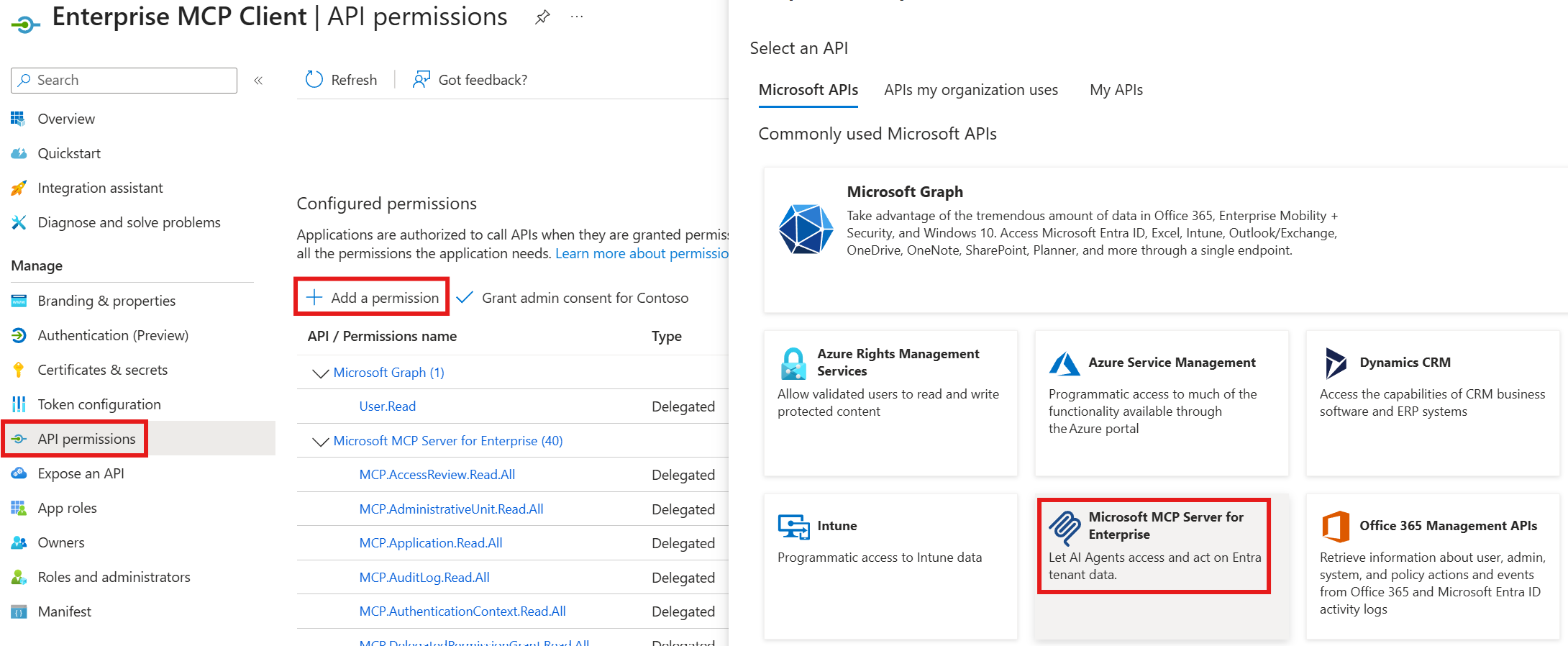
Associate the MCP permissions (
MCP.<Microsoft_Graph_Scope>) between the MCP Server and the MCP Client
Info Table
| Property | Value | Notes |
|---|---|---|
| MCP Endpoint | https://mcp.svc.cloud.microsoft/enterprise | Configure in your agent or mcp.json |
| MCP Server App Id | e8c77dc2-69b3-43f4-bc51-3213c9d915b4 | Used for provisioning and telemetry |
| MCP Client App Id | < The one you registered in your tenant > | Required to configure your agent |
| Token URL | https://login.microsoftonline.com/organizations/oauth2/v2.0/token | Required in some agents config |
| Token endpoint auth method | client_secret_post | Required in some agents config |
| Auth URL | https://login.microsoftonline.com/organizations/oauth2/v2.0/authorize | Required in some agents config |
| Refresh URL | https://login.microsoftonline.com/organizations/oauth2/v2.0/token | Required in some agents config |
| Scopes | api://e8c77dc2-69b3-43f4-bc51-3213c9d915b4/.default | Required in some agents config |
Tools
This MCP Server uses Retrieval-Augmented Generation (RAG) and few-shot prompting to generate complete Microsoft Graph queries rather than exposing a separate tool per Graph operation.
It exposes three tools:
microsoft_graph_suggest_queries: Finds relevant Microsoft Graph API calls based on user intent.microsoft_graph_get: Executes read-only Microsoft Graph API calls, respecting User roles and MCP Client scopes.microsoft_graph_list_properties: Retrieves properties of specific Microsoft Graph entities to help the AI model
Current scope and capabilities
For Public Preview, we support read-only enterprise IT scenarios in Microsoft Entra identity and directory operations (user, group, application, device management, and administrative actions).
The MCP Server handles queries such as:
- Security posture: authentication methods/strengths, Conditional Access, Security Defaults.
- Privileged access: Who has which directory roles, how assigned (direct vs group), and PIM status.
- Application risk: Which Apps / Service Principals exist, who owns them, what permissions/SSO they use, and which are ownerless or external.
- Access governance: Who has access to what (users, groups, packages); review decisions, automate joiner/mover/leaver.
- Device readiness: Managed/compliant status, join state, OS/version distribution, and stale or inactive devices.
- Provenance and investigation: End‑to‑end telemetry (sign‑in, audit, provisioning, network), health alerts, and SLA/availability.
- Optimize spending & hygiene: License counts/usage, unused or stale apps/groups, domain configuration and contacts.
Supported Clients and Configurations
The Microsoft MCP Server for Enterprise works with any MCP-compatible client that supports the latest standard.
⚠️ Notes:
- Dynamic Client Registration (DCR) is not supported, but we are working to support OAuth Client ID Metadata Documents (CIMD) in a future release.
- ChatGPT, Claude, and other 3P Agents require a custom client Id: register your own MCP Client application in your tenant, assign the required MCP.* scopes, and configure the redirect URIs accordingly.
Microsoft Agent Platforms
Third Party MCP clients
These clients require a custom MCP Client application registered in your tenant. See Authorization and permissions to grant the required MCP.* scopes to your app.
ChatGPT
Go to Settings, Apps, Create App, and fill the dialog:
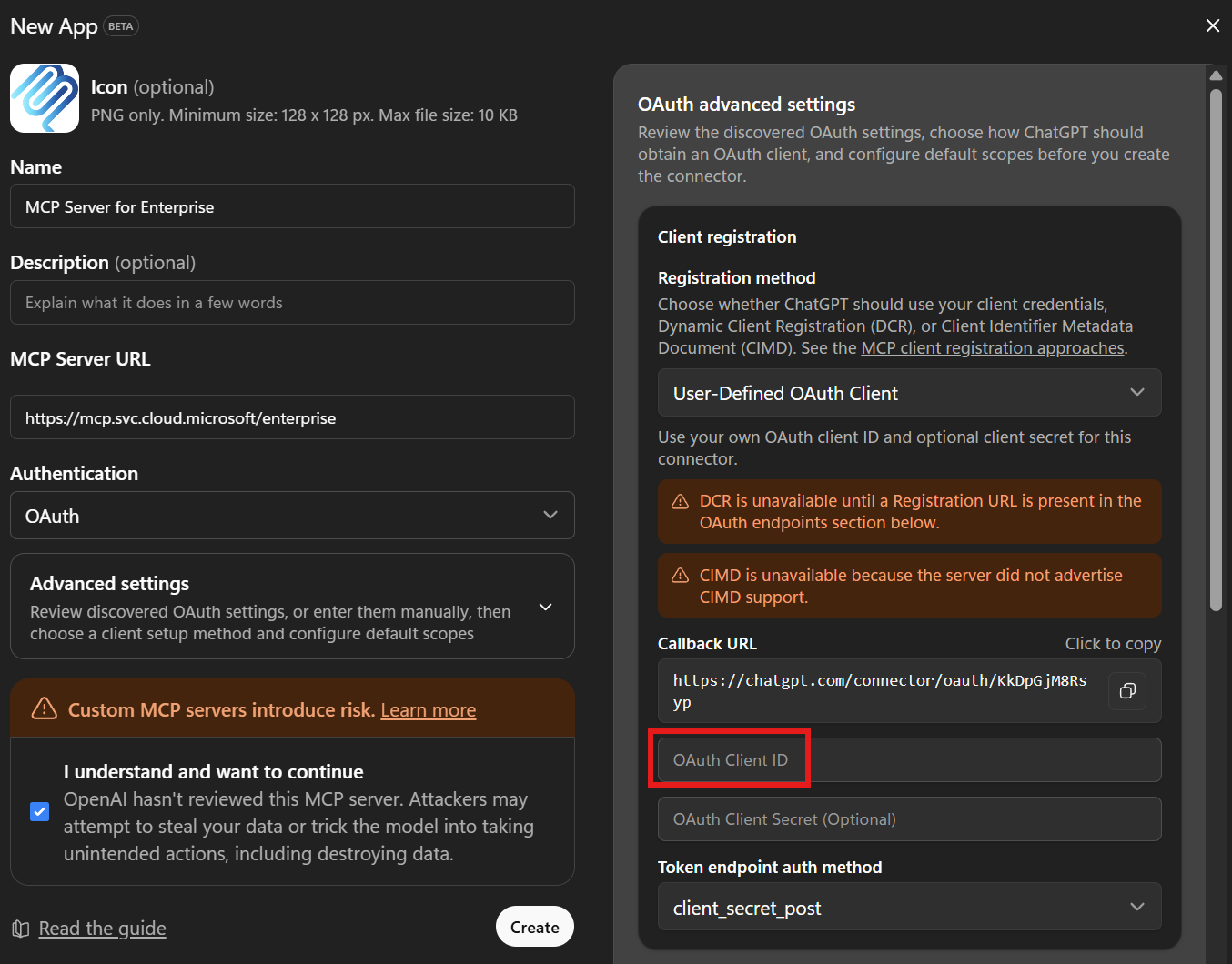
Put the App ID of the Registered app in the red box.
Claude
Go to Customize, Connectors, click "+", Add Custom Connector, and fill the dialog:
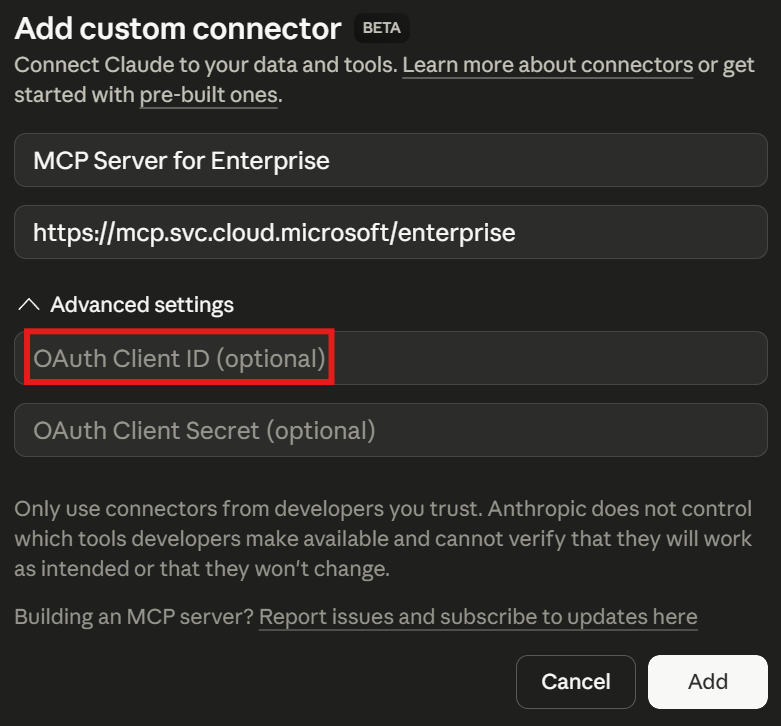
Put the App ID of the Registered app in the red box.
Visual Studio Code and GitHub Copilot CLI
Visual Studio Code and GitHub Copilot CLI share the same Visual Studio Code MCP Client app Id, so they use the same setup.
GitHub Copilot CLI can also use a custom client Id (see Option 2).
Prerequisites
These steps provision the Visual Studio Code MCP Client application in your tenant and grant it the MCP permissions.
They're required for Visual Studio Code and for GitHub Copilot CLI when it uses the default application Id (Option 1 below). Skip them if you're configuring GitHub Copilot CLI with a custom oauthClientId instead (Option 2 below).
-
Install Microsoft.Entra.Beta PowerShell module (version 1.0.13 or later, requires PowerShell 7):
-
Connect Microsoft Entra ID to your tenant:
-
Grant all MCP permissions to the Visual Studio Code MCP Client app (also used by GitHub Copilot CLI when configured with the default application Id):
Learn more about Grant-EntraBetaMCPServerPermission. For detailed installation help, see the installation instructions.
If the Microsoft Graph PowerShell SDK modules conflict with Microsoft.Entra.Beta, run the following and retry from step 1:
Visual Studio Code
Related MCP Servers
Reviews
No reviews yet — be the first to share how this listing worked for you.
Frequently Asked Questions about Microsoft MCP Server for Enterprise
AllMCPs Directory Badge
Showcase your server listing on GitHub or your project documentation. Embed this dynamic SVG badge to highlight official listing status and live engagement.
Badge Style:
Live Dynamic SVG Preview
Markdown (GitHub README)
[](https://allmcps.com/mcp/microsoft-mcp-server-for-enterprise)HTML Embed
<a href="https://allmcps.com/mcp/microsoft-mcp-server-for-enterprise"><img src="https://allmcps.com/api/badge/microsoft-mcp-server-for-enterprise?style=directory" alt="Microsoft MCP Server for Enterprise on AllMCPs" /></a>Technical Specs & Signals
CategoryDeveloper Tools
40Quality signal: Fair · 40/100How this signal is calculated ▾
Server availabilityNot measured
Not scored for repo-hosted servers — we can't reach the running server, only its GitHub page. Hosted MCP endpoints are health-checked live.
Verified ownership10/20
Documentation & tools16/30
Adoption & activity4/15
Community engagement0/10
A guidance signal from public completeness & health data — not a user rating. New listings start lower and rise as they add docs, get verified, and grow adoption. Signals we can't observe for a listing are skipped, not counted against it.
Own this project?
This directory is pre-filled from public sources. Claim via GitHub README, site badge, or DNS TXT to unlock edit access and the Official badge — proof is checked automatically, then reviewed by our team.
Free dofollow backlink: add your website and place the AllMCPs badge on it — no claim needed. We detect it automatically and keep it verified as long as the badge stays live.
Claim & get free dofollowShare & Embed
Add our SVG badge (dark/light directory styles) or embeddable widget to your site.