Create immersive travel experiences by instructing an avatar to navigate Google Maps. Report on th…
Quick Install
Automated & IDE SetupCopy the AI prompt to install this server into Claude Code, Cursor, or another agent — or use 1-click editor setup below.
Not yet automatically verified
We haven't yet run this listing's install command through our automated sandbox check. This isn't a red flag — we're steadily working through the catalog.
Manual Client & Custom JSON ConfigExpand JSON ▾
Client Config & Setup
Choose your client or environment
Target File:
💡 Paste the JSON block into your client's configuration file under mcpServers, then restart the application.
Documentation Overview
Virtual Traveling bot environment for MCP
We are currently developing a next-generation traveling bot system. It will take some time to complete, but in the meantime, please enjoy using this MCP server, which operates in MCP v1 mode.
English / Japanese
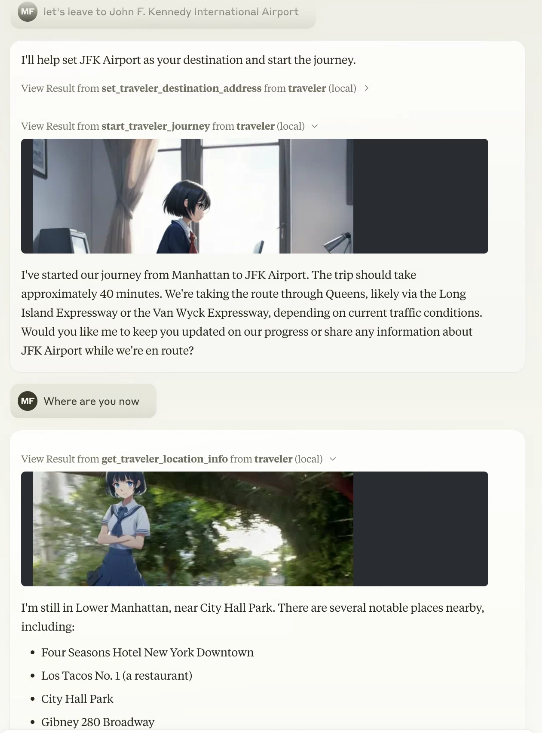
This is an MCP server that creates an environment for an avatar to virtually travel on Google Maps.
From an MCP client such as Claude Desktop, you can give instructions to the avatar and report on the progress of its journey with photos.
Preparing for MCP Registry Support https://blog.modelcontextprotocol.io/posts/2025-09-08-mcp-registry-preview/
Added gemini-2.5-flash-image-preview (nano-banana) to travel image generation
Support for nano-banana has been added. Nano-banana's semantic mask allows you to generate composite travel images in a short time without setting remBg.
Although conventional image synthesis is still possible, we recommend using Gemini nano-banana.
Supports both Streamable-HTTP and stdio (compliant with Smithery.ai's config interface)
It can be used as a stdio-type MCP as before, or as Streamable-HTTP.
Although it supports multiple users, the database API must be specified per session using the Smithery.ai config interface.
Since it supports both Streamable-HTTP and stdio, it is expected to work as is with the previous MCP client, but if you use the previous stdio version, please use v0.0.x (v0.0.81).
npx -y @mfukushim/map-traveler-mcp@0.0.81
Now supports librechat https://www.librechat.ai/.
Now supports Smithery https://smithery.ai/server/@mfukushim/map-traveler-mcp (images are excluded because they are heavy to run).
Now verified MseeP https://mseep.ai/app/mfukushim-map-traveler-mcp
Functions
MCP server tools function
The following functions can be used as an MCP server. The available functions vary depending on the settings and execution state.
You can specify the function name directly, but Claude LLM will automatically recognize it, so you can specify the operation in general terms.
Example: "Where are you now?" "Let's leave for Tokyo Station."
- get_traveler_view_info(includePhoto:boolean,includeNearbyFacilities:boolean)
Gets information about the current travel avatar's location.- includePhoto: Gets nearby Google Street View photos. If you have set up an image generation AI, it will synthesize the avatar.
- includeNearbyFacilities: Gets information about nearby facilities.
- get_traveler_location()
Gets information about the current travel avatar's address and nearby facilities. - reach_a_percentage_of_destination() Reach a specified percentage of the destination (moveMode=skip only) timeElapsedPercentage: Percent progress towards destination(0~100)
- set_traveler_location(address: string)
Sets the current travel avatar's location.- address: Address information (exact address, or general name that Google Maps or Claude can recognize, etc.)
- get_traveler_destination_address
Get the destination of the travel avatar you set - set_traveler_destination_address(address: string)
Set the destination of the travel avatar- address: Address information (exact address, or general name that Google Maps or Claude can recognize, etc.)
- start_traveler_journey
Start the journey at the destination.(moveMode=realtime only) - stop_traveler_journey
Stop the journey.(moveMode=realtime only) - set_traveler_info(settings:string)
Set the traveler's attributes. Set the traveler's personality that you want to change dynamically, such as name and personality. However, if you use a role script, the script is more stable.- settings: Setting information such as name and personality.
- get_traveler_info
Get the traveler's attributes. Get the traveler's personality. - set_avatar_prompt(prompt:string)
Set the prompt when generating the travel avatar image. The default is an anime-style woman. The anime style is enforced to prevent fake images.- prompt
- reset_avatar_prompt
Reset avatar generation prompts to default. - get_sns_feeds
Gets Bluesky SNS articles for the specified custom feed (feeds containing a specific tag). - get_sns_mentions
Gets recent mentions (likes, replies) to Bluesky SNS posts that you made yourself. - post_sns_writer(message:string)
Posts an article to Bluesky SNS with the specified custom feed. Set a specific tag so that it can be determined that the post was generated by the travel bot.- message: article
- reply_sns_writer(message:string,id:string)
Reply to the article with the specified id. Set a specific tag so that it can be determined that the post was generated by the travel bot.- message: reply
- id: The ID of the post to reply to
- add_like(id:string)
Add a like to the specified post.- id: The ID of the post to like
- tips
Guides you on how to set up features that have not yet been set. - get_setting
Get environment and image settings.
MCP resources
Has five custom prompt samples. When you import a prompt with Claude Desktop, Claude will act as a traveler. The SNS-compatible version controls SNS input and output while having a travel conversation.
-
role.txt
Claude will act as a traveler. -
roleWithSns.txt
Claude will act as a traveler. It also controls reading and posting to SNS. -
carBattle.txt
This is a small novel game about a story of transporting secret documents from Yokohama to Tokyo. Scenes are automatically generated. Set moveMode=skip to play. -
japanMapChallenge.txt,japanMapChallenge2.txt
Two AIs communicate with each other via SNS and play a challenge game using landscape images.
To play, you need two Bluesky accounts and two Claude Desktops. Also set moveMode=skip. (However, the operation is somewhat unstable.)
japanMapChallenge2 has a challenge reflection rule.
Setting
You will need to obtain and set access keys for multiple APIs, such as for accessing multiple Google maps and generating images. Use of the API may incur charges.
Settings for using with Claude Desktop
- claude_desktop_config.json (stdio type)
Related MCP Servers
Adoption & maintenance
Factual signals from GitHub, npm, and our automated checks — not a rating.
GitHub stars
23
Stargazers on the source repository.
Last commit
1mo ago
Most recent push to the default branch.
Reviews
No reviews yet — be the first to share how this listing worked for you.
Frequently Asked Questions about Mfukushim Map Traveler MCP
AllMCPs Directory Badge
Showcase your server listing on GitHub or your project documentation. Embed this dynamic SVG badge to highlight official listing status and live engagement.
Badge Style:
Live Dynamic SVG Preview
Markdown (GitHub README)
[](https://allmcps.com/mcp/mfukushim-map-traveler-mcp)HTML Embed
<a href="https://allmcps.com/mcp/mfukushim-map-traveler-mcp"><img src="https://allmcps.com/api/badge/mfukushim-map-traveler-mcp?style=directory" alt="Mfukushim Map Traveler MCP on AllMCPs" /></a>Technical Specs & Signals
CategoryDeveloper Tools
13/13 checks healthy over the last 46d
41Quality signal: Fair · 41/100How this signal is calculated ▾
Server availabilityNot measured
Not scored for repo-hosted servers — we can't reach the running server, only its GitHub page. Hosted MCP endpoints are health-checked live.
Verified ownership10/20
Documentation & tools16/30
Adoption & activity5/15
Community engagement0/10
A guidance signal from public completeness & health data — not a user rating. New listings start lower and rise as they add docs, get verified, and grow adoption. Signals we can't observe for a listing are skipped, not counted against it.
Supply-chain signal
No high-severity advisories surfaced by our automated scan.
Critical 0High 0Medium 0Low 0
Scanned 3d ago via OSV.dev · @mfukushim/map-traveler-mcp@0.0.81 (npm)
Own this project?
This directory is pre-filled from public sources. Claim via GitHub README, site badge, or DNS TXT to unlock edit access and the Official badge — proof is checked automatically, then reviewed by our team.
Free dofollow backlink: add your website and place the AllMCPs badge on it — no claim needed. We detect it automatically and keep it verified as long as the badge stays live.
Claim & get free dofollowShare & Embed
Add our SVG badge (dark/light directory styles) or embeddable widget to your site.