AllMCPs
BrowseBestCategoriesStackCompareToolsGuidesBlog Log in Submit MCP

Stay in the loop

Get new MCP servers and top picks in your inbox.

AllMCPs

The open directory for discovering and installing Model Context Protocol servers.

Explore

  • Browse servers
  • Best MCP servers
  • Categories
  • MCP clients
  • Agent prompts
  • Stack Builder
  • Compare servers
  • Tags index
  • Submit a server
  • Pricing

Learn

  • Guides hub
  • What is MCP?
  • Install guide
  • Troubleshooting
  • Security
  • Blog
  • Blog RSS

Tools

  • All tools
  • Config generator
  • Config validator
  • MCP playground
  • OpenAPI β†’ MCP
  • Badge generator

For agents

  • API docs
  • Trust & traffic
  • llms.txt β†— (opens in a new tab)
  • Catalog JSON β†— (opens in a new tab)
  • Remote MCP β†— (opens in a new tab)

Company

  • About
  • Contact
  • X (@AllMCPs) β†— (opens in a new tab)
  • GitHub β†— (opens in a new tab)
  • Terms
  • Privacy
AllMCPs VerifiedAllMCPs VerifiedFeatured on Nick LaunchesFeatured on Nick LaunchesLaunch Llama NewsletterLaunch Llama NewsletterVerified DR - allmcps.comVerified DR - allmcps.comFeatured on SaaSGrowFeatured on SaaSGrowFeatured on Twelve ToolsFeatured on Twelve ToolsFeatured on Saaspa.geFeatured on Saaspa.geFeatured on Findly.toolsFeatured on Findly.toolsFeatured on Startup FameFeatured on Startup FameFeatured on LaunchKiwiFeatured on LaunchKiwiFeatured on ScrollLaunchFeatured on ScrollLaunchFeatured on DailyPingsFeatured on DailyPingsFazier badgeFazier badgeFeatured on NewTool.siteFeatured on NewTool.siteFeatured on saasfame.comFeatured on saasfame.comDR Checker - Domain RatingDR Checker - Domain RatingListed on Turbo0Listed on Turbo0Launched on LaunchBoard - Product Launch PlatformLaunched on LaunchBoard - Product Launch PlatformList on SimilarlabsList on Similarlabshttps://codetrendy.comhttps://codetrendy.comListed on DevTool.ioFeatured on BuildlistFeatured on BuildlistAllMCPs VerifiedAllMCPs VerifiedFeatured on Nick LaunchesFeatured on Nick LaunchesLaunch Llama NewsletterLaunch Llama NewsletterVerified DR - allmcps.comVerified DR - allmcps.comFeatured on SaaSGrowFeatured on SaaSGrowFeatured on Twelve ToolsFeatured on Twelve ToolsFeatured on Saaspa.geFeatured on Saaspa.geFeatured on Findly.toolsFeatured on Findly.toolsFeatured on Startup FameFeatured on Startup FameFeatured on LaunchKiwiFeatured on LaunchKiwiFeatured on ScrollLaunchFeatured on ScrollLaunchFeatured on DailyPingsFeatured on DailyPingsFazier badgeFazier badgeFeatured on NewTool.siteFeatured on NewTool.siteFeatured on saasfame.comFeatured on saasfame.comDR Checker - Domain RatingDR Checker - Domain RatingListed on Turbo0Listed on Turbo0Launched on LaunchBoard - Product Launch PlatformLaunched on LaunchBoard - Product Launch PlatformList on SimilarlabsList on Similarlabshttps://codetrendy.comhttps://codetrendy.comListed on DevTool.ioFeatured on BuildlistFeatured on Buildlist
Β© 2026 Jackalope Digital LLC. All rights reserved.
  1. Home
  2. πŸ’» Developer Tools
  3. Metrillm
M
Health: Not checked yetWe have not completed a health check for this listing yet.Last checked 8/11/2026, 12:07:39 AM

Metrillm

Enrichment pendingWe haven’t run our AI enrichment pass on this listing yet, so the overview, use cases, and FAQ below may be sparse or missing. We work through the catalog over time β€” check back soon.
View Repository

Benchmark local LLM models β€” speed, quality & hardware fitness verdict from any MCP client

Quick Install

Automated & IDE Setup

Copy the AI prompt to install this server into Claude Code, Cursor, or another agent β€” or use 1-click editor setup below.

Add to CursorAdd to VS Code
Manual Client & Custom JSON ConfigExpand JSON β–Ύ

Install Config Generator

Choose your client
claude_desktop_config.json
{
  "mcpServers": {
    "metrillm": {
      "command": "npx",
      "args": [
        "-y",
        "metrillm"
      ]
    }
  }
}

πŸ’‘ Paste into ~/Library/Application Support/Claude/claude_desktop_config.json (macOS) or %APPDATA%\Claude\claude_desktop_config.json (Windows)

Install Directory Badge Claim listing AlternativesπŸ’» More in Developer Tools

Documentation Overview

MetriLLM

CI Node.js License

npm version npm downloads GitHub stars

Benchmark your local LLM models in one command. Speed, quality, hardware fitness β€” with a shareable score and public leaderboard.

Think Geekbench, but for local LLMs on your actual hardware.
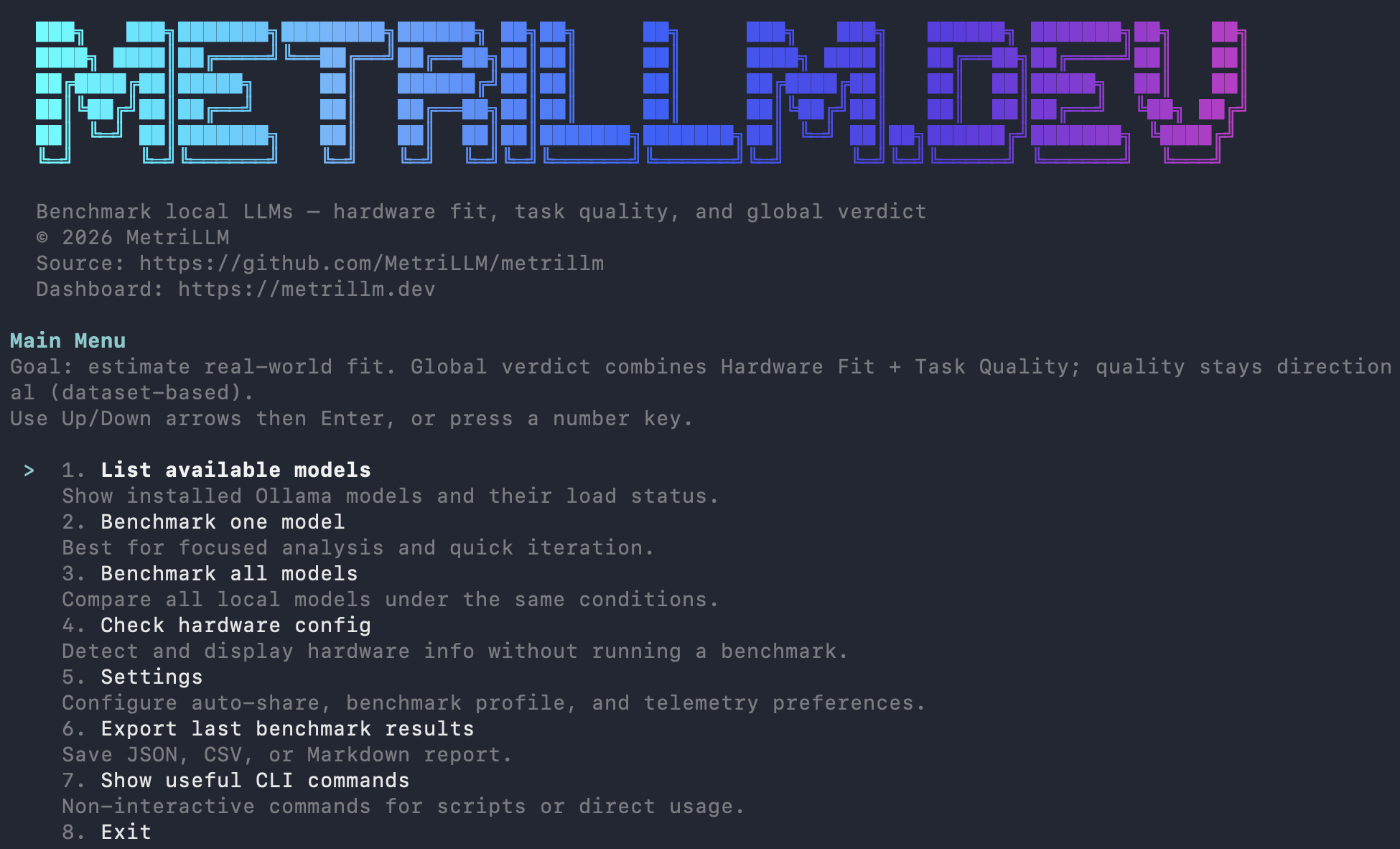
Terminal
npm install -g metrillm@latest
metrillm bench

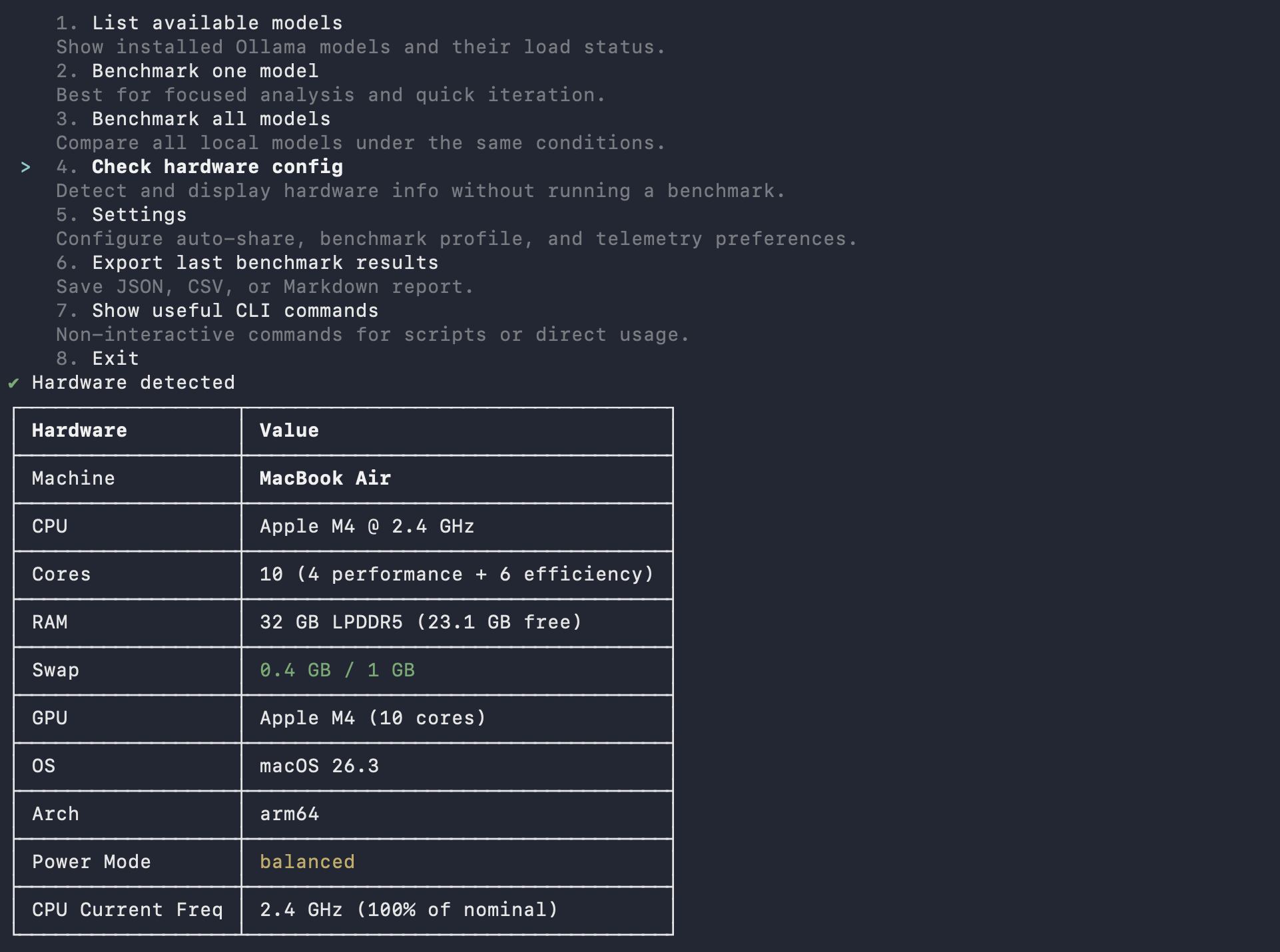
MetriLLM CLI β€” interactive menu MetriLLM CLI β€” hardware detection

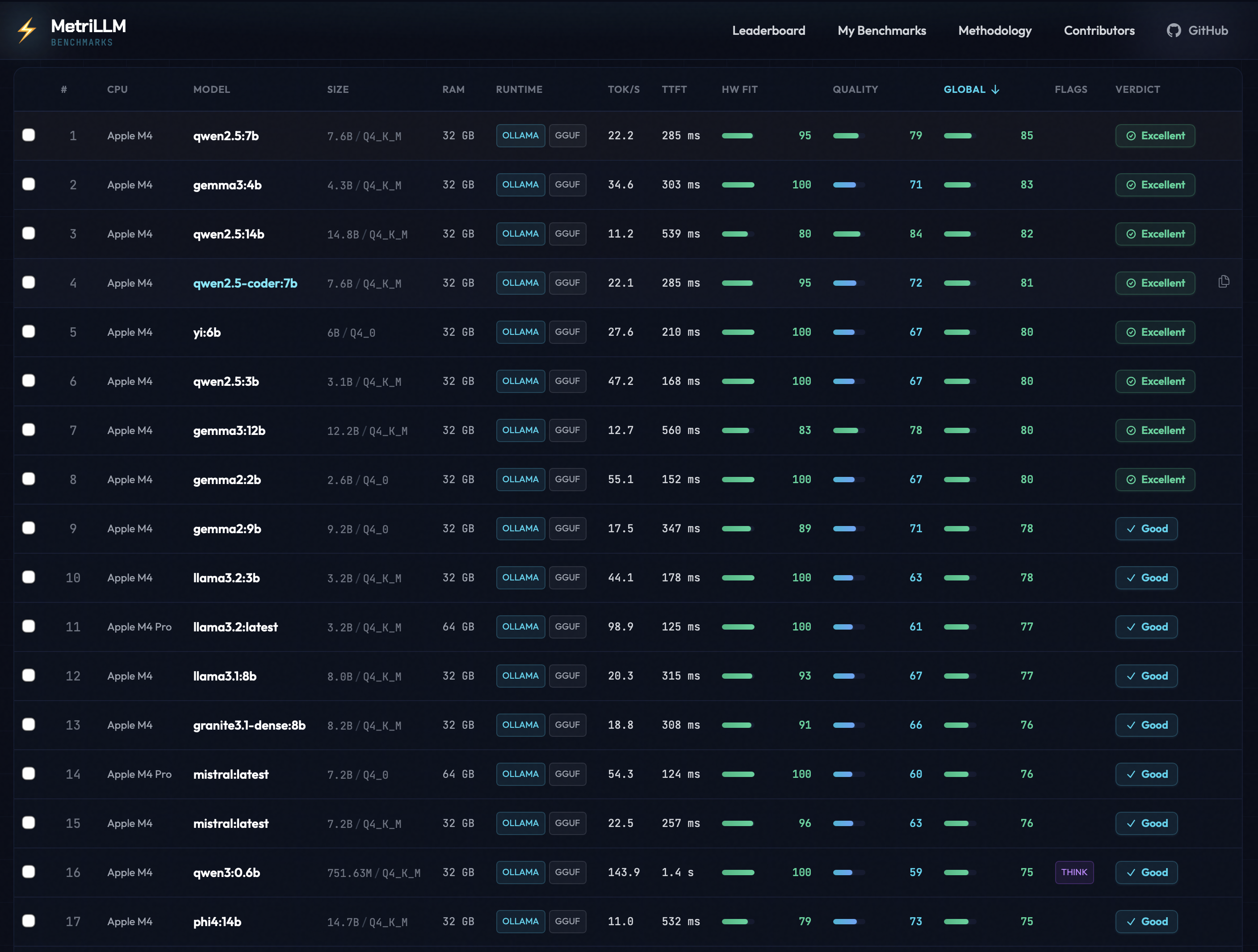
MetriLLM Leaderboard

What You Get

  • Performance metrics: tokens/sec, time to first token, memory usage, load time
  • Quality evaluation: reasoning, coding, math, instruction following, structured output, multilingual (14 prompts, 6 categories)
  • Global score (0-100): 30% hardware fit + 70% quality
  • Verdict: EXCELLENT / GOOD / MARGINAL / NOT RECOMMENDED
  • One-click share: --share uploads your result and gives you a public URL + leaderboard rank

Real Benchmark Results

From the public leaderboard β€” all results below were submitted with metrillm bench --share.

ModelMachineCPURAMtok/sTTFTGlobalVerdict
llama3.2:latestMac MiniApple M4 Pro64 GB98.9125 ms77GOOD
mistral:latestMac MiniApple M4 Pro64 GB54.3124 ms76GOOD
gemma3:4bMacBook AirApple M432 GB35.9303 ms72GOOD
gemma3:1bMacBook AirApple M432 GB39.4362 ms72GOOD
qwen3:1.7bMacBook AirApple M432 GB37.93.1 s70GOOD
llama3.2:3bMacBook AirApple M432 GB27.8285 ms69GOOD
gemma3:12bMacBook AirApple M432 GB12.3656 ms67GOOD
phi4:14bMacBook AirApple M432 GB11.1515 ms65GOOD
mistral:7bMacBook AirApple M432 GB13.6517 ms61GOOD
deepseek-r1:14bMacBook AirApple M432 GB10.830.0 s25NOT RECOMMENDED

Key takeaway: Small models (1-4B) fly on Apple Silicon. Larger models (14B+) with thinking chains can choke even on capable hardware. See full leaderboard β†’

Install

Requires Node 20+ and a local runtime: Ollama or LM Studio.

bash
# Install globally
npm install -g metrillm@latest
metrillm bench

# Alternative package managers
pnpm add -g metrillm@latest
bun add -g metrillm@latest

# Homebrew
brew install MetriLLM/metrillm/metrillm

# Or run without installing
npx metrillm@latest bench

Usage

server.ts
# Interactive mode β€” pick models from a menu
metrillm bench

# Benchmark a specific model
metrillm bench --model gemma3:4b

# Benchmark with LM Studio backend
metrillm bench --backend lm-studio --model qwen3-8b

# Benchmark all installed models
metrillm bench --all

# Share your result (upload + public URL + leaderboard rank)
metrillm bench --share

# CI/non-interactive mode
metrillm bench --ci-no-menu --share

# Force unload after each model (useful for memory isolation)
metrillm bench --all --unload-after-bench

# Export results locally
metrillm bench --export json
metrillm bench --export csv

Upload Configuration (CLI + MCP)

By default, production builds upload shared results to the official MetriLLM leaderboard (https://metrillm.dev).

  • No CI secret injection is required for standard releases.
  • Local/dev runs use the same default behavior.
  • Self-hosted or staging deployments can override endpoints with:
    • METRILLM_SUPABASE_URL
    • METRILLM_SUPABASE_ANON_KEY
    • METRILLM_PUBLIC_RESULT_BASE_URL

If these variables are set to placeholder values (from templates), MetriLLM falls back to official defaults.

Windows Users

PowerShell's default execution policy blocks npm global scripts. If you see PSSecurityException or UnauthorizedAccess when running metrillm, run this once:

powershell
Set-ExecutionPolicy -Scope CurrentUser -ExecutionPolicy RemoteSigned

Alternatively, use npx metrillm@latest which bypasses the issue entirely.

Runtime Backends

BackendFlagDefault URLRequired env
Ollama--backend ollamahttp://127.0.0.1:11434OLLAMA_HOST (optional)
LM Studio--backend lm-studiohttp://127.0.0.1:1234LM_STUDIO_BASE_URL (optional), LM_STUDIO_API_KEY (optional)

Shared runtime env:

  • METRILLM_STREAM_STALL_TIMEOUT_MS (optional): stream watchdog for all backends, default 30000, 0 disables it

LM Studio benchmark runs now use the native REST inference endpoint (/api/v1/chat) for both streaming and non-streaming generation. The previous OpenAI-compatible inference path (/v1/chat/completions) has been retired from MetriLLM so tok/s and TTFT can rely on native LM Studio stats when available. If a LM Studio response omits native token stats, MetriLLM still computes a score and shows the throughput as estimated.

For very large models, tune timeout flags:

  • --perf-warmup-timeout-ms (default 300000)
  • --perf-prompt-timeout-ms (default 120000)
  • --quality-timeout-ms (default 120000)
  • --coding-timeout-ms (default 240000)
  • --stream-stall-timeout-ms (default 30000, 0 disables stall timeout for any backend)

Benchmark Profile v1 (applied to all benchmark prompts):

  • temperature=0
  • top_p=1
  • seed=42
  • thinking follows your benchmark mode (--thinking / --no-thinking)
  • Context window stays runtime default (context=runtime-default) and is recorded as such in metadata.

LM Studio non-thinking guard:

  • When benchmark mode requests non-thinking (--no-thinking or default), MetriLLM now aborts if the model still emits reasoning traces (for result comparability).
  • To disable it in LM Studio for affected models, put this at the top of the model chat template: {%- set enable_thinking = false %} then eject/reload the model.

How Scoring Works

Hardware Fit Score (0-100) β€” how well the model runs on your machine:

  • Speed: 50% (tokens/sec relative to your hardware tier)
  • TTFT: 20% (time to first token)
  • Memory: 30% (RAM efficiency)

Quality Score (0-100) β€” how well the model answers:

  • Reasoning: 20pts | Coding: 20pts | Instruction Following: 20pts
  • Structured Output: 15pts | Math: 15pts | Multilingual: 10pts

Global Score = 30% Hardware Fit + 70% Quality

Hardware is auto-detected and scoring adapts to your tier (Entry/Balanced/High-End). A model hitting 10 tok/s on a 8GB machine scores differently than on a 64GB rig.

Full methodology β†’

Share Your Results

Every benchmark you share enriches the public leaderboard. No account needed β€” pick the method that fits your workflow:

MethodCommand / ActionBest for
CLImetrillm bench --shareTerminal users
MCPCall share_result toolAI coding assistants
Plugin/benchmark skill with share optionClaude Code / Cursor

All methods produce the same result:

  • A public URL for your benchmark
  • Your rank: "Top X% globally, Top Y% on [your CPU]"
  • A share card for social media
  • A challenge link to send to friends

Compare your results on the leaderboard β†’

MCP Server

Use MetriLLM from Claude Code, Cursor, Windsurf, or any MCP client β€” no CLI needed.

bash
# Claude Code
claude mcp add metrillm -- npx metrillm-mcp@latest

# Claude Desktop / Cursor / Windsurf β€” add to MCP config:
# { "command": "npx", "args": ["metrillm-mcp@latest"] }
ToolDescription
list_modelsList locally available LLM models
run_benchmarkRun full benchmark (performance + quality) on a model
get_resultsRetrieve previous benchmark results
share_resultUpload a result to the public leaderboard

Full MCP documentation β†’

Skills

Slash commands that work inside AI coding assistants β€” no server needed, just a Markdown file.

SkillTriggerDescription
/benchmarkUser-invokedRun a full benchmark interactively
metrillm-guideAuto-invokedContextual guidance on model selection and results

Skills are included in the plugins below, or can be installed standalone:

bash
# Claude Code
cp -r plugins/claude-code/skills/* ~/.claude/skills/

# Cursor
cp -r plugins/cursor/skills/* ~/.cursor/skills/

Plugins

Pre-built bundles (MCP + skills + agents) for deeper IDE integration.

ComponentDescription
MCP configAuto-connects to metrillm-mcp server
Skills/benchmark + metrillm-guide
Agentbenchmark-advisor β€” analyzes your hardware and recommends models

Install:

bash
# Claude Code
cp -r plugins/claude-code/.claude/* ~/.claude/

# Cursor
cp -r plugins/cursor/.cursor/* ~/.cursor/

See Claude Code plugin and Cursor plugin for details.

Integrations

IntegrationPackageStatusDocs
CLImetrillmStableUsage
MCP Servermetrillm-mcpStableMCP docs
Skillsβ€”StableSkills
Claude Code pluginβ€”StablePlugin docs
Cursor pluginβ€”StablePlugin docs

Development

Terminal
npm ci
npm run ci:verify     # typecheck + tests + build
npm run dev           # run from source
npm run test:watch    # vitest watch mode

Homebrew Formula Maintenance

The tap formula lives in Formula/metrillm.rb.

bash
# Refresh Formula/metrillm.rb with latest npm tarball + sha256
./scripts/update-homebrew-formula.sh

# Or pin a specific version
./scripts/update-homebrew-formula.sh 0.2.1

After updating the formula, commit and push so users can install/update with:

bash
brew tap MetriLLM/metrillm
brew install metrillm
brew upgrade metrillm

Contributing

Contributions are welcome! Please read the Contributing Guide before submitting a pull request. All commits must include a DCO sign-off.

License

Apache License 2.0 β€” see NOTICE for trademark information.

Related MCP Servers

View all in Developer Tools View all alternatives
  • A
    Ai Netcafe

    Compare LLM cost & latency on one prompt, translate PDF keeping layout, cited research, make PPTX

    πŸ’» Developer Tools0 views
    Compare vs Ai Netcafe β†’
  • Claude Task Master logoClaude Task Master

    AI-powered task management system for AI-driven development. Features PRD parsing, task expansion, multi-provider support (Claude, OpenAI, Gemini, Perplexity, xAI), and selective tool loading for optimized context usage.

    πŸ’» Developer Tools7 views
    Compare vs Claude Task Master β†’
  • Globalping Mcp Server logoGlobalping Mcp Server

    The Globalping MCP server provides users and LLMs access to run network tools like ping, traceroute, mtr, HTTP and DNS resolve from thousands of locations around the world.

    πŸ’» Developer Tools2 views
    Compare vs Globalping Mcp Server β†’
  • I
    I18n Agent

    AI-powered translation for 48 languages with context-aware quality

    πŸ’» Developer Tools1 views
    Compare vs I18n Agent β†’

Frequently Asked Questions about Metrillm

Add the following block to your claude_desktop_config.json under mcpServers: "mcpServers": { "metrillm": { "command": "npx", "args": ["-y", "metrillm"] } }

AllMCPs Directory Badge

Full Badge Customizer

Showcase your server listing on GitHub or your project documentation. Embed this dynamic SVG badge to highlight official listing status and live engagement.

Badge Style:
Live Dynamic SVG PreviewMetrillm AllMCPs Directory Badge

Markdown (GitHub README)
[![AllMCPs](https://allmcps.com/api/badge/metrillm?style=directory)](https://allmcps.com/mcp/metrillm)
HTML Embed
<a href="https://allmcps.com/mcp/metrillm"><img src="https://allmcps.com/api/badge/metrillm?style=directory" alt="Metrillm on AllMCPs" /></a>

Technical Specs & Signals

CategoryπŸ’»Developer Tools
More technical detailsExpand β–Ύ
TransportSTDIO
RuntimeNode.js
0/5 checks healthy over the last 6h
Views0
Unique ViewsTotal visits recorded for this listing page on AllMCPs.
Installs0
Installs & Copy ActionsTotal times users copied install commands or configuration snippets for this server.
27Quality signal: Emerging Β· 27/100How this signal is calculated β–Ύ
Server availabilityNot measured

Not scored for repo-hosted servers β€” we can't reach the running server, only its GitHub page. Hosted MCP endpoints are health-checked live.

Verified ownership8/20
Documentation & tools11/30
Adoption & activity1/15
Community engagement0/10

A guidance signal from public completeness & health data β€” not a user rating. New listings start lower and rise as they add docs, get verified, and grow adoption. Signals we can't observe for a listing are skipped, not counted against it.

β˜… Spotlight Slot

Feature Your MCP Server

Get maximum visibility for your server across our directory, search results, and detail pages.

Spotlight Your Server

Own this project?

This directory is pre-filled from public sources. Claim via GitHub README, site badge, or DNS TXT to get the verified badge and attach your website.

Free dofollow backlink: after claiming, verify your product site and place a dofollow AllMCPs badge β€” we recheck it stays live.

Claim & get free dofollow

Share & Embed

Add our SVG badge (dark/light directory styles) or embeddable widget to your site.

Explore more

More in πŸ’» Developer Tools β†’Best MCP servers for Developers β†’Alternatives to Metrillm β†’Install in Claude DesktopInstall in CursorInstall in VS Code