MeteoSwiss Open Data for weather, climate normals, warnings
Quick Install
Automated & IDE SetupCopy the AI prompt to install this server into Claude Code, Cursor, or another agent — or use 1-click editor setup below.
Not yet automatically verified
We haven't yet run this listing's install command through our automated sandbox check. This isn't a red flag — we're steadily working through the catalog.
Manual Client & Custom JSON ConfigExpand JSON ▾
Client Config & Setup
Choose your client or environment
Target File:
💡 Paste the JSON block into your client's configuration file under mcpServers, then restart the application.
Documentation Overview
🌦️ meteoswiss-mcp





MCP server for Swiss weather and climate data from MeteoSwiss.
Connects AI models to the SwissMetNet measurement network (160+ stations, 10-minute interval), MeteoSwiss ICON-CH1/CH2-EPS forecasts and climate normals 1991–2020. Part of the swiss-public-data-mcp portfolio.
Demo query (anchor example)
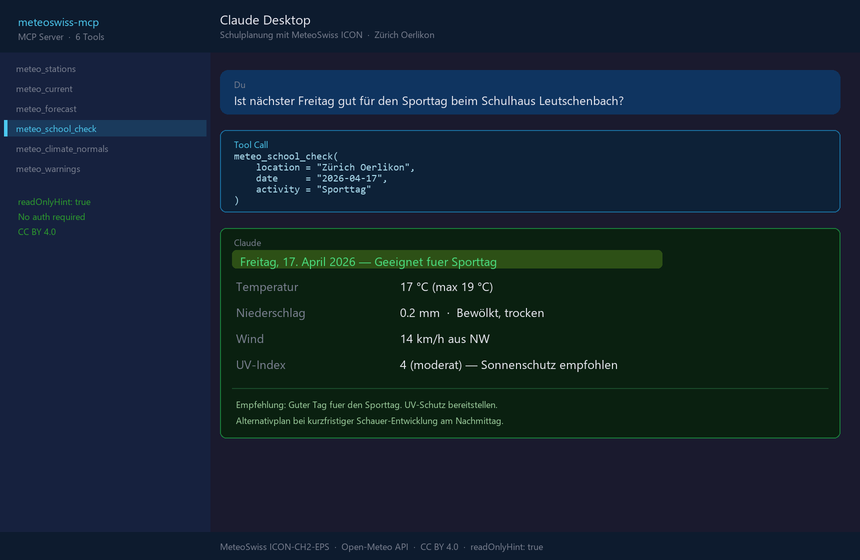
→ meteo_school_check(location="Zürich Oerlikon", activity="Sporttag") returns a 🟢/🟡/🔴 traffic light for each day of the coming week — straight from the MeteoSwiss ICON model.
Combined with swiss-environment-mcp:
→ meteo_current(station='REH') + env_nabel_current(station='ZUE') = a complete environmental picture.
→ More use cases by audience →
Tools (6)
| Tool | Description | Data source |
|---|---|---|
meteo_stations | List SwissMetNet stations (filterable by canton) | Embedded |
meteo_current | Current 10-min observations for a station | BGDI STAC API |
meteo_forecast | 1–16 day forecast for a place or coordinates | Open-Meteo / MeteoSwiss ICON |
meteo_school_check | 🟢/🟡/🔴 traffic light for outdoor school events | Open-Meteo / MeteoSwiss ICON |
meteo_climate_normals | Monthly climate normals 1991–2020 | Embedded (KLO, SMA, BER, LUG, GVE) |
meteo_warnings | Active official weather warnings (storm, thunderstorm, heat, forest fire, …) — nationwide, by canton, or by PLZ | MeteoSwiss App-API + opendata.swiss |
Tool annotations (MCP hints)
All tools carry explicit MCP annotations — relevant for the client approval UI and for the LLM's safety decisions.
| Tool | readOnlyHint | destructiveHint | idempotentHint | openWorldHint |
|---|---|---|---|---|
meteo_stations | ✅ | ✗ | ✅ | ✗ (curated list) |
meteo_current | ✅ | ✗ | ✗ (live data) | ✅ (upstream STAC) |
meteo_forecast | ✅ | ✗ | ✗ (live data) | ✅ (upstream Open-Meteo) |
meteo_school_check | ✅ | ✗ | ✗ (live data) | ✅ (geocoding + forecast) |
meteo_climate_normals | ✅ | ✗ | ✅ | ✗ (embedded normals) |
meteo_warnings | ✅ | ✗ | ✗ (live data) | ✅ (MeteoSwiss App-API) |
Read rules: all 6 tools are readOnly + non-destructive — the server fundamentally cannot write or delete anything. idempotentHint=False marks tools that return different values depending on when they are called.
MCP protocol version
| Aspect | Value |
|---|---|
| Tested spec versions | 2024-11-05, 2025-03-26, 2025-06-18 (via the mcp[cli] SDK) |
| MCP SDK version | see pyproject.toml → mcp[cli]>=2.0.0,<3 (the MCPServer API from mcp.server.mcpserver) |
| Update policy | Dependabot watches mcp[cli]; spec bumps are documented in the CHANGELOG with a "Tool Definition Changes" marker |
→ Full roadmap & update strategy: docs/roadmap.md
Quick start
Claude Desktop
Claude Desktop (local development)
Cloud / Render.com (Streamable HTTP)
Configuration via ENV variables (the CLI flags --http / --port N still work as an override):
| Variable | Default | Meaning |
|---|---|---|
MCP_TRANSPORT | stdio | stdio or streamable-http |
MCP_HOST | 127.0.0.1 | Bind address — never change locally |
MCP_PORT | 8000 | Port |
MCP_ALLOW_ANY_HOST | unset | Must be set to 1 to allow the server to bind to 0.0.0.0 (containers/cloud only) |
MCP_LOG_LEVEL | INFO | DEBUG / INFO / WARNING / ERROR — structured JSON logs on stderr |
MCP_ALLOWED_ORIGINS | unset | Comma-separated list of allowed origins for CORS. Empty = CORS disabled (same-origin only). Mcp-Session-Id is exposed automatically. |
MCP_API_KEY | unset | If set: every request except /health requires X-API-Key: <key> or Authorization: Bearer <key>. Constant-time comparison. |
MCP_STATELESS_HTTP | 0 | 1 enables the SDK's stateless mode → each HTTP request opens a new session. Prerequisite for multi-replica deploys without sticky sessions (SCALE-002/003). |
OTEL_EXPORTER_OTLP_ENDPOINT | unset | If set + pip install meteoswiss-mcp[otel]: OpenTelemetry spans per tool call + automatic httpx instrumentation are sent as OTLP-HTTP to the collector. |
OTEL_SERVICE_NAME | meteoswiss_mcp | Service name in the OTel resources |
MCP_CACHE_ENABLED | 1 | 0 disables the TTL cache entirely (e.g. for end-to-end tests) |
MCP_CACHE_TTL_STAC | 300 | TTL in seconds for STAC SMN observations (default 5 min) |
MCP_CACHE_TTL_OPEN_METEO | 600 | TTL for ICON forecasts (default 10 min) |
MCP_CACHE_TTL_GEOCODING | 3600 | TTL for geocoding lookups (default 1 h) |
MCP_CACHE_TTL_OPENDATA | 3600 | TTL for the opendata.swiss catalogue (default 1 h) |
MCP_CACHE_TTL_WARNINGS | 300 | TTL for warnings (MeteoSwiss App-API / structured override; default 5 min) |
MCP_CLIMATE_NORMALS_PATH | unset | Path to a JSON file with additional climate normals — see data/climate-normals.example.json |
MCP_WARNINGS_API_URL | unset | Override for the default MeteoSwiss App-API source: URL of a structured MeteoSwiss warnings API (e.g. the future OGD warnings REST endpoint). The host must be on the egress allow-list. Schema-tolerant (GeoJSON features, a warnings array or items). Unset → live App-API. |
MCP_CLIMATE_NORMALS_URL_TEMPLATE | unset | URL template for runtime lookup of climate normals (for stations without embedded or JSON values). Tokens: {station} (lowercase), {STATION} (uppercase), {param} (MeteoSwiss code tre200m0/rre150m0/sre000m0). Example: https://data.geo.admin.ch/.../{station}/{param}.txt. The host must be on the egress allow-list. |
Docker / Render
The repo includes a production-ready multi-stage Dockerfile (non-root user, HEALTHCHECK) and a render.yaml blueprint:
On Render: "New → Blueprint" → select the repo. Defaults (plan starter, Frankfurt, single instance) are set in render.yaml.
Important: numInstances: 1 is set deliberately — sticky-session routing for multi-replica (audit SCALE-002/003) is not yet implemented.
Structured logging
All tool invocations, upstream failures and egress blocks are emitted as JSON events on stderr (stdio-transport safe). Example:
HTTP-mode security
MCP_HOSTdeliberately defaults to127.0.0.1so that--httpon a dev laptop is not accidentally exposed to the local subnet (audit finding SEC-016).- All outgoing HTTP calls (including redirect follows) are validated against an allow-list:
data.geo.admin.ch,api.open-meteo.com,geocoding-api.open-meteo.com,opendata.swiss. Other hosts and IP literals (in particular169.254.169.254, RFC1918) are rejected withEgressBlocked(SEC-004 / SEC-021). - CORS: disabled by default (same-origin only). Browser clients (e.g. claude.ai web) need
MCP_ALLOWED_ORIGINS=<csv>— theMcp-Session-Idheader is then automatically inAccess-Control-Expose-Headers(SDK-004). - API-key auth: disabled by default. In a production HTTP setup, always set
MCP_API_KEY=<random>— requests without a validX-API-KeyorAuthorization: Bearer …are rejected with 401 (SEC-009 / SEC-013)./healthstays open for container health probes.
Example: production HTTP stack
Example queries
School planning
Related MCP Servers
Reviews
No reviews yet — be the first to share how this listing worked for you.
Frequently Asked Questions about Meteoswiss MCP
AllMCPs Directory Badge
Showcase your server listing on GitHub or your project documentation. Embed this dynamic SVG badge to highlight official listing status and live engagement.
Badge Style:
Live Dynamic SVG Preview
Markdown (GitHub README)
[](https://allmcps.com/mcp/meteoswiss-mcp)HTML Embed
<a href="https://allmcps.com/mcp/meteoswiss-mcp"><img src="https://allmcps.com/api/badge/meteoswiss-mcp?style=directory" alt="Meteoswiss MCP on AllMCPs" /></a>Technical Specs & Signals
CategoryDeveloper Tools
35Quality signal: Fair · 35/100How this signal is calculated ▾
Server availabilityNot measured
Not scored for repo-hosted servers — we can't reach the running server, only its GitHub page. Hosted MCP endpoints are health-checked live.
Verified ownership10/20
Documentation & tools15/30
Adoption & activity1/15
Community engagement0/10
A guidance signal from public completeness & health data — not a user rating. New listings start lower and rise as they add docs, get verified, and grow adoption. Signals we can't observe for a listing are skipped, not counted against it.
Own this project?
This directory is pre-filled from public sources. Claim via GitHub README, site badge, or DNS TXT to unlock edit access and the Official badge — proof is checked automatically, then reviewed by our team.
Free dofollow backlink: add your website and place the AllMCPs badge on it — no claim needed. We detect it automatically and keep it verified as long as the badge stays live.
Claim & get free dofollowShare & Embed
Add our SVG badge (dark/light directory styles) or embeddable widget to your site.