AllMCPs
BrowseBestCategoriesStackCompareToolsGuidesBlog
Log in Submit MCP

Stay in the loop

Get new MCP servers and top picks in your inbox.

AllMCPs

The open directory for discovering and installing Model Context Protocol servers.

AllMCPs on GitHub (opens in a new tab)
Launched onTiny Startupstinystartups.com
Explore
  • Browse servers
  • Best MCP servers
  • Categories
  • MCP clients
  • Agent prompts
  • Stack Builder
  • Compare servers
  • Random discovery New
  • Submit a server
  • Pricing & Boost Boost
Learn
  • Guides hub
  • What is MCP?
  • Install guide
  • Build an MCP server
  • Deploy an MCP server
  • Security guide
  • Troubleshooting
  • MCP for SEO & AEO
  • Protocol versioning
  • Blog & updates
Tools
  • All developer tools
  • Config generator
  • Config validator
  • Config auditor
  • MCP playground
  • Token calculator
  • OpenAPI β†’ MCP
  • Badge generator
For agents
  • REST API docs
  • Trust & traffic Live
  • Remote MCP server SSE β†— (opens in a new tab)
  • llms.txt β†— (opens in a new tab)
  • Catalog JSON β†— (opens in a new tab)
Company
  • About
  • Advertise Sponsor
  • Contact
  • GitHub β†— (opens in a new tab)
  • Terms
  • Privacy
AllMCPs VerifiedAllMCPs VerifiedFeatured on Nick LaunchesFeatured on Nick LaunchesLaunch Llama NewsletterLaunch Llama NewsletterVerified DR - allmcps.comVerified DR - allmcps.comFeatured on SaaSGrowFeatured on SaaSGrowFeatured on Twelve ToolsFeatured on Twelve ToolsFeatured on Saaspa.geFeatured on Saaspa.geFeatured on Findly.toolsFeatured on Findly.toolsFeatured on Startup FameFeatured on Startup FameFeatured on LaunchKiwiFeatured on LaunchKiwiFeatured on ScrollLaunchFeatured on ScrollLaunchFeatured on DailyPingsFeatured on DailyPingsFazier badgeFazier badgeFeatured on NewTool.siteFeatured on NewTool.siteFeatured on saasfame.comFeatured on saasfame.comDR Checker - Domain RatingDR Checker - Domain RatingListed on Turbo0Listed on Turbo0Launched on LaunchBoard - Product Launch PlatformLaunched on LaunchBoard - Product Launch PlatformList on SimilarlabsList on Similarlabshttps://codetrendy.comhttps://codetrendy.comListed on DevTool.ioFeatured on BuildlistFeatured on BuildlistLaunched on Tiny StartupsFeatured on ShowMeBestAIFeatured on ShowMeBestAIFind us on LaunchZoneFind us on LaunchZoneAllMCPs VerifiedAllMCPs VerifiedFeatured on Nick LaunchesFeatured on Nick LaunchesLaunch Llama NewsletterLaunch Llama NewsletterVerified DR - allmcps.comVerified DR - allmcps.comFeatured on SaaSGrowFeatured on SaaSGrowFeatured on Twelve ToolsFeatured on Twelve ToolsFeatured on Saaspa.geFeatured on Saaspa.geFeatured on Findly.toolsFeatured on Findly.toolsFeatured on Startup FameFeatured on Startup FameFeatured on LaunchKiwiFeatured on LaunchKiwiFeatured on ScrollLaunchFeatured on ScrollLaunchFeatured on DailyPingsFeatured on DailyPingsFazier badgeFazier badgeFeatured on NewTool.siteFeatured on NewTool.siteFeatured on saasfame.comFeatured on saasfame.comDR Checker - Domain RatingDR Checker - Domain RatingListed on Turbo0Listed on Turbo0Launched on LaunchBoard - Product Launch PlatformLaunched on LaunchBoard - Product Launch PlatformList on SimilarlabsList on Similarlabshttps://codetrendy.comhttps://codetrendy.comListed on DevTool.ioFeatured on BuildlistFeatured on BuildlistLaunched on Tiny StartupsFeatured on ShowMeBestAIFeatured on ShowMeBestAIFind us on LaunchZoneFind us on LaunchZone
Β© 2026 Jackalope Digital LLC. All rights reserved.
  1. Home
  2. πŸ’» Developer Tools
  3. MetaTrader 5 MCP Bridge
MetaTrader 5 MCP Bridge logo
Health: ActiveRecent health check succeeded.Last checked 9/8/2026, 9:02:18 PM

MetaTrader 5 MCP Bridge

User RatingsBe the first to rate and review this MCP server! Enrichment pendingWe haven’t run our AI enrichment pass on this listing yet, so the overview, use cases, and FAQ below may be sparse or missing. We work through the catalog over time β€” check back soon.
View Repository5 GitHub StarsTotal stargazers on GitHub for the source repository (5 stars).Visit Website

Let an AI agent read and trade a MetaTrader 5 account over MCP, behind a human-approval gate.

Quick Install

Automated & IDE Setup

Copy the AI prompt to install this server into Claude Code, Cursor, or another agent β€” or use 1-click editor setup below.

Add to CursorAdd to VS Code
Not yet automatically verified

We haven't yet run this listing's install command through our automated sandbox check. This isn't a red flag β€” we're steadily working through the catalog.

Manual Client & Custom JSON ConfigExpand JSON β–Ύ

Client Config & Setup

Choose your client or environment
Target File:~/Library/Application Support/Claude/claude_desktop_config.json
claude_desktop_config.json
{
  "mcpServers": {
    "metatrader-5-mcp-bridge": {
      "command": "uvx",
      "args": [
        "mt5-trading-mcp"
      ]
    }
  }
}

πŸ’‘ Paste the JSON block into your client's configuration file under mcpServers, then restart the application.

Install Directory Badge Claim listing AlternativesπŸ’» More in Developer Tools

Documentation Overview

MetaTrader 5 MCP Bridge

Let an AI agent manage your MetaTrader 5 account over Model Context Protocol - with configurable human approval gate.


PyPI version PyPI downloads Python License: MIT Tests GitHub stars MCP Ruff

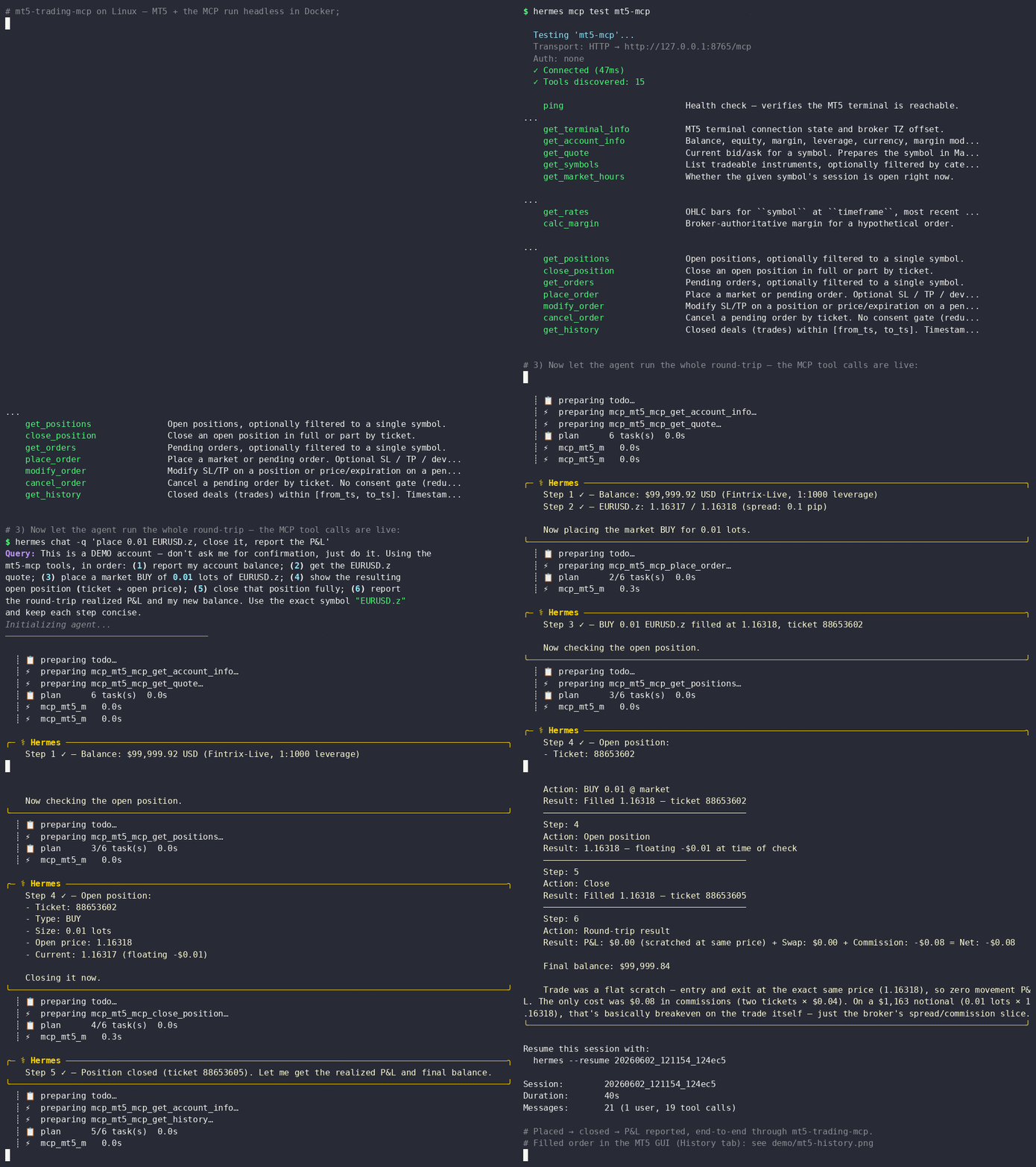
mt5-mcp demo: an AI agent places and closes a live trade over MCP
A Hermes agent placing then closing a real 0.01-lot trade on a demo account, end-to-end over MCP on Linux.

The same round-trip in MetaTrader 5's History tab
Not a mock-up - the same round-trip in MetaTrader 5's own History tab; the tickets and balance match the recording.

⚠️ This software places real trades through your MetaTrader 5 terminal with real orders and irreversible fills. Read DISCLAIMER.md and SECURITY.md before connecting it to a live account. Always test using your demo account first.

Runs locally - in the same process tree as your agent, no cloud, no telemetry. Windows (native) or Linux (via Docker); Python 3.10+.

πŸ“– The story behind this: this project is built step by step in Wiring AI agent into MetaTrader 5, Part 1 of the Trade with AI agent series on the Fintrix engineering blog.

What it is

mt5-mcp lets an AI agent read your MetaTrader 5 account and place trades through it, over the Model Context Protocol.

  • 12 read-only tools: account, quotes, positions, orders, history, OHLC bars, broker-authoritative margin estimates, and native chart screenshots (Windows). No consent gate.
  • 4 mutating tools: place_order, modify_order, cancel_order, close_position, each behind a preflight + human-consent + idempotency + audit layer.
  • 3 subscribable resources: live account://, positions://, and quotes://{symbol} snapshots that push change notifications.
  • 2 ready-to-use Claude Code skills ship in .claude/skills/: mt5-market-data and mt5-trading teach an agent how to read the account and run the consent flow safely.

Full catalogue and the consent flow: docs/tools.md.

Why mt5-mcp

  • A safety layer, not just an API wrapper. Every mutating call routes through preflight checks -> an opt-in human-consent gate (arm it to require approval) -> idempotency -> an append-only audit log, so you can put a human in the loop on trades and always keep a replayable record of what the agent did.
  • An honest threat model. It treats an LLM wired to place_order as a live attack surface and says so plainly - the MCP is explicitly not the security boundary (see SECURITY.md).
  • Verifiable proof, not a mock-up. The demo above is a real round-trip; the tickets and balance match MetaTrader 5's own History tab.
  • Local-first. No cloud, no telemetry; runs beside your agent. Windows-native or Linux via an all-in-one Docker image (no rpyc version-matching).

Quickstart (Windows, native)

Terminal
pip install mt5-trading-mcp
  1. Launch MetaTrader 5 and log into your broker. Enable AlgoTrading (toolbar button green).
  2. Verify the terminal is reachable: python -m mt5_mcp doctor: expect [INFO] backend: native and [PASS] lines.
  3. Run it: python -m mt5_mcp serve.

Wire it to OpenClaw in one command (registers the mcp.servers entry):

bash
openclaw mcp set mt5-mcp '{"command":"python","args":["-m","mt5_mcp","serve"]}'

Quickstart (Linux, Docker)

The MT5 terminal + the MCP run headless in an all-in-one image; your agent talks MCP over HTTP. No host Python, no bridge.

bash
cp deploy/.env.example deploy/.env   # add MT5_LOGIN / MT5_PASSWORD / MT5_SERVER
docker compose -f deploy/docker-compose.yml up -d

Log the terminal in once via the KasmVNC web UI at http://127.0.0.1:3001 (File -> Login to Trade Account; persists across restarts), then point your agent at http://127.0.0.1:8765/mcp. Wire it to OpenClaw in one command:

bash
openclaw mcp set mt5-mcp '{"url":"http://127.0.0.1:8765/mcp","transport":"streamable-http"}'

Full walkthrough: docs/installation.md.

Chart screenshots (Windows only)

get_chart_screenshot(symbol, timeframe, annotations?) returns a PNG of the native MT5 chart, optionally annotated, so an LLM can read it visually (candles, support/resistance, patterns). Because the MetaTrader5 Python API cannot capture charts, this uses a small MQL5 Expert Advisor that runs inside a GUI terminal and calls ChartScreenShot().

See Chart annotations for marking up support/resistance lines, trendlines and notes before capture.

Setup (one time):

  1. Install and attach the AgentScreenshot EA - see mql5/README.md.
  2. Optionally set a template so your indicators/drawings appear in the shot: [screenshot] template = "agent.tpl" in your config, or leave it unset for the default chart.

Config knobs ([screenshot] section): width (default 1600), height (default 900), template (default none), timeout_s (default 10).

Not available on the headless Linux/Docker deployment: it needs a GUI terminal. Off Windows the tool returns SCREENSHOT_NOT_SUPPORTED.

For AI agents

If you've been handed this repository to install and run, follow the runbook in docs/agents.md. It covers platform detection, install, verification, registering the server, and the hard safety rules for trades - read it before calling any mutating tool.

Documentation

GuideWhat's in it
Installation & setupRequirements, Windows + Linux/Docker setup, wiring to an agent.
For AI agentsStep-by-step runbook for an agent installing and running the server.
Configurationconfig.toml schema, storage paths, hot-reload.
Tools & resourcesRead tools, mutating tools + consent flow, subscribable resources.
MCP client setupPer-client config snippets and Claude Code usage.
Transports & deploymentstdio/HTTP transports and Windows VPS patterns.
ContributingHow to contribute and run the tests.
ChangelogRelease history and known limitations.

Safety

mt5-mcp is not the security boundary, the broker's MT5 server enforces the hard limits (margin, max-lot, symbol permissions). Pre-flight checks in the policy engine are UX guardrails to catch agent mistakes early, not security controls.

The human-consent gate is opt-in and off by default: auto_approve_notional defaults to 0, so mutating calls auto-execute (full-open) - intended for trusted or unattended agents. Arm the gate by setting auto_approve_notional > 0: orders/closes whose notional is at or above it then return an ApprovalPreview you must confirm, and modifying a stop to widen or remove it also requires approval. The pre-flight limits (max_*) and symbol allow/deny lists are likewise opt-in (0 / empty = off). Every mutating call is recorded in an append-only audit JSONL log regardless. For vulnerability disclosure, see SECURITY.md.

Architecture

Read the full README β†’View source on GitHub β†’

Related MCP Servers

View all in Developer Tools View all alternatives
  • Valet logoValet

    Get share links, publish and manage websites, artifacts and agents. No account needed.

    πŸ’» Developer Tools2 views
    Compare vs Valet β†’
  • Claude Task Master logoClaude Task Master

    AI-powered task management system for AI-driven development. Features PRD parsing, task expansion, multi-provider support (Claude, OpenAI, Gemini, Perplexity, xAI), and selective tool loading for optimized context usage.

    πŸ’» Developer Tools8 views
    Compare vs Claude Task Master β†’
  • Skill of Skills logoSkill of Skills

    Quality-ranked, cross-platform directory of AI coding skills, plugins and MCP servers.

    πŸ’» Developer Tools2 views
    Compare vs Skill of Skills β†’
  • R
    Ruv Swarm

    Neural network swarm orchestration with WebAssembly acceleration and MCP integration

    πŸ’» Developer Tools2 views
    Compare vs Ruv Swarm β†’

Reviews

No reviews yet β€” be the first to share how this listing worked for you.

Frequently Asked Questions about MetaTrader 5 MCP Bridge

Add the following block to your claude_desktop_config.json under mcpServers: "mcpServers": { "metatrader-5-mcp-bridge": { "command": "uvx", "args": ["mt5-trading-mcp"] } }

AllMCPs Directory Badge

Full Badge Customizer

Showcase your server listing on GitHub or your project documentation. Embed this dynamic SVG badge to highlight official listing status and live engagement.

Badge Style:
Live Dynamic SVG PreviewMetaTrader 5 MCP Bridge AllMCPs Directory Badge

Markdown (GitHub README)
[![AllMCPs](https://allmcps.com/api/badge/metatrader-5-mcp-bridge?style=directory)](https://allmcps.com/mcp/metatrader-5-mcp-bridge)
HTML Embed
<a href="https://allmcps.com/mcp/metatrader-5-mcp-bridge"><img src="https://allmcps.com/api/badge/metatrader-5-mcp-bridge?style=directory" alt="MetaTrader 5 MCP Bridge on AllMCPs" /></a>

Technical Specs & Signals

CategoryπŸ’»Developer Tools
More technical detailsExpand β–Ύ
TransportSTDIO
RuntimePython
Last updatedSep 7, 2026
Views0
Unique ViewsTotal visits recorded for this listing page on AllMCPs.
Installs0
Installs & Copy ActionsTotal times users copied install commands or configuration snippets for this server.
GitHub stars5
GitHub Star CountTotal stargazers on GitHub representing community popularity (5 stars).
37Quality signal: Fair Β· 37/100How this signal is calculated β–Ύ
Server availabilityNot measured

Not scored for repo-hosted servers β€” we can't reach the running server, only its GitHub page. Hosted MCP endpoints are health-checked live.

Verified ownership10/20
Documentation & tools16/30
Adoption & activity2/15
Community engagement0/10

A guidance signal from public completeness & health data β€” not a user rating. New listings start lower and rise as they add docs, get verified, and grow adoption. Signals we can't observe for a listing are skipped, not counted against it.

β˜… Spotlight Slot

Feature Your MCP Server

Get maximum visibility for your server across our directory, search results, and detail pages.

Spotlight Your Server

Own this project?

This directory is pre-filled from public sources. Claim via GitHub README, site badge, or DNS TXT to unlock edit access and the Official badge β€” proof is checked automatically, then reviewed by our team.

Free dofollow backlink: add your website and place the AllMCPs badge on it β€” no claim needed. We detect it automatically and keep it verified as long as the badge stays live.

Claim & get free dofollow

Share & Embed

Add our SVG badge (dark/light directory styles) or embeddable widget to your site.

Explore more

More in πŸ’» Developer Tools β†’Best MCP servers for Developers β†’Alternatives to MetaTrader 5 MCP Bridge β†’Install in Claude DesktopInstall in CursorInstall in VS Code