Local-first AI memory layer with hybrid search. Postgres + pgvector. Self-hosted, MIT.
Quick Install
Automated & IDE SetupCopy the AI prompt to install this server into Claude Code, Cursor, or another agent — or use 1-click editor setup below.
Manual Client & Custom JSON ConfigExpand JSON ▾
Client Config & Setup
Remote HTTPChoose your client or environment
Target File:
💡 Paste the JSON block into your client's configuration file under mcpServers, then restart the application.
Capabilities & Tool Schemas (6)
Inspect callable tools, capabilities, and parameters exposed to AI agents by Memory Vault.
recallSearch memories with hybrid search (vector + full-text + RRF)
rememberStore a new memory — auto-classified and embedded
forgetSoft-delete a memory by chunk ID
purge_forgottenPermanently delete memories forgotten more than N days ago
move_memoryMove a memory to another space, rebuilding its graph entries
memory_statusDatabase health, chunk counts, embedding model info
Documentation Overview
Memory Vault




The memory database for AI applications. Self-hosted Postgres + pgvector with hybrid search, MCP-native, and a knowledge graph baked in.
Every conversation with Claude or ChatGPT starts from zero. No memory of what you built last week, what decisions you made last month, what problems you've already solved. You either re-explain everything from scratch, or paste in a wall of context and hope it fits in the window.
Memory Vault is the persistent layer underneath. It stores what you want your AI to remember — decisions, conversations, notes, project context — in a single Postgres database with hybrid semantic + keyword search. Claude can recall and store memories during any session via MCP, you can chat with your own memories through a local LLM, or you can build your own AI tool on top of the REST API.
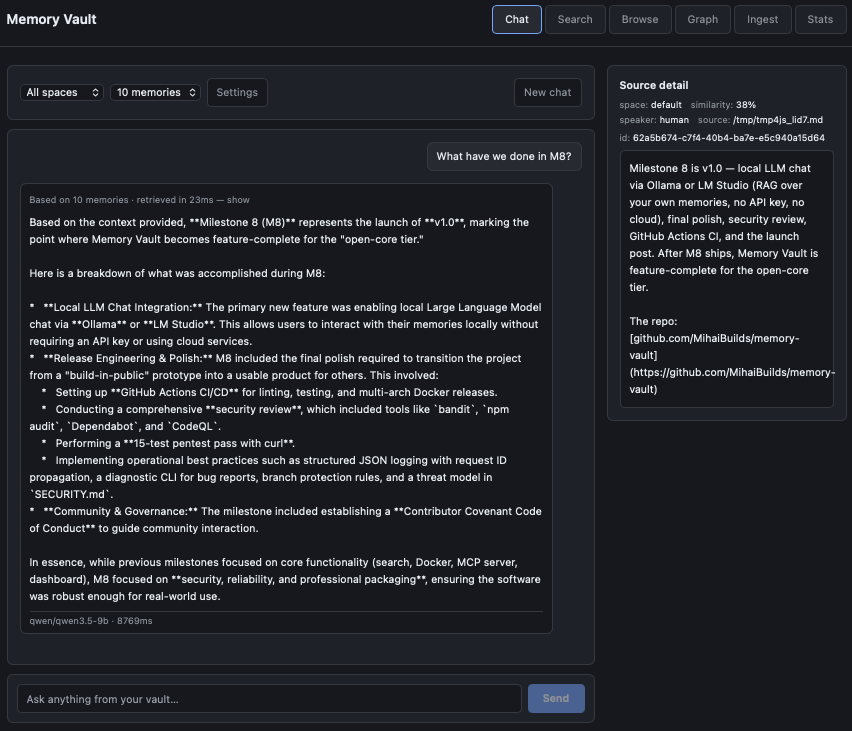
Chat with your vault using a local LLM. Every answer shows the exact memories it was grounded in — click any source to verify.
Status
v1.0 — released 2026-05-07. First stable release of Memory Vault. M1-M7 (hybrid search, Docker, MCP, REST API, dashboard, knowledge graph, local LLM chat) all shipped and stable.
See CHANGELOG.md for the full per-release history, or GitHub Releases for the platform-native view.
Semver from here forward — the public surface (REST API endpoints, MCP tool signatures, DB schema) is stable. Breaking changes only on a major version bump.
Quick Start (Docker)
That's it. PostgreSQL + pgvector + Memory Vault, running and ready. Migrations run automatically on first start.
Data persists in a Docker volume — docker compose down and up again, your memories are still there.
Open http://localhost:8000 in your browser to use the dashboard (Chat, Search, Browse, Graph, Ingest, Stats).
Windows users: clone into WSL2, not a Windows path, and read docs/windows.md if you hit a line-ending error.
No-Docker quick start
If you prefer running without Docker:
Prerequisites
Setup with uv (recommended)
Setup with pip + venv (fallback)
If you don't want to install uv, plain pip + venv works too:
Usage
If you set up with uv, prefix commands with uv run (e.g. uv run memory-vault search ...). If you used pip + venv, activate the venv first (source .venv/bin/activate) and run commands directly:
Features
- Hybrid search — semantic similarity + keyword matching combined, so you find the right memory even when you don't remember the exact words
- MCP integration — four tools (
recall,remember,forget,memory_status) that Claude can use natively during any session - Local LLM chat — query your own memories through LM Studio without sending anything to the cloud, with sources shown for every answer
- Knowledge graph — entities and relationships extracted automatically, connections between things emerge over time
- Memory spaces — separate namespaces for different projects or domains
- REST API — integrate AI memory into any application
- One-command setup —
docker compose upand it's running - Self-hosted — your data stays on your machine, always
Architecture
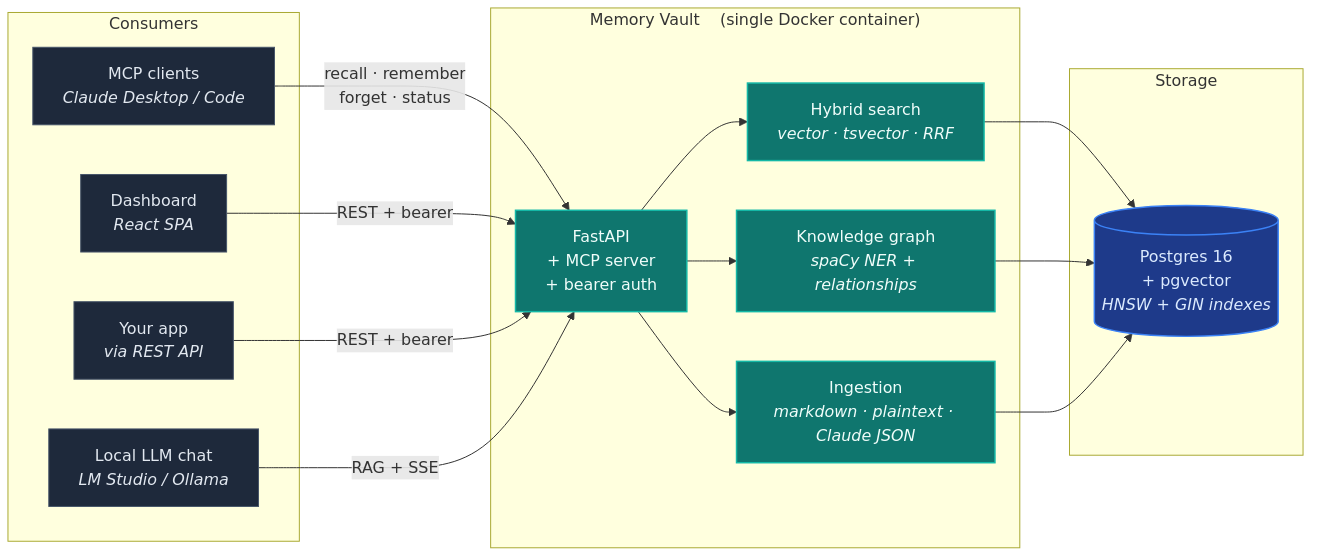
Postgres + pgvector at the core. The same memory layer is reachable from MCP (Claude), the dashboard chat page, the REST API, and any app you build on top.
Three things are deliberate about this stack:
- One database, not two. Vector embeddings, full-text indexes, and relational data all live in Postgres. No separate vector DB to keep in sync.
- Frontend-agnostic. The dashboard is one consumer of the API, not the API itself. MCP, REST, CLI, and your own apps are equal first-class clients.
- CPU-only by default. No GPU required. Embeddings (sentence-transformers) and entity extraction (spaCy) both run on a normal laptop.
Tech Stack
- PostgreSQL 16 + pgvector — vector storage and hybrid search in one database
- Python 3.11+ — async backend with psycopg 3
- sentence-transformers —
all-MiniLM-L6-v2embeddings (384-d, runs on CPU) - spaCy —
en_core_web_smfor entity extraction (CPU-only, no LLM calls) - FastAPI — REST API with bearer auth, rate limiting, and OpenAPI docs
- React 19 + Vite + TanStack Query — web dashboard, baked into the main Docker image
- Cytoscape.js + cose-bilkent — force-directed knowledge graph rendering on the dashboard
- Docker — one-command deployment with
docker compose up - MCP — Claude integration via FastMCP (stdio transport)
MCP Integration (Claude Desktop & Claude Code)
Memory Vault exposes six tools via the Model Context Protocol so Claude can read and write memories during any conversation.
Tools
| Tool | Description |
|---|---|
recall | Search memories with hybrid search (vector + full-text + RRF) |
remember | Store a new memory — auto-classified and embedded |
forget | Soft-delete a memory by chunk ID |
purge_forgotten | Permanently delete memories forgotten more than N days ago |
move_memory | Move a memory to another space, rebuilding its graph entries |
memory_status | Database health, chunk counts, embedding model info |
Resources
| Resource | Description |
|---|---|
memory://spaces | List all memory spaces with chunk counts |
memory://stats | Current system statistics |
Setup — Claude Code
Make sure you've completed the No-Docker quick start above (uv sync or pip install, plus the spaCy model download) so the memory_vault package is installed.
Project scope — add to your project's .mcp.json:
Global scope — to make memory-vault available in every Claude Code session, add the same server block to ~/.claude/.mcp.json, then add memory-vault to enabledMcpjsonServers in ~/.claude/settings.json:
Verify with claude mcp list — memory-vault should show connected.
Setup — Claude Desktop
Add the same server block to Claude Desktop's config (Settings → Developer → Edit Config), then restart Claude Desktop.
Docker Users
If you're running Memory Vault via Docker, use DB_HOST: "127.0.0.1" and make sure port 5432 is exposed in your docker-compose.yml:
The MCP server runs on the host (not inside Docker) and connects to the PostgreSQL container over the exposed port.
Verify It Works
Once configured, Claude will have access to the memory tools. Try:
Related MCP Servers
Adoption & maintenance
Factual signals from GitHub, npm, and our automated checks — not a rating.
GitHub stars
63
Stargazers on the source repository.
Last commit
10d ago
Most recent push to the default branch.
Tools exposed
6
Callable tools this server registers over MCP.
Directory activity
1 views
Config copies, upvotes, and views on AllMCPs.
Reviews
No reviews yet — be the first to share how this listing worked for you.
Frequently Asked Questions about Memory Vault
AllMCPs Directory Badge
Showcase your server listing on GitHub or your project documentation. Embed this dynamic SVG badge to highlight official listing status and live engagement.
Badge Style:
Live Dynamic SVG Preview
Markdown (GitHub README)
[](https://allmcps.com/mcp/memory-vault)HTML Embed
<a href="https://allmcps.com/mcp/memory-vault"><img src="https://allmcps.com/api/badge/memory-vault?style=directory" alt="Memory Vault on AllMCPs" /></a>Technical Specs & Signals
CategoryKnowledge & Memory
7/11 checks healthy over the last 45d
55Quality signal: Good · 55/100How this signal is calculated ▾
Server availabilityNot measured
Not scored for repo-hosted servers — we can't reach the running server, only its GitHub page. Hosted MCP endpoints are health-checked live.
Verified ownership10/20
Documentation & tools24/30
Adoption & activity7/15
Community engagement0/10
A guidance signal from public completeness & health data — not a user rating. New listings start lower and rise as they add docs, get verified, and grow adoption. Signals we can't observe for a listing are skipped, not counted against it.
Own this project?
This directory is pre-filled from public sources. Claim via GitHub README, site badge, or DNS TXT to unlock edit access and the Official badge — proof is checked automatically, then reviewed by our team.
Free dofollow backlink: add your website and place the AllMCPs badge on it — no claim needed. We detect it automatically and keep it verified as long as the badge stays live.
Claim & get free dofollowShare & Embed
Add our SVG badge (dark/light directory styles) or embeddable widget to your site.