AllMCPs
BrowseBestCategoriesStackCompareToolsGuidesBlog
Log in Submit MCP

Stay in the loop

Get new MCP servers and top picks in your inbox.

AllMCPs

The open directory for discovering and installing Model Context Protocol servers.

AllMCPs on GitHub (opens in a new tab)
Launched onTiny Startupstinystartups.com
Explore
  • Browse servers
  • Best MCP servers
  • Categories
  • MCP clients
  • Agent prompts
  • Stack Builder
  • Compare servers
  • Random discovery New
  • Submit a server
  • Pricing & Boost Boost
Learn
  • Guides hub
  • What is MCP?
  • Install guide
  • Build an MCP server
  • Deploy an MCP server
  • Security guide
  • Troubleshooting
  • MCP for SEO & AEO
  • Protocol versioning
  • Blog & updates
Tools
  • All developer tools
  • Config generator
  • Config validator
  • Config auditor
  • MCP playground
  • Token calculator
  • OpenAPI β†’ MCP
  • Badge generator
For agents
  • REST API docs
  • Trust & traffic Live
  • Remote MCP server SSE β†— (opens in a new tab)
  • llms.txt β†— (opens in a new tab)
  • Catalog JSON β†— (opens in a new tab)
Company
  • About
  • Advertise Sponsor
  • Contact
  • GitHub β†— (opens in a new tab)
  • Terms
  • Privacy
AllMCPs VerifiedAllMCPs VerifiedFeatured on Nick LaunchesFeatured on Nick LaunchesLaunch Llama NewsletterLaunch Llama NewsletterVerified DR - allmcps.comVerified DR - allmcps.comFeatured on SaaSGrowFeatured on SaaSGrowFeatured on Twelve ToolsFeatured on Twelve ToolsFeatured on Saaspa.geFeatured on Saaspa.geFeatured on Findly.toolsFeatured on Findly.toolsFeatured on Startup FameFeatured on Startup FameFeatured on LaunchKiwiFeatured on LaunchKiwiFeatured on ScrollLaunchFeatured on ScrollLaunchFeatured on DailyPingsFeatured on DailyPingsFazier badgeFazier badgeFeatured on NewTool.siteFeatured on NewTool.siteFeatured on saasfame.comFeatured on saasfame.comDR Checker - Domain RatingDR Checker - Domain RatingListed on Turbo0Listed on Turbo0Launched on LaunchBoard - Product Launch PlatformLaunched on LaunchBoard - Product Launch PlatformList on SimilarlabsList on Similarlabshttps://codetrendy.comhttps://codetrendy.comListed on DevTool.ioFeatured on BuildlistFeatured on BuildlistLaunched on Tiny StartupsFeatured on ShowMeBestAIFeatured on ShowMeBestAIFind us on LaunchZoneFind us on LaunchZoneAllMCPs VerifiedAllMCPs VerifiedFeatured on Nick LaunchesFeatured on Nick LaunchesLaunch Llama NewsletterLaunch Llama NewsletterVerified DR - allmcps.comVerified DR - allmcps.comFeatured on SaaSGrowFeatured on SaaSGrowFeatured on Twelve ToolsFeatured on Twelve ToolsFeatured on Saaspa.geFeatured on Saaspa.geFeatured on Findly.toolsFeatured on Findly.toolsFeatured on Startup FameFeatured on Startup FameFeatured on LaunchKiwiFeatured on LaunchKiwiFeatured on ScrollLaunchFeatured on ScrollLaunchFeatured on DailyPingsFeatured on DailyPingsFazier badgeFazier badgeFeatured on NewTool.siteFeatured on NewTool.siteFeatured on saasfame.comFeatured on saasfame.comDR Checker - Domain RatingDR Checker - Domain RatingListed on Turbo0Listed on Turbo0Launched on LaunchBoard - Product Launch PlatformLaunched on LaunchBoard - Product Launch PlatformList on SimilarlabsList on Similarlabshttps://codetrendy.comhttps://codetrendy.comListed on DevTool.ioFeatured on BuildlistFeatured on BuildlistLaunched on Tiny StartupsFeatured on ShowMeBestAIFeatured on ShowMeBestAIFind us on LaunchZoneFind us on LaunchZone
Β© 2026 Jackalope Digital LLC. All rights reserved.
  1. Home
  2. 🧠 Knowledge & Memory
  3. Memory Fabric
Memory Fabric logo
Health: ActiveRecent health check succeeded.Last checked 9/7/2026, 7:48:48 PM

Memory Fabric

User RatingsBe the first to rate and review this MCP server! Enrichment pendingWe haven’t run our AI enrichment pass on this listing yet, so the overview, use cases, and FAQ below may be sparse or missing. We work through the catalog over time β€” check back soon.
View Repository2 GitHub StarsTotal stargazers on GitHub for the source repository (2 stars).Visit Website

File-first, local-first MCP memory for AI coding assistants: Markdown + YAML, no vector DB.

Quick Install

Automated & IDE Setup

Copy the AI prompt to install this server into Claude Code, Cursor, or another agent β€” or use 1-click editor setup below.

Add to CursorAdd to VS Code
Not yet automatically verified

We haven't yet run this listing's install command through our automated sandbox check. This isn't a red flag β€” we're steadily working through the catalog.

Manual Client & Custom JSON ConfigExpand JSON β–Ύ

Client Config & Setup

Choose your client or environment
Target File:~/Library/Application Support/Claude/claude_desktop_config.json
claude_desktop_config.json
{
  "mcpServers": {
    "memory-fabric": {
      "command": "uvx",
      "args": [
        "--from"
      ]
    }
  }
}

πŸ’‘ Paste the JSON block into your client's configuration file under mcpServers, then restart the application.

Install Directory Badge Claim listing Alternatives🧠 More in Knowledge & Memory

Documentation Overview

Memory Fabric

CI

File-first, local-first memory layer for MCP-compatible AI coding assistants.

Memory Fabric gives AI tools like Claude Code, Cursor, and GitHub Copilot a consistent, project-aware context layer without locking you into one model, editor, cloud provider, or operating system.

Memory is stored as human-readable Markdown with YAML frontmatter. No vector database. No cloud account. No embeddings required.


Features

  • MCP-native: exposes memory tools through the standard Model Context Protocol
  • File-first: Markdown files are the source of truth, inspectable and commit-ready
  • Local-first: core reads and writes work offline
  • Store-first: facts live in memory-store/, one per file; root maps (architecture.md, decisions.md, ...) are generated views rebuilt by Dreaming, never hand-written
  • Captures itself: every git commit is recorded as episodic memory automatically β€” no agent cooperation required β€” via an opt-in post-commit hook
  • Git-native merge: an optional custom merge driver lets two branches' memory merge as cleanly as their code, instead of conflicting on a shared timestamp line
  • Self-verifying: memories can cite the file/line/commit they depend on; ai-memory verify flags citations that rotted
  • Learns from failure: write_failure_memory_tool deduplicates repeat occurrences of the same error into one growing record instead of scattering near-duplicates
  • Secret-safe: API keys and credentials are redacted before writing
  • Token-budget aware: assembles context within limits; never slices files mid-document
  • Quality eval: scores memory usefulness and Dreaming before/after results locally
  • Unicode-safe: works with any human language
  • Graceful degradation: works without rg, git hooks, or Dreaming configured

Status

v1.4.1 β€” field-store write/read hygiene (live handoffs, query packs, doctor smells) on top of the local field diary. Live on PyPI. Core CLI and MCP tools work end-to-end. See ROADMAP.md for what shipped, what's in progress, and what's next.


Demo
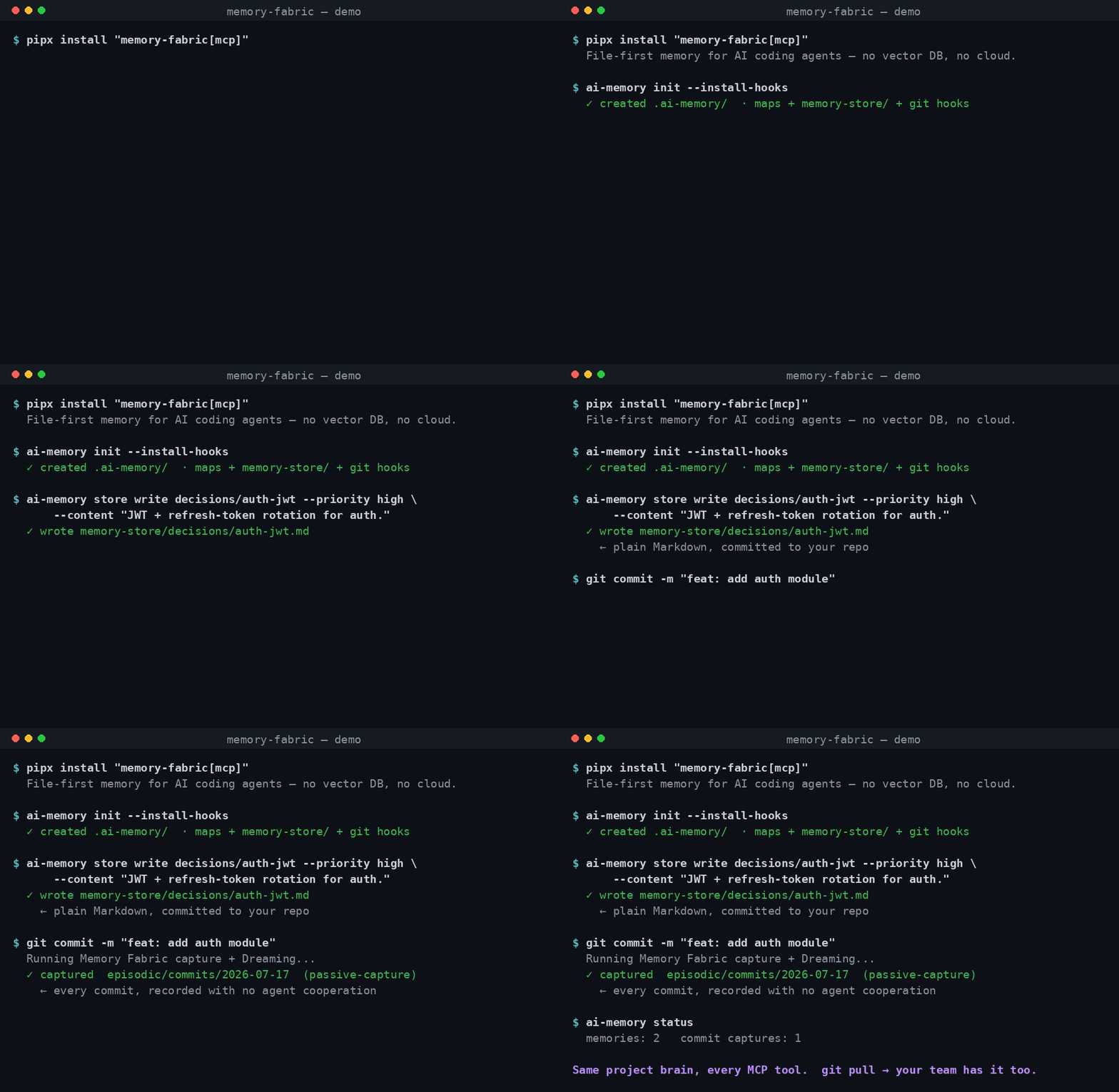
Memory Fabric CLI demo β€” init, write a memory, and a commit captures itself

The CLI and self-capture flow: initialize a project, write a memory as a plain Markdown file in your repo, and watch a git commit record itself as episodic memory with no agent cooperation. The cross-tool moment β€” an agent writes memory in one tool and a different tool reads it back β€” is storyboarded in DEMO.md for the full video.


Privacy β€” no telemetry

Memory Fabric never sends data anywhere. There is no account, no cloud, no analytics, no phone-home. The core read and write paths make no network calls at all; the only optional network requests are a PyPI version-drift check and an LLM-provider preflight, both of which you can turn off with --offline. Your memory is plain Markdown in your own git history β€” it never leaves your machine unless you push it.

An optional, off-by-default field diary can record operational counts on your machine after you run ai-memory diary approve. That is not the session journal, and it is not telemetry: nothing is transmitted. MEMORY_FABRIC_DIARY=0 is a kill switch. This is a deliberate guarantee, not a default we might change.


Installation

From PyPI (recommended)

Requires Python β‰₯ 3.11.

sh
pipx install memory-fabric          # CLI only
pipx install "memory-fabric[mcp]"   # CLI + MCP server

Or with plain pip (inside a virtual environment):

Terminal
pip install memory-fabric          # CLI only
pip install "memory-fabric[mcp]"   # CLI + MCP server

Zero-install one-off run (requires uv):

sh
uvx --from "memory-fabric[mcp]" memory-fabric-mcp   # starts the MCP server on stdio

From GitHub (latest, pre-release)

sh
# CLI only
pipx install "git+https://github.com/elViRafa/agentic-memory.git"

# CLI + MCP server
pipx install "memory-fabric[mcp] @ git+https://github.com/elViRafa/agentic-memory.git"

Or with plain pip (inside a virtual environment):

Terminal
pip install "git+https://github.com/elViRafa/agentic-memory.git"          # CLI only
pip install "memory-fabric[mcp] @ git+https://github.com/elViRafa/agentic-memory.git"  # + MCP

Upgrading

Because Memory Fabric is in active development, we recommend upgrading regularly:

  1. Upgrade the Package:

    sh
    # If installed via pipx:
    pipx upgrade memory-fabric
    
    # If installed in a virtual environment via pip:
    pip install --upgrade "memory-fabric[mcp]"
    
    # If installed from GitHub (pre-release):
    pipx install --force "memory-fabric[mcp] @ git+https://github.com/elViRafa/agentic-memory.git"
    
  2. Refresh the MCP client config (uvx installs): If your client config launches the server via uvx (the default written by older ai-memory install runs), uv serves the build it cached the first time and never re-resolves an unpinned spec β€” restarting the client is not enough and can leave the server several releases behind without any signal. After upgrading, either:

    sh
    # Re-write the client config (now pins the exact installed version, or points
    # at the local memory-fabric-mcp binary when one sits next to the CLI):
    ai-memory install --client <your-client> --project
    
    # ...or drop the stale cached build so uvx re-resolves:
    uv cache clean memory-fabric
    

    ai-memory doctor warns when the local version drifts from the latest on PyPI or when a different ai-memory installation shadows this one on PATH.

  3. Restart MCP Clients: After upgrading, restart your IDE (Cursor, VS Code) or assistant process (Claude Code) to ensure the client reloads the updated memory-fabric-mcp server.

  4. Refresh Local Projects (Optional): If you have projects initialized with older versions of Memory Fabric, navigate to the project directory and run:

    sh
    ai-memory init --install-hooks
    

    This will safely refresh starter templates and local git hook integration to the latest format without overwriting your existing memory markdown files.

Windows terminals: the CLI emits UTF-8 (memory content legitimately contains em-dashes and bullets). Windows Terminal and PowerShell 7 render it out of the box; on legacy consoles (PowerShell 5.1 with an OEM code page) set chcp 65001 or PYTHONUTF8=1 if you see replacement characters.

Or clone and install in editable mode for local development:

sh
git clone https://github.com/elViRafa/agentic-memory.git
cd agentic-memory
pip install -e .          # CLI only
pip install -e ".[mcp]"   # CLI + MCP server

Quick Start

1. Initialize a project

sh
ai-memory init

Creates .ai-memory/ in the current directory with starter sections and a .gitignore.

2. Check health

sh
ai-memory doctor

3. Evaluate memory quality

sh
ai-memory eval
ai-memory eval --json

eval scores whether memories are useful for coding assistants. It checks section coverage, starter-template content, summary quality, metadata, retrieval readiness, and likely secrets.

If .ai-memory/ exists, reports are saved under ignored local files:

text
.ai-memory/evals/latest.json
.ai-memory/evals/latest.md
.ai-memory/evals/<timestamp>-memory.json
.ai-memory/evals/<timestamp>-memory.md

If .ai-memory/ does not exist yet, eval prints a pre-init report only and creates no files.

4. Query memory

sh
ai-memory query "authentication"

5. Run maintenance (Dreaming)

sh
ai-memory dream --mode light
ai-memory dream --mode deep

Dreaming creates a snapshot before maintenance. You can evaluate whether a Dreaming run improved memory quality:

sh
ai-memory eval --dream latest
ai-memory dream --mode light --eval

Dream eval compares the pre-dream snapshot to current memory and reports score delta, changed files, improvements, and regressions.


MCP Server β€” Install

One command per client. Safe to re-run: merges with your existing config, never overwrites it, and backs up the original file if it can't be parsed.

One-click install

Install in VS Code Install in VS Code Insiders Install in Cursor

These call uvx --from "memory-fabric[mcp]" memory-fabric-mcp under the hood β€” same canonical invocation as ai-memory install, just without the CLI step. Requires uv.

Read the full README β†’View source on GitHub β†’

Related MCP Servers

View all in Knowledge & Memory View all alternatives
  • Moxie Docs MCP logoMoxie Docs MCP
    β˜… Featured

    MCP & Agent Skills for Automated Documentation, and codebase conventions + context

    🧠 Knowledge & Memory21 views
    Compare vs Moxie Docs MCP β†’
  • Scrivener MCP logoScrivener MCP

    Connect Scrivener 3 writing projects to Claude and other AI assistants. 47 tools for document management, writing analysis, semantic search, character/plot memory, and content enhancement. Progressive skill loading, relationship engine with HMS triplets, and JS fallback for offline semantic search. npm i -g scrivener-mcp

    🧠 Knowledge & Memory16 views
    Compare vs Scrivener MCP β†’
  • Continuum logoContinuum

    Shared memory + orchestration for your coding agents. Local-first MCP, vector RAG.

    🧠 Knowledge & Memory0 views
    Compare vs Continuum β†’
  • Mindswap logoMindswap

    Local-first AI context and memory server for cross-tool coding continuity.

    🧠 Knowledge & Memory0 views
    Compare vs Mindswap β†’

Reviews

No reviews yet β€” be the first to share how this listing worked for you.

Frequently Asked Questions about Memory Fabric

Add the following block to your claude_desktop_config.json under mcpServers: "mcpServers": { "memory-fabric": { "command": "npx", "args": ["-y", "Memory Fabric"] } }

AllMCPs Directory Badge

Full Badge Customizer

Showcase your server listing on GitHub or your project documentation. Embed this dynamic SVG badge to highlight official listing status and live engagement.

Badge Style:
Live Dynamic SVG PreviewMemory Fabric AllMCPs Directory Badge

Markdown (GitHub README)
[![AllMCPs](https://allmcps.com/api/badge/memory-fabric?style=directory)](https://allmcps.com/mcp/memory-fabric)
HTML Embed
<a href="https://allmcps.com/mcp/memory-fabric"><img src="https://allmcps.com/api/badge/memory-fabric?style=directory" alt="Memory Fabric on AllMCPs" /></a>

Technical Specs & Signals

Category🧠Knowledge & Memory
More technical detailsExpand β–Ύ
TransportSTDIO
RuntimePython
Last updatedSep 7, 2026
Views0
Unique ViewsTotal visits recorded for this listing page on AllMCPs.
Installs0
Installs & Copy ActionsTotal times users copied install commands or configuration snippets for this server.
GitHub stars2
GitHub Star CountTotal stargazers on GitHub representing community popularity (2 stars).
37Quality signal: Fair Β· 37/100How this signal is calculated β–Ύ
Server availabilityNot measured

Not scored for repo-hosted servers β€” we can't reach the running server, only its GitHub page. Hosted MCP endpoints are health-checked live.

Verified ownership10/20
Documentation & tools16/30
Adoption & activity2/15
Community engagement0/10

A guidance signal from public completeness & health data β€” not a user rating. New listings start lower and rise as they add docs, get verified, and grow adoption. Signals we can't observe for a listing are skipped, not counted against it.

β˜… FeaturedAllMCPs Server logo

AllMCPs Server

The official MCP server for AllMCPs.com - submit and manage tools directly from your AI. The open directory for MCP servers. Connect Claude, Cursor, Windsurf, and AI agents to databases, tools, files, and APIs. Explore 10,000+ servers. AllMCPs is the premier, open directory for discovering, evaluating, and installing Model Context Protocol (MCP) servers to equip AI agents and LLMs with real-world superpowers.

Explore Server β†’

Own this project?

This directory is pre-filled from public sources. Claim via GitHub README, site badge, or DNS TXT to unlock edit access and the Official badge β€” proof is checked automatically, then reviewed by our team.

Free dofollow backlink: add your website and place the AllMCPs badge on it β€” no claim needed. We detect it automatically and keep it verified as long as the badge stays live.

Claim & get free dofollow

Share & Embed

Add our SVG badge (dark/light directory styles) or embeddable widget to your site.

Explore more

More in 🧠 Knowledge & Memory β†’Best MCP servers for Memory & Knowledge β†’Alternatives to Memory Fabric β†’Install in Claude DesktopInstall in CursorInstall in VS Code


