Local-first graph memory for AI assistants with SQLite, semantic search, and MCP tools.
Quick Install
Automated & IDE SetupCopy the AI prompt to install this server into Claude Code, Cursor, or another agent — or use 1-click editor setup below.
One-click editor setup isn’t available for this listing yet — we don’t have a confirmed install command, and we’d rather show nothing than point your editor at the wrong package or host. Follow the project’s own setup instructions, linked above.
Manual Client & Custom JSON ConfigExpand JSON ▾
No confirmed setup config for this listing yet. We only publish a config block when the install details come from the project itself — its README, its docs, or a verified owner. We haven’t found those for Memory Engine MCP, and we’d rather show nothing than a guess you’d paste into your client. Follow the project’s own setup instructions for the current steps.
Capabilities & Tool Schemas (38)
Inspect callable tools, capabilities, and parameters exposed to AI agents by Memory Engine MCP.
rememberCreate or update an atom
recallSmart hybrid recall with graph expansion
working_setBuild a task-oriented context pack
semantic_searchPure semantic search
get_atomRead one atom with bonds
list_atomsBrowse atoms by domain/type/status
Documentation Overview





🧠 Memory Engine MCP
Local-first, graph-aware long-term memory for AI assistants.
SQLite + semantic search + knowledge graph + MCP tools for agents that need continuity.
Works with Claude Desktop · Claude Code · Cursor · Cline · Windsurf · OpenClaw · any MCP client
Why Memory Engine?
Most MCP memory servers are either simple key-value stores or plain text search wrappers.
Memory Engine is different: it models memory as typed atoms connected by typed bonds, then retrieves context with a hybrid ranking pipeline that combines:
- full-text search (SQLite FTS5)
- semantic similarity via local Ollama embeddings
- confidence, recency, and weight
- graph expansion from related memories
The goal is not just storage. The goal is a memory system that can recall, connect, decay, curate, and learn over time.
Highlights
- Local-first — SQLite database, optional local embeddings via Ollama, no required cloud API.
- MCP-native — exposes 35 tools through FastMCP.
- Graph-aware recall — expands top hits through bidirectional bonds for richer context.
- Semantic search — meaning-based retrieval with
nomic-embed-text. - Markdown coexistence — import existing notes one-way without replacing your human-readable memory.
- Error memory — remembers mistakes and corrections, with auto-promotion to preferences after repeated failures.
- Cognitive curator — non-destructive maintenance pass for compaction, bond suggestions, duplicate detection, and isolated atom classification.
- Session watcher — canonical OpenClaw SQLite ingestion (schema 17), reset-aware digests, and JSONL legacy fallback.
- Backup & restore — full SQLite snapshots, JSON export/import, verified restores with automatic safety backups.
- Auth & hardening — optional API token, secure bind, input validation, rate limiting.
- Test suite — 144 tests covering CRUD, ranking, migrations, auth, backup, concurrency, and transcript ingestion.
- Benchmark — CLI recall quality suite with Precision@K, MRR, latency percentiles.
Architecture
MCP Tools
Memory
| Tool | Purpose |
|---|---|
remember | Create or update an atom |
recall | Smart hybrid recall with graph expansion |
working_set | Build a task-oriented context pack |
semantic_search | Pure semantic search |
get_atom | Read one atom with bonds |
list_atoms | Browse atoms by domain/type/status |
merge_atoms | Merge duplicate atoms |
export_atom | Export one atom as markdown |
Knowledge graph
| Tool | Purpose |
|---|---|
link / unlink | Create or remove typed bonds |
search_graph | Traverse the graph from one atom |
suggest_bonds | Suggest bonds for one atom |
suggest_bonds_all | Suggest or create bonds in bulk |
Learning and maintenance
| Tool | Purpose |
|---|---|
curator_run | Conservative curation pass |
cognitive_status | Graph and memory health metrics |
learning_run | Detect contradictions, weak atoms, merge candidates, gaps |
ask_pending / answer_human | Human-in-the-loop clarification |
decay_run | Run decay cycle |
cleanup_sessions | Remove expired session atoms |
cleanup_duplicates | Remove duplicate session atoms |
reindex_embeddings | Rebuild embeddings |
Error memory and preferences
| Tool | Purpose |
|---|---|
error_check | Check past failures before doing a task |
error_log | Record a mistake and the correction |
error_list | Browse unresolved/resolved errors |
preference_search | Search structured preferences |
Import and introspection
| Tool | Purpose |
|---|---|
import_markdown | Import markdown notes into atoms |
memory_summary | 3-level summary: global → domain → detail |
stats | Database statistics |
version | Server version |
recall_session | Search one OpenClaw session |
session_summary | Summarize one OpenClaw session |
memory_contradict | Supersede an old atom with a newer contradictory one |
list_contradictions | List explicit contradiction/supersession records |
classify_memory_tier | Infer the 3-tier class (episodic/semantic/procedural) |
memory_impact | Impact analysis: what depends on this atom |
Backup, restore & export
| Tool | Purpose |
|---|---|
backup_database | Create, list, verify, or clean up SQLite snapshots |
restore_database | Restore from a backup (with automatic safety backup) |
export_all | Export all memory data as portable JSON |
import_data | Import from JSON (merge or replace mode) |
Web UI (optional)
Memory Engine includes an optional web UI for graph exploration, atom inspection, contradiction browsing, and impact analysis.
Or run standalone:
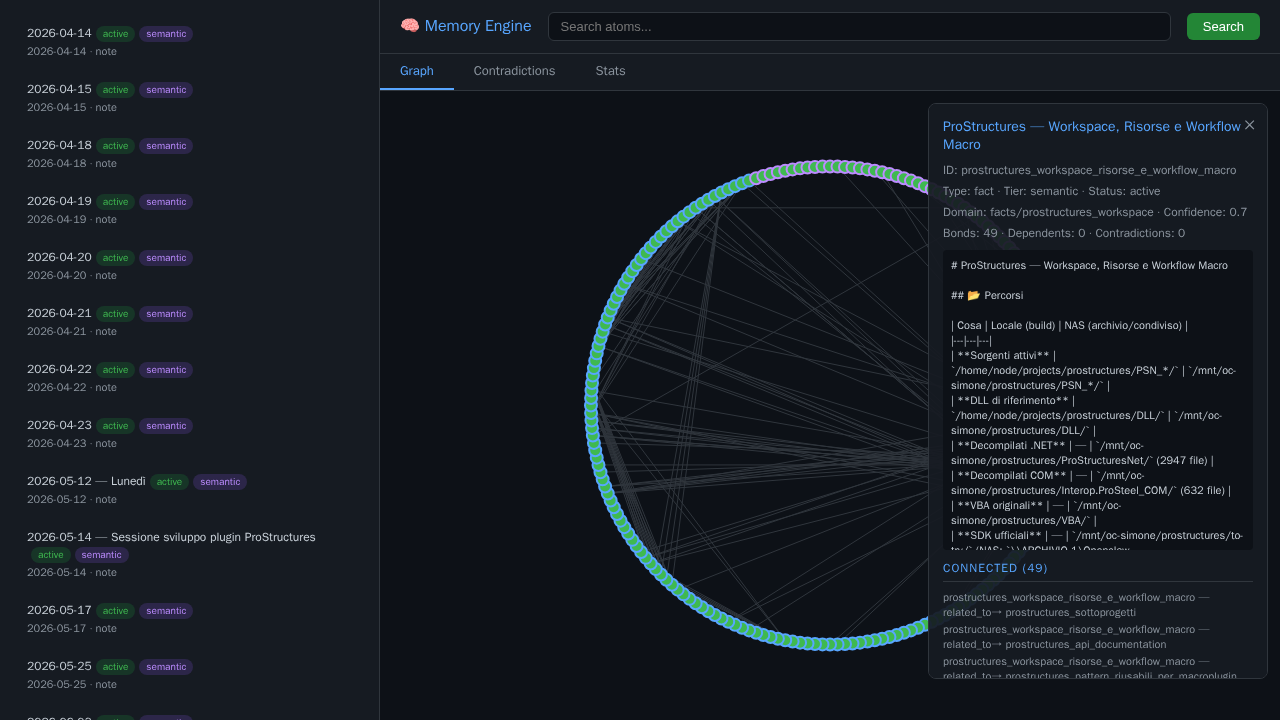
Web UI: interactive graph, atom details, contradiction browser, stats dashboard
Quick start with Docker
Option A — Use the pre-built image (recommended)
Pin the version. Use an explicit tag like
:1.7.0in production. Avoid:latest— it can change without notice.
Option B — Build from source
Default endpoint:
Example MCP client config:
See docs/INSTALL.md for Docker, local Python, Claude Desktop, Cursor, and OpenClaw examples.
Local Python
Configuration
Main configuration file: config.json
Important environment variables:
| Variable | Default | Purpose |
|---|---|---|
MEMORY_DB_PATH | /data/memory.db | SQLite database path |
MARKDOWN_SOURCE | /workspace/memory | Markdown directory for import |
MEMORY_HOST | 127.0.0.1 | Server bind address (secure default) |
MEMORY_PORT | 8085 | SSE port |
MEMORY_API_TOKEN | (none) | Optional API token for auth (see Security) |
OPENCLAW_AGENT_DB | (none) | Preferred per-agent OpenClaw SQLite DB (schema 17) |
OPENCLAW_SESSIONS_DIR | /sessions | Legacy JSONL fallback when no agent DB is configured |
SESSION_DIGEST_DIR | /data/session_digests | Optional session digest output |
For the SQLite mount, WAL/SHM handling, filtering, and security boundary, see OpenClaw transcript ingestion.
Semantic search requires Ollama reachable from the container or host. Default:
If you do not use Ollama, set ollama.enabled to false; FTS recall still works.
Memory model
Atoms have:
titlebodytype:fact,decision,event,preference,log,procedure,note, etc.domain: project or topic namespaceconfidenceweighttags- optional TTL
Bonds connect atoms with relation types:
Example usage
Security
By default, Memory Engine runs in open mode (no auth) — safe for stdio or trusted local environments.
To enable API token auth:
Or via environment variable:
Related MCP Servers
Adoption & maintenance
Factual signals from GitHub, npm, and our automated checks — not a rating.
GitHub stars
1
Stargazers on the source repository.
Last commit
5d ago
Most recent push to the default branch.
Tools exposed
38
Callable tools this server registers over MCP.
Reviews
No reviews yet — be the first to share how this listing worked for you.
Frequently Asked Questions about Memory Engine MCP
AllMCPs Directory Badge
Showcase your server listing on GitHub or your project documentation. Embed this dynamic SVG badge to highlight official listing status and live engagement.
Badge Style:
Live Dynamic SVG Preview
Markdown (GitHub README)
[](https://allmcps.com/mcp/memory-engine-mcp)HTML Embed
<a href="https://allmcps.com/mcp/memory-engine-mcp"><img src="https://allmcps.com/api/badge/memory-engine-mcp?style=directory" alt="Memory Engine MCP on AllMCPs" /></a>Technical Specs & Signals
CategoryDatabases
11/15 checks healthy over the last 45d
45Quality signal: Fair · 45/100How this signal is calculated ▾
Server availabilityNot measured
Not scored for repo-hosted servers — we can't reach the running server, only its GitHub page. Hosted MCP endpoints are health-checked live.
Verified ownership10/20
Documentation & tools20/30
Adoption & activity4/15
Community engagement0/10
A guidance signal from public completeness & health data — not a user rating. New listings start lower and rise as they add docs, get verified, and grow adoption. Signals we can't observe for a listing are skipped, not counted against it.
Own this project?
This directory is pre-filled from public sources. Claim via GitHub README, site badge, or DNS TXT to unlock edit access and the Official badge — proof is checked automatically, then reviewed by our team.
Free dofollow backlink: add your website and place the AllMCPs badge on it — no claim needed. We detect it automatically and keep it verified as long as the badge stays live.
Claim & get free dofollowShare & Embed
Add our SVG badge (dark/light directory styles) or embeddable widget to your site.