Zettelkasten-based agent memory system with bidirectional links
Quick Install
Automated & IDE SetupCopy the AI prompt to install this server into Claude Code, Cursor, or another agent — or use 1-click editor setup below.
%5D(https%3A%2F%2Fmseep.ai%2Fapp%2Fiamtouchskyer-memex%22%7D)
Manual Client & Custom JSON ConfigExpand JSON ▾
Client Config & Setup
Remote HTTPChoose your client or environment
Target File:
💡 Paste the JSON block into your client's configuration file under mcpServers, then restart the application.
Documentation Overview
memex
Persistent memory for AI coding agents. Your agent remembers what it learned across sessions.
English | 中文 | 日本語 | 한국어 | Español
English
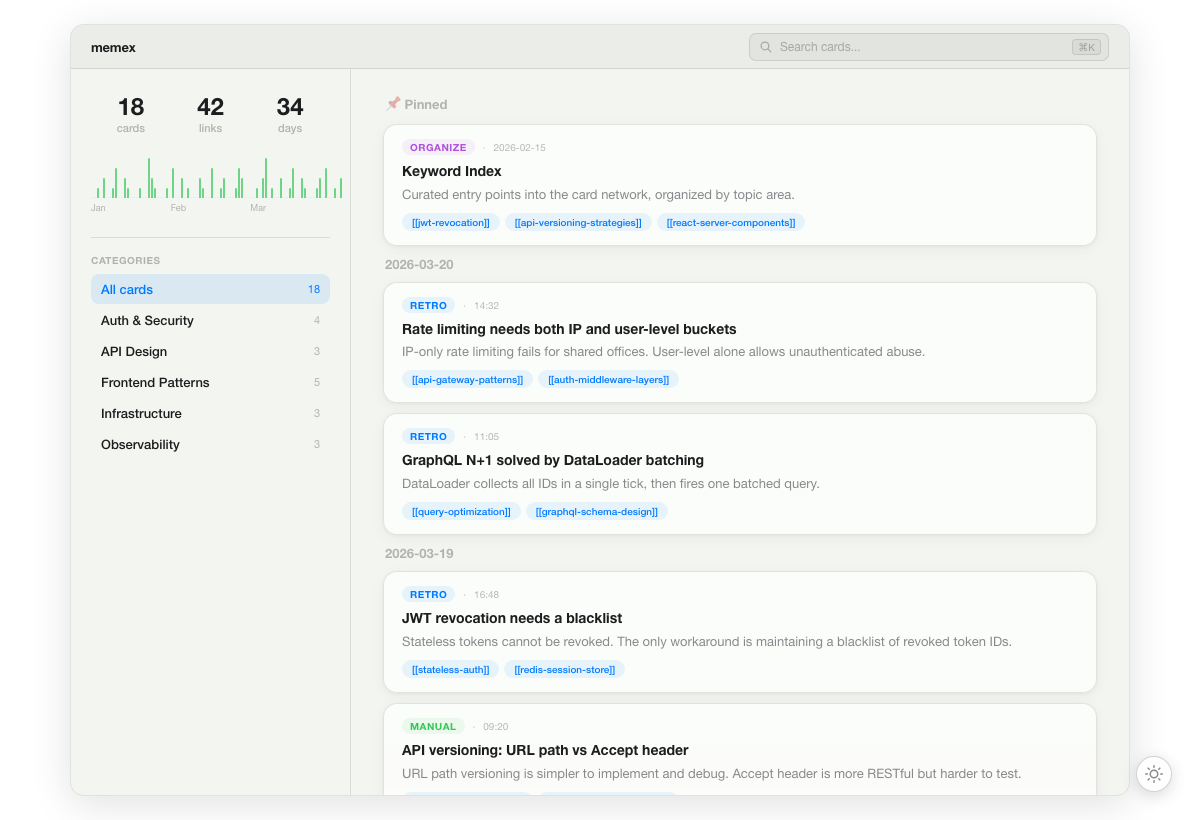
Every time your AI agent finishes a task, it saves insights as atomic knowledge cards with [[bidirectional links]]. Next session, it recalls relevant cards before starting work — building on what it already knows instead of starting from scratch.
No vector database, no embeddings — just markdown files your agent (and you) can read.
Supported platforms
| Platform | Integration | Experience |
|---|---|---|
| Claude Code | Plugin (hooks + skills) | Best — auto-recall, slash commands, SessionStart hook |
| VS Code / Copilot | MCP Server | 10 MCP tools, zero config |
| Cursor | MCP Server | 10 MCP tools, zero config |
| Codex | MCP Server | 10 MCP tools, zero config |
| Windsurf | MCP Server | 10 MCP tools, zero config |
| Pi | Extension (custom tools + hooks) | 8 tools, auto-recall hook, slash commands |
| Any MCP client | MCP Server | 10 MCP tools, zero config |
All platforms share the same ~/.memex/cards/ directory. A card written in Claude Code is instantly available in Cursor, Codex, or any other client.
Prerequisites
- VS Code / Copilot: No prerequisites — the extension bundles everything
- Claude Code: No prerequisites — the plugin handles everything
- Pi: Requires Node.js 18+ and
npm install -g @touchskyer/memex - All other platforms (Cursor, Codex, Windsurf, etc.): Requires Node.js 18+
Install
Step 1: Add memex to your editor
| Platform | Command |
|---|---|
| VS Code / Copilot | Search "memex" in VS Code Extensions — install and done, no extra setup |
| Claude Code | /plugin marketplace add iamtouchskyer/memex then /plugin install memex@memex |
| Claude Code (MCP fallback) | npm install -g @touchskyer/memex && memex mcp-config --claude-code |
| Cursor | First npm install -g @touchskyer/memex, then one-click install |
| Codex | npm install -g @touchskyer/memex && codex mcp add memex -- memex mcp |
| Pi | npm install -g @touchskyer/memex && pi install npm:@touchskyer/memex |
| Windsurf / others | npm install -g @touchskyer/memex, then add MCP server: command memex, args ["mcp"] |
Note: If you use Claude Code inside VS Code, follow the Claude Code row — not "VS Code / Copilot". The VS Code extension serves GitHub Copilot only; Claude Code has its own plugin system.
That's it — no extra setup needed. The MCP tool descriptions tell your agent when to recall and retro.
Upgrade
| Platform | How |
|---|---|
| VS Code / Copilot | Extension auto-updates from marketplace |
| Claude Code | /plugin uninstall memex then /plugin install memex@memex |
| Pi | npm update -g @touchskyer/memex and re-copy pi-extension/index.ts |
| Cursor / Codex / Windsurf | npm update -g @touchskyer/memex |
Cross-platform sharing
All clients read and write the same ~/.memex/cards/ directory. Sync across devices with git:
Prerequisite: Auto-create requires GitHub CLI (
gh auth login). Or pass your own git remote URL to skip this, including GitLab and self-hosted GitLab remotes.
For GitLab, create an empty private repository first, then pass its SSH or HTTPS remote URL. See the GitLab sync guide for examples.
Browse your memory
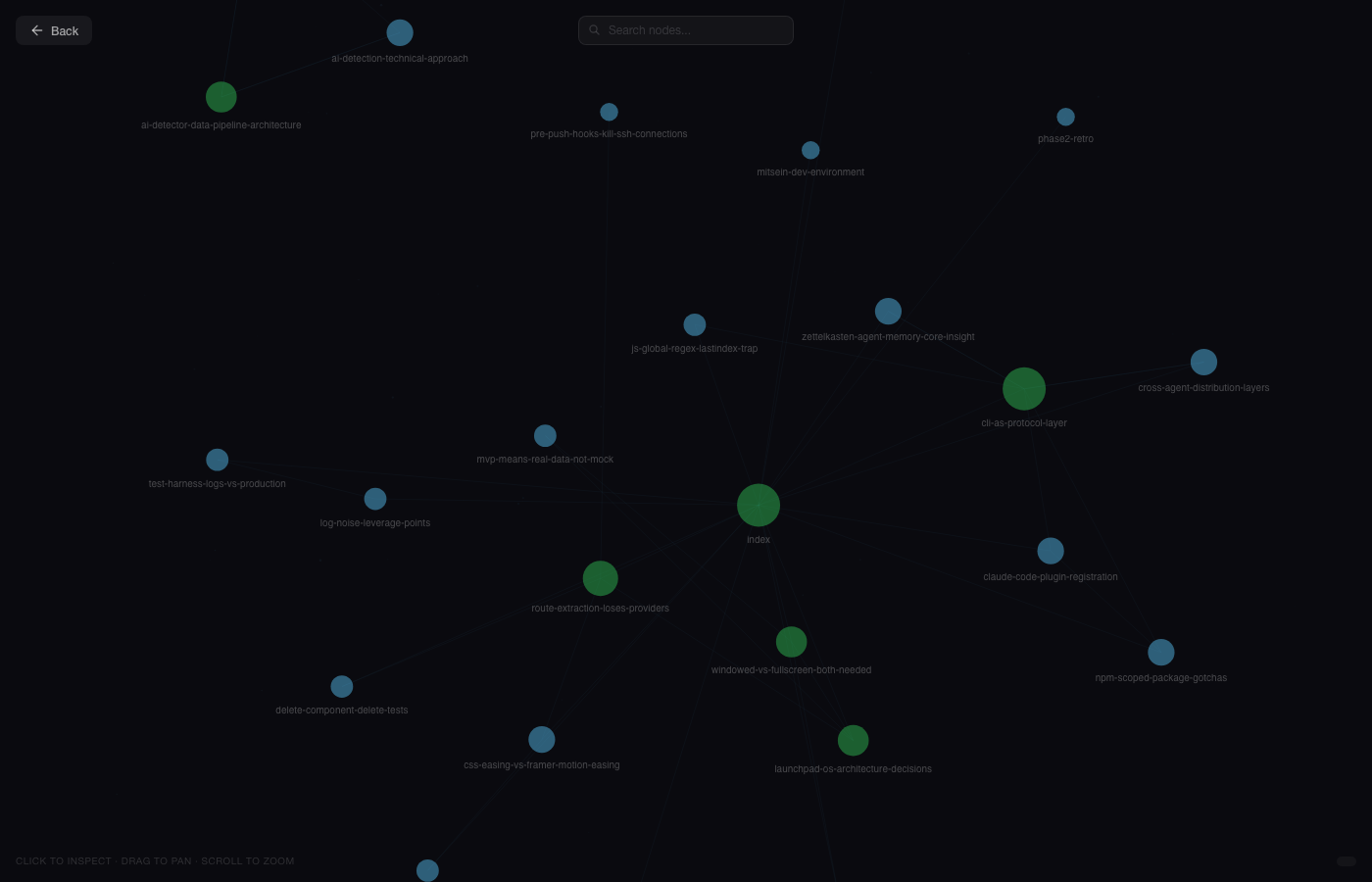
Opens a visual timeline of all your cards at localhost:3939. Includes a graph view to explore bidirectional links.
If you've set up sync, memex serve opens memra.vercel.app — a web UI with Timeline, Graph view, and Share card. Pass --local to force the local UI instead (useful offline, or when you'd rather not send queries to a third-party web app):
CLI reference
How it works
Based on Niklas Luhmann's Zettelkasten method — the system behind 70 books from 90,000 handwritten cards:
- Atomic notes — one idea per card
- Own words — forces understanding (the Feynman method)
- Links in context — "this relates to [[X]] because..." not just tags
- Keyword index — curated entry points to the card network
Cards are stored as markdown in ~/.memex/cards/. Open them in Obsidian, edit with vim, grep from terminal. Your memory is never locked in.
Privacy guardrails
Do not put actual secrets, credentials, tokens, or exact secret file contents into memex queries or cards. Use abstract descriptions and redacted examples instead.
Memex rejects high-confidence raw secrets, redacts credentials embedded in URLs before saving, and masks webhook/tokenized URLs in display output. It cannot hide unsafe tool-call arguments that your AI client has already shown in its transcript, so redact before calling tools.
Configuration
Optional settings go in ~/.memex/.memexrc (JSON):
| Key | Type | Default | Description |
|---|---|---|---|
nestedSlugs | boolean | false | Allow / in slugs for hierarchical card paths |
searchDirs | string[] | — | Extra directories to search with --all (in addition to the built-in cards/ store) |
experimental.agenticMemory | boolean | false | Enable A-MEM-inspired agentic memory workflow (see below) |
Experimental: Agentic Memory
When experimental.agenticMemory is true, agents gain access to a structured memory skill that guides them through: observe → draft atomic card → enrich metadata → retrieve candidates → decide (create/update/skip) → preview → write → verify.
This produces higher-quality cards with agent-proposed [[wikilinks]] (links are suggested after candidate retrieval and agent review, never added from keyword or embedding similarity alone) and metadata enrichment, compared to the default recall/retro workflow. The feature is default-off and does not change any existing behavior when disabled.
See skills/memex-agentic-memory/SKILL.md for the full skill specification and docs/ARCHITECTURE.md for config details.
中文
AI 编程 agent 的持久记忆系统。让你的 agent 跨会话记住学到的知识。
每次 agent 完成任务后,它会将洞察保存为带有 [[双向链接]] 的原子知识卡片。下次会话时,agent 会先回顾相关卡片再开始工作——基于已有知识继续,而非从零开始。
无需向量数据库,无需 embedding——只是你和 agent 都能读取的 markdown 文件。
支持平台
| 平台 | 集成方式 | 体验 |
|---|---|---|
| Claude Code | Plugin(hooks + skills) | 最佳——自动回顾、斜杠命令、SessionStart hook |
| VS Code / Copilot | MCP Server | 10 个 MCP 工具,零配置 |
| Cursor | MCP Server | 10 个 MCP 工具,零配置 |
| Codex | MCP Server | 10 个 MCP 工具,零配置 |
| Windsurf | MCP Server | 10 个 MCP 工具,零配置 |
| Pi | Extension(自定义工具 + hooks) | 8 个工具,自动回顾 hook,斜杠命令 |
| 任何 MCP 客户端 | MCP Server | 10 个 MCP 工具,零配置 |
所有平台共享同一个 ~/.memex/cards/ 目录。在 Claude Code 中写的卡片,在 Cursor、Codex 或其他客户端中即刻可用。
前置要求
- VS Code / Copilot:无需额外安装——扩展内置了所有依赖
- Claude Code:无需额外安装——plugin 自动处理
- Pi:需要 Node.js 18+ 和
npm install -g @touchskyer/memex - 其他平台(Cursor、Codex、Windsurf 等):需要 Node.js 18+
安装
第一步:添加 memex 到编辑器
| 平台 | 命令 |
|---|---|
| VS Code / Copilot | 在 VS Code 扩展商店 搜索 "memex"——安装即用,无需其他配置 |
| Claude Code | /plugin marketplace add iamtouchskyer/memex,然后 /plugin install memex@memex |
| Claude Code(MCP 备选) | npm install -g @touchskyer/memex && memex mcp-config --claude-code |
| Cursor | 先 npm install -g @touchskyer/memex,然后 一键安装 |
| Codex | npm install -g @touchskyer/memex && codex mcp add memex -- memex mcp |
| Pi | npm install -g @touchskyer/memex && pi install npm:@touchskyer/memex |
| Windsurf / 其他 | npm install -g @touchskyer/memex,然后添加 MCP server:命令 memex,参数 ["mcp"] |
注意: 如果你在 VS Code 里使用 Claude Code,请按照 Claude Code 那一行操作,而非"VS Code / Copilot"。VS Code 扩展仅服务于 GitHub Copilot;Claude Code 有自己的 plugin 系统。
安装完成,无需额外配置。MCP 工具描述会自动告诉 agent 何时 recall 和 retro。
日本語
AIコーディングエージェントのための永続メモリシステム。エージェントがセッションをまたいで学んだことを記憶します。
エージェントがタスクを完了するたびに、[[双方向リンク]]付きのアトミックな知識カードとしてインサイトを保存します。次のセッションでは、作業開始前に関連カードを呼び出し、ゼロからではなく既存の知識の上に構築します。
ベクトルデータベースもembeddingも不要——エージェント(とあなた)が読めるmarkdownファイルだけです。
対応プラットフォーム
Related MCP Servers
Reviews
No reviews yet — be the first to share how this listing worked for you.
Frequently Asked Questions about Memex
AllMCPs Directory Badge
Showcase your server listing on GitHub or your project documentation. Embed this dynamic SVG badge to highlight official listing status and live engagement.
Badge Style:
Live Dynamic SVG Preview
Markdown (GitHub README)
[](https://allmcps.com/mcp/memex-3)HTML Embed
<a href="https://allmcps.com/mcp/memex-3"><img src="https://allmcps.com/api/badge/memex-3?style=directory" alt="Memex on AllMCPs" /></a>