AllMCPs
BrowseBestCategoriesStackCompareToolsGuidesBlog
Log in Submit MCP

Stay in the loop

Get new MCP servers and top picks in your inbox.

AllMCPs

The open directory for discovering and installing Model Context Protocol servers.

AllMCPs on GitHub (opens in a new tab)
Launched onTiny Startupstinystartups.com
Explore
  • Browse servers
  • Best MCP servers
  • Categories
  • MCP clients
  • Agent prompts
  • Stack Builder
  • Compare servers
  • Random discovery New
  • Submit a server
  • Pricing & Boost Boost
Learn
  • Guides hub
  • What is MCP?
  • Install guide
  • Build an MCP server
  • Deploy an MCP server
  • Security guide
  • Troubleshooting
  • MCP for SEO & AEO
  • Protocol versioning
  • Blog & updates
Tools
  • All developer tools
  • Config generator
  • Config validator
  • Config auditor
  • MCP playground
  • Token calculator
  • OpenAPI β†’ MCP
  • Badge generator
For agents
  • REST API docs
  • Trust & traffic Live
  • Remote MCP server SSE β†— (opens in a new tab)
  • llms.txt β†— (opens in a new tab)
  • Catalog JSON β†— (opens in a new tab)
Company
  • About
  • Advertise Sponsor
  • Contact
  • GitHub β†— (opens in a new tab)
  • Terms
  • Privacy
AllMCPs VerifiedAllMCPs VerifiedFeatured on Nick LaunchesFeatured on Nick LaunchesLaunch Llama NewsletterLaunch Llama NewsletterVerified DR - allmcps.comVerified DR - allmcps.comFeatured on SaaSGrowFeatured on SaaSGrowFeatured on Twelve ToolsFeatured on Twelve ToolsFeatured on Saaspa.geFeatured on Saaspa.geFeatured on Findly.toolsFeatured on Findly.toolsFeatured on Startup FameFeatured on Startup FameFeatured on LaunchKiwiFeatured on LaunchKiwiFeatured on ScrollLaunchFeatured on ScrollLaunchFeatured on DailyPingsFeatured on DailyPingsFazier badgeFazier badgeFeatured on NewTool.siteFeatured on NewTool.siteFeatured on saasfame.comFeatured on saasfame.comDR Checker - Domain RatingDR Checker - Domain RatingListed on Turbo0Listed on Turbo0Launched on LaunchBoard - Product Launch PlatformLaunched on LaunchBoard - Product Launch PlatformList on SimilarlabsList on Similarlabshttps://codetrendy.comhttps://codetrendy.comListed on DevTool.ioFeatured on BuildlistFeatured on BuildlistLaunched on Tiny StartupsFeatured on ShowMeBestAIFeatured on ShowMeBestAIFind us on LaunchZoneFind us on LaunchZoneAllMCPs VerifiedAllMCPs VerifiedFeatured on Nick LaunchesFeatured on Nick LaunchesLaunch Llama NewsletterLaunch Llama NewsletterVerified DR - allmcps.comVerified DR - allmcps.comFeatured on SaaSGrowFeatured on SaaSGrowFeatured on Twelve ToolsFeatured on Twelve ToolsFeatured on Saaspa.geFeatured on Saaspa.geFeatured on Findly.toolsFeatured on Findly.toolsFeatured on Startup FameFeatured on Startup FameFeatured on LaunchKiwiFeatured on LaunchKiwiFeatured on ScrollLaunchFeatured on ScrollLaunchFeatured on DailyPingsFeatured on DailyPingsFazier badgeFazier badgeFeatured on NewTool.siteFeatured on NewTool.siteFeatured on saasfame.comFeatured on saasfame.comDR Checker - Domain RatingDR Checker - Domain RatingListed on Turbo0Listed on Turbo0Launched on LaunchBoard - Product Launch PlatformLaunched on LaunchBoard - Product Launch PlatformList on SimilarlabsList on Similarlabshttps://codetrendy.comhttps://codetrendy.comListed on DevTool.ioFeatured on BuildlistFeatured on BuildlistLaunched on Tiny StartupsFeatured on ShowMeBestAIFeatured on ShowMeBestAIFind us on LaunchZoneFind us on LaunchZone
Β© 2026 Jackalope Digital LLC. All rights reserved.
  1. Home
  2. πŸ’» Developer Tools
  3. Md Feedback
M
Health: Not checked yetWe have not completed a health check for this listing yet.No health check has run yet.

Md Feedback

User RatingsBe the first to rate and review this MCP server! Enrichment pendingWe haven’t run our AI enrichment pass on this listing yet, so the overview, use cases, and FAQ below may be sparse or missing. We work through the catalog over time β€” check back soon.
View Repository

Review markdown plans before AI agents build. Annotate, gate-check, apply fixes, session handoffs.

Quick Install

Automated & IDE Setup

Copy the AI prompt to install this server into Claude Code, Cursor, or another agent β€” or use 1-click editor setup below.

Add to CursorAdd to VS Code
Manual Client & Custom JSON ConfigExpand JSON β–Ύ

Client Config & Setup

Choose your client or environment
Target File:~/Library/Application Support/Claude/claude_desktop_config.json
claude_desktop_config.json
{
  "mcpServers": {
    "md-feedback": {
      "command": "npx",
      "args": [
        "-y",
        "md-feedback"
      ]
    }
  }
}

πŸ’‘ Paste the JSON block into your client's configuration file under mcpServers, then restart the application.

Install Directory Badge Claim listing AlternativesπŸ’» More in Developer Tools

Documentation Overview

MD Feedback

Review your plan. Guide your AI agent. Ship with confidence.

English | ν•œκ΅­μ–΄

VS Code Marketplace npm License: SUL-1.0 Buy Me A Coffee

MD Feedback is a VS Code extension and MCP server for reviewing markdown plans before AI agents implement them. Annotate plans with Fix, Question, and Highlight β€” AI agents read your structured feedback directly through MCP. No copy-paste, no export step, no context lost between sessions.

Install from VS Code Marketplace, open a .md plan, select text, press 1/2/3, and your agent can act on that review immediately.

You review. The agent builds. Gates track completion. Handoffs preserve context.
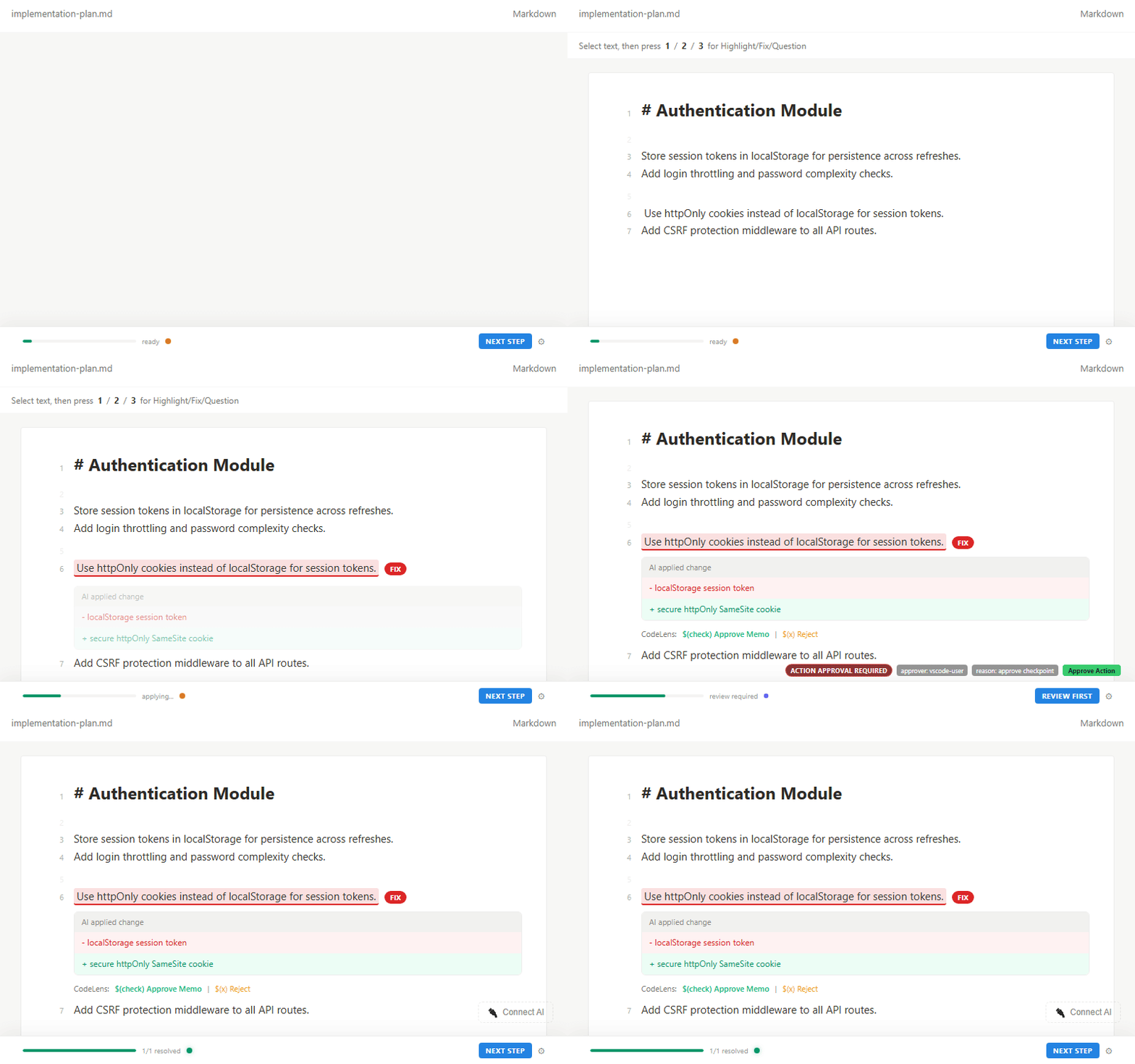
MD Feedback Demo: annotating a markdown plan with Fix, Question, and Highlight in the VS Code sidebar, then reviewing AI-applied changes

Latest (v1.5.7): Web UI for npx md-feedback β€” open your markdown workspace in any browser.

How It Works

From plan to implementation, the complete AI coding loop:

server.ts
Step 1  YOU        Write a plan in markdown

          β”‚

Step 2  YOU        Open in MD Feedback sidebar β†’ highlight, fix, question

          β”‚         (press 1, 2, or 3)

          β”‚

Step 3  AGENT      Reads annotations via MCP β€” no export step needed

          β”‚

Step 4  AGENT      Implements fixes, answers questions

          β”‚

Step 5  YOU        Review AI work β†’ Approve, Request Changes, or Reject

          β”‚

Step 6  AGENT      Gates auto-evaluate

          β”‚         "3 fixes remaining" β†’ "All done, ready to merge"

          β”‚

Step 7  AGENT      Generates handoff β†’ next session picks up where you left off

You do steps 1–2 and 5. The agent does the rest.

This is the MCP-first path. If you use export-based workflow, run export after step 2.

Features

  • 3 annotation types: Highlight (reading mark), Fix (needs change), Question (needs clarification)
  • 27 MCP tools for direct agent integration
  • Export to 11 AI tools: Claude Code, Cursor, Copilot, Codex, Cline, Windsurf, Roo Code, Gemini, Antigravity, Generic, Handoff
  • Quality gates with automatic pass/fail evaluation
  • Session handoffs preserve context across AI agent sessions
  • Checkpoints track review progress with snapshots
  • Plan cursor tracks current position in a document
  • Keyboard shortcuts: press 1, 2, 3 for instant annotation
  • AI applies fixes via MCP β€” agent reports implementations, you see inline before/after diffs
  • 7 status badges: Open, Working, Review, Answered, Done, Failed, Won't Fix
  • Rollback: agent can undo its last change if something went wrong
  • Batch operations: multiple fixes applied in one transaction
  • Safe text replacement: when the same text appears multiple times, agents must specify which one to change (prevents accidental wrong-line edits)
  • File safety: blocks writes to .env, credentials, node_modules
  • Approve / Reject buttons β€” accept or dismiss annotations inline, always visible when review needed
  • CodeLens in editor β€” approve or reject directly in the markdown file, no sidebar needed
  • Activity Bar badge β€” see pending review count at a glance
  • Status bar + toast notifications β€” never miss when AI delivers work for review
  • Keyboard shortcuts β€” Ctrl+Shift+A to approve, Ctrl+Shift+X to reject
  • Gate override β€” manually control gate status when auto-evaluation isn't enough
  • External file diffs inline β€” see exactly what AI will change before applying
  • Gate transition notifications β€” know when gates unblock or complete
  • Concurrent safety β€” prevents data corruption when multiple AI operations run at the same time
  • Auto-refresh: document updates in real-time when AI writes changes
  • Portable format: annotations stored as HTML comments β€” works in any markdown renderer, survives git
  • Rich rendering: Mermaid diagrams, callout blocks, syntax-highlighted code

Quick Start (under 2 minutes)

  1. Install from VS Code Marketplace
  2. Annotate first β€” select text in a markdown file, then press 1 (highlight), 2 (fix), 3 (question)
  3. Optional: Connect MCP β€” after first annotation, click Connect AI in the sidebar and add config to your MCP client:
config.json
{ "mcpServers": { "md-feedback": { "command": "npx", "args": ["-y", "md-feedback"] } } }
  1. Done β€” MCP-compatible agents read annotations directly. If your agent is export-only (for example current Copilot flow), use Export.

Node.js 18+ required for MCP (npx). Claude path: .claude/mcp.json
Cursor path: .cursor/mcp.json

Try it now: Install from Marketplace, open any .md file, and press 2 to add your first Fix annotation.

Use Cases

Vibe Coding Workflow

Write a plan in markdown. Review it with MD Feedback. Let your AI agent build exactly what you reviewed. The plan is the contract β€” annotations are the instructions.

AI Plan Review

An AI agent generates an implementation plan. You review it with highlights, fixes, and questions before the agent writes any code. Catch errors at design time, not after implementation.

Session Continuity

Working with AI across multiple sessions? Handoffs preserve every decision, open question, and key context point. The next session starts where the last one ended.

Team Plan Review

Annotations are HTML comments in the markdown file. They survive git commits, PRs, and branch merges. Share reviewed plans with your team through your normal version control workflow.

Quality Gate Enforcement

Set conditions that must be met before the agent proceeds. Gates auto-evaluate based on annotation resolution status β€” blocked, proceed, or done.

Design Philosophy

  • Humans only state what is wrong. AI decides how to fix it.
  • Three annotation types are sufficient. AI infers intent from context β€” whether a fix means a document edit or a code change.
  • Markdown is the source of truth. All state lives in the file itself.
  • Zero cognitive load. Status bar shows progress passively. No extra decisions required.
  • Portable and git-friendly. Annotations are HTML comments β€” they survive any markdown renderer and version control.

VS Code Settings

You can customize MD Feedback from VS Code Settings via md-feedback.*. Advanced timing and performance tuning options are available for large workspaces.

MCP Server

MD Feedback includes an MCP server with 27 tools that let AI agents read your annotations without manual export. Agents can query memos, mark tasks done, apply fixes, check gate status, and generate handoffs β€” all through the Model Context Protocol.

Setup:

Terminal
npx md-feedback

Workspace override β€” if your MCP client doesn't set cwd to the project folder (e.g. Antigravity), specify it explicitly:

config.json
{ "command": "npx", "args": ["-y", "md-feedback", "--workspace=/path/to/project"] }

Windows example: { "command": "npx", "args": ["-y", "md-feedback", "--workspace=C:\\\\work\\\\my-project"] }
Or via environment variable: MD_FEEDBACK_WORKSPACE=/path/to/project

For full details, see MCP Server documentation.

Links

  • VS Code Marketplace
  • npm (MCP Server)
  • Report Issues
  • Contributing
  • Sponsor

License

SUL-1.0 β€” Free for personal and non-commercial use.


FAQ

What is MD Feedback? MD Feedback is a VS Code extension and MCP server for reviewing markdown plans before AI agents implement them. Select text, press 1 (highlight), 2 (fix), or 3 (question) β€” annotations are stored as portable HTML comments in the markdown file itself. AI agents read annotations directly via MCP, or you can export to 11 AI tools.

Does it work with Claude Code / Cursor / Copilot? Yes. MD Feedback exports to Claude Code (CLAUDE.md), Cursor (.cursor/rules/), GitHub Copilot (.github/copilot-instructions.md), and 8 more tools. With MCP, agents read annotations directly β€” no export step needed.

What is MCP and why does it matter? MCP (Model Context Protocol) lets AI agents interact with external tools. MD Feedback's MCP server gives agents direct access to your annotations, so they can read feedback, mark tasks done, evaluate gates, and generate handoffs automatically. For example, when you mark a section as "Fix: use retry logic here," the agent reads that annotation via MCP, implements the fix, and marks it done β€” all without you switching tabs.

Can multiple people review the same plan? Yes. Annotations are HTML comments embedded in the markdown file. They travel with the file through git β€” commits, branches, pull requests, and merges all preserve annotations intact.

Is it free?

Read the full README β†’View source on GitHub β†’

Related MCP Servers

View all in Developer Tools View all alternatives
  • PraisonAI logoPraisonAI

    AI Agents Framework with Self Reflection and MCP support

    πŸ’» Developer Tools1 views
    Compare vs PraisonAI β†’
  • Labelhead Artist Momentum logoLabelhead Artist Momentum

    Trending hip-hop artist momentum scores across four cultural dimensions.

    πŸ’» Developer Tools0 views
    Compare vs Labelhead Artist Momentum β†’
  • Valet logoValet

    Get share links, publish and manage websites, artifacts and agents. No account needed.

    πŸ’» Developer Tools2 views
    Compare vs Valet β†’
  • HeyClaude β€” Claude & AI workflow directory logoHeyClaude β€” Claude & AI workflow directory

    Search the HeyClaude directory of Claude Code agents, MCP servers, skills, and tools.

    πŸ’» Developer Tools0 views
    Compare vs HeyClaude β€” Claude & AI workflow directory β†’

Reviews

No reviews yet β€” be the first to share how this listing worked for you.

Frequently Asked Questions about Md Feedback

Add the following block to your claude_desktop_config.json under mcpServers: "mcpServers": { "md-feedback": { "command": "npx", "args": ["-y", "md-feedback"] } }

AllMCPs Directory Badge

Full Badge Customizer

Showcase your server listing on GitHub or your project documentation. Embed this dynamic SVG badge to highlight official listing status and live engagement.

Badge Style:
Live Dynamic SVG PreviewMd Feedback AllMCPs Directory Badge

Markdown (GitHub README)
[![AllMCPs](https://allmcps.com/api/badge/md-feedback?style=directory)](https://allmcps.com/mcp/md-feedback)
HTML Embed
<a href="https://allmcps.com/mcp/md-feedback"><img src="https://allmcps.com/api/badge/md-feedback?style=directory" alt="Md Feedback on AllMCPs" /></a>

Technical Specs & Signals

CategoryπŸ’»Developer Tools
More technical detailsExpand β–Ύ
TransportSTDIO
RuntimeNode.js
Last updatedSep 7, 2026
Views0
Unique ViewsTotal visits recorded for this listing page on AllMCPs.
Installs0
Installs & Copy ActionsTotal times users copied install commands or configuration snippets for this server.
27Quality signal: Emerging Β· 27/100How this signal is calculated β–Ύ
Server availabilityNot measured

Not scored for repo-hosted servers β€” we can't reach the running server, only its GitHub page. Hosted MCP endpoints are health-checked live.

Verified ownership8/20
Documentation & tools11/30
Adoption & activity1/15
Community engagement0/10

A guidance signal from public completeness & health data β€” not a user rating. New listings start lower and rise as they add docs, get verified, and grow adoption. Signals we can't observe for a listing are skipped, not counted against it.

β˜… Spotlight Slot

Feature Your MCP Server

Get maximum visibility for your server across our directory, search results, and detail pages.

Spotlight Your Server

Own this project?

This directory is pre-filled from public sources. Claim via GitHub README, site badge, or DNS TXT to unlock edit access and the Official badge and attach your website β€” proof is checked automatically, then reviewed by our team.

Free dofollow backlink: add your website and place the AllMCPs badge on it β€” no claim needed. We detect it automatically and keep it verified as long as the badge stays live.

Claim & get free dofollow

Share & Embed

Add our SVG badge (dark/light directory styles) or embeddable widget to your site.

Explore more

More in πŸ’» Developer Tools β†’Best MCP servers for Developers β†’Alternatives to Md Feedback β†’Install in Claude DesktopInstall in CursorInstall in VS Code


