ui-inspectionweb-developmentdeveloper-toolsreverse-proxy
Reverse-proxies web pages to add hover annotations and expose detected UI elements through MCP tools.
Quick Install
Automated & IDE SetupCopy the AI prompt to install this server into Claude Code, Cursor, or another agent — or use 1-click editor setup below.
Not yet automatically verified
We haven't yet run this listing's install command through our automated sandbox check. This isn't a red flag — we're steadily working through the catalog.
Manual Client & Custom JSON ConfigExpand JSON ▾
Client Config & Setup
Choose your client or environment
Target File:
💡 Paste the JSON block into your client's configuration file under mcpServers, then restart the application.
Overview
Use cases
Identify web UI elements by name before requesting code changes
Inspect element selectors, positions, content, and dimensions
Highlight a named element for visual confirmation
Rescan the page after UI changes
Copy element names while preventing page interactions in inspect mode
Key features
Reverse proxy with injected hover annotations
Element names, CSS selectors, content previews, and dimensions
MCP tools for annotation, element lookup, highlighting, rescanning, and inspect mode
Browser toolbar with inspect, element count, and collapse controls
Works in Chrome, Firefox, Safari, Edge, and other browsers
No browser extension or application code changes required
Capabilities & Tool Schemas
Inspect callable tools, capabilities, and parameters exposed to AI agents by Ui Annotator MCP.
Extracted Tool Capabilities
Reverse proxy with injected hover annotations
Element names, CSS selectors, content previews, and dimensions
MCP tools for annotation, element lookup, highlighting, rescanning, and inspect mode
Browser toolbar with inspect, element count, and collapse controls
Works in Chrome, Firefox, Safari, Edge, and other browsers
No browser extension or application code changes required
Documentation Overview
UI Annotator MCP





English | 廣東話
Bridge the gap between what you see and what AI can reference — in any browser, zero extensions.
The only tool that puts visible labels on every web element. Hover any element, see its name. Tell your AI assistant "make the sidebar wider" — it knows exactly which element you mean. No screenshots, no CSS selectors, no miscommunication.
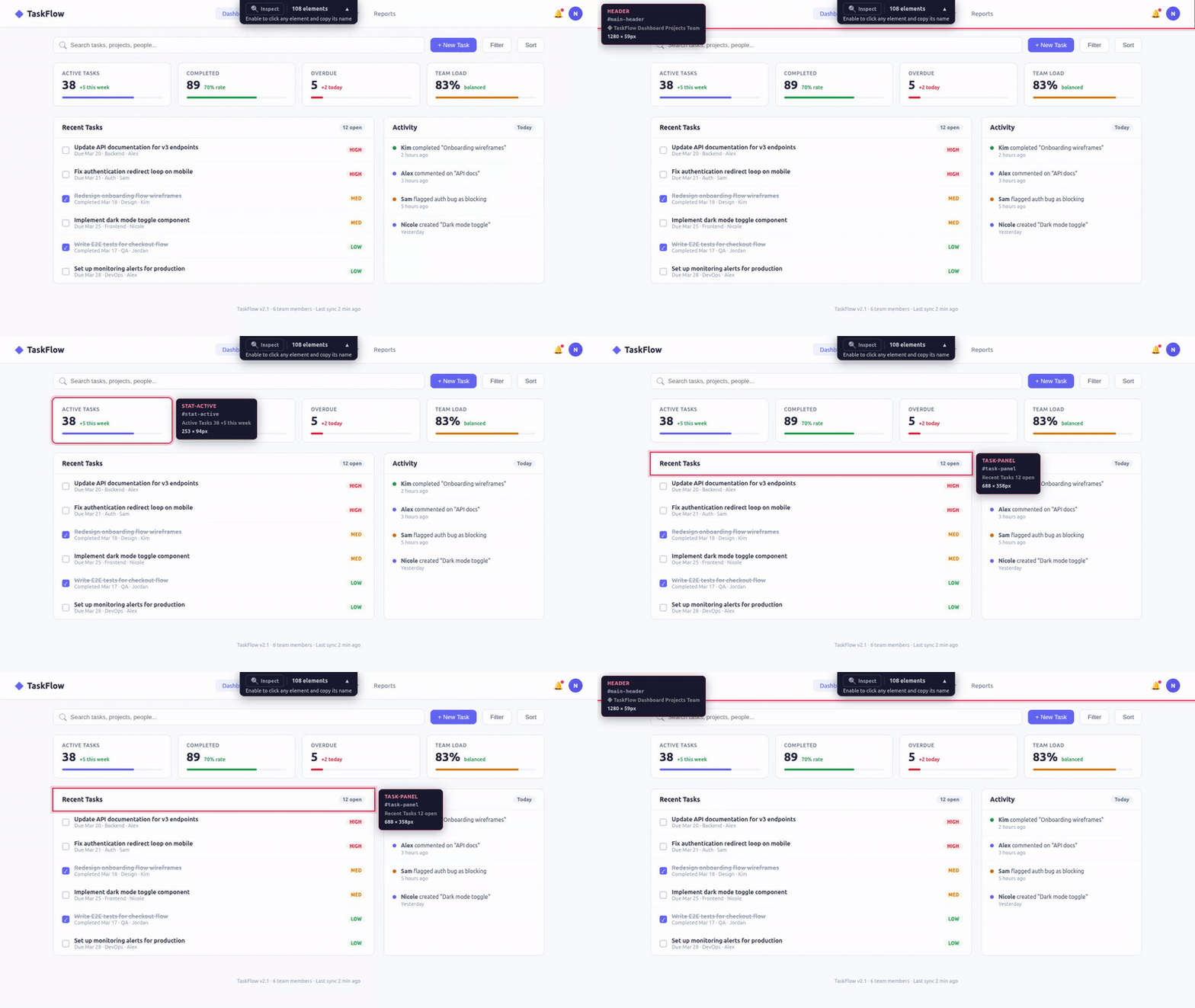
Why It Matters
Dramatically improves AI-driven UI design and iteration. The pain: telling AI "move that button next to the search bar" never works because the AI can't see your page. UI Annotator fixes this — hover over any element and its component name appears as a label. Now you say "move SearchButton below NavBar" and Claude edits the right component instantly. No browser extensions, works with any framework. The workflow becomes: open page → hover to identify elements → describe changes using real component names → Claude edits → refresh and repeat. Turns a frustrating back-and-forth into a fluid design loop.
The Problem
When reviewing a web UI with an AI coding assistant, the hardest part isn't the code change — it's describing which element you want changed.
"That thing on the left... the second row... no, the one with the icon..."
You don't know what it's called. The AI doesn't know what you're pointing at. You waste time on miscommunication instead of shipping.
The Solution
Open your page through the annotator proxy. Hover any element — instantly see its name, CSS selector, and dimensions. Now you both speak the same language.
That's it. No browser extensions. No code changes. No setup. Works in Chrome, Firefox, Safari, Edge — any browser.
How It Works
The proxy fetches your page, injects a lightweight annotation script, and serves it back. The script scans the DOM, identifies named elements, and reports them to the MCP server. Your AI assistant queries the server to understand what's on the page.
Features
Hover Annotations
Hover any element to see:
- Element name (pink) — the human-readable identifier
- CSS selector (monospace) — the technical reference
- Content preview — what text the element contains
- Dimensions — width × height in pixels
Inspect Mode
Click the Inspect button in the toolbar (or let your AI toggle it). In inspect mode:
- Click any element → copies its name to clipboard
- All page interactions are paused (clicks don't trigger buttons/links)
- Click Inspect again to return to normal mode
Collapsible Toolbar
The toolbar sits at the top center of the page showing:
- Inspect toggle button
- Element count
- Helpful subtitle explaining what to do
- Collapse button (▲) to minimize when not needed
MCP Tools for AI
| Tool | What it does |
|---|---|
annotate(url) | Returns proxy URL for user to open in any browser |
get_elements() | Returns all detected UI elements with names, selectors, positions |
highlight_element(name) | Flash-highlights a specific element so user can confirm |
rescan_elements() | Force DOM rescan after page changes |
inspect_mode(enabled) | Toggle inspect mode remotely |
Why Not Just Use DevTools?
| Browser DevTools | UI Annotator | |
|---|---|---|
| Target user | Frontend developers who know the DOM | Anyone — QA, PM, designer, junior dev |
| Learning curve | Need to understand DOM tree, CSS selectors, box model | Hover and read — zero learning |
| Communication | "The div.flex.gap-4 inside the second child of..." | "The sidebar" |
| Language | CSS/HTML technical terms | Human-readable names |
| Setup | Teach people to open DevTools + navigate the DOM | Open a URL |
| AI integration | None — AI can't see what you're inspecting | MCP — AI sees the same element names you do |
DevTools is for debugging. UI Annotator is for communication — giving humans and AI a shared vocabulary for UI elements.
Why Not Use Existing Tools?
None of these do what UI Annotator does — live visual labels on every element via reverse proxy:
| Tool | Approach | Why we're different |
|---|---|---|
| browser-use (82K⭐) | AI automation framework | Automates browsers, doesn't label elements for humans. Different use case entirely. |
| Chrome DevTools MCP (31K⭐) | DOM snapshot + element UIDs | AI can inspect, but humans don't see visual annotations. No shared vocabulary. |
| Playwright MCP (29K⭐) | Accessibility tree snapshot | Returns structured text, no visual overlay. Truncates important context. |
| OmniParser | Screenshot + CV detection | Screenshot-based, not live DOM. ~40% accuracy on hard benchmarks. |
| MCP Pointer (526 users) | Chrome extension + MCP | Requires Chrome extension. Human clicks to select — no hover overlay. |
| Agentation | npm embedded in your app | Requires code changes. React 18+ dependency. Not zero-config. |
| Vibe Annotations | Chrome extension | Extension-based, developer-only annotation workflow. |
Feature Comparison
| Feature | UI Annotator | MCP Pointer | Agentation | Cursor | Chrome DevTools MCP |
|---|---|---|---|---|---|
| Visual hover annotation | Yes | No | Partial | Yes (IDE only) | No |
| Shows element names | Yes | Yes | Yes | No (high-level) | Programmatic |
| Shows dimensions | Yes | Yes | Yes (Detailed) | Yes | Programmatic |
| MCP server | Yes | Yes | Yes | No | Yes |
| Zero browser extensions | Yes | No | Yes | N/A | No |
| Zero code changes | Yes | Yes | No | N/A | Yes |
| Any browser | Yes | Chrome only | Desktop only | Cursor only | Chrome only |
| Zero dependencies | Yes | Chrome ext | React 18+ | Cursor | Chrome |
| Click to copy element name | Yes | No | No | No | No |
Architecture
Zero external dependencies
- Reverse proxy: Node.js built-in
httpmodule - MCP server:
@modelcontextprotocol/sdk(stdio transport) - Communication: HTTP POST (browser → server) + GET polling (server → browser)
- No WebSocket, no Express, no browser extension
How the proxy works
- User requests
localhost:7077/localhost:3847 - Proxy fetches
http://localhost:3847 - For HTML responses:
- Injects
fetch()/XMLHttpRequestinterceptor (rewrites API paths through proxy) - Rewrites
href="/..."andsrc="/..."attributes to route through proxy - Injects annotation script before
</body>
- Injects
- For non-HTML (CSS, JS, images): passes through directly
- Strips
Content-Security-Policyheaders to allow injected script
How annotation works
- Script scans DOM for elements with
id,class, semantic roles, or interactive roles - On hover: positions overlay border (follows
border-radius) + positions tooltip (always within viewport) - Reports all detected elements to server via
POST /__annotator/elements - Polls
GET /__annotator/commandsevery second for server instructions (highlight, rescan, inspect toggle) MutationObserverauto-rescans when DOM changes
Quick Start
With Claude Code
Manual
Environment Variables
| Variable | Default | Description |
|---|---|---|
UI_ANNOTATOR_PORT | 7077 | Port for the proxy server |
More from @mcpware
| Project | What it does | Install |
|---|---|---|
| Instagram MCP | 23 Instagram Graph API tools — posts, comments, DMs, stories, analytics | npx @mcpware/instagram-mcp |
| Claude Code Organizer | Visual dashboard for Claude Code memories, skills, MCP servers, hooks | npx @mcpware/claude-code-organizer |
| Pagecast | Record browser sessions as GIF or video via MCP | npx @mcpware/pagecast |
| LogoLoom | AI logo design → SVG → full brand kit export | npx @mcpware/logoloom |
License
MIT
Related MCP Servers

Adoption & maintenance
Factual signals from GitHub, npm, and our automated checks — not a rating.
GitHub stars
16
Stargazers on the source repository.
npm downloads
274
Package downloads in the last 30 days.
Last commit
5mo ago
Most recent push to the default branch.
Directory activity
2 views
Config copies, upvotes, and views on AllMCPs.
Reviews
No reviews yet — be the first to share how this listing worked for you.
Frequently Asked Questions about Ui Annotator MCP
AllMCPs Directory Badge
Showcase your server listing on GitHub or your project documentation. Embed this dynamic SVG badge to highlight official listing status and live engagement.
Badge Style:
Live Dynamic SVG Preview
Markdown (GitHub README)
[](https://allmcps.com/mcp/mcpware-ui-annotator-mcp)HTML Embed
<a href="https://allmcps.com/mcp/mcpware-ui-annotator-mcp"><img src="https://allmcps.com/api/badge/mcpware-ui-annotator-mcp?style=directory" alt="Ui Annotator MCP on AllMCPs" /></a>Technical Specs & Signals
CategoryDeveloper Tools
PricingFree
52Quality signal: Good · 52/100How this signal is calculated ▾
Server availabilityNot measured
Not scored for repo-hosted servers — we can't reach the running server, only its GitHub page. Hosted MCP endpoints are health-checked live.
Verified ownership10/20
Documentation & tools23/30
Adoption & activity6/15
Community engagement0/10
A guidance signal from public completeness & health data — not a user rating. New listings start lower and rise as they add docs, get verified, and grow adoption. Signals we can't observe for a listing are skipped, not counted against it.
Supply-chain signal
No high-severity advisories surfaced by our automated scan.
Critical 0High 0Medium 0Low 0
Scanned 23d ago via OSV.dev · @mcpware/ui-annotator (npm)
Own this project?
This directory is pre-filled from public sources. Claim via GitHub README, site badge, or DNS TXT to unlock edit access and the Official badge and attach your website — proof is checked automatically, then reviewed by our team.
Free dofollow backlink: add your website and place the AllMCPs badge on it — no claim needed. We detect it automatically and keep it verified as long as the badge stays live.
Claim & get free dofollowShare & Embed
Add our SVG badge (dark/light directory styles) or embeddable widget to your site.