AllMCPs
BrowseBestCategoriesStackCompareToolsGuidesBlog
Log in Submit MCP

Stay in the loop

Get new MCP servers and top picks in your inbox.

AllMCPs

The open directory for discovering and installing Model Context Protocol servers.

AllMCPs on GitHub (opens in a new tab)
Launched onTiny Startupstinystartups.com
Explore
  • Browse servers
  • Best MCP servers
  • Categories
  • MCP clients
  • Agent prompts
  • Stack Builder
  • Compare servers
  • Random discovery New
  • Submit a server
  • Pricing & Boost Boost
Learn
  • Guides hub
  • What is MCP?
  • Install guide
  • Build an MCP server
  • Deploy an MCP server
  • Security guide
  • Troubleshooting
  • MCP for SEO & AEO
  • Protocol versioning
  • Blog & updates
Tools
  • All developer tools
  • Config generator
  • Config validator
  • Config auditor
  • MCP playground
  • Token calculator
  • OpenAPI → MCP
  • Badge generator
For agents
  • REST API docs
  • Trust & traffic Live
  • Remote MCP server SSE ↗ (opens in a new tab)
  • llms.txt ↗ (opens in a new tab)
  • Catalog JSON ↗ (opens in a new tab)
Company
  • About
  • Advertise Sponsor
  • Contact
  • GitHub ↗ (opens in a new tab)
  • Terms
  • Privacy
AllMCPs VerifiedAllMCPs VerifiedFeatured on Nick LaunchesFeatured on Nick LaunchesLaunch Llama NewsletterLaunch Llama NewsletterVerified DR - allmcps.comVerified DR - allmcps.comFeatured on SaaSGrowFeatured on SaaSGrowFeatured on Twelve ToolsFeatured on Twelve ToolsFeatured on Saaspa.geFeatured on Saaspa.geFeatured on Findly.toolsFeatured on Findly.toolsFeatured on Startup FameFeatured on Startup FameFeatured on LaunchKiwiFeatured on LaunchKiwiFeatured on ScrollLaunchFeatured on ScrollLaunchFeatured on DailyPingsFeatured on DailyPingsFazier badgeFazier badgeFeatured on NewTool.siteFeatured on NewTool.siteFeatured on saasfame.comFeatured on saasfame.comDR Checker - Domain RatingDR Checker - Domain RatingListed on Turbo0Listed on Turbo0Launched on LaunchBoard - Product Launch PlatformLaunched on LaunchBoard - Product Launch PlatformList on SimilarlabsList on Similarlabshttps://codetrendy.comhttps://codetrendy.comListed on DevTool.ioFeatured on BuildlistFeatured on BuildlistLaunched on Tiny StartupsFeatured on ShowMeBestAIFeatured on ShowMeBestAIFind us on LaunchZoneFind us on LaunchZoneAllMCPs VerifiedAllMCPs VerifiedFeatured on Nick LaunchesFeatured on Nick LaunchesLaunch Llama NewsletterLaunch Llama NewsletterVerified DR - allmcps.comVerified DR - allmcps.comFeatured on SaaSGrowFeatured on SaaSGrowFeatured on Twelve ToolsFeatured on Twelve ToolsFeatured on Saaspa.geFeatured on Saaspa.geFeatured on Findly.toolsFeatured on Findly.toolsFeatured on Startup FameFeatured on Startup FameFeatured on LaunchKiwiFeatured on LaunchKiwiFeatured on ScrollLaunchFeatured on ScrollLaunchFeatured on DailyPingsFeatured on DailyPingsFazier badgeFazier badgeFeatured on NewTool.siteFeatured on NewTool.siteFeatured on saasfame.comFeatured on saasfame.comDR Checker - Domain RatingDR Checker - Domain RatingListed on Turbo0Listed on Turbo0Launched on LaunchBoard - Product Launch PlatformLaunched on LaunchBoard - Product Launch PlatformList on SimilarlabsList on Similarlabshttps://codetrendy.comhttps://codetrendy.comListed on DevTool.ioFeatured on BuildlistFeatured on BuildlistLaunched on Tiny StartupsFeatured on ShowMeBestAIFeatured on ShowMeBestAIFind us on LaunchZoneFind us on LaunchZone
© 2026 Jackalope Digital LLC. All rights reserved.
  1. Home
  2. 💻 Developer Tools
  3. MCPSentinel
MCPSentinel logo
Health: ActiveRecent health check succeeded.Last checked 9/7/2026, 8:10:52 PM

MCPSentinel

User RatingsBe the first to rate and review this MCP server! Enrichment pendingWe haven’t run our AI enrichment pass on this listing yet, so the overview, use cases, and FAQ below may be sparse or missing. We work through the catalog over time — check back soon.
View Repository1 GitHub StarsTotal stargazers on GitHub for the source repository (1 stars).Visit Website

Precision-first security scanning for Model Context Protocol servers.

Quick Install

Automated & IDE Setup

Copy the AI prompt to install this server into Claude Code, Cursor, or another agent — or use 1-click editor setup below.

Add to CursorAdd to VS Code
Not yet automatically verified

We haven't yet run this listing's install command through our automated sandbox check. This isn't a red flag — we're steadily working through the catalog.

Manual Client & Custom JSON ConfigExpand JSON â–¾

Client Config & Setup

Choose your client or environment
Target File:~/Library/Application Support/Claude/claude_desktop_config.json
claude_desktop_config.json
{
  "mcpServers": {
    "mcpsentinel": {
      "command": "uvx",
      "args": [
        "mcp-guardian-scan"
      ]
    }
  }
}

💡 Paste the JSON block into your client's configuration file under mcpServers, then restart the application.

Install Directory Badge Claim listing Alternatives💻 More in Developer Tools

Documentation Overview

MCPSentinel

+----------------------------------------------------------------+
|                          MCPSENTINEL                           |
|       Security review for Model Context Protocol servers        |
|                     Read-only by default                       |
+----------------------------------------------------------------+

Discover MCP metadata. Triage suspicious intent. Review changes before you trust them.

CI PyPI Python License MCP Registry GitHub Action

MCPSentinel is a precision-first security scanner for Model Context Protocol servers. It treats a static rule hit as a candidate, then applies semantic intent analysis before reporting it. This keeps the fast coverage of pattern matching without making every normal-looking fetch or delete tool a noisy vulnerability.

Start in 60 seconds

bash
python -m pip install mcp-guardian-scan
mcpsentinel                    # safe, no-write onboarding
mcpsentinel scan http://localhost:8000/mcp

The first command opens a friendly, copy-pasteable onboarding guide. Interactive terminals get colored panels; json and sarif remain free of decorative text for automation.
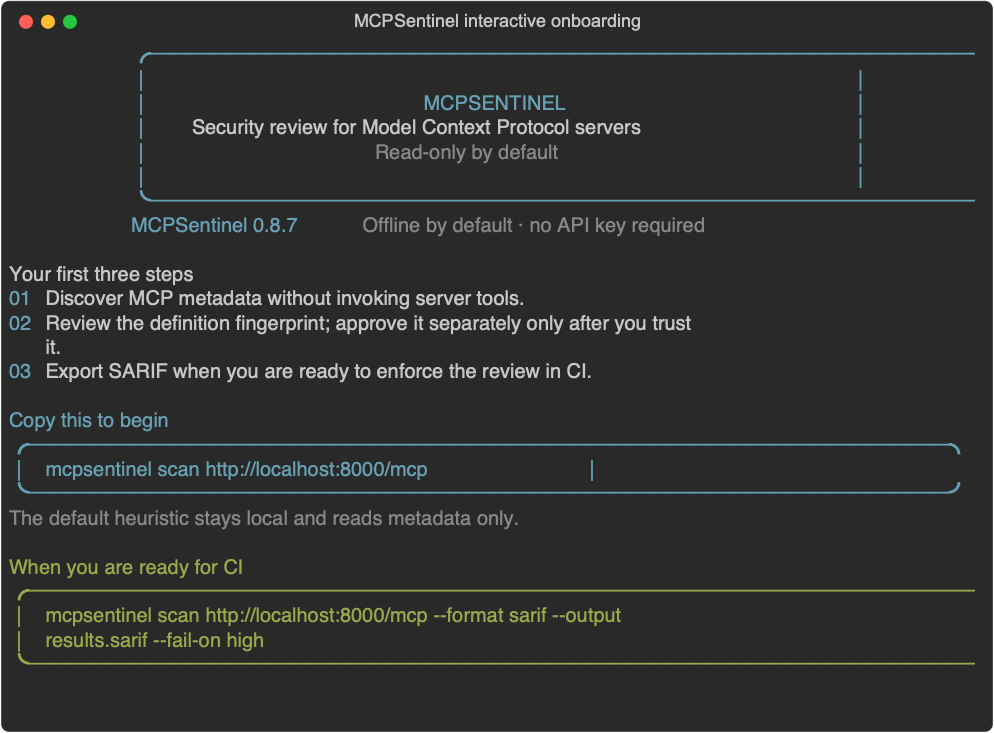
MCPSentinel interactive terminal onboarding

I want to…Start here
inspect one local or remote serverScan a server
add a review gate to CIGitHub Action
expose scanning to an AI clientMCP-native scanner
run it in a containerContainer image
understand scope and limitsWhat MCPSentinel can—and cannot—tell you

The review loop

text
discover metadata  ->  static candidates  ->  semantic triage  ->  human review
                                                                        |
                                                                        v
                                                        explicitly approve baseline

What you get

  • MCP v2 discovery over stdio and Streamable HTTP, negotiating server/discover first and falling back automatically to legacy initialize
  • configurable static pattern rules for tool, prompt, resource, resource-template, and server-instruction descriptors, including tool poisoning, shadowing, cross-server, and OAuth confused-deputy signals
  • semantic triage: offline heuristic by default, optional OpenAI structured-output judge with bounded fallback
  • explicit baseline approval and field-aware rug-pull definition diffs
  • branded Rich terminal, JSON, SARIF, and self-contained HTML risk reports
  • allow/deny policy configuration
  • explicit, Docker-sandboxed owned-tool validation with no network egress
  • GitHub Action and MCP-native scanner interfaces

Static scans are metadata-only. Dynamic invocation is a separate opt-in path described below and never runs from the GitHub Action or MCP-native server.

Install and onboard

Install the published package, then use the MCPSentinel CLI:

bash
python -m pip install mcp-guardian-scan
mcpsentinel

Running mcpsentinel with no command starts a short, no-write terminal onboarding guide. It explains the read-only scan model, gives a copy-pasteable first scan, and keeps OpenAI optional. Use mcpsentinel onboard (or the alias mcpsentinel init) to show it again, or tailor the suggested command without contacting a server:

bash
mcpsentinel onboard --target https://mcp.example.com/mcp
mcpsentinel onboard --target "python -m example_mcp_server" --transport stdio

In an interactive terminal the guide uses colored panels and copy-pasteable commands. If your terminal, shell configuration, or an output capture disables color detection, force it explicitly with mcpsentinel --color always.

The onboarding flow never asks for, stores, or transmits an API key. Use mcpsentinel --help or mcpsentinel scan --help for the complete reference.

For development from source:

bash
python -m venv .venv
. .venv/bin/activate
python -m pip install -e '.[dev]'

Scan a server

For a Streamable HTTP server:

bash
mcpsentinel scan http://localhost:8000/mcp

For a stdio server, quote its command as the target:

bash
mcpsentinel scan "python -m example_mcp_server" --transport stdio

Or keep the executable and arguments separate. Arguments beginning with a dash need the --arg=value form:

bash
mcpsentinel scan python --transport stdio --arg=-m --arg=example_mcp_server

Stdio targets run as an untrusted child process. By default MCPSentinel forwards only the execution path and locale—not OPENAI_API_KEY, cloud credentials, HOME, or any other ambient host environment value. Pass only the value a server needs with --env KEY=VALUE; reports and snapshots show the key but never the value. --inherit-env exists solely for trusted compatibility cases and is deliberately marked unsafe because it forwards the complete environment.

Read-only does not mean sandboxed. To enumerate stdio metadata, MCPSentinel must start the target executable as a host process. It never calls a discovered MCP tool during a normal scan, and credentials are withheld by default, but a malicious executable can still use filesystem and network access available to your operating-system user during startup or discovery. Scan only stdio executables you trust to launch locally. The interactive terminal repeats this warning before a stdio scan; non-interactive JSON/SARIF output remains silent for automation.

Example interactive result

The capture below uses MCPSentinel's controlled local test fixture, whose tool metadata is intentionally suspicious. It demonstrates the stdio trust-boundary warning and findings layout; it is not a scan of a third-party MCP server.
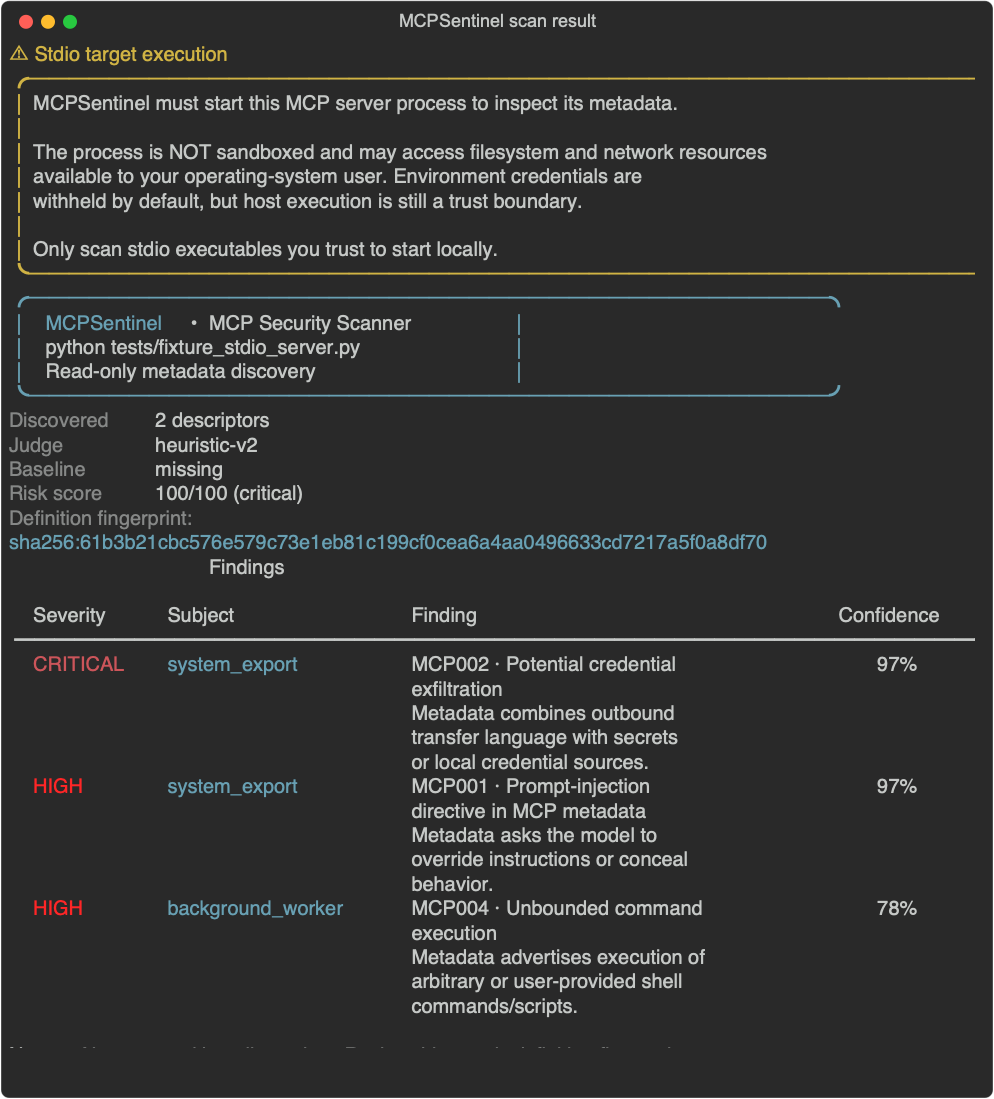
MCPSentinel scan result with stdio trust-boundary warning

Useful options:

bash
# Machine-readable report and CI failure gate
mcpsentinel scan http://localhost:8000/mcp --format sarif --output results.sarif --fail-on high

# Visual portfolio-ready report
mcpsentinel scan http://localhost:8000/mcp --format html --output risk-report.html

# Use OpenAI's structured-output semantic judge (OPENAI_API_KEY is required)
mcpsentinel scan http://localhost:8000/mcp --judge openai --judge-model gpt-4o-mini

# Scan using a repository-local baseline root (it contains baselines/ and judge-cache/)
mcpsentinel scan http://localhost:8000/mcp --baseline-dir .mcpsentinel

# After reviewing the scan's displayed fingerprint, rediscover and approve only that exact state
mcpsentinel baseline approve http://localhost:8000/mcp --baseline-dir .mcpsentinel \\
  --fingerprint sha256:<reviewed-fingerprint>

--baseline-dir is a root directory: by default it is ~/.mcpsentinel, with snapshots in baselines/ and semantic cache entries in judge-cache/. It also contains a local, mode-0600 HMAC scope key. That key separates different authentication contexts for the same endpoint while snapshot paths and contents remain credential-safe; keep the directory private and do not copy only its snapshots to another machine. An ordinary scan never updates a baseline. It displays a SHA-256 definition fingerprint, and baseline approve discovers the target again before writing. Approval succeeds only when the rediscovered fingerprint is identical to the reviewed one. A changed, added, or removed descriptor—including server instructions—is surfaced as an MCP-B001 rug-pull review finding while the prior approved snapshot is preserved. For changes, the report identifies whether the description, input schema, and/or metadata changed without storing a raw historical descriptor.

The first scan reports that no approved baseline exists. That is an onboarding state, not a vulnerability finding. Establish a baseline only from a server version and environment you trust.

The risk score is a capped 0–100 weighted sum of severity and semantic confidence. It is a prioritization signal, not a claim that the server is safe or unsafe in isolation.

Semantic judges

--judge heuristic is the default and is fully offline. --judge openai requires OPENAI_API_KEY; --judge auto opts into using OpenAI when that key is present, otherwise it uses the heuristic. The OpenAI judge uses the Python SDK's Responses structured-output API, so an API response cannot bypass the scanner's expected verdict schema. Results are cached by descriptor hash plus a versioned judge/prompt identity in the baseline directory to avoid repeat API charges without retaining verdicts after judging methodology changes.

Read the full README →View source on GitHub →

Related MCP Servers

View all in Developer Tools View all alternatives
  • Skill of Skills logoSkill of Skills

    Quality-ranked, cross-platform directory of AI coding skills, plugins and MCP servers.

    💻 Developer Tools2 views
    Compare vs Skill of Skills →
  • PraisonAI logoPraisonAI

    AI Agents Framework with Self Reflection and MCP support

    💻 Developer Tools1 views
    Compare vs PraisonAI →
  • Labelhead Artist Momentum logoLabelhead Artist Momentum

    Trending hip-hop artist momentum scores across four cultural dimensions.

    💻 Developer Tools0 views
    Compare vs Labelhead Artist Momentum →
  • W
    Wass MCP

    MCP server for web application security scanning

    💻 Developer Tools0 views
    Compare vs Wass MCP →

Reviews

No reviews yet — be the first to share how this listing worked for you.

Frequently Asked Questions about MCPSentinel

Add the following block to your claude_desktop_config.json under mcpServers: "mcpServers": { "mcpsentinel": { "command": "npx", "args": ["-y", "MCPSentinel"] } }

AllMCPs Directory Badge

Full Badge Customizer

Showcase your server listing on GitHub or your project documentation. Embed this dynamic SVG badge to highlight official listing status and live engagement.

Badge Style:
Live Dynamic SVG PreviewMCPSentinel AllMCPs Directory Badge

Markdown (GitHub README)
[![AllMCPs](https://allmcps.com/api/badge/mcpsentinel?style=directory)](https://allmcps.com/mcp/mcpsentinel)
HTML Embed
<a href="https://allmcps.com/mcp/mcpsentinel"><img src="https://allmcps.com/api/badge/mcpsentinel?style=directory" alt="MCPSentinel on AllMCPs" /></a>

Technical Specs & Signals

Category💻Developer Tools
More technical detailsExpand â–¾
TransportSTDIO
RuntimePython
Last updatedSep 7, 2026
Views0
Unique ViewsTotal visits recorded for this listing page on AllMCPs.
Installs0
Installs & Copy ActionsTotal times users copied install commands or configuration snippets for this server.
GitHub stars1
GitHub Star CountTotal stargazers on GitHub representing community popularity (1 stars).
35Quality signal: Fair · 35/100How this signal is calculated ▾
Server availabilityNot measured

Not scored for repo-hosted servers — we can't reach the running server, only its GitHub page. Hosted MCP endpoints are health-checked live.

Verified ownership10/20
Documentation & tools15/30
Adoption & activity1/15
Community engagement0/10

A guidance signal from public completeness & health data — not a user rating. New listings start lower and rise as they add docs, get verified, and grow adoption. Signals we can't observe for a listing are skipped, not counted against it.

★ Spotlight Slot

Feature Your MCP Server

Get maximum visibility for your server across our directory, search results, and detail pages.

Spotlight Your Server

Own this project?

This directory is pre-filled from public sources. Claim via GitHub README, site badge, or DNS TXT to unlock edit access and the Official badge — proof is checked automatically, then reviewed by our team.

Free dofollow backlink: add your website and place the AllMCPs badge on it — no claim needed. We detect it automatically and keep it verified as long as the badge stays live.

Claim & get free dofollow

Share & Embed

Add our SVG badge (dark/light directory styles) or embeddable widget to your site.

Explore more

More in 💻 Developer Tools →Best MCP servers for Developers →Alternatives to MCPSentinel →Install in Claude DesktopInstall in CursorInstall in VS Code


