AllMCPs
BrowseBestCategoriesStackCompareToolsGuidesBlog Log in Submit MCP

Stay in the loop

Get new MCP servers and top picks in your inbox.

AllMCPs

The open directory for discovering and installing Model Context Protocol servers.

Explore

  • Browse servers
  • Best MCP servers
  • Categories
  • MCP clients
  • Agent prompts
  • Stack Builder
  • Compare servers
  • Tags index
  • Submit a server
  • Pricing

Learn

  • Guides hub
  • What is MCP?
  • Install guide
  • Troubleshooting
  • Security
  • Blog
  • Blog RSS

Tools

  • All tools
  • Config generator
  • Config validator
  • MCP playground
  • OpenAPI β†’ MCP
  • Badge generator

For agents

  • API docs
  • Trust & traffic
  • llms.txt β†— (opens in a new tab)
  • Catalog JSON β†— (opens in a new tab)
  • Remote MCP β†— (opens in a new tab)

Company

  • About
  • Contact
  • X (@AllMCPs) β†— (opens in a new tab)
  • GitHub β†— (opens in a new tab)
  • Terms
  • Privacy
AllMCPs VerifiedAllMCPs VerifiedFeatured on Nick LaunchesFeatured on Nick LaunchesLaunch Llama NewsletterLaunch Llama NewsletterVerified DR - allmcps.comVerified DR - allmcps.comFeatured on SaaSGrowFeatured on SaaSGrowFeatured on Twelve ToolsFeatured on Twelve ToolsFeatured on Saaspa.geFeatured on Saaspa.geFeatured on Findly.toolsFeatured on Findly.toolsFeatured on Startup FameFeatured on Startup FameFeatured on LaunchKiwiFeatured on LaunchKiwiFeatured on ScrollLaunchFeatured on ScrollLaunchFeatured on DailyPingsFeatured on DailyPingsFazier badgeFazier badgeFeatured on NewTool.siteFeatured on NewTool.siteFeatured on saasfame.comFeatured on saasfame.comDR Checker - Domain RatingDR Checker - Domain RatingListed on Turbo0Listed on Turbo0Launched on LaunchBoard - Product Launch PlatformLaunched on LaunchBoard - Product Launch PlatformList on SimilarlabsList on Similarlabshttps://codetrendy.comhttps://codetrendy.comListed on DevTool.ioFeatured on BuildlistFeatured on BuildlistAllMCPs VerifiedAllMCPs VerifiedFeatured on Nick LaunchesFeatured on Nick LaunchesLaunch Llama NewsletterLaunch Llama NewsletterVerified DR - allmcps.comVerified DR - allmcps.comFeatured on SaaSGrowFeatured on SaaSGrowFeatured on Twelve ToolsFeatured on Twelve ToolsFeatured on Saaspa.geFeatured on Saaspa.geFeatured on Findly.toolsFeatured on Findly.toolsFeatured on Startup FameFeatured on Startup FameFeatured on LaunchKiwiFeatured on LaunchKiwiFeatured on ScrollLaunchFeatured on ScrollLaunchFeatured on DailyPingsFeatured on DailyPingsFazier badgeFazier badgeFeatured on NewTool.siteFeatured on NewTool.siteFeatured on saasfame.comFeatured on saasfame.comDR Checker - Domain RatingDR Checker - Domain RatingListed on Turbo0Listed on Turbo0Launched on LaunchBoard - Product Launch PlatformLaunched on LaunchBoard - Product Launch PlatformList on SimilarlabsList on Similarlabshttps://codetrendy.comhttps://codetrendy.comListed on DevTool.ioFeatured on BuildlistFeatured on Buildlist
Β© 2026 Jackalope Digital LLC. All rights reserved.
  1. Home
  2. πŸ’¬ Communication
  3. Mcp Uptime Kuma
M
Health: ActiveRecent health check succeeded.Last checked 8/10/2026, 11:56:15 PM

Mcp Uptime Kuma

Enrichment pendingWe haven’t run our AI enrichment pass on this listing yet, so the overview, use cases, and FAQ below may be sparse or missing. We work through the catalog over time β€” check back soon.
View Repository39 GitHub StarsTotal stargazers on GitHub for the source repository (39 stars).

A Model Context Protocol (MCP) server for Uptime Kuma version 2.

Quick Install

Automated & IDE Setup

Copy the AI prompt to install this server into Claude Code, Cursor, or another agent β€” or use 1-click editor setup below.

Add to CursorAdd to VS Code
Not yet automatically verified

We haven't yet run this listing's install command through our automated sandbox check. This isn't a red flag β€” we're steadily working through the catalog.

Manual Client & Custom JSON ConfigExpand JSON β–Ύ

Install Config Generator

Choose your client
claude_desktop_config.json
{
  "mcpServers": {
    "mcp-uptime-kuma": {
      "command": "npx",
      "args": [
        "-y",
        "-p"
      ]
    }
  }
}

πŸ’‘ Paste into ~/Library/Application Support/Claude/claude_desktop_config.json (macOS) or %APPDATA%\Claude\claude_desktop_config.json (Windows)

Install Tool Schemas (22) Directory Badge Claim listing AlternativesπŸ’¬ More in Communication

Capabilities & Tool Schemas (22) ~346 tokensApproximate context cost of this server’s tool schemas (~4 chars/token), before any tool is called. Actual usage depends on your client and model.Self-reported Self-reportedParsed from the repository README, not verified against a live server β€” may be incomplete or out of date.

Inspect callable tools, capabilities, and parameters exposed to AI agents by Mcp Uptime Kuma.

getMonitorSummary

Get a quick overview of all monitors with their current status. Supports filtering.

listMonitors

Get the full list of all monitors with configurations. Supports filtering.

listMonitorTypes

Get all available monitor types supported by Uptime Kuma.

getMonitor

Get detailed configuration for a specific monitor by ID.

createMonitor

Create a new monitor (requires name and type at minimum).

updateMonitor

Update an existing monitor's configuration.

Documentation Overview

mcp-uptime-kuma

A Model Context Protocol (MCP) server for Uptime Kuma version 2. Supports stdio and streamable HTTP transports.


GitHub Stars GitHub Last Commit GitHub Repo Size

GitHub Actions - npmjs npmjs Version npmjs Downloads

GitHub Actions - DockerHub Docker Version Docker Pulls

Features

  • Real-time Monitoring: Access monitors, heartbeats, uptime, and responsiveness metrics via Socket.IO with instant status change notifications.
  • Context-Friendly: Returns only essential data by default to avoid overwhelming LLM context windows.
  • Multiple Transports: Supports stdio (local) and streamable HTTP (remote) transports.

Quick Start

Using npx (stdio transport)

Add this to your MCP client configuration:

config.json
{
  "mcpServers": {
    "uptime-kuma": {
      "command": "npx",
      "args": ["-y", "@davidfuchs/mcp-uptime-kuma"],
      "env": {
        "UPTIME_KUMA_URL": "http://your-uptime-kuma-instance:3001",
        "UPTIME_KUMA_USERNAME": "your_username",
        "UPTIME_KUMA_PASSWORD": "your_password"
      }
    }
  }
}

Using Docker (streamable HTTP transport)

Option 1: Docker Run

Terminal
docker run -d \
  --name mcp-uptime-kuma \
  -p 3000:3000 \
  -e UPTIME_KUMA_URL=http://your-uptime-kuma-instance:3001 \
  -e UPTIME_KUMA_USERNAME=your_username \
  -e UPTIME_KUMA_PASSWORD=your_password \
  davidfuchs/mcp-uptime-kuma:latest \
  -t streamable-http

Option 2: Docker Compose

A docker-compose.yml file is provided in the repository. Download it, configure your environment variables, and run:

Terminal
docker compose up -d

Then configure your MCP client to connect to the endpoint:

config.json
{
  "mcpServers": {
    "uptime-kuma": {
      "url": "http://localhost:3000/mcp"
    }
  }
}

See Authentication Methods for JWT token and anonymous authentication options.

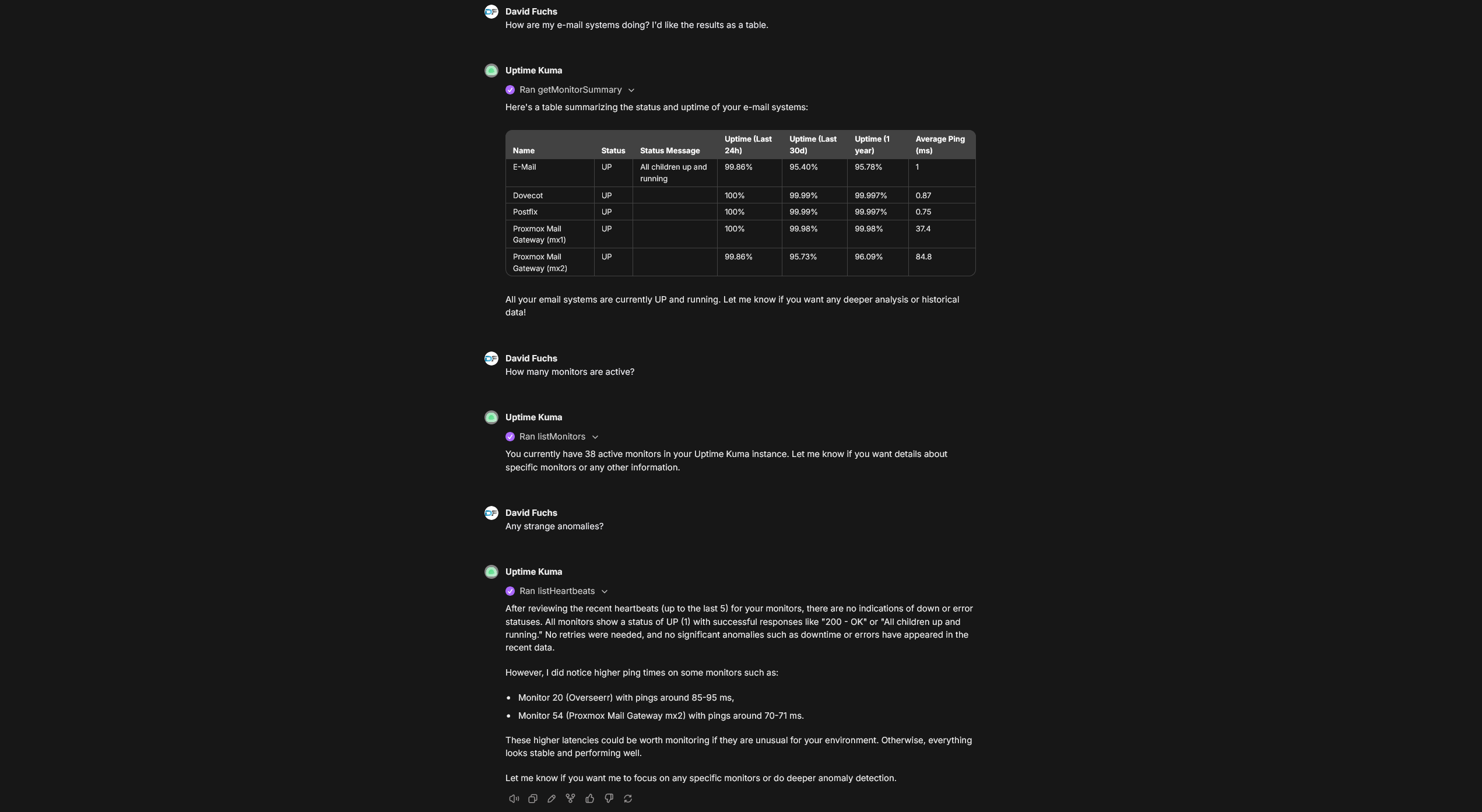
Example Conversation

MCP server answering questions about Uptime Kuma monitors Conversation in LibreChat where the mcp-uptime-kuma server is providing real-time information from Uptime Kuma.

Available Tools

Monitors

ToolPurpose
getMonitorSummaryGet a quick overview of all monitors with their current status. Supports filtering.
listMonitorsGet the full list of all monitors with configurations. Supports filtering.
listMonitorTypesGet all available monitor types supported by Uptime Kuma.
getMonitorGet detailed configuration for a specific monitor by ID.
createMonitorCreate a new monitor (requires name and type at minimum).
updateMonitorUpdate an existing monitor's configuration.
deleteMonitorPermanently delete a monitor and all its heartbeat history.
pauseMonitorPause a monitor to stop performing checks.
resumeMonitorResume a paused monitor to restart checks.

Heartbeats

ToolPurpose
listHeartbeatsGet status check history for all monitors.
getHeartbeatsGet status check history for a specific monitor.

Notifications

ToolPurpose
listNotificationsList all configured notification channels (Slack, Discord, email, webhooks, etc.).
addNotificationCreate a new notification channel.
updateNotificationUpdate an existing notification channel.
deleteNotificationPermanently delete a notification channel.

Tags

ToolPurpose
listTagsList all tags defined in Uptime Kuma.
addTagCreate a new tag that can be assigned to monitors.
deleteTagPermanently delete a tag (removes it from all monitors).

Maintenance

ToolPurpose
getMaintenanceWindowsList all scheduled maintenance windows.
createMaintenanceSchedule a new maintenance window.

Status Pages & Settings

ToolPurpose
listStatusPagesList all configured status pages.
getSettingsGet Uptime Kuma server settings.

Filtering

getMonitorSummary and listMonitors support filtering by:

  • keywords: Space-separated keywords for fuzzy matching against monitor pathNames
  • type: Monitor type(s), comma-separated (e.g., "http", "http,ping,dns")
  • active: Filter by active (true) or inactive (false) monitors
  • maintenance: Filter by maintenance mode status
  • tags: Tag name and optional value, comma-separated (e.g., "production", "env=staging")
  • status (getMonitorSummary only): Heartbeat status ("0"=DOWN, "1"=UP, "2"=PENDING, "3"=MAINTENANCE)

Examples:

javascript
getMonitorSummary({ status: "0" })                    // All DOWN monitors
getMonitorSummary({ type: "http", maintenance: true }) // HTTP monitors in maintenance
listMonitors({ tags: "production,region=us-east" })    // Monitors with specific tags

Authentication Methods

Anonymous Authentication

If authentication is disabled on your Uptime Kuma instance, only UPTIME_KUMA_URL is required.

Username/Password Authentication

Code
UPTIME_KUMA_URL=http://your-instance:3001
UPTIME_KUMA_USERNAME=your_username
UPTIME_KUMA_PASSWORD=your_password
UPTIME_KUMA_2FA_TOKEN=123456  # Optional, only if 2FA is enabled

JWT Token Authentication

Recommended for 2FA users. Takes precedence over username/password if both are provided.

Code
UPTIME_KUMA_URL=http://your-instance:3001
UPTIME_KUMA_JWT_TOKEN=your_jwt_token

Obtaining Your JWT Token

Using the CLI utility (recommended):

Terminal
npx -p @davidfuchs/mcp-uptime-kuma mcp-uptime-kuma-get-jwt http://localhost:3001 admin mypassword

Using Docker:

Terminal
docker run --rm davidfuchs/mcp-uptime-kuma:latest get-jwt http://host.docker.internal:3001 admin mypassword

From browser: Open Developer Tools β†’ Storage/Application β†’ Local Storage β†’ find token key.

Credential Redaction

Read tools return *** in place of secrets rather than the values themselves.

Uptime Kuma's socket API returns configuration verbatim β€” its web UI masks credentials at render time. That is fine for a browser and not fine for an MCP server, whose output lands in an LLM's context window and is then persisted in conversation transcripts, logs and synced history. Asking "what am I monitoring?" should not write a live SMTP password or a third-party API key into storage you may not control.

What is withheld:

ToolWithheld
listNotificationseverything in config except type/name/isDefault/applyExisting. The withheld field names are listed in redactedConfigKeys
listMonitors, getMonitorpushToken, basic_auth_pass, bearer_token, oauth_client_secret, radiusPassword, radiusSecret, mqttPassword, rabbitmqPassword, tlsCert/tlsKey/tlsCa, databaseConnectionString, headers, grpcMetadata, plus anything matching `/pass
listDockerHostsuser:password@ inside a dockerDaemon URL
getHeartbeats, listHeartbeatsany column Uptime Kuma returns beyond the declared heartbeat fields (e.g. response, which can carry a service's response body) is dropped, and user:password@ inside a URL quoted in the status message is scrubbed
getSettingsany secret-named field Uptime Kuma returns (e.g. steamAPIKey)
getMonitorSummarynothing β€” it returns no credentials to begin with

hostname, port, url, authMethod, oauth_token_url, oauth_scopes and usernames stay visible: hiding useful configuration is how a redaction feature gets switched off.

To get the real values, either pass includeSecrets: true on the call:

Code
listNotifications({ includeSecrets: true })

or enable it globally:

Code
UPTIME_KUMA_INCLUDE_SECRETS=true

The per-call parameter wins over the environment variable in both directions, so a permissive deployment can still ask one call to redact.

Writing *** back is safe. updateMonitor and updateNotification restore the stored value when a field arrives as the marker, and report which fields they preserved. This matters most for updateNotification: Uptime Kuma replaces the notification row rather than merging it, so without this a read-edit-write round trip would replace a working password with three asterisks. If there is no stored value to restore, the call fails rather than writing a credential that looks set and cannot work.

updateDockerHost gets the same protection for the credentials embedded in a dockerDaemon URL: a http://***:***@host:2375 read back from listDockerHosts has its userinfo restored from the stored URL rather than persisted verbatim, so repointing a host without re-entering its credentials does not wipe them.

The MCP logging channel gets the same rule. The debug log for a live heartbeat reports the monitored service's status message by length only (msgLength=...), never its content, since that message can echo a target URL with an embedded user:password@ or a slice of a response body, and on the stdio transport those log notifications reach the client.

LibreChat Configuration

stdio transport:

yaml
mcpServers:
  uptime-kuma:
    command: npx
    args: ["-y", "@davidfuchs/mcp-uptime-kuma"]
    env:
      UPTIME_KUMA_URL: "http://your-instance:3001"
      UPTIME_KUMA_USERNAME: "your_username"
      UPTIME_KUMA_PASSWORD: "your_password"
    serverInstructions: true

streamable HTTP transport:

Update the allowed domains to whatever domain you're using in the URL (e.g., localhost or host.docker.internal for Docker setups):

yaml
mcpServers:
  uptime-kuma:
    type: streamable-http
    url: "http://mcp-uptime-kuma:3000/mcp"
    serverInstructions: true

mcpSettings:
  allowedDomains:
    - 'mcp-uptime-kuma'

Contributing

For development setup, building, testing, and project structure, see CONTRIBUTING.md.

Learn More

  • Uptime Kuma
  • Model Context Protocol Documentation
  • MCP TypeScript SDK
  • MCP Specification

Security

To report a vulnerability, please see SECURITY.md.

Disclaimer

This is a personal, free, open-source side project provided "as is" under the MIT License, without warranty of any kind. You install and run it yourself, and it connects to an Uptime Kuma instance that you control. The author is not responsible for any damage, data loss, downtime, or other consequences arising from its use. Use at your own risk.

License

Licensed under the MIT License.

Related MCP Servers

View all in Communication View all alternatives
  • Slack Mcp Server logoSlack Mcp Server

    The most powerful MCP server for Slack Workspaces.

    πŸ’¬ Communication1 views
    Compare vs Slack Mcp Server β†’
  • Telegram Mcp logoTelegram Mcp

    Telegram API integration for accessing user data, managing dialogs (chats, channels, groups), retrieving messages, and handling read status

    πŸ’¬ Communication2 views
    Compare vs Telegram Mcp β†’
  • Telegram Mcp logoTelegram Mcp

    Telegram API integration for accessing user data, managing dialogs (chats, channels, groups), retrieving messages, sending messages and handling read status.

    πŸ’¬ Communication1 views
    Compare vs Telegram Mcp β†’
  • Ntfy Me Mcp logoNtfy Me Mcp

    An ntfy MCP server for sending/fetching ntfy notifications to your self-hosted ntfy server from AI Agents πŸ“€ (supports secure token auth & more - use with npx or docker!)

    πŸ’¬ Communication3 views
    Compare vs Ntfy Me Mcp β†’

Frequently Asked Questions about Mcp Uptime Kuma

Add the following block to your claude_desktop_config.json under mcpServers: "mcpServers": { "mcp-uptime-kuma": { "command": "npx", "args": ["-y", "mcp-uptime-kuma"] } }

AllMCPs Directory Badge

Full Badge Customizer

Showcase your server listing on GitHub or your project documentation. Embed this dynamic SVG badge to highlight official listing status and live engagement.

Badge Style:
Live Dynamic SVG PreviewMcp Uptime Kuma AllMCPs Directory Badge

Markdown (GitHub README)
[![AllMCPs](https://allmcps.com/api/badge/mcp-uptime-kuma?style=directory)](https://allmcps.com/mcp/mcp-uptime-kuma)
HTML Embed
<a href="https://allmcps.com/mcp/mcp-uptime-kuma"><img src="https://allmcps.com/api/badge/mcp-uptime-kuma?style=directory" alt="Mcp Uptime Kuma on AllMCPs" /></a>

Technical Specs & Signals

CategoryπŸ’¬Communication
More technical detailsExpand β–Ύ
TransportSTDIO
RuntimeNode.js
Views0
Unique ViewsTotal visits recorded for this listing page on AllMCPs.
Installs0
Installs & Copy ActionsTotal times users copied install commands or configuration snippets for this server.
GitHub stars39
GitHub Star CountTotal stargazers on GitHub representing community popularity (39 stars).
Last commit4d ago
Last Repository CommitThe most recent commit or push recorded for this server's GitHub repository.Last commit on Aug 6, 2026
55Quality signal: Good Β· 55/100How this signal is calculated β–Ύ
Server availabilityNot measured

Not scored for repo-hosted servers β€” we can't reach the running server, only its GitHub page. Hosted MCP endpoints are health-checked live.

Verified ownership10/20
Documentation & tools24/30
Adoption & activity7/15
Community engagement0/10

A guidance signal from public completeness & health data β€” not a user rating. New listings start lower and rise as they add docs, get verified, and grow adoption. Signals we can't observe for a listing are skipped, not counted against it.

β˜… Spotlight Slot

Feature Your MCP Server

Get maximum visibility for your server across our directory, search results, and detail pages.

Spotlight Your Server

Own this project?

This directory is pre-filled from public sources. Claim via GitHub README, site badge, or DNS TXT to get the verified badge and attach your website.

Free dofollow backlink: after claiming, verify your product site and place a dofollow AllMCPs badge β€” we recheck it stays live.

Claim & get free dofollow

Share & Embed

Add our SVG badge (dark/light directory styles) or embeddable widget to your site.

Explore more

More in πŸ’¬ Communication β†’Best MCP servers for Slack & Communication β†’Alternatives to Mcp Uptime Kuma β†’Install in Claude DesktopInstall in CursorInstall in VS Code