Desktop UI automation for AI agents: screenshots, windows, mouse, keyboard, UI Automation, OCR
Quick Install
Automated & IDE SetupCopy the AI prompt to install this server into Claude Code, Cursor, or another agent — or use 1-click editor setup below.
One-click editor setup isn’t available for this listing yet — we don’t have a confirmed install command, and we’d rather show nothing than point your editor at the wrong package or host. Follow the project’s own setup instructions, linked above.
Manual Client & Custom JSON ConfigExpand JSON ▾
No confirmed setup config for this listing yet. We only publish a config block when the install details come from the project itself — its README, its docs, or a verified owner. We haven’t found those for MCP Test Utils, and we’d rather show nothing than a guess you’d paste into your client. Follow the project’s own setup instructions for the current steps.
Capabilities & Tool Schemas (19)
Inspect callable tools, capabilities, and parameters exposed to AI agents by MCP Test Utils.
take_screenshotScreenshot of the entire desktop with configurable quality
take_window_screenshotScreenshot of a specific window (screen or window capture mode)
read_screen_textOCR the entire screen (Windows.Media.Ocr)
read_region_textOCR a screen region with precise word coordinates
list_windowsList windows with id, title, app, position, size, minimized, focused
focus_windowBring a window to front, restore if minimized
Documentation Overview
MCP Test Utils


MCP server for automated desktop UI testing. A single binary — no runtime, no dependencies, no installation.
Windows x64 only. macOS and Linux support is planned.
Gives AI agents eyes and hands: screenshots, window management, mouse, keyboard, UI Automation, OCR, file search.
Why
AI agents can trigger actions in applications but can't see the screen. This server bridges that gap:
Fully autonomous, no user involvement required.
Demo
3.25.1 — a VS Code form filled, submitted and verified in a couple of minutes. Watch on YouTube →
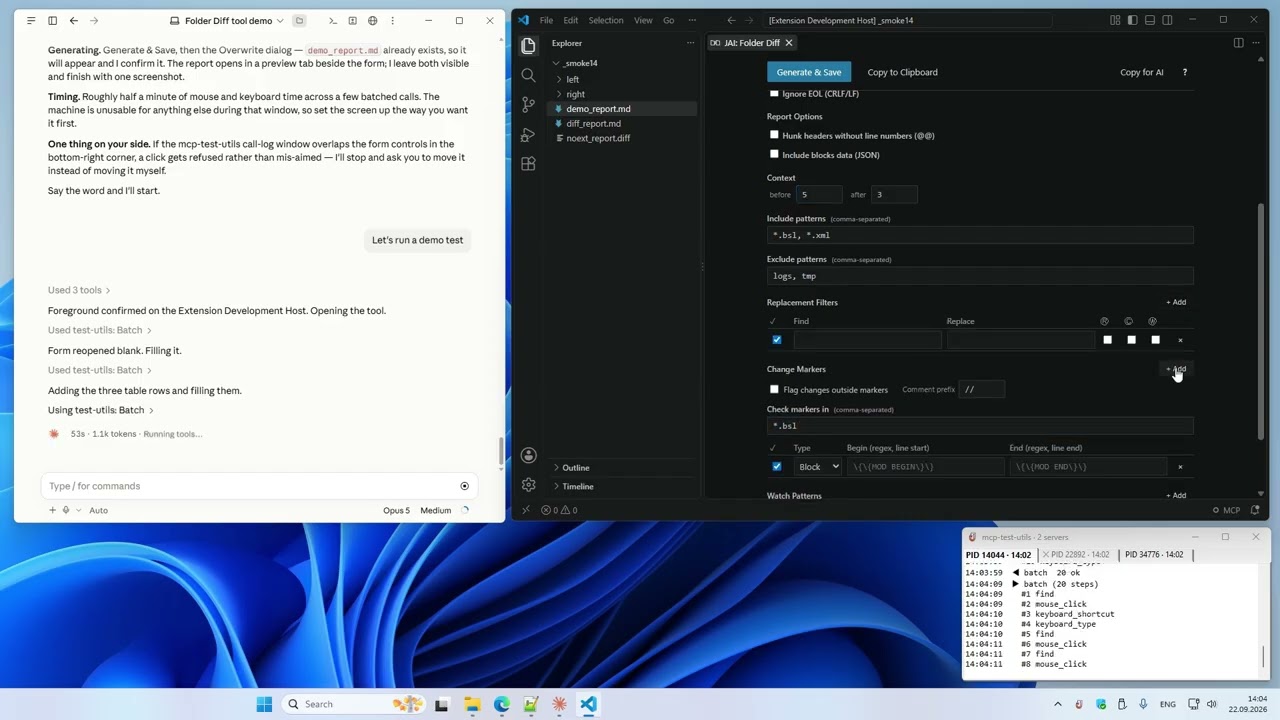
3.10.1 — setup, configuration and the basic tools: 10 tasks in one take. Watch on YouTube →
MCP Test Utils vs Anthropic Computer Use
Claude Cowork now includes built-in Computer Use — Claude takes screenshots and clicks through interfaces visually. It works with zero setup. MCP Test Utils takes a different approach: instead of guessing where to click from a screenshot, it reads the actual UI structure through Windows APIs.
| MCP Test Utils | Computer Use | |
|---|---|---|
| Click precision | Exact — UI Automation API | Visual estimate from screenshot |
| Speed & token cost | Fast, low cost — text responses | Slower, costly — image on every step |
| UI structure | Full tree: roles, states, coordinates | Not available |
| OCR | Word-level coordinates, multi-language | Not available (model vision only) |
| Window management | API-based, window-relative coords | Visual navigation |
| File search | Ripgrep engine built-in | Not available |
| Session logging | JSONL + screenshots, live log in the tray | Not available |
| Verified clicks | By element id, refused if covered | Visual estimate |
| Waiting & batching | wait_for, batch with assert | Not available |
| Visual analysis | ✅ Same Claude model, full-res 1:1 | ✅ Same Claude model |
| Setup | Download binary, add to config | Built-in, one toggle |
| Mobile / Dispatch | — | ✅ Tasks from phone |
| Cross-platform | Windows (macOS/Linux planned) | macOS + Windows |
MCP Test Utils is faster, more precise, and cheaper per action. Computer Use is easier to start and works across platforms. They complement each other.
Platforms
| Platform | Status |
|---|---|
| Windows x64 | ✅ Full support |
| macOS arm64 | ⏳ Planned |
| Linux x64 | ⏳ Planned |
Tools (21)
Vision
| Tool | Description |
|---|---|
take_screenshot | Screenshot of the entire desktop with configurable quality |
take_window_screenshot | Screenshot of a specific window (screen or window capture mode) |
read_screen_text | OCR the entire screen (Windows.Media.Ocr) |
read_region_text | OCR a screen region with precise word coordinates |
Window Management
| Tool | Description |
|---|---|
list_windows | List windows with id, title, app, position, size, minimized, focused |
focus_window | Bring a window to front, restore if minimized |
Input
| Tool | Description |
|---|---|
mouse_click | Click (left / right / middle) on a UI element by id, or at screen / window-relative coordinates |
mouse_move | Move cursor to a point or to a UI element |
mouse_drag | Drag from point A to point B |
mouse_scroll | Scroll the mouse wheel |
keyboard_type | Type text (full Unicode — Latin, Cyrillic, CJK, emoji) |
keyboard_press | Press a key (Enter, Tab, F1–F12, arrows, etc.) |
keyboard_shortcut | Key combinations (Ctrl+S, Alt+F4, Ctrl+Shift+P, etc.) |
Structured UI Access
| Tool | Description |
|---|---|
list_ui_elements | UI Automation tree — buttons, fields, menus with ids, values, states and exact coordinates; filters by name, value, class |
Waiting and Batching
| Tool | Description |
|---|---|
wait_for | Wait for a window, an element or its state instead of sleeping |
batch | Run up to 20 tool calls in one request, with find and assert steps |
File Search
| Tool | Description |
|---|---|
search_in_files | Search text or regex in files within allowed directories (like VS Code Find in Files) |
find_files | Find files and directories by name pattern (glob), like "Go to File" |
Agent Guide
| Tool | Description |
|---|---|
get_usage_guide | Compact workflow guide for LLM agents — precision clicking, coordinate metadata, quality tips |
Session Logging
| Tool | Description |
|---|---|
enable_logging | Start recording tool calls to JSONL + screenshots (opt-in) |
disable_logging | Stop recording, get session stats |
Installation
- Download the binary from Releases.
- Add it to your MCP client config. Example below is for Claude Desktop — for other clients, refer to their documentation.
Claude Desktop: %APPDATA%\Claude\claude_desktop_config.json
- Restart Claude Desktop.
- In chat, try: "Take a screenshot" — the agent will return an image of your desktop.
With Logging and File Search (optional)
Quality Presets
Screenshots support configurable quality to balance detail and token cost:
| Preset | Scale | Format | Use Case |
|---|---|---|---|
full | 100% | JPEG q90 | Maximum detail |
standard | 50% | JPEG q70 | Balanced (default) |
compact | 50% | PNG | When PNG is needed |
minimal | 25% | Grayscale | Lowest token cost |
custom | 10–100% | JPEG / PNG / Grayscale | Full control |
Environment Variables
| Variable | Description | Default |
|---|---|---|
MCP_LOG_DIR | Path for log sessions. Without it, logging tools are hidden | — |
MCP_LOG_MAX_MB | Session size limit (warning on exceed) | 500 |
MCP_LOG_RETAIN_DAYS | Auto-delete sessions older than N days. 0 to disable | 30 |
MCP_SEARCH_DIRS | Allowed directories for search_in_files (; on Windows, : on macOS/Linux). Without it, the tool is hidden | — |
MCP_NOTIFY | off hides the tray icon and the live call log window | — |
Tray Log
The server shows a tray icon with a live log of tool calls — one tab per session, errors in red. MCP_NOTIFY=off hides it; the window position is kept in %LOCALAPPDATA%\mcp-test-utils\notify.json.
How It Works
MCP Test Utils is a JSON-RPC 2.0 server communicating over stdin/stdout. Any MCP-compatible client launches the binary, sends tool calls, and receives structured responses (text, base64 images). Tested with Claude Desktop.
The server uses native Windows APIs directly — Win32 GDI for screenshots, SendInput for mouse and keyboard, UI Automation COM API for element inspection, WinRT Windows.Media.Ocr for text recognition. File search uses the ripgrep engine (grep-regex, grep-searcher, ignore) — cross-platform, no external dependencies. No PowerShell, no external tools, no network access.
Use Cases
- Automated QA — agent navigates the app, clicks through flows, takes screenshots at each step, writes a test report
- Desktop automation — fill forms, copy data between windows, run workflows
- Accessibility audit — scan UI Automation tree for missing labels or roles
- Visual regression — screenshot comparison across releases
- Data extraction — OCR text from applications that don't expose APIs
- Code search — find patterns across multiple projects without leaving the agent session
Security
- Responds only to requests from the MCP client
- Opens no network ports
- Writes nothing to disk except opt-in logging and the tray window settings (
%LOCALAPPDATA%\mcp-test-utils\notify.json) - Sends no data externally
- Screenshots capture the entire screen — make sure no sensitive information is visible
- File search is sandboxed — only directories in
MCP_SEARCH_DIRSare accessible
Support us
Free and unrestricted. If you find it useful — jeenyjai.github.io
License
Copyright 2026 JeenyJAI. All rights reserved.
🚀 Created with Claude
Related MCP Servers
Adoption & maintenance
Factual signals from GitHub, npm, and our automated checks — not a rating.
Last commit
5mo ago
Most recent push to the default branch.
Tools exposed
19
Callable tools this server registers over MCP.
Reviews
No reviews yet — be the first to share how this listing worked for you.
Frequently Asked Questions about MCP Test Utils
AllMCPs Directory Badge
Showcase your server listing on GitHub or your project documentation. Embed this dynamic SVG badge to highlight official listing status and live engagement.
Badge Style:
Live Dynamic SVG Preview
Markdown (GitHub README)
[](https://allmcps.com/mcp/mcp-test-utils)HTML Embed
<a href="https://allmcps.com/mcp/mcp-test-utils"><img src="https://allmcps.com/api/badge/mcp-test-utils?style=directory" alt="MCP Test Utils on AllMCPs" /></a>