AllMCPs
BrowseBestCategoriesStackCompareToolsGuidesBlog
Log in Submit MCP

Stay in the loop

Get new MCP servers and top picks in your inbox.

AllMCPs

The open directory for discovering and installing Model Context Protocol servers.

AllMCPs on GitHub (opens in a new tab)
Launched onTiny Startupstinystartups.com
Explore
  • Browse servers
  • Best MCP servers
  • Categories
  • MCP clients
  • Agent prompts
  • Stack Builder
  • Compare servers
  • Random discovery New
  • Submit a server
  • Pricing & Boost Boost
Learn
  • Guides hub
  • What is MCP?
  • Install guide
  • Build an MCP server
  • Deploy an MCP server
  • Security guide
  • Troubleshooting
  • MCP for SEO & AEO
  • Protocol versioning
  • Blog & updates
Tools
  • All developer tools
  • Config generator
  • Config validator
  • Config auditor
  • MCP playground
  • Token calculator
  • OpenAPI β†’ MCP
  • Badge generator
For agents
  • REST API docs
  • Trust & traffic Live
  • Remote MCP server SSE β†— (opens in a new tab)
  • llms.txt β†— (opens in a new tab)
  • Catalog JSON β†— (opens in a new tab)
Company
  • About
  • Advertise Sponsor
  • Contact
  • GitHub β†— (opens in a new tab)
  • Terms
  • Privacy
AllMCPs VerifiedAllMCPs VerifiedFeatured on Nick LaunchesFeatured on Nick LaunchesLaunch Llama NewsletterLaunch Llama NewsletterVerified DR - allmcps.comVerified DR - allmcps.comFeatured on SaaSGrowFeatured on SaaSGrowFeatured on Twelve ToolsFeatured on Twelve ToolsFeatured on Saaspa.geFeatured on Saaspa.geFeatured on Findly.toolsFeatured on Findly.toolsFeatured on Startup FameFeatured on Startup FameFeatured on LaunchKiwiFeatured on LaunchKiwiFeatured on ScrollLaunchFeatured on ScrollLaunchFeatured on DailyPingsFeatured on DailyPingsFazier badgeFazier badgeFeatured on NewTool.siteFeatured on NewTool.siteFeatured on saasfame.comFeatured on saasfame.comDR Checker - Domain RatingDR Checker - Domain RatingListed on Turbo0Listed on Turbo0Launched on LaunchBoard - Product Launch PlatformLaunched on LaunchBoard - Product Launch PlatformList on SimilarlabsList on Similarlabshttps://codetrendy.comhttps://codetrendy.comListed on DevTool.ioFeatured on BuildlistFeatured on BuildlistLaunched on Tiny StartupsFeatured on ShowMeBestAIFeatured on ShowMeBestAIFind us on LaunchZoneFind us on LaunchZoneAllMCPs VerifiedAllMCPs VerifiedFeatured on Nick LaunchesFeatured on Nick LaunchesLaunch Llama NewsletterLaunch Llama NewsletterVerified DR - allmcps.comVerified DR - allmcps.comFeatured on SaaSGrowFeatured on SaaSGrowFeatured on Twelve ToolsFeatured on Twelve ToolsFeatured on Saaspa.geFeatured on Saaspa.geFeatured on Findly.toolsFeatured on Findly.toolsFeatured on Startup FameFeatured on Startup FameFeatured on LaunchKiwiFeatured on LaunchKiwiFeatured on ScrollLaunchFeatured on ScrollLaunchFeatured on DailyPingsFeatured on DailyPingsFazier badgeFazier badgeFeatured on NewTool.siteFeatured on NewTool.siteFeatured on saasfame.comFeatured on saasfame.comDR Checker - Domain RatingDR Checker - Domain RatingListed on Turbo0Listed on Turbo0Launched on LaunchBoard - Product Launch PlatformLaunched on LaunchBoard - Product Launch PlatformList on SimilarlabsList on Similarlabshttps://codetrendy.comhttps://codetrendy.comListed on DevTool.ioFeatured on BuildlistFeatured on BuildlistLaunched on Tiny StartupsFeatured on ShowMeBestAIFeatured on ShowMeBestAIFind us on LaunchZoneFind us on LaunchZone
Β© 2026 Jackalope Digital LLC. All rights reserved.
  1. Home
  2. πŸ’» Developer Tools
  3. MCP Server for YNAB
MCP Server for YNAB logo
Health: ActiveRecent health check succeeded.Last checked 9/7/2026, 8:29:23 PM

MCP Server for YNAB

User RatingsBe the first to rate and review this MCP server! Enrichment pendingWe haven’t run our AI enrichment pass on this listing yet, so the overview, use cases, and FAQ below may be sparse or missing. We work through the catalog over time β€” check back soon.
View Repository1 GitHub StarsTotal stargazers on GitHub for the source repository (1 stars).Visit Website

Connect your AI assistant to YNAB. Read-only by default, with reversible opt-in writes.

Quick Install

Automated & IDE Setup

Copy the AI prompt to install this server into Claude Code, Cursor, or another agent β€” or use 1-click editor setup below.

Add to CursorAdd to VS Code
Not yet automatically verified

We haven't yet run this listing's install command through our automated sandbox check. This isn't a red flag β€” we're steadily working through the catalog.

Manual Client & Custom JSON ConfigExpand JSON β–Ύ

Client Config & Setup

Choose your client or environment
Target File:~/Library/Application Support/Claude/claude_desktop_config.json
claude_desktop_config.json
{
  "mcpServers": {
    "mcp-server-for-ynab": {
      "command": "uvx",
      "args": [
        "mcp-server-for-ynab"
      ]
    }
  }
}

πŸ’‘ Paste the JSON block into your client's configuration file under mcpServers, then restart the application.

Install Directory Badge Claim listing AlternativesπŸ’» More in Developer Tools

Documentation Overview

MCP Server for YNAB

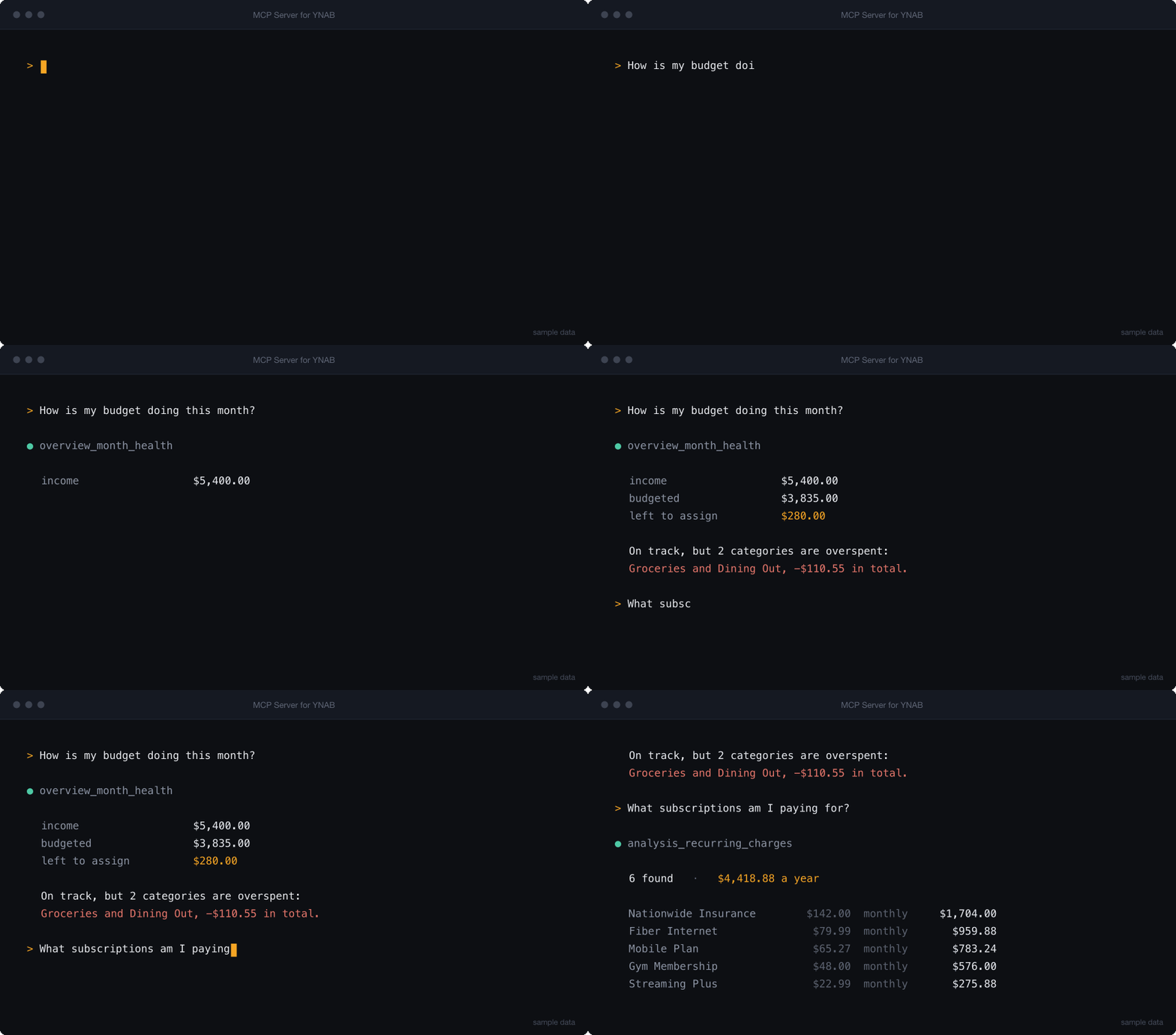
Ask your budget a question. Connect Claude, Codex, Cursor, or any MCP client to YNAB and get answers about your actual money β€” how the month is going, what is overspent, what your subscriptions really cost.

PyPI Python CI License Listed on mcpservers.org

A terminal session asking how the month is going and what subscriptions cost, answered by the server from a sample budget

bash
YNAB_API_KEY=your_token uvx mcp-server-for-ynab smoke

Read-only by default. The write tools are not registered at all unless you set YNAB_ALLOW_WRITES=1, so they never appear to the assistant and nothing can change your budget until you say so. When you do enable them, every write records the state that preceded it and can be undone.

An MCP server that exposes the YNAB API as tools, then adds enriched tools answering questions the raw API cannot answer in one call β€” budget health, cleanup queues, spending analysis, recurring charges.

Quick Start

1. Get a YNAB token

Generate a personal access token at app.ynab.com/settings/developer.

You also need uv, which provides uvx:

Terminal
curl -LsSf https://astral.sh/uv/install.sh | sh   # macOS and Linux
brew install uv                                   # macOS with Homebrew
winget install --id=astral-sh.uv -e               # Windows

Check both work. Nothing to clone β€” uvx fetches the package and runs it in a throwaway environment:

bash
YNAB_API_KEY=your_token uvx mcp-server-for-ynab smoke

smoke validates configuration and tool registration, then exits. It should print smoke: app created, 62 tools registered.

2. Add it to your client

ClientSetup
Claude Codeone command
Claude Desktopconfig file
Cursorone-click link
VS Code (GitHub Copilot)one command
Codex CLIone command
Gemini CLIone command
Windsurf, Zed, othersgeneric stdio config
MCP Inspectordebugging

The two most common paths:

Claude Code β€” install the plugin, which brings its own MCP config:

bash
/plugin marketplace add hs737/mcp-server-for-ynab
/plugin install mcp-server-for-ynab@mcp-server-for-ynab

Or register the server directly, if you would rather not use a plugin:

Terminal
claude mcp add --env YNAB_API_KEY=your_ynab_token --transport stdio --scope user \
  ynab -- uvx mcp-server-for-ynab stdio

Claude Desktop, Cursor, Windsurf, and most others β€” paste into the client's MCP config file:

config.json
{
  "mcpServers": {
    "ynab": {
      "command": "uvx",
      "args": ["mcp-server-for-ynab", "stdio"],
      "env": {
        "YNAB_API_KEY": "your_ynab_token",
        "YNAB_PLAN_ID": "your_plan_id"
      }
    }
  }
}

YNAB_PLAN_ID is optional but recommended β€” with it set, you never have to name a budget in a request. Full per-client instructions, including where each config file lives and how to keep the token out of it, are in Client Setup.

Desktop hosts that accept bundles β€” download the .mcpb file from the latest release and open it. The host asks for your token in a form and stores it in your OS keychain, so there is no config file to edit and no token sitting in plain text. A checkbox controls whether writes are enabled.

Docker

A published image is available for linux/amd64 and linux/arm64. The server speaks MCP over stdin and stdout, so run it attached with -i. There is no port to publish:

Terminal
docker run -i --rm -e YNAB_API_KEY=your_ynab_token \
  ghcr.io/hs737/mcp-server-for-ynab

Or build it yourself from a clone:

Terminal
docker build -t mcp-server-for-ynab .
docker run -i --rm -e YNAB_API_KEY=your_ynab_token mcp-server-for-ynab

If you enable writes, mount a volume for the history β€” otherwise --rm discards the record that makes a revert possible:

Terminal
docker run -i --rm -e YNAB_API_KEY=your_ynab_token -e YNAB_ALLOW_WRITES=1 \
  -v ynab-mcp-history:/home/app/.mcp-server-for-ynab mcp-server-for-ynab

3. Ask it something

What's my cash position across all accounts?

If that works, you're set. If it doesn't, see Troubleshooting β€” the usual cause is that the client cannot find uvx on its PATH.

What You Can Ask

Read-only, works out of the box:

AskTool it reaches for
"How is this month's budget doing?"overview_month_health
"What's my cash position across all accounts?"overview_cash_position
"Which transactions still need a category?"triage_uncategorized
"What's waiting for me to approve?"triage_unapproved
"Which categories are overspent, and by how much?"analysis_overspent_categories
"Which targets won't be funded this month?"analysis_target_funding_gaps
"Are any scheduled transactions at risk?"analysis_upcoming_scheduled_risks
"What have I spent at this payee over the last year?"bookkeeping_transaction_history
"What subscriptions am I actually paying for?"analysis_recurring_charges
"Does this account match the statement, and what's in the way?"reconcile_preview
"Here's the bank CSV β€” what's missing on each side?"transactions_match_statement
"Are there card holds sitting on my account that never posted?"triage_pending_imports

With YNAB_ALLOW_WRITES=1:

Categorize last week's uncategorized transactions, then show me what you changed.

The agent categorizes, and history_list shows every write with the value that preceded it. history_revert undoes any of them.

Agents work best when they start with overview_available_tools, which returns the current tool catalog grouped by family. See Tool Surface for the full map.

Guided workflows

Seven prompts ship with the server, and most clients surface them as slash commands β€” a starting point that does not require reading the tool list first: monthly review, weekly triage, categorize and approve, subscription audit, cash position, review-and-undo, and a multi-month budget audit.

Four resources (ynab://guide/*) carry the YNAB method, the write-safety rules, guidance on which tool to reach for, and how credit accounts behave. They are fetched on demand, so they cost nothing until a client asks for them.

Configuration

VariableRequiredDescription
YNAB_API_KEYYesYNAB personal access token
YNAB_PLAN_IDRecommendedDefault plan ID, making plan_id optional on most tools
YNAB_ALLOW_WRITESNoRegister write tools. Unset means read-only
YNAB_HISTORY_PATHNoWrite history file, default ~/.mcp-server-for-ynab/history.jsonl
YNAB_RATE_LIMIT_PER_HOURNoClient-side request budget, default 190 of YNAB's 200
YNAB_RATE_WARN_THRESHOLDNoWarn when this many requests remain, default 50
LOG_LEVELNoLogging verbosity, default INFO

Set these in your MCP client's env block. For local development, copy .env.example to .env and fill it in.

Rate limits

YNAB allows 200 requests per hour per token, and a single enriched tool can spend several. The server tracks its own usage in a rolling hour and stops just below YNAB's ceiling, so the limit you hit is local and clearly reported rather than a 429 in the middle of a workflow.

Read the full README β†’View source on GitHub β†’

Related MCP Servers

View all in Developer Tools View all alternatives
  • Weeek MCP logoWeeek MCP

    Local MCP server for Weeek (stdio transport) β€” read-only by default, opt-in write tools.

    πŸ’» Developer Tools0 views
    Compare vs Weeek MCP β†’
  • PraisonAI logoPraisonAI

    AI Agents Framework with Self Reflection and MCP support

    πŸ’» Developer Tools1 views
    Compare vs PraisonAI β†’
  • M
    MIRASTACK Redfish MCP Server

    Governed MCP server for DMTF Redfish BMCs. Read-only by default; writes are opt-in and dry-run.

    πŸ’» Developer Tools0 views
    Compare vs MIRASTACK Redfish MCP Server β†’
  • Labelhead Artist Momentum logoLabelhead Artist Momentum

    Trending hip-hop artist momentum scores across four cultural dimensions.

    πŸ’» Developer Tools0 views
    Compare vs Labelhead Artist Momentum β†’

Reviews

No reviews yet β€” be the first to share how this listing worked for you.

Frequently Asked Questions about MCP Server for YNAB

Add the following block to your claude_desktop_config.json under mcpServers: "mcpServers": { "mcp-server-for-ynab": { "command": "npx", "args": ["-y", "MCP Server for YNAB"] } }

AllMCPs Directory Badge

Full Badge Customizer

Showcase your server listing on GitHub or your project documentation. Embed this dynamic SVG badge to highlight official listing status and live engagement.

Badge Style:
Live Dynamic SVG PreviewMCP Server for YNAB AllMCPs Directory Badge

Markdown (GitHub README)
[![AllMCPs](https://allmcps.com/api/badge/mcp-server-for-ynab?style=directory)](https://allmcps.com/mcp/mcp-server-for-ynab)
HTML Embed
<a href="https://allmcps.com/mcp/mcp-server-for-ynab"><img src="https://allmcps.com/api/badge/mcp-server-for-ynab?style=directory" alt="MCP Server for YNAB on AllMCPs" /></a>

Technical Specs & Signals

CategoryπŸ’»Developer Tools
More technical detailsExpand β–Ύ
TransportSTDIO
RuntimePython
Last updatedSep 7, 2026
Views0
Unique ViewsTotal visits recorded for this listing page on AllMCPs.
Installs0
Installs & Copy ActionsTotal times users copied install commands or configuration snippets for this server.
GitHub stars1
GitHub Star CountTotal stargazers on GitHub representing community popularity (1 stars).
36Quality signal: Fair Β· 36/100How this signal is calculated β–Ύ
Server availabilityNot measured

Not scored for repo-hosted servers β€” we can't reach the running server, only its GitHub page. Hosted MCP endpoints are health-checked live.

Verified ownership10/20
Documentation & tools16/30
Adoption & activity1/15
Community engagement0/10

A guidance signal from public completeness & health data β€” not a user rating. New listings start lower and rise as they add docs, get verified, and grow adoption. Signals we can't observe for a listing are skipped, not counted against it.

β˜… FeaturedAllMCPs Server logo

AllMCPs Server

The official MCP server for AllMCPs.com - submit and manage tools directly from your AI. The open directory for MCP servers. Connect Claude, Cursor, Windsurf, and AI agents to databases, tools, files, and APIs. Explore 10,000+ servers. AllMCPs is the premier, open directory for discovering, evaluating, and installing Model Context Protocol (MCP) servers to equip AI agents and LLMs with real-world superpowers.

Explore Server β†’

Own this project?

This directory is pre-filled from public sources. Claim via GitHub README, site badge, or DNS TXT to unlock edit access and the Official badge β€” proof is checked automatically, then reviewed by our team.

Free dofollow backlink: add your website and place the AllMCPs badge on it β€” no claim needed. We detect it automatically and keep it verified as long as the badge stays live.

Claim & get free dofollow

Share & Embed

Add our SVG badge (dark/light directory styles) or embeddable widget to your site.

Explore more

More in πŸ’» Developer Tools β†’Best MCP servers for Developers β†’Alternatives to MCP Server for YNAB β†’Install in Claude DesktopInstall in CursorInstall in VS Code