mcp-repo-auditor
Check your code changes against the rules your repository already gives AI agents: AGENTS.md, CLAUDE.md, .cursorrules, Copilot instructions, Kiro steering, skills and more.
It is a local Model Context Protocol server. You ask your AI assistant to "audit my changes" and get back a compliance table in the chat, or an HTML report you open in a browser.
- Local. No API key, no account, no network calls. It reads your git diff and your rule files, nothing else.
- Any repository, any language. Nothing to configure per repo; the rules come from the files already in it.
- Only relevant rules. A Python rule is not checked against a TypeScript file, and a testing rule is not checked against a migration.
Demo
https://github.com/user-attachments/assets/3414f3aa-ac69-45a1-a277-c8e9797ff5da
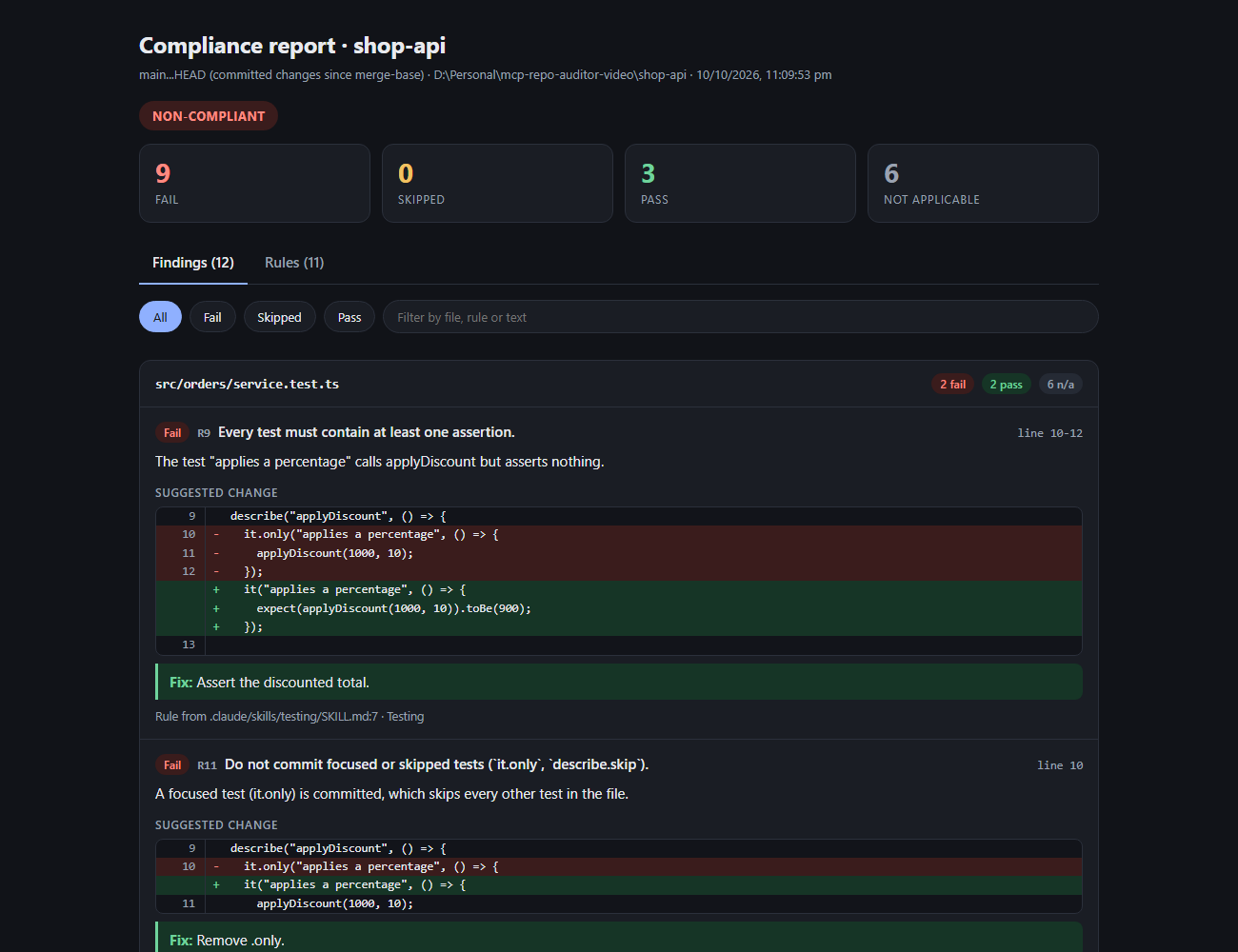
The HTML report for a sample audit:
Requirements
- Node.js 18.17 or newer
- Git on your
PATH - An MCP client: Claude Code, Claude Desktop, Cursor, VS Code, Kiro, Windsurf or any other
Install
There is nothing to download by hand. Your MCP client starts the server with npx, which fetches the package the first time.
Claude Code
claude mcp add repo-auditor --scope user -- npx -y mcp-repo-auditor
On Windows (not WSL), npx has to be started through cmd:
claude mcp add repo-auditor --scope user -- cmd /c npx -y mcp-repo-auditor
--scope user makes it available in every project. Start a new Claude Code session, then run /mcp to confirm repo-auditor is connected.
Cursor
Add to ~/.cursor/mcp.json (all projects) or .cursor/mcp.json (one project):
{
  "mcpServers": {
    "repo-auditor": {
      "command": "npx",
      "args": ["-y", "mcp-repo-auditor"]
    }
  }
}
VS Code (GitHub Copilot)
Add to .vscode/mcp.json in your workspace:
{
  "servers": {
    "repo-auditor": {
      "command": "npx",
      "args": ["-y", "mcp-repo-auditor"]
    }
  }
}
Kiro
Add to .kiro/settings/mcp.json (workspace) or ~/.kiro/settings/mcp.json (all workspaces):
{
  "mcpServers": {
    "repo-auditor": {
      "command": "npx",
      "args": ["-y", "mcp-repo-auditor"],
      "autoApprove": ["audit_repo_compliance", "render_compliance_report"]
    }
  }
}
Windsurf
Add to ~/.codeium/windsurf/mcp_config.json, using the same block as Cursor.
Claude Desktop
Config file: %APPDATA%\Claude\claude_desktop_config.json (Windows) or ~/Library/Application Support/Claude/claude_desktop_config.json (macOS).
Claude Desktop does not run inside your repository, so tell the server where it is:
{
  "mcpServers": {
    "repo-auditor": {
      "command": "npx",
      "args": ["-y", "mcp-repo-auditor"],
      "env": { "MCP_REPO_AUDITOR_ROOT": "/path/to/your/repo" }
    }
  }
}
You can also leave env out and name the repository in your request: "audit the working changes in /path/to/your/repo".
Windows note for JSON configs
If the server fails to start on Windows with npx as the command, launch it through cmd:
{ "command": "cmd", "args": ["/c", "npx", "-y", "mcp-repo-auditor"] }
Use
Open your repository in the client and ask in plain words:
| You say | What is audited |
|---|---|
| "Audit my staged changes" | What git add has staged (the default) |
| "Audit my working changes" | Staged, unstaged and new untracked files |
| "Audit this branch" | Every commit on your branch since it left the default branch |
| "Audit this branch against develop" | The same, against a base branch you name |
| "Audit my working changes in src/api" | Only the changed files in that folder (a file or a glob works too) |
First run: four questions
The first time you audit a repository, you are asked:
- Results format: Markdown table in the chat, or an HTML report file.
- Report folder (HTML only): an absolute path, or a word like
downloads,desktopordocuments. Blank uses the system temp folder. - Extra rule files: files or folders to audit against besides the ones found automatically. Blank means none.
- Base branch for branch audits. Blank means the repository's default branch (
main,master, ...), which is found automatically.
Clients that support MCP forms (Claude Code does) show these as a form. In other clients the assistant asks them in the chat.
Your answers are saved per repository in ~/.mcp-repo-auditor/preferences.json, never inside the repository. To change them, say "reconfigure the repo auditor". To override the format once, say it in the request: "audit my working changes as an HTML report".
Large changes
MCP clients limit how much a tool may return in one result (Claude Code allows 25,000 tokens by default), so a big change cannot be handed to the assistant in one piece. Nothing is cut or sampled. The change is audited in parts, and you decide how before anything runs.
-
You see the plan first. The audit stops and shows how the change is divided:
This change is too large for one result: 3 file(s), 4,201 added line(s), about 107,000 tokens to read (estimate). It will be audited in 6 parts, every line in exactly one of them: Part 1 (+743 lines): src/big-one.ts (lines 1-743) Part 2 (+720 lines): src/big-one.ts (lines 744-1463) ... Part 6 (+587 lines): src/big-two.ts (lines 615-1200), src/small.ts Not audited: 1 file(s) (lockfiles, binaries, generated or deleted files). -
You choose. Audit every part one after another, every part in parallel (see below), only some parts ("just parts 1 and 2"), only some files or folders ("only src/api"), or cancel. In Claude Code this is a form; in other clients the assistant asks in the chat.
-
You watch it run. Each part is reported as it is judged. In Markdown you get that part's table and its counts. For HTML, the report file is rewritten after every part and you get a one-line progress note.
-
You always know what was covered. The final result says which parts were audited. An HTML report with parts still open is marked INCOMPLETE, lists the files not audited yet, and tags files that were only partly covered. It never shows COMPLIANT for a partial audit.
A file too big for one part continues in the next one with its line numbers intact. All parts come from one snapshot of the diff taken when the plan is made, so edits you make while the audit runs do not shift the parts.
A bigger change takes proportionally more time and tokens; the estimate in the plan is there so you can narrow the audit instead.
One after another, or in parallel
| One after another (default) | In parallel | |
|---|---|---|
| How | Your assistant judges part 1, then part 2, and so on | Your assistant starts one subagent per part, all at the same time |
| Time | Grows with the number of parts | About the time of one part |
| What you see while it runs | Each part's results as it is judged | One line saying the subagents were started, then the combined result |
| Size it copes with | Around ten parts, because every part is read into the same conversation | More, because each subagent reads only its own part |
| Tokens | Spread over the run | Somewhat more in total, and spent all at once |
| Needs | Any MCP client | A client whose assistant can start subagents that can use this server's tools (Claude Code can) |
In parallel mode every subagent sends its verdicts to the server. The server adds them up and builds the combined result: the HTML report, or the finished Markdown table, which the assistant prints as it is. If a subagent fails, the result names the part that is still open and the assistant retries it once. If the client cannot run subagents, the assistant says so and audits the parts one after another instead.
What you get
Markdown (in the chat):
- Compliance Matrix: one row per file and rule that passed, failed or could not be judged.
- Violations: each failure with the line, the reason and a fix.
- Rules Considered: what each rule key (
R1,R2, ...) means and which file it came from. - Result: counts and a verdict.
HTML (a single self-contained file; the assistant replies with its path):
- A verdict and pass / fail / skipped / not-applicable counts.
- A Findings tab: results per file, the offending lines, and suggested fixes shown as a code diff.
- A Rules tab: every rule key with its full text and source.
- Filters by status and by text; light and dark mode.
Where rules come from
These are found automatically. A rule file you keep out of git (a personal CLAUDE.md, an ignored .cursor/ folder) is still used. Only AGENTS.md / CLAUDE.md files found inside ignored subfolders, such as a virtualenv or vendored package, are skipped.
| Tool | Files |
|---|---|
| Agents (generic) | AGENTS.md (any folder), .agent/ or .agents/ → rules/, guidelines/, workflows/, steering/, and SKILL.md files |
| Claude | CLAUDE.md (any folder), .claude/rules/**/*.md, .claude/skills/*/SKILL.md |
| Cursor | .cursorrules, .cursor/rules/**/*.{md,mdc} |
| GitHub Copilot | .github/copilot-instructions.md, .github/instructions/**/*.instructions.md |
| Kiro | .kiro/steering/**/*.{md,json}, other .kiro/**/*.md |
| Cline | .clinerules (file or folder) |
| Windsurf | .windsurfrules, .windsurf/rules/**/*.md |
| Project docs | CONTRIBUTING.md, ARCHITECTURE.md (root, docs/ or .github/) |
Also:
- Notes that only describe the project, such as a list of build commands or a folder layout, are not treated as rules. A bullet in those sections still counts when it is worded as a rule ("always", "never", "must", "only", ...).
- An
AGENTS.mdorCLAUDE.mdinside a subfolder applies only to files in that subfolder. - If a rule file points at another one ("follow the guidelines in
docs/standards/"), that target is read too. - Scoping written in the files is respected: Cursor
globs/alwaysApply, CopilotapplyTo, Kiroinclusion/fileMatchPattern, Windsurftrigger/globs. - Rules kept somewhere else? Name them in setup question 3, or in the request: "audit my changes, also use
docs/engineering-rules.md".
How it works
- Reads the git diff for the scope you chose.
- Finds the rule files and splits them into single rules.
- Maps each changed file to the rules that apply to it, by language, path, glob and the content of the changed lines.
- Hands the diff, the rules and the mapping to your AI assistant, with instructions to judge every pair strictly.
- For HTML, the assistant sends its verdicts back and the server writes the report.
A change too large for one result goes through steps 4 and 5 once per part; see Large changes.
Steps 1 to 3 and the report are plain code and take well under a second. The judging in step 4 is done by your assistant's model, so its speed and quality depend on the model you use.
Tools
| Tool | Purpose |
|---|---|
audit_repo_compliance | Runs the audit, or returns the plan for a large change. Inputs: scope (staged, working, branch), branch, paths (files, folders or globs to limit the audit to), part (which part of a large audit), parallel (hand the parts to subagents), customRulePaths, repoPath, report (markdown, html), reconfigure |
render_compliance_report | Writes the HTML report from the assistant's findings; in a large audit it is called once per part and refreshes the same file |
audit_status | Says which parts of the current audit have verdicts and the totals so far; after a parallel audit it returns the combined result |
configure_audit | Saves or changes the preferences for a repository |
You do not normally call these yourself; the assistant picks them.
Settings
Optional environment variables, set in the env block of your MCP config.
| Variable | Default | Meaning |
|---|---|---|
MCP_REPO_AUDITOR_ROOT | the client's workspace | Repository to audit when the request does not name one |
MCP_REPO_AUDITOR_SETUP | on | off skips the first-run questions and uses the defaults below |
MCP_REPO_AUDITOR_REPORT | markdown | Default format: markdown or html |
MCP_REPO_AUDITOR_REPORT_DIR | system temp folder | Default folder for HTML reports |
MCP_REPO_AUDITOR_CONFIG_DIR | ~/.mcp-repo-auditor | Where preferences are stored |
MCP_REPO_AUDITOR_MAX_CHARS | 64000 | Size of one audit result, in characters. A larger change is audited in parts of about this size |
MCP_REPO_AUDITOR_MAX_RULES_PER_FILE | 80 | Most rules checked per file (highest priority kept) |
MCP_REPO_AUDITOR_MAX_UNTRACKED_BYTES | 524288 | Largest untracked file read in working scope |
MCP_REPO_AUDITOR_GIT_TIMEOUT_MS | 60000 | Timeout for each git command |
MCP_REPO_AUDITOR_LOG_LEVEL | info | debug, info, warn or error (written to stderr) |
If your client accepts larger tool results, raise MCP_REPO_AUDITOR_MAX_CHARS and big changes need fewer parts. The older line and file limits (MAX_FILES, MAX_LINES_PER_FILE, MAX_TOTAL_LINES) are gone: they cut the diff, and parts replace them.
Two things are still left out, and the audit says so each time: more than 80 rules for one file (the highest-priority 80 are kept), and the tail of a single line longer than 2,000 characters.
Troubleshooting
| Problem | What to do |
|---|---|
| The server does not start on Windows | Use the cmd /c npx form shown above |
| "Not inside a git repository" | Open the repository folder in your client, set MCP_REPO_AUDITOR_ROOT, or name the path in your request |
| "git could not open the repository" | Git itself refused; the message carries its reason and, for "dubious ownership", the command that fixes it |
| "Nothing is staged" | The default audit covers staged changes only. Accept the offer to audit your working changes, run git add, or ask for a branch audit |
| No rules found | The repository has none of the files listed above. Add one, or point at your own in setup question 3 |
| The setup questions do not appear | They are asked once per repository. Say "reconfigure the repo auditor" |
| The audit is slow | The time is the model judging each file against each rule. Audit a smaller scope or fewer files ("only src/api"), or lower MCP_REPO_AUDITOR_MAX_RULES_PER_FILE |
| The assistant stopped part-way through a large audit | Say "continue the audit" or name the parts left; the result and the HTML report list them |
| I want to see what it is doing | Set MCP_REPO_AUDITOR_LOG_LEVEL to debug and read the server's stderr log in your client |
To update, restart your client; npx -y mcp-repo-auditor@latest in the config always fetches the newest version.
Privacy
The server itself sends nothing anywhere. The diff and the rules it returns go to whichever AI assistant you are using, as with any other code you show it.
Development
npm install        # installs and builds
npm run build      # -> dist/
npm test           # builds, then runs the end-to-end tests
npm run inspect    # try the tools in the MCP Inspector
License
MIT