AI-Powered Development Toolkit with 21 tools for code quality, project management, and UI/UX design.
Quick Install
Automated & IDE SetupCopy the AI prompt to install this server into Claude Code, Cursor, or another agent — or use 1-click editor setup below.
Not yet automatically verified
We haven't yet run this listing's install command through our automated sandbox check. This isn't a red flag — we're steadily working through the catalog.
Manual Client & Custom JSON ConfigExpand JSON ▾
Client Config & Setup
Choose your client or environment
Target File:
💡 Paste the JSON block into your client's configuration file under mcpServers, then restart the application.
Documentation Overview
mcp-probe-kit — Know the Context, Feed the Moment
知时MCP | mcp-probe-kit
Know the Context, Feed the Moment.
Introspection · Context Hydration · Delegated Orchestration
Talk is cheap, show me the Context.
mcp-probe-kit is a protocol-level toolkit designed for developers who want AI to understand project intent, choose a precise workflow, and retain validated experience without flooding the model with internal actions.
Languages: English | 简体中文 | 日本語 | 한국어 | Español | Français | Deutsch | Português (BR)




🚀 AI-Powered Complete Development Toolkit - Covering the Entire Development Lifecycle
A powerful MCP (Model Context Protocol) server with 24 model-visible tools by default, 30 when Memory is configured, and a 34-tool compatibility surface available through MCP_TOOLSET=full. It covers the complete workflow from product analysis to final release and supports structured output.
🎉 v4 stable release: native MCP Apps, resumable plans, evidence convergence, managed GitNexus Sidecar, parent-child specs, and a version-locked CLI fallback.
Supports All MCP Clients: Cursor, Claude Desktop, Cline, Continue, and more
Protocol Support: Legacy MCP (2025-era) + Modern MCP 2026-07-28 · SDK: split TypeScript SDK v2 packages
Runtime: Node.js 20 or newer. MCP_PROTOCOL_MODE=auto is the default; use legacy or modern only for compatibility diagnosis.
🎬 v4 in action
v4 turns delegated Agent work into an observable and verifiable delivery loop. The animations below are rendered from the same MCP App source shipped in the npm package—not separate marketing mockups.
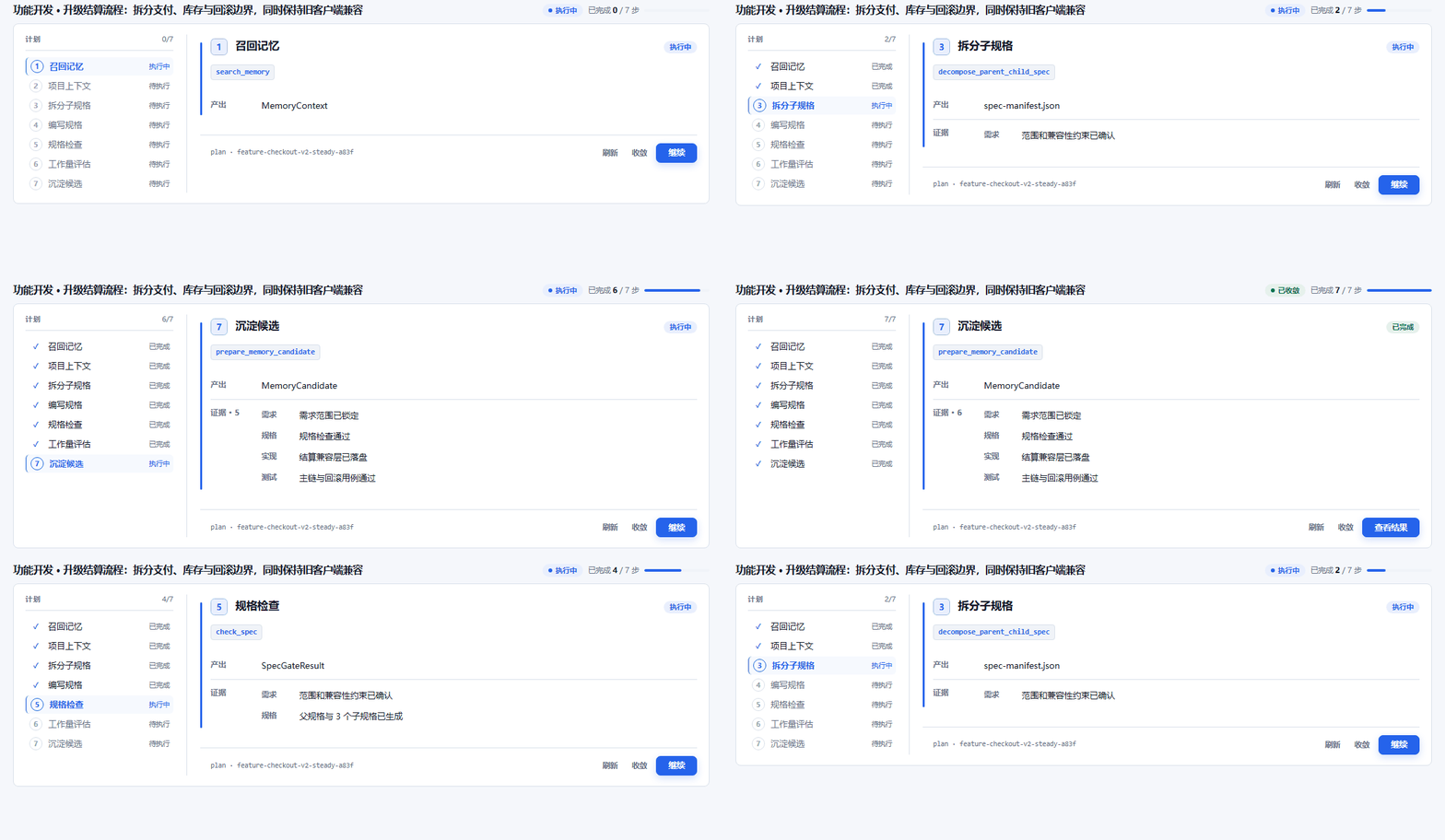
Feature Workbench — parent-child specs, active step, outputs, evidence, and cross-session recovery.
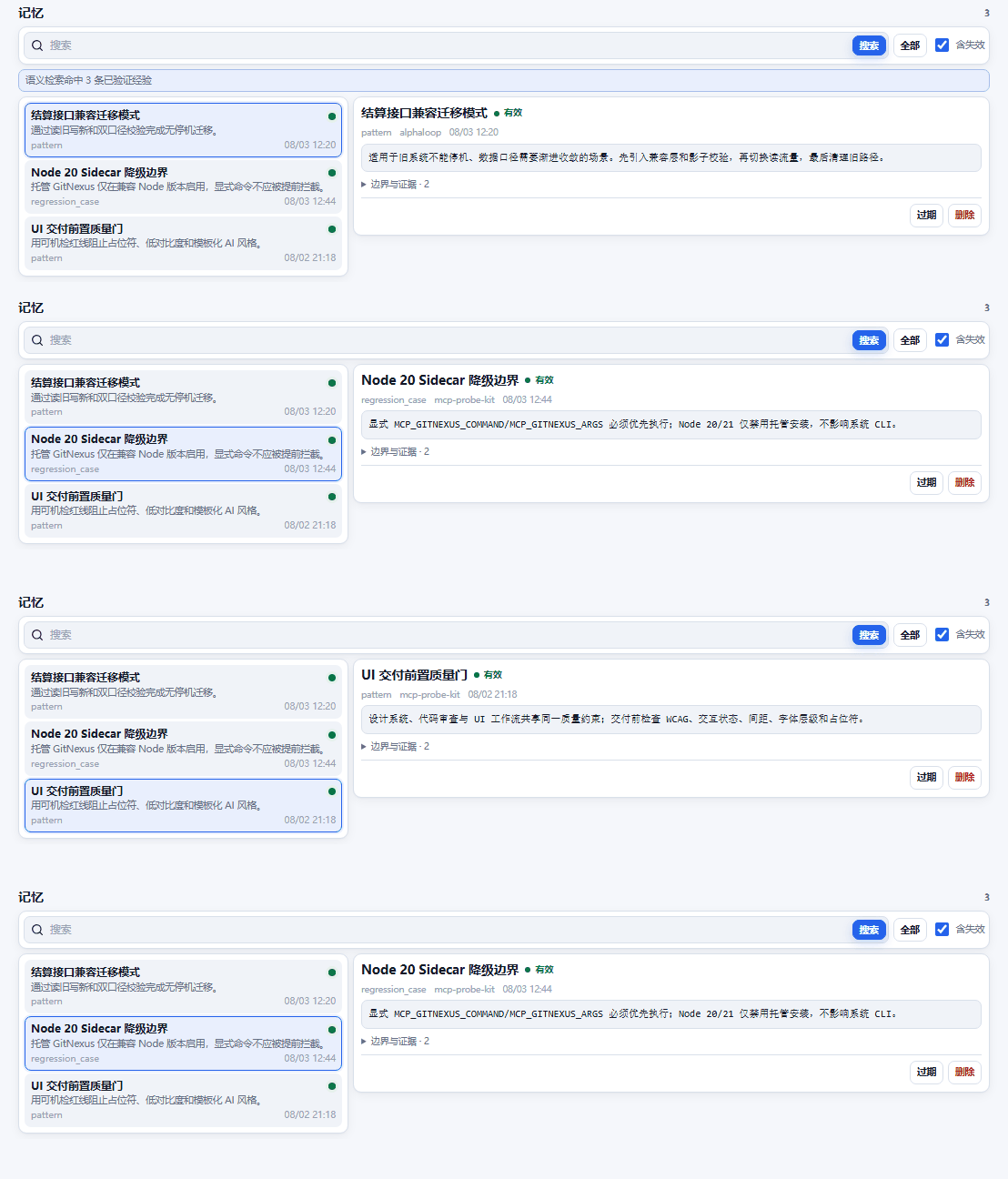
Memory Center — semantic search, full-content inspection, lifecycle state, evidence, stale marking, and confirmed deletion.
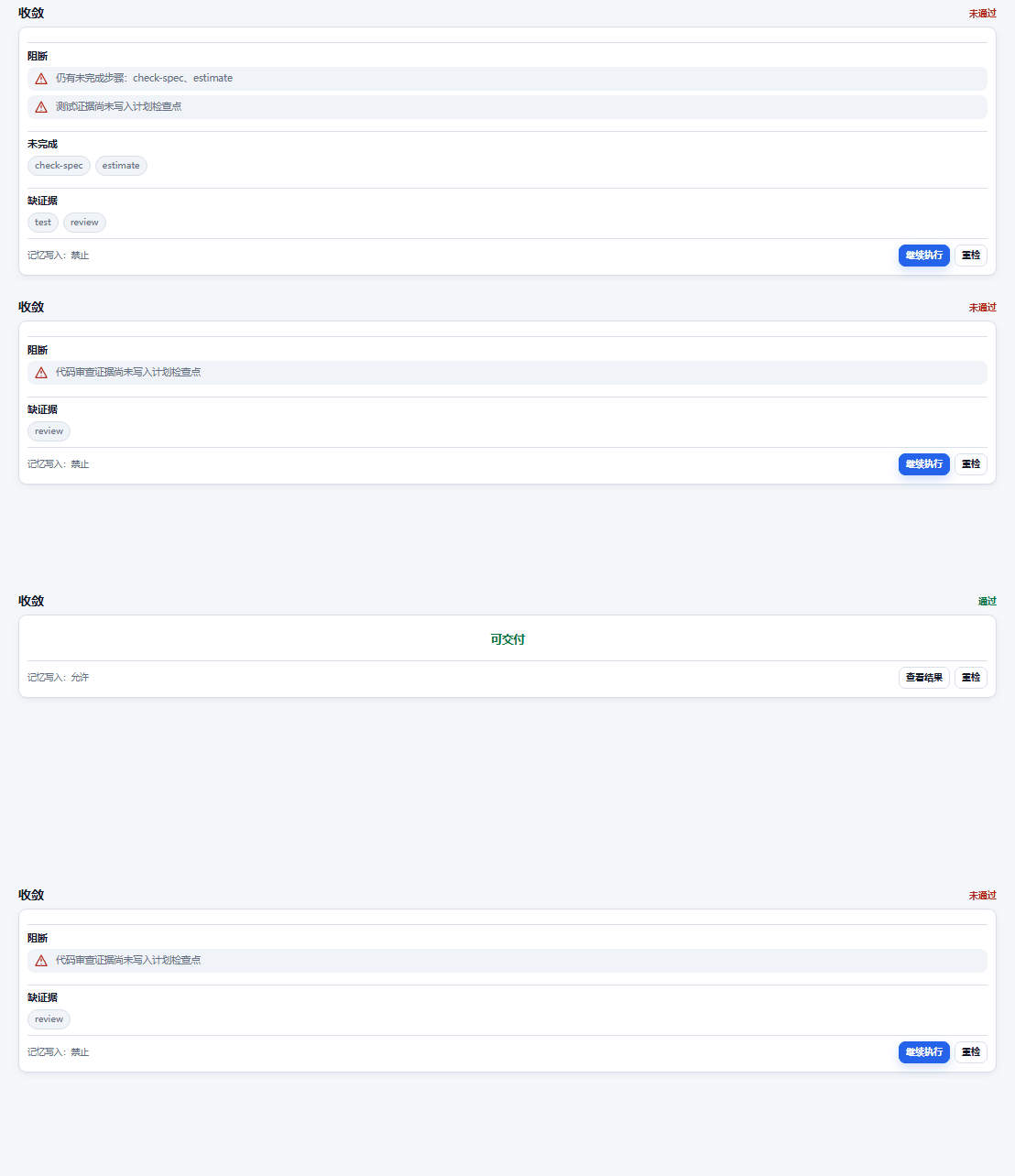
Convergence Gate — blocks closure when steps or requirements/spec/implementation/test/review evidence are incomplete.
- Five native MCP Apps: Memory Center, Feature Workbench, Bug Workbench, Product Workbench, and Convergence Gate.
- Resumable delegated plans:
plan_heartbeatpersists real progress;resume_planrestores the next executable step. - Evidence-based convergence:
convergegates delivery and long-term Memory writes. - Managed GitNexus Sidecar: version/platform/architecture/Node isolation, integrity verification, real FTS probe, and safe degradation.
- Version-locked CLI fallback: project-local
probewrappers reach the same Tool Registry when a host drops the MCP tool lease. - Parent-child specifications: complex releases are decomposed and recursively validated instead of being flattened into one oversized spec.
Open the five live, read-only MCP App demos
v4 stable:
mcp-probe-kit@4.0.0is the current stable release and npmlatestchannel.
📚 Complete Documentation
👉 https://mcp-probe-kit.bytezonex.com
- Quick Start - Setup in 5 minutes
- Local Memory Stack (Qdrant + Nomic Embed) - Docker Compose, ports
50008/50012, MCP env - All Tools - Default, conditional Memory, App-only, and full compatibility surfaces
- Best Practices - Full development workflow guide
- v3 → v4 Migration Guide - Tool surfaces, protocol, Apps, plan state, Memory, and compatibility
- MCP Apps Live Demos - Five real read-only workbenches generated from the shipped App source
✨ Core Features
📦 Tool Surfaces
The default compact surface keeps every independently useful workflow while removing competing internal and maintenance entries from the model context.
- 🧭 Routing (1) —
workflow - 🔁 Plan State & Convergence (3) —
plan_heartbeat,resume_plan,converge - 🔄 Workflow Orchestration (6) —
start_feature,start_bugfix,start_onboard,start_ui,start_product,start_ralph - 📦 Project & Specification (4) —
init_project,init_project_context,check_spec,estimate - 🏗️ Architecture (1) —
architecture - 🔍 Code, Test & Git (6) —
code_insight,gentest,code_review,refactor,gencommit,git_work_report - 🎨 UI/UX Utilities (2) —
ui_design_system,ui_search - 🗣️ Structured Interview (1) —
interview
That is 24 model-visible tools by default. When the full Memory stack is configured, six Memory tools are added dynamically, bringing the model-visible surface to 30:
search_memory, read_memory_asset, memorize_asset, update_memory_asset, delete_memory_asset, scan_and_extract_patterns
For compatibility and diagnostics, MCP_TOOLSET=full restores all 34 model tools. The compact surface deliberately omits add_feature, fix_bug, sync_ui_data, and ask_user: their implementations remain available through orchestration, maintenance scripts, or full compatibility mode.
workflow is a fallback tool-selection guide, not a natural-language intent classifier. The Agent normally chooses the appropriate MCP tool directly from the current conversation, Skill, and tool descriptions. scenario=auto returns guidance only (firstTool=null); an explicit scenario returns deterministic guidance for a scenario the Agent has already selected.
🔁 Delegated Plan State, Recovery, and Convergence
- Every v4 delegated plan declares
executionStatePolicyand instructs the Agent to create a local checkpoint on the first step. plan_heartbeatpersists completed/skipped steps, unresolved items, evidence, and the last verified revision under.mcp-probe-kit/plans/.resume_planrecalculates ready and blocked steps from stored dependencies after interruption, restart, or Agent handoff.convergerefuses closure while steps, unresolved items, or requirements/spec/implementation/test/review evidence are incomplete. Formal long-term memory writes are allowed only after convergence passes.- These tools track and validate Agent execution; they do not move file, shell, Git, or implementation work into the MCP server.
🛡️ Quality Constraints (single source of truth)
All hard quality rules live in one module (src/lib/quality-constraints.ts) and are injected into code_review, the add_feature task templates, and the UI tools. Change once, apply everywhere — inspired by taste-skill and impeccable.
- Code limits: single file ≤ 500 lines (split into modules/components when exceeded), function ≤ 50 lines, nesting ≤ 4, parameters ≤ 3.
- Completeness blacklist:
code_reviewflags placeholder/elision patterns (// ...,// TODO,// rest of code, bare...) as CRITICAL — "a partial output is a broken output". - Anti-laziness task templates:
add_featuretasks now carry a Scope-lock deliverable count, a mandatory evidence block (read code before writing), a per-file line budget, and a binary zero-tolerance rule for placeholders.check_specvalidates these (missing Scope-lock = error, thin task without evidence = warning). - UI hard red lines: numeric, machine-checkable rules — 4pt spacing scale, WCAG contrast (4.5/3/3), type scale ≥ 1.25, hero font ≤ 6rem, OKLCH, eight interaction states, cognitive load ≤ 4, motion 150-300ms.
- UI banned list + Pre-Flight checklist: match-and-refuse blacklist for AI slop (default Inter/Roboto, AI purple-blue gradients, gradient text, cookie-cutter card grids, em-dash, cream/beige body backgrounds, nested cards) plus a delivery-gate self-check matrix.
🧠 Code Graph Bridge (GitNexus)
Related MCP Servers
Reviews
No reviews yet — be the first to share how this listing worked for you.
Frequently Asked Questions about MCP Probe Kit
AllMCPs Directory Badge
Showcase your server listing on GitHub or your project documentation. Embed this dynamic SVG badge to highlight official listing status and live engagement.
Badge Style:
Live Dynamic SVG Preview
Markdown (GitHub README)
[](https://allmcps.com/mcp/mcp-probe-kit)HTML Embed
<a href="https://allmcps.com/mcp/mcp-probe-kit"><img src="https://allmcps.com/api/badge/mcp-probe-kit?style=directory" alt="MCP Probe Kit on AllMCPs" /></a>Technical Specs & Signals
CategoryDeveloper Tools
40Quality signal: Fair · 40/100How this signal is calculated ▾
Server availabilityNot measured
Not scored for repo-hosted servers — we can't reach the running server, only its GitHub page. Hosted MCP endpoints are health-checked live.
Verified ownership10/20
Documentation & tools16/30
Adoption & activity4/15
Community engagement0/10
A guidance signal from public completeness & health data — not a user rating. New listings start lower and rise as they add docs, get verified, and grow adoption. Signals we can't observe for a listing are skipped, not counted against it.
Own this project?
This directory is pre-filled from public sources. Claim via GitHub README, site badge, or DNS TXT to unlock edit access and the Official badge — proof is checked automatically, then reviewed by our team.
Free dofollow backlink: add your website and place the AllMCPs badge on it — no claim needed. We detect it automatically and keep it verified as long as the badge stays live.
Claim & get free dofollowShare & Embed
Add our SVG badge (dark/light directory styles) or embeddable widget to your site.