MCP Power Automate
Local MCP for Power Automate flows with browser-backed auth, extension, and Codex skill.
Install MCP Power Automate
Pick your client, then add it in one click or paste the config.
~/Library/Application Support/Claude/claude_desktop_config.json{
"mcpServers": {
"mcp-power-automate": {
"command": "npx",
"args": [
"-y",
"@kaael1/mcp-power-automate"
]
}
}
}
Settings → Developer → Edit Config, merge this into mcpServers, then fully quit and reopen Claude Desktop.
Automated check passed— started and listed 22 tools correctly (3d ago).
Overview
Tools22
What MCP Power Automate lets your agent do. Expand a tool for its parameters.
Security & health
What it can reach and how reliably it runs — from our own checks, not the maintainer’s claims.
Recent health check succeeded.
What it can do
From the 22 tools this server returned when we ran it.
Observed 2026-10-25 in an isolated sandbox. A description of reach, not a security audit.
Supply-chain signal
No high-severity advisories surfaced by our automated scan.
Scanned 2d ago via OSV.dev · @kaael1/mcp-power-automate (npm)
Adoption & maintenance
Factual signals from GitHub, npm, and our automated checks — not a rating.
From the project README
MCP Power Automate
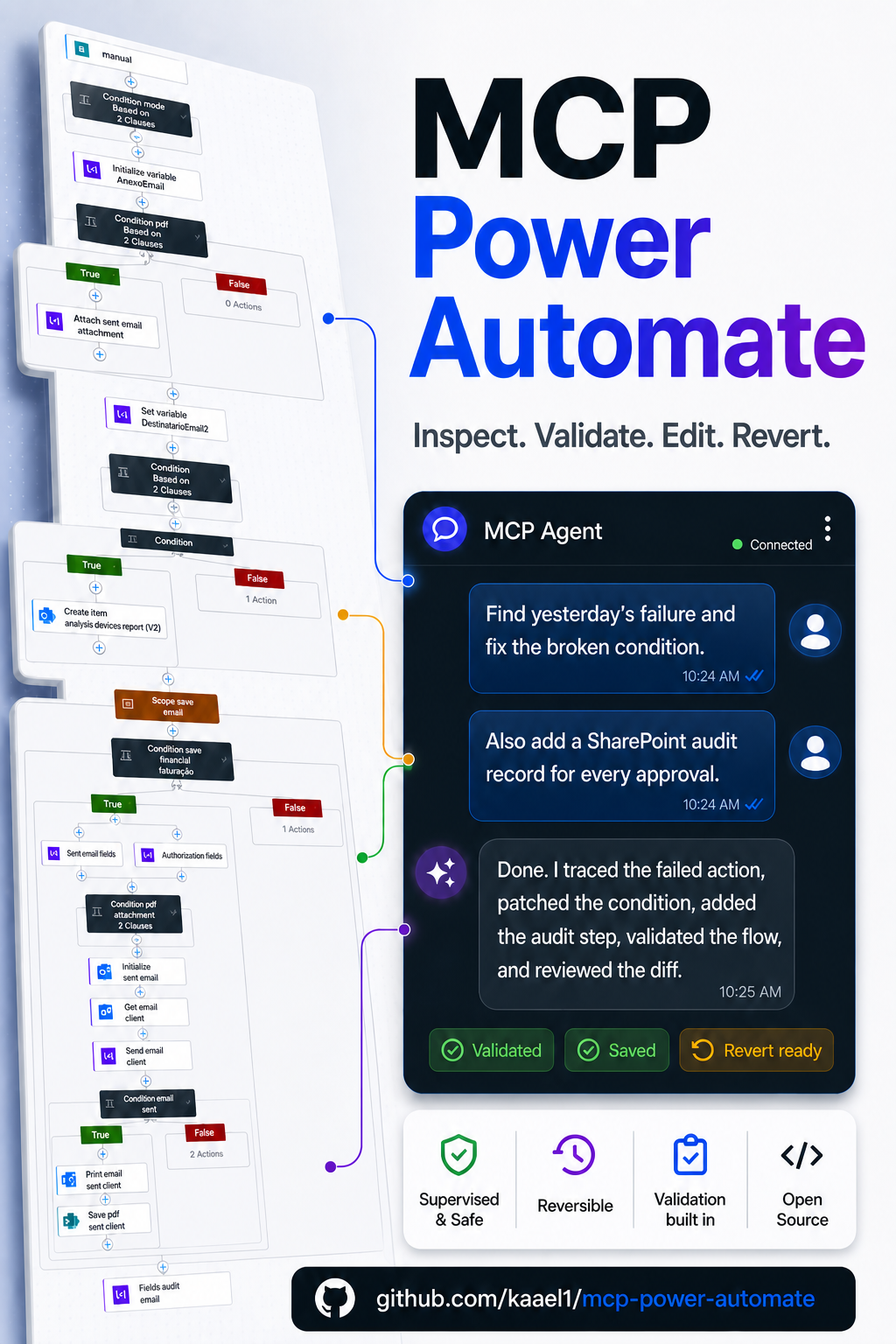
Local-first MCP server and Chromium extension for AI-assisted Microsoft Power Automate work.
Use your existing logged-in browser session to let an MCP client inspect, validate, edit, run, review, and revert Power Automate cloud flows. No Microsoft Entra ID app registration, admin consent flow, or custom enterprise application setup is required to get started.
Early public signal: 15,000+ LinkedIn post views and 14 GitHub stars while the project is still small, practical, and moving fast.
Why It Exists
Power Automate is powerful, but AI agents need more than raw convenience before they should touch real flows. This project keeps the workflow visible and reversible:
- The browser extension captures the active Power Automate context and compatible tokens from your own Chromium session.
- The MCP server exposes a v1 command surface for targeting, reading, previewing, validating, saving, run inspection, and rollback.
- The extension stays mostly passive: status, diagnostics, and review surfaces instead of mystery buttons that hide what changed.
- Local state, snapshots, and backups stay on your machine.
What It Can Do
| Area | Capabilities |
|---|---|
| Context | Detect browser-captured flows, list flows, and explicitly lock onto a target flow. |
| Safe editing | Read the flow, preview the smallest candidate update, validate, save, review the diff, and revert. |
| Debugging | Inspect recent runs, latest run details, and action-level failures. |
| Testing | Invoke safe manual/request trigger flows and wait for the resulting run. |
| Solutions | List unmanaged Dataverse solutions, inspect solution components and environment variables, add existing flows, and create blank flows inside solutions. |
Write operations are deliberately scoped. The MCP does not expose solution deletion, component deletion, managed-solution modification, environment-variable writes, or blind production edits as the default path.
Quickstart
Register the MCP in Codex:
codex mcp add power-automate-local -- npx -y @kaael1/mcp-power-automate
Find the packaged extension path:
npx -y @kaael1/mcp-power-automate extension-path
Load that folder in Chromium:
- Open
chrome://extensionsoredge://extensions. - Enable Developer Mode.
- Choose
Load unpacked. - Select the folder printed by
extension-path.
Then open or focus a Power Automate flow page. The extension captures the session and target context automatically.
Check readiness:
npx -y @kaael1/mcp-power-automate doctor
Recommended Agent Loop
For a supervised edit, ask your MCP client to follow this loop:
doctorget_contextconnect_flowget_flowpreview_flow_updatevalidate_flowapply_flow_updateget_last_updatevalidate_flowagain when available
For run inspection and manual/request trigger tests, use list_runs, get_latest_run, get_run, get_run_actions, wait_for_run, get_trigger_callback_url, and invoke_trigger.
For Dataverse solution work, use list_solutions, list_solution_components, list_environment_variables, add_flow_to_solution, and create_flow_in_solution. Solution writes are intentionally limited to adding cloud flows to unmanaged solutions.
Public v1 Tools
get_context
doctor
connect_flow
list_flows
list_solutions
list_solution_components
list_environment_variables
add_flow_to_solution
get_flow
preview_flow_update
validate_flow
apply_flow_update
get_last_update
revert_last_update
list_runs
get_latest_run
get_run
get_run_actions
wait_for_run
get_trigger_callback_url
invoke_trigger
create_flow
create_flow_in_solution
clone_flow
Safety Model
- Inspect with
get_context,connect_flow, andget_flowbefore any write. - Preview with
preview_flow_updatebefore saving. - Validate before and after meaningful edits when Power Automate accepts validation.
- Review
get_last_updateafter save so the diff is visible. - Use
revert_last_updatewhen the saved result is wrong. - Prefer test or staging flows before production flows.
If Power Automate rejects a save because of a connection permission problem, the MCP reports CONNECTION_AUTHORIZATION_FAILED and waits for the user to fix that connection in Power Automate. If the service rejects a field such as retryPolicy, the MCP reports SCHEMA_VALIDATION_FAILED with the rejected member so the agent can correct the candidate flow instead of guessing.
Browser-Backed Auth
The extension can capture Power Automate, Power Platform/BAP, and Dataverse-audience tokens from your logged-in browser session. When those tokens are present, get_context and /health expose readiness details such as canManageSolutions.
This means the MCP can work without a new Microsoft Entra app registration, but it also means the browser session remains the live authority. If a token expires or a permission is missing, reopen or focus the relevant Power Automate, Power Apps, or Dataverse page and retry after capture.
HTTP Bridge
The local bridge listens on 127.0.0.1:17373.
GET /healthis kept for simple probes.GET /v1/healthreturns bridge identity and readiness.GET /v1/contextreturns the same context used by the MCP.GET /v1/commandslists the public v1 command surface.POST /v1/commands/:nameruns any public v1 command with a JSON body.
Only the process that owns the bridge port executes stateful work. If another process already owns the port, new MCP instances refuse to reuse it; stop the existing bridge process or choose a different POWER_AUTOMATE_BRIDGE_PORT.
Development
npm install
npm run typecheck
npm run lint
npm run test
npm run build
npm run pack:dry-run
For a local clone, prefer registering Codex against the built server from this checkout:
npm run build
$nodePath = (Get-Command node).Source
$serverPath = Join-Path (Get-Location) "dist/server/index.js"
codex mcp add power-automate-local -- $nodePath $serverPath
If an older local entry exists, remove it first:
codex mcp remove power-automate-local
Load the browser extension from dist/extension after rebuilding. Runtime state lives in data/ and must not be committed.
Docs
Package Links
- GitHub: https://github.com/kaael1/mcp-power-automate
- npm: https://www.npmjs.com/package/@kaael1/mcp-power-automate
- MCP Registry: https://registry.modelcontextprotocol.io/v0/servers?search=io.github.kaael1/mcp-power-automate
License
MIT. See LICENSE.
Reviews
No reviews yet — be the first to share how it worked for you.
Frequently Asked Questions about MCP Power Automate
Related MCP servers
Add a badge to your READMEShow it’s listed — live SVG, Markdown or HTML.
AllMCPs Directory Badge
Showcase your server listing on GitHub or your project documentation. Embed this dynamic SVG badge to highlight official listing status and live engagement.
[](https://allmcps.com/mcp/mcp-power-automate)<a href="https://allmcps.com/mcp/mcp-power-automate"><img src="https://allmcps.com/api/badge/mcp-power-automate?style=directory" alt="MCP Power Automate on AllMCPs" /></a>