MCP server for Pickaxe API - manage AI agents, knowledge bases, users, and analytics
Quick Install
Automated & IDE SetupCopy the AI prompt to install this server into Claude Code, Cursor, or another agent — or use 1-click editor setup below.
Not yet automatically verified
We haven't yet run this listing's install command through our automated sandbox check. This isn't a red flag — we're steadily working through the catalog.
Manual Client & Custom JSON ConfigExpand JSON ▾
Client Config & Setup
Choose your client or environment
Target File:
💡 Paste the JSON block into your client's configuration file under mcpServers, then restart the application.
Capabilities & Tool Schemas (17)
Inspect callable tools, capabilities, and parameters exposed to AI agents by MCP Pickaxe.
studios_listList all configured studios and the current default
chat_historyFetch conversation history for an agent
doc_createCreate document from content or URL
doc_listList all documents (with pagination)
doc_getGet a specific document
doc_deleteDelete a document
Documentation Overview
MCP Pickaxe Server
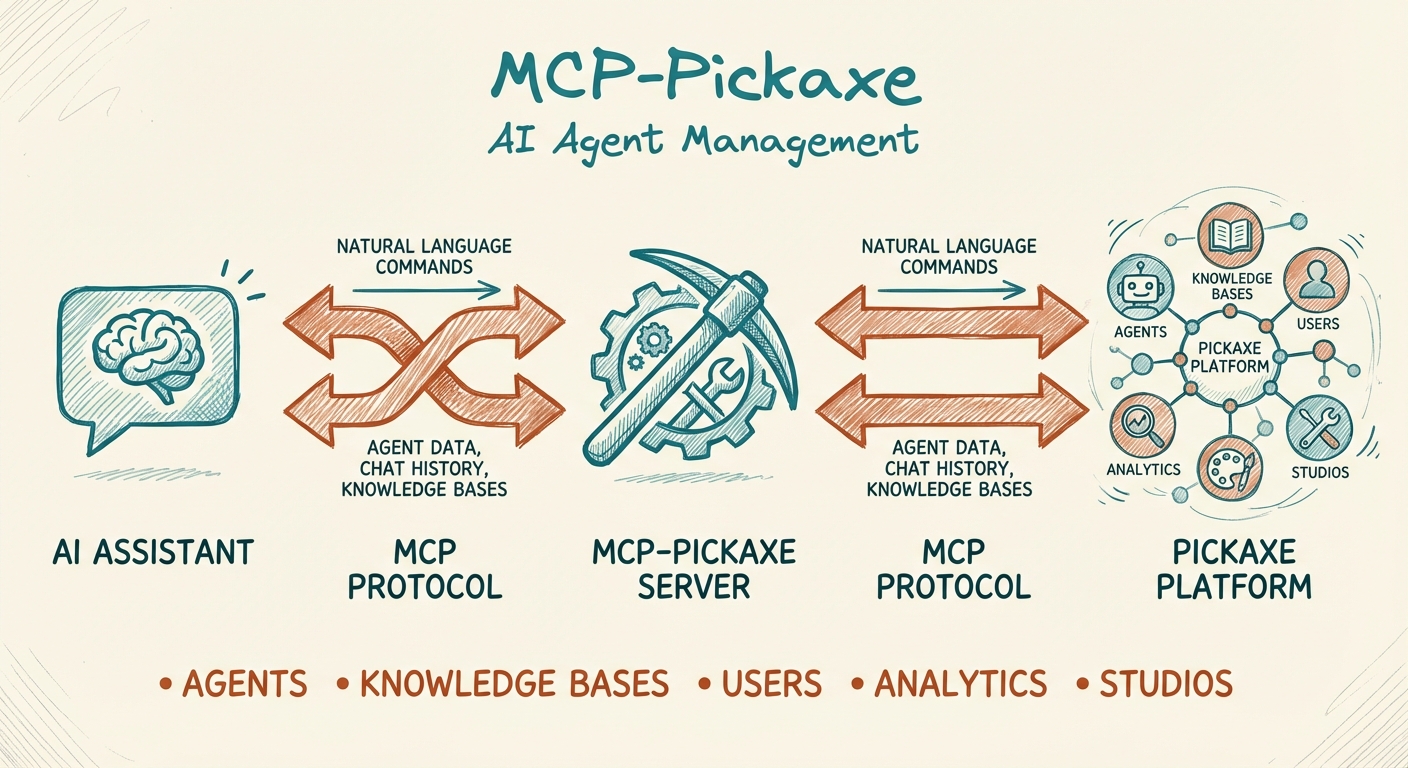



An MCP (Model Context Protocol) server that connects AI assistants like Claude to the Pickaxe platform. Manage your AI agents, knowledge bases, users, and analytics directly through natural language.
Why Use This?
If you're building AI agents on Pickaxe, this MCP server lets you:
- Analyze agent conversations - Review chat history to identify knowledge gaps and improve agent performance
- Manage knowledge bases - Create, update, and connect documents to your agents without leaving your AI workflow
- Handle user management - Create users, manage access, send invitations, and track usage
- Work across multiple studios - Seamlessly switch between different Pickaxe studios in a single session
- Automate workflows - Let Claude handle repetitive Pickaxe admin tasks
Features
| Category | Tools |
|---|---|
| Studios | List configured studios, switch between them |
| Chat History | Fetch and analyze agent conversation logs |
| Documents | Create, list, get, delete, connect/disconnect to agents |
| Users | Create, list, get, update, delete, invite |
| Products | List available products and bundles |
| Memory | List memory schemas, retrieve user memories |
Prerequisites
- Node.js 18+
- A Pickaxe account with API access
- Your Pickaxe Studio API key(s)
Installation
Option 1: Install from npm (recommended)
Or install globally:
Option 2: Clone and Build
Configuration
1. Get Your Pickaxe API Key
- Log in to Pickaxe Studio
- Navigate to Settings > API
- Copy your Studio API key (starts with
studio-)
2. Configure Your MCP Client
For Claude Desktop
Add to your Claude Desktop config file:
macOS: ~/Library/Application Support/Claude/claude_desktop_config.json
Windows: %APPDATA%\Claude\claude_desktop_config.json
For Claude Code
Add to ~/.claude.json:
Multi-Studio Configuration
To work with multiple Pickaxe studios, add multiple environment variables:
Then specify which studio to use in your requests:
- If you set
PICKAXE_DEFAULT_STUDIO, that studio is used when none is specified - If only one studio is configured, it's used automatically
- Otherwise, pass
studio="STAGING"(or similar) to any tool
Use Cases
These are real workflows built with mcp-pickaxe in production environments.
1. Security Monitoring with n8n
Scenario: Detect prompt injection attempts across 29+ AI agents in real-time.
Implementation:
An n8n workflow polls chat_history hourly for all agents, runs messages against injection detection patterns (stored in Notion), and routes alerts by severity:
- HIGH/CRITICAL → Telegram alert + Notion log
- LOW/MEDIUM → Notion log only
Tools used: chat_history, studios_list
Result: Real-time security monitoring across an entire studio with dynamic pattern management and severity-based alerting.
2. Knowledge Base Auto-Research Pipeline
Scenario: Automatically fact-check and maintain 31+ knowledge base articles.
Implementation: An n8n workflow queries KB articles from Notion, extracts key claims, fact-checks via Perplexity API, classifies changes by risk level, and routes to auto-update or human review.
Tools used: doc_list, doc_get, doc_create, doc_connect
Result: KB content stays current with automated fact-checking and human-in-the-loop for major changes.
3. Agent Performance Review
Scenario: Quarterly review of a training studio to identify KB gaps and user pain points.
Workflow:
Tools used: chat_history, doc_list, doc_create, doc_connect, user_list
Result: Data-driven KB improvements based on actual user conversations rather than guesswork.
4. Multi-Studio Operations
Scenario: Managing multiple Pickaxe studios from a single Claude session.
Configuration:
Workflow:
Tools used: studios_list, user_list, doc_list, products_list
Result: Cross-studio visibility without switching contexts or API keys manually.
5. User Memory Auditing
Scenario: Review what your agents remember about users for personalization and privacy compliance.
Workflow:
Example output:
Tools used: memory_list, memory_get_user, user_list
Result: Visibility into personalization data for both product improvement and GDPR compliance.
Quick Start Examples
Once configured, you can interact with Pickaxe through natural language:
Analyze Agent Performance
"Show me the last 20 conversations from my support agent"
"What questions are users asking that my agent can't answer?"
Manage Knowledge Base
"Create a new document called 'FAQ' with this content: [your content]"
"Connect the FAQ document to my customer support agent"
"List all documents in my knowledge base"
User Management
"Show me all users and their usage stats"
"Create a new user with email user@example.com and give them access to the Pro product"
"Send invitations to these emails: [list of emails]"
Multi-Studio Operations
"List all users in my staging studio"
"Compare the documents between production and staging"
Available Tools
Studio Management
studios_list- List all configured studios and the current default
Chat History
chat_history- Fetch conversation history for an agent- Parameters:
pickaxeId,skip,limit,format("messages" or "raw"),studio
- Parameters:
Document Management
doc_create- Create document from content or URLdoc_list- List all documents (with pagination)doc_get- Get a specific documentdoc_delete- Delete a documentdoc_connect- Link document to an agentdoc_disconnect- Unlink document from an agent
User Management
user_list- List all users with access and usage infouser_get- Get a specific user by emailuser_create- Create a new useruser_update- Update user details, products, or usageuser_delete- Delete a useruser_invite- Send email invitations
Products
products_list- List available products/bundles
Memory
memory_list- List memory schemasmemory_get_user- Get collected memories for a user
Development
Troubleshooting
"No Pickaxe studios configured"
Ensure you have at least one PICKAXE_STUDIO_* environment variable set in your MCP config.
"Studio not found"
Check that the studio name matches exactly (case-insensitive). Run studios_list to see available options.
Related MCP Servers
Adoption & maintenance
Factual signals from GitHub, npm, and our automated checks — not a rating.
GitHub stars
2
Stargazers on the source repository.
npm downloads
178
Package downloads in the last 30 days.
Last commit
4mo ago
Most recent push to the default branch.
Tools exposed
17
Callable tools this server registers over MCP.
Directory activity
1 views
Config copies, upvotes, and views on AllMCPs.
Reviews
No reviews yet — be the first to share how this listing worked for you.
Frequently Asked Questions about MCP Pickaxe
AllMCPs Directory Badge
Showcase your server listing on GitHub or your project documentation. Embed this dynamic SVG badge to highlight official listing status and live engagement.
Badge Style:
Live Dynamic SVG Preview
Markdown (GitHub README)
[](https://allmcps.com/mcp/mcp-pickaxe)HTML Embed
<a href="https://allmcps.com/mcp/mcp-pickaxe"><img src="https://allmcps.com/api/badge/mcp-pickaxe?style=directory" alt="MCP Pickaxe on AllMCPs" /></a>Technical Specs & Signals
CategoryDeveloper Tools
0/15 checks healthy over the last 45d
37Quality signal: Fair · 37/100How this signal is calculated ▾
Server availability0/25
Verified ownership8/20
Documentation & tools25/30
Adoption & activity4/15
Community engagement0/10
A guidance signal from public completeness & health data — not a user rating. New listings start lower and rise as they add docs, get verified, and grow adoption. Signals we can't observe for a listing are skipped, not counted against it.
Supply-chain signal
No high-severity advisories surfaced by our automated scan.
Critical 0High 0Medium 0Low 0
Scanned 5d ago via OSV.dev · mcp-pickaxe (npm)
Own this project?
This directory is pre-filled from public sources. Claim via GitHub README, site badge, or DNS TXT to unlock edit access and the Official badge — proof is checked automatically, then reviewed by our team.
Free dofollow backlink: add your website and place the AllMCPs badge on it — no claim needed. We detect it automatically and keep it verified as long as the badge stays live.
Claim & get free dofollowShare & Embed
Add our SVG badge (dark/light directory styles) or embeddable widget to your site.