MCP server for Kit.com (ConvertKit) - manage subscribers, tags, sequences, broadcasts
Quick Install
Automated & IDE SetupCopy the AI prompt to install this server into Claude Code, Cursor, or another agent — or use 1-click editor setup below.
Not yet automatically verified
We haven't yet run this listing's install command through our automated sandbox check. This isn't a red flag — we're steadily working through the catalog.
Manual Client & Custom JSON ConfigExpand JSON ▾
Client Config & Setup
Choose your client or environment
Target File:
💡 Paste the JSON block into your client's configuration file under mcpServers, then restart the application.
Documentation Overview
MCP Kit Server
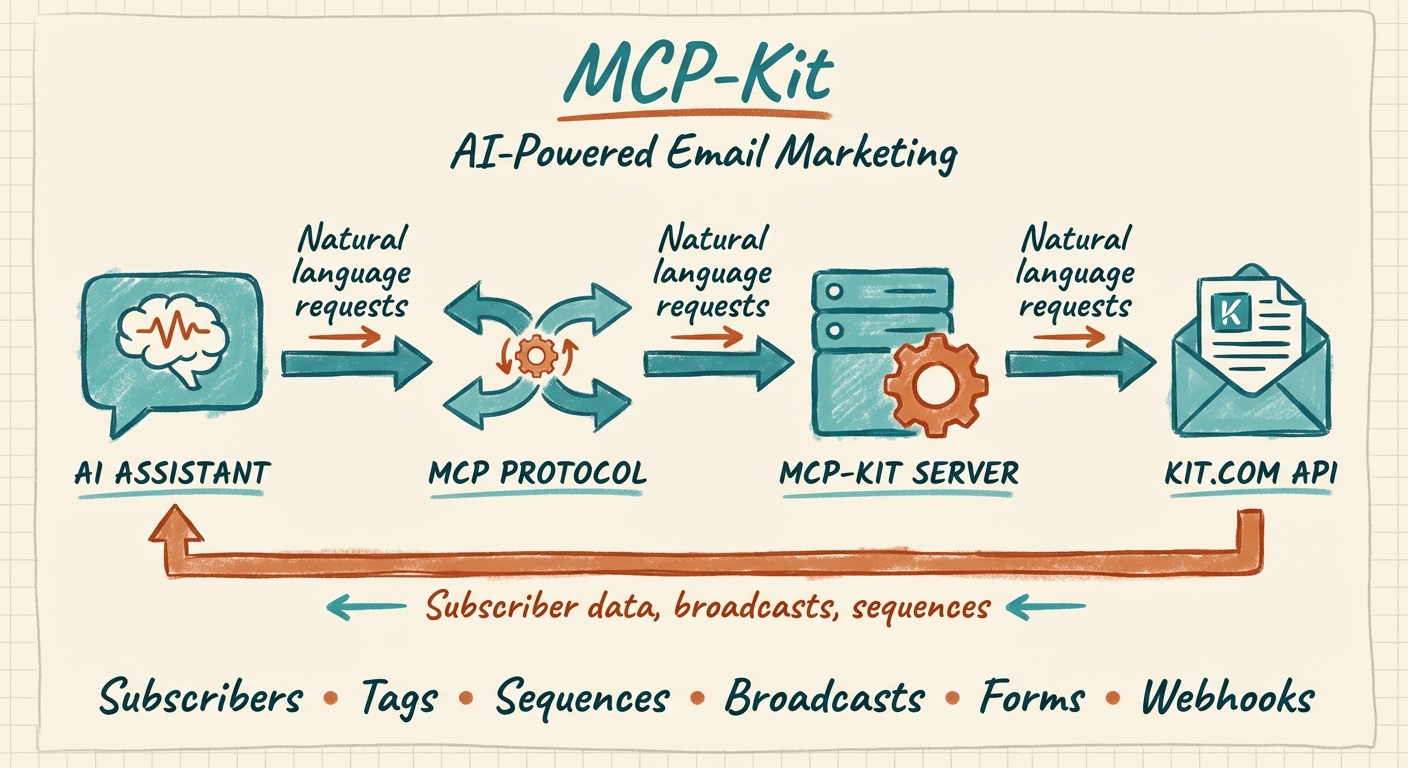




An MCP (Model Context Protocol) server that connects AI assistants like Claude to the Kit.com (formerly ConvertKit) email marketing platform. Manage your email lists, subscribers, broadcasts, sequences, and more through natural language.
[!WARNING] This project is deprecated and no longer maintained. Kit now ships official, first-party MCP servers that supersede it with broader API coverage and managed authentication. Please migrate — see below.
⚠️ Deprecated — use Kit's official MCP servers
This community server was built before Kit offered its own MCP. Kit now maintains official servers that cover far more of the Kit API v4 surface (including analytics, commerce, segments, and bulk operations), handle auth for you, and stay current with API changes. New and existing users should migrate.
| Use case | Official server | URL |
|---|---|---|
| Act on your Kit account — subscribers, tags, sequences, broadcasts, analytics, commerce… | Kit MCP | https://app.kit.com/mcp |
| Give a coding agent live access to Kit's developer docs + API | Kit Developer Docs MCP | https://developers.kit.com/mcp |
Migrate in Claude Code
Official setup guides (Claude Desktop, Cursor, Windsurf, Cline, and more): https://developers.kit.com/mcp/kit-developer-docs-mcp/mcp/overview
📦 Legacy documentation (for historical reference)
Why Use This?
If you run a newsletter or email marketing on Kit.com, this MCP server lets you:
- Manage subscribers - List, create, update, and organize your email subscribers
- Handle tags efficiently - Create tags, add/remove tags from subscribers, list subscribers by tag
- Work with sequences - View email sequences and add subscribers to automated sequences
- Create broadcasts - Draft and manage email campaigns
- Analyze your list - Query subscriber data with filters (status, date ranges, custom fields)
- Automate workflows - Let Claude handle repetitive email marketing tasks
Features
| Category | Tools |
|---|---|
| Account | Get account information |
| Subscribers | List, get, create, update, manage tags |
| Tags | List, create, update, delete, get subscribers by tag |
| Sequences | List, get, add subscribers |
| Broadcasts | List, get, create, update, delete |
| Forms | List, get, add subscribers |
| Custom Fields | List available fields |
| Webhooks | List, create, delete |
Complete Tool Reference
Account
kit_get_account- Get Kit.com account information
Subscribers (7 tools)
kit_list_subscribers- List subscribers with filters (status, date ranges, pagination)kit_get_subscriber- Get a specific subscriber by IDkit_create_subscriber- Create a new subscriberkit_update_subscriber- Update subscriber detailskit_get_subscriber_tags- Get all tags for a subscriberkit_add_tag_to_subscriber- Add a tag to a subscriberkit_remove_tag_from_subscriber- Remove a tag from a subscriber
Tags (6 tools)
kit_list_tags- List all tagskit_get_tag- Get a specific tagkit_create_tag- Create a new tagkit_update_tag- Rename a tagkit_delete_tag- Delete a tagkit_list_tag_subscribers- List all subscribers with a specific tag
Sequences (3 tools)
kit_list_sequences- List all email sequenceskit_get_sequence- Get sequence detailskit_add_subscriber_to_sequence- Add subscriber to a sequence
Broadcasts (5 tools)
kit_list_broadcasts- List all broadcastskit_get_broadcast- Get broadcast detailskit_create_broadcast- Create a new broadcastkit_update_broadcast- Update a broadcastkit_delete_broadcast- Delete a broadcast
Forms (3 tools)
kit_list_forms- List all formskit_get_form- Get form detailskit_add_subscriber_to_form- Add subscriber via form
Custom Fields (1 tool)
kit_list_custom_fields- List all custom fields
Webhooks (3 tools)
kit_list_webhooks- List configured webhookskit_create_webhook- Create a new webhookkit_delete_webhook- Delete a webhook
Prerequisites
- Node.js 18+
- A Kit.com account
- Your Kit.com API key (v4 API)
Installation
Option 1: Install from npm (recommended)
Or install globally:
Option 2: Clone and Build
Configuration
1. Get Your Kit.com API Key
- Log in to Kit.com
- Navigate to Settings > Developer
- Create a new API key or copy an existing v4 API key
2. Configure Your MCP Client
For Claude Desktop
Add to your Claude Desktop config file:
macOS: ~/Library/Application Support/Claude/claude_desktop_config.json
Windows: %APPDATA%\Claude\claude_desktop_config.json
For Claude Code
Or add to ~/.claude.json:
Usage Examples
Once configured, you can interact with Kit.com through natural language:
Subscriber Management
"Show me all active subscribers from the last 30 days"
"Create a new subscriber with email user@example.com and tag them as 'newsletter'"
"What tags does subscriber@example.com have?"
Tag Operations
"List all my tags and how many subscribers each has"
"Create a tag called 'VIP Customers'"
"Add the 'engaged' tag to all subscribers who signed up this month"
Email Sequences
"Show me all my email sequences"
"Add user@example.com to the welcome sequence"
Broadcasts
"Create a draft broadcast with subject 'Weekly Update' and preview text 'This week in AI...'"
"List all my recent broadcasts and their stats"
Forms
"Show me all active forms"
"Add a subscriber to my main signup form"
Development
Troubleshooting
"KIT_API_KEY environment variable is required"
Ensure you have set the KIT_API_KEY environment variable in your MCP configuration.
"Kit API error (401)"
Your API key is invalid or expired. Generate a new one from Kit.com Settings > Developer.
"Kit API error (403)"
Your API key doesn't have permission for this operation. Check that you're using a v4 API key with appropriate scopes.
"Kit API error (404)"
The resource (subscriber, tag, broadcast, etc.) was not found. Verify the ID is correct.
"Kit API error (422)"
Invalid request data. Check that email addresses are valid and required fields are provided.
API Reference
This server uses the Kit.com API v4. All tools support pagination where applicable using per_page and after cursor parameters.
Contributing
This project is deprecated and not accepting contributions. Please use Kit's official MCP servers instead.
License
MIT License - see LICENSE for details.
Links
Related MCP Servers
Adoption & maintenance
Factual signals from GitHub, npm, and our automated checks — not a rating.
GitHub stars
4
Stargazers on the source repository.
Last commit
3mo ago
Most recent push to the default branch.
Reviews
No reviews yet — be the first to share how this listing worked for you.
Frequently Asked Questions about Aplaceforallmystuff MCP
AllMCPs Directory Badge
Showcase your server listing on GitHub or your project documentation. Embed this dynamic SVG badge to highlight official listing status and live engagement.
Badge Style:
Live Dynamic SVG Preview
Markdown (GitHub README)
[](https://allmcps.com/mcp/mcp-kit)HTML Embed
<a href="https://allmcps.com/mcp/mcp-kit"><img src="https://allmcps.com/api/badge/mcp-kit?style=directory" alt="Aplaceforallmystuff MCP on AllMCPs" /></a>Technical Specs & Signals
CategoryDeveloper Tools
0/15 checks healthy over the last 45d
26Quality signal: Emerging · 26/100How this signal is calculated ▾
Server availability0/25
Verified ownership8/20
Documentation & tools16/30
Adoption & activity2/15
Community engagement0/10
A guidance signal from public completeness & health data — not a user rating. New listings start lower and rise as they add docs, get verified, and grow adoption. Signals we can't observe for a listing are skipped, not counted against it.
Supply-chain signal
No high-severity advisories surfaced by our automated scan.
Critical 0High 0Medium 0Low 0
Scanned 6d ago via OSV.dev · kit-mcp-server (npm)
Own this project?
This directory is pre-filled from public sources. Claim via GitHub README, site badge, or DNS TXT to unlock edit access and the Official badge — proof is checked automatically, then reviewed by our team.
Free dofollow backlink: add your website and place the AllMCPs badge on it — no claim needed. We detect it automatically and keep it verified as long as the badge stays live.
Claim & get free dofollowShare & Embed
Add our SVG badge (dark/light directory styles) or embeddable widget to your site.