Convert PDF, DOCX, HTML, Markdown, and Text for AI assistant context injection.
Quick Install
Automated & IDE SetupCopy the AI prompt to install this server into Claude Code, Cursor, or another agent — or use 1-click editor setup below.
Manual Client & Custom JSON ConfigExpand JSON ▾
Client Config & Setup
Choose your client or environment
Target File:
💡 Paste the JSON block into your client's configuration file under mcpServers, then restart the application.
Documentation Overview
MCP Document Converter
MCP (Model Context Protocol) Document Converter - A powerful MCP tool for converting documents between multiple formats, enabling AI agents to easily transform documents.









Features
- Multi-format Support: Supports 5 mainstream document formats: Markdown, HTML, DOCX, PDF, and Text
- Bidirectional Conversion: Any format can be converted to any other format (5×5=25 conversion combinations)
- MCP Protocol: Compliant with MCP standards, can be used as a tool for AI assistants like Trae IDE
- Plugin Architecture: Easy to extend with new parsers and renderers
- Syntax Highlighting: HTML and PDF outputs support code syntax highlighting
- Style Customization: Support for custom CSS styles
- Metadata Preservation: Preserves document title, author, creation time, and other metadata during conversion
📚 Documentation
User Guide · API Reference · Contributing · Changelog · License
Architecture
Core Components
- DocumentIR (Intermediate Representation): Unified abstraction for all documents, containing document tree, metadata, assets, etc.
- BaseParser (Parser Base Class): Defines the parser interface, parses various formats into DocumentIR
- BaseRenderer (Renderer Base Class): Defines the renderer interface, renders DocumentIR into various formats
- ConverterRegistry (Registry): Manages all parsers and renderers, provides format lookup and auto-matching
- DocumentConverter (Conversion Engine): Coordinates parsers and renderers to complete document conversion
Supported Formats
Input Formats (Parsers)
| Format | Extensions | MIME Type | Features |
|---|---|---|---|
| Markdown | .md, .markdown, .mdown, .mkd | text/markdown | YAML Front Matter, GFM extensions |
| HTML | .html, .htm | text/html | Semantic tag parsing |
| DOCX | .docx | application/vnd.openxmlformats-officedocument.wordprocessingml.document | Styles, tables, images |
| application/pdf | Text extraction and structure recognition | ||
| Text | .txt, .text | text/plain | Auto encoding detection and structure recognition |
Output Formats (Renderers)
| Format | Extension | MIME Type | Features |
|---|---|---|---|
| HTML | .html | text/html | Beautiful styling, code highlighting, responsive design |
| Markdown | .md | text/markdown | Standard Markdown format, YAML Front Matter |
| DOCX | .docx | application/vnd.openxmlformats-officedocument.wordprocessingml.document | Word document format, style preservation |
| application/pdf | Generated with WeasyPrint, pagination support | ||
| Text | .txt | text/plain | Plain text, basic formatting preserved |
Conversion Matrix
Installation
Using pip (Recommended)
From Source
MCP Tools
This server provides the following tools:
convert_document
Convert a document from one format to another.
Arguments:
source_path(string, required): Path to the source document.target_format(string, required): Target format (html,pdf,markdown,docx,text).output_path(string, optional): Path for the output file.source_format(string, optional): Format of the source file (auto-detected if not provided).options(object, optional): Additional options liketemplate,css, andpreserve_metadata.
Configuration
Using in Trae IDE / Claude Desktop
Add the following to your MCP configuration file:
Option 1: Using PyPI (Recommended)
Option 2: Using GitHub repository
Option 3: Using Gitee repository (Faster access in China)
Option 4: Using pip (Manual installation)
First install the package:
Then add to configuration:
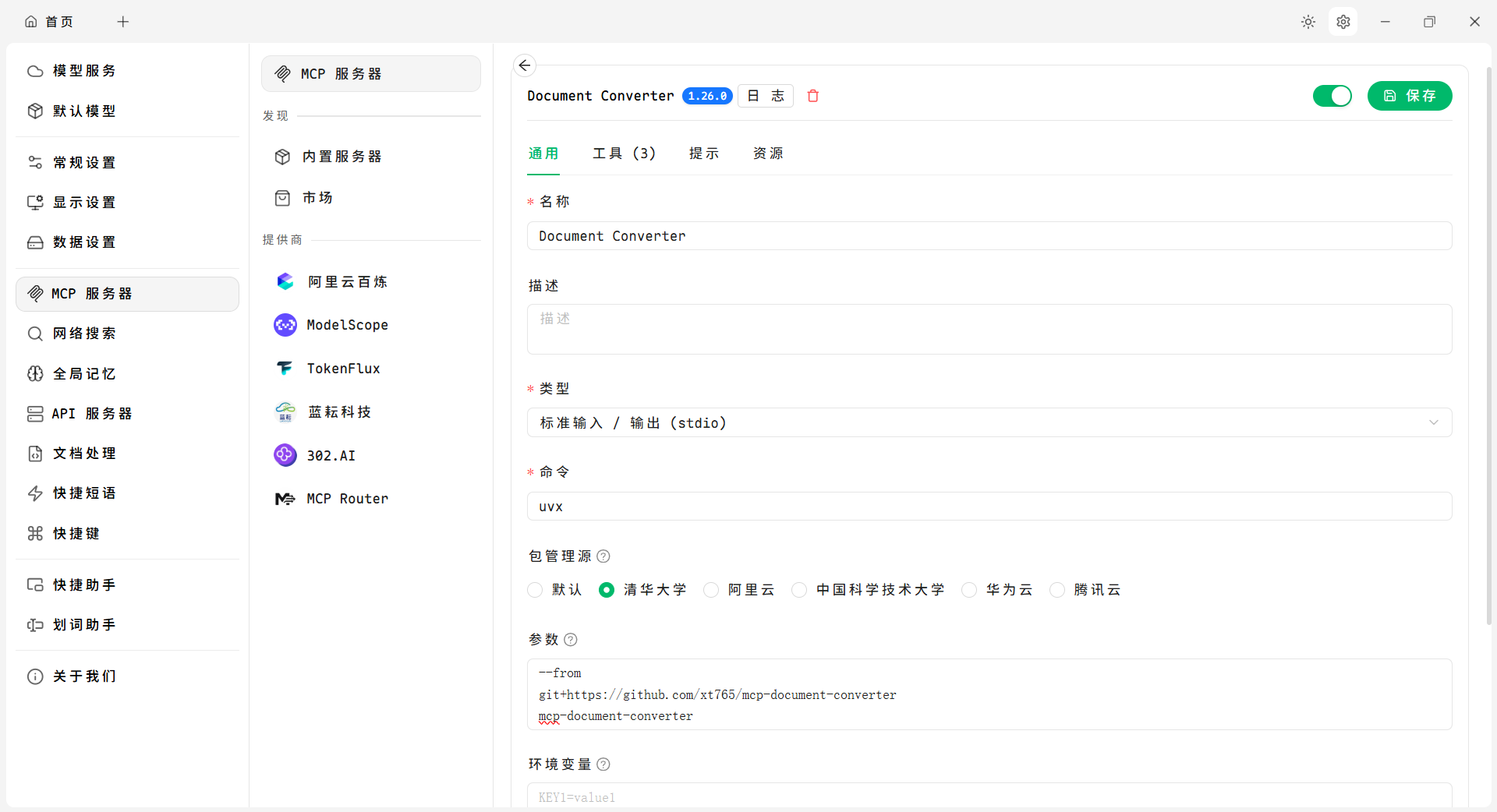
Using in Cherry Studio
Cherry Studio is a powerful open-source desktop AI client assistant that supports integrating various tools through the MCP protocol
Configuration Example:
Usage Example:
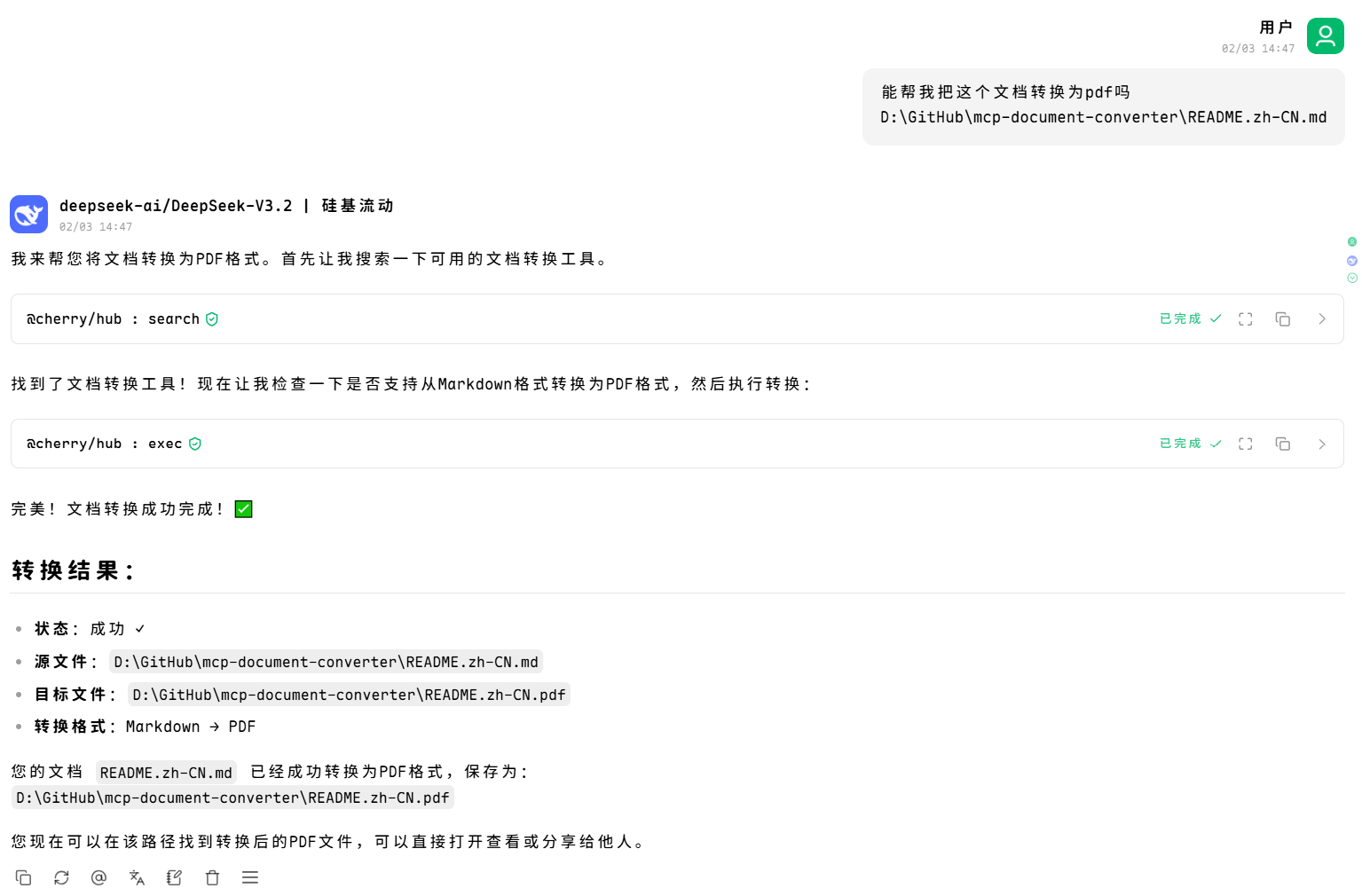
Usage
As an MCP Tool
After configuration, AI assistants can directly call the following tools:
1. convert_document (Recommended)
Use a unified interface to convert any supported document type.
2. list_supported_formats
List all supported document formats.
3. get_conversion_matrix
Get the complete format conversion matrix.
4. can_convert
Check if conversion from source format to target format is supported.
5. get_format_info
Get detailed information about a specific format.
As a Python Library
Related MCP Servers
Reviews
No reviews yet — be the first to share how this listing worked for you.
Frequently Asked Questions about MCP Document Converter
AllMCPs Directory Badge
Showcase your server listing on GitHub or your project documentation. Embed this dynamic SVG badge to highlight official listing status and live engagement.
Badge Style:
Live Dynamic SVG Preview
Markdown (GitHub README)
[](https://allmcps.com/mcp/mcp-document-converter)HTML Embed
<a href="https://allmcps.com/mcp/mcp-document-converter"><img src="https://allmcps.com/api/badge/mcp-document-converter?style=directory" alt="MCP Document Converter on AllMCPs" /></a>