Live crypto prices, conversion, gas tracker, portfolio tools, and calculators for AI agents.
Quick Install
Automated & IDE SetupCopy the AI prompt to install this server into Claude Code, Cursor, or another agent — or use 1-click editor setup below.
Manual Client & Custom JSON ConfigExpand JSON ▾
Client Config & Setup
Choose your client or environment
Target File:
💡 Paste the JSON block into your client's configuration file under mcpServers, then restart the application.
Documentation Overview
mcp-crypto-toolkit




Live crypto prices, conversion, gas tracker, portfolio tools, and calculators for AI agents.
Ask Claude: What's ETH doing? Top 10 coins? Gas on Base? What's my portfolio worth?
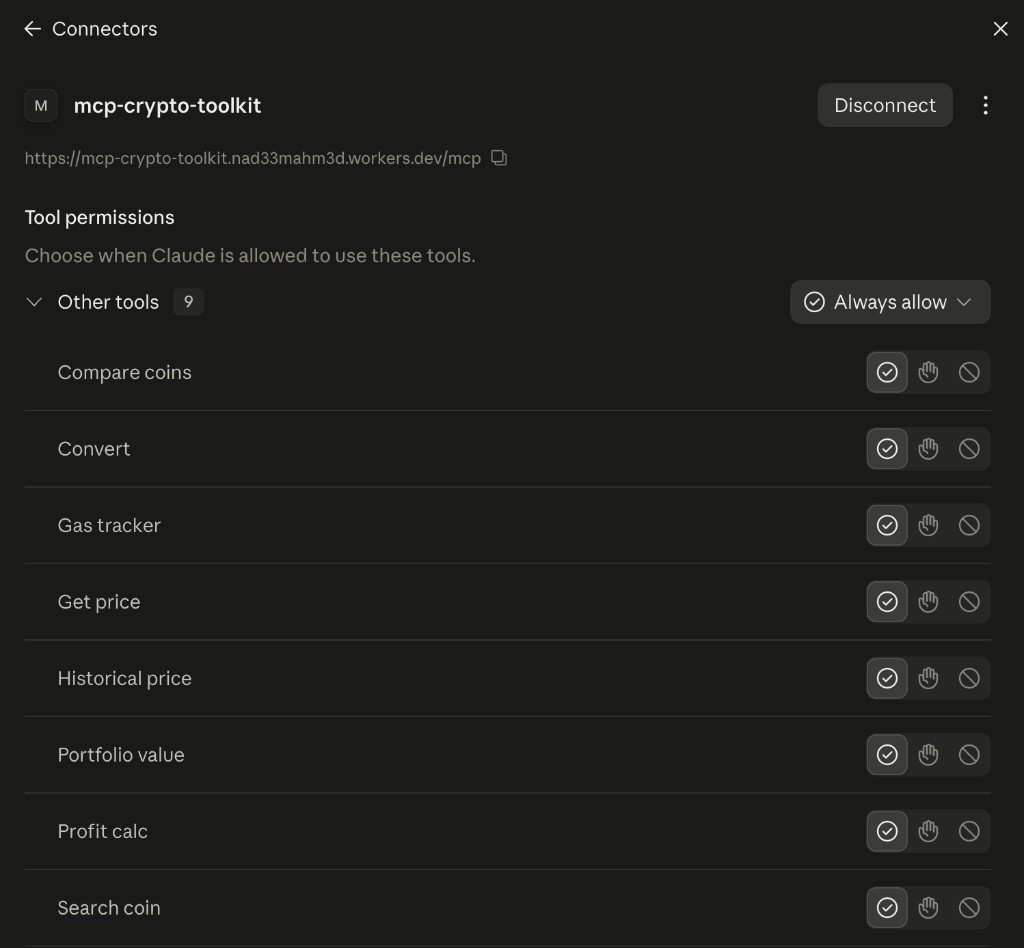
Hosted (Claude.ai Custom Connector): https://mcp-crypto-toolkit.nad33mahm3d.workers.dev/mcp
Docs: DeepWiki · mcpservers.org
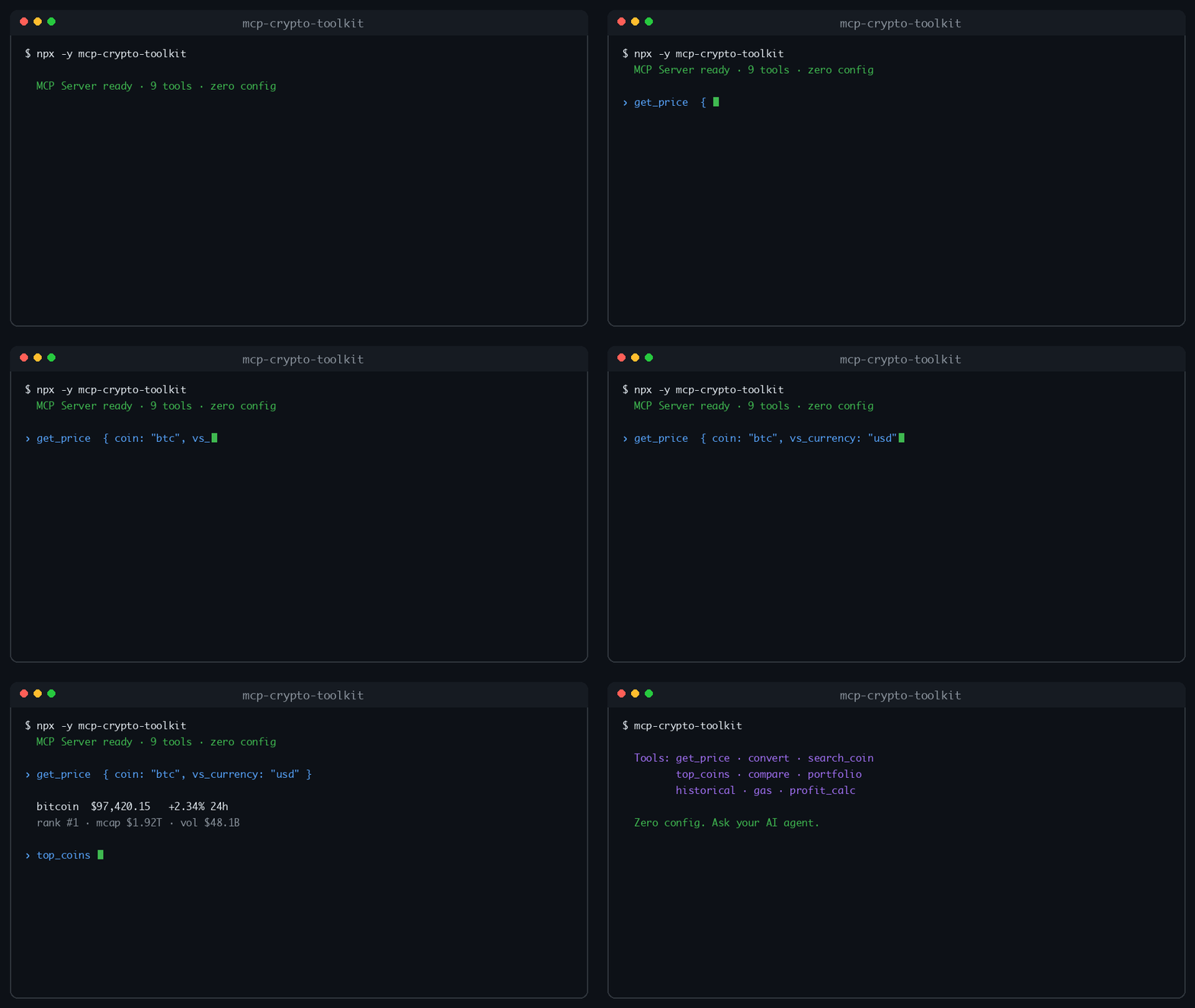
Features
- Live prices with market cap, volume, rank, ATH/ATL (CoinGecko)
- Convert between crypto and fiat (optimized PKR via Binance P2P when needed)
- Search coins by name/symbol
- Top coins + gainers/losers snapshot
- Compare 2–5 coins side by side
- Portfolio valuation (batch holdings)
- Historical point-in-time + range charts (7d/30d/…)
- EVM gas tracker with USD transfer estimates
- Profit/loss calculator with exchange + network fees
- Trending coins + Crypto Fear & Greed Index
- MCP prompts for common workflows
- Zero config — no API key required (optional
COINGECKO_API_KEYfor higher limits) - stdio + HTTP + Cloudflare Workers transports
Quick Install
Installation
Claude Desktop / Cursor / Windsurf
Local build:
HTTP server
Deploy (Smithery / remote MCP) — optional
You do not need paid hosting for discoverability. This server already installs via npx -y mcp-crypto-toolkit (stdio) and is listed on the Official MCP Registry. Glama and PulseMCP ingest from there — no Fly/Railway bill required.
Only deploy HTTP if you want a remote /mcp endpoint (e.g. Claude.ai Custom Connector or Smithery URL publish).
Claude.ai Custom Connector
Public hosted endpoint (Cloudflare Workers):
- In Claude.ai: Settings → Connectors → Add custom connector
- Paste the URL above (must include
/mcp) - You should see 10 tools (get price, convert, trending, …)
Or deploy your own (Cloudflare / Docker / Render) and use https://YOUR-HOST/mcp. After upgrading a hosted server, remove and re-add the connector if tools still show as empty.
Do not put a remote URL in claude_desktop_config.json — that file is stdio-only. For Claude Desktop local use, prefer:
Cloudflare Workers (recommended remote — free tier)
Uses the web-standard MCP transport (src/worker.ts) — no Docker required.
After deploy: https://mcp-crypto-toolkit.<your-subdomain>.workers.dev/health
Claude / Smithery URL: https://mcp-crypto-toolkit.<your-subdomain>.workers.dev/mcp
Local preview: npm run dev:cf
Optional secrets / vars:
CI: add repo secrets CLOUDFLARE_API_TOKEN + CLOUDFLARE_ACCOUNT_ID — Worker auto-deploys on GitHub Release (and via workflow_dispatch).
Render (free — no credit card)
- Fork/connect repo at render.com
- New → Blueprint → point at this repo (
render.yamluses the Free plan) - After deploy:
https://YOUR-SERVICE.onrender.com/health - Smithery: publish
https://YOUR-SERVICE.onrender.com/mcp
Free tier sleeps after ~15 min idle; first request may take ~30s to wake.
Docker (local / your own VPS)
Paid PaaS (if you outgrow free tier): Fly.io and Railway work with the included fly.toml / railway.toml but are not free long-term.
Optional env: COINGECKO_API_KEY, COINGECKO_PRO=1, gas oracle keys (see table below).
Tools (10)
| Tool | Description |
|---|---|
get_price | Live price + market cap, volume, rank, ATH/ATL |
convert | Crypto ↔ fiat/crypto conversion |
search_coin | Search by name or symbol |
top_coins | Top N by market cap/volume + gainers/losers |
compare_coins | Side-by-side compare 2–5 coins |
portfolio_value | Value a list of holdings |
historical_price | Point date or range chart + investment snapshot |
gas_tracker | Gas fees + estimated transfer cost (USD) |
profit_calc | P&L, ROI, break-even (fees + network fee) |
trending | Trending coins + Fear & Greed Index |
Prompts
| Prompt | Purpose |
|---|---|
market-overview | Top coins + trending + market tone |
whats-trending | Trending coins + Fear & Greed |
analyze-coin | Price + 7d trend for one coin |
trade-pnl | Walk through a P&L calc |
gas-check | Gas + transfer cost advice |
Example prompts
- What's the current price of Bitcoin and its market cap?
- Search for coins matching "pepe"
- Show top 10 coins and today's gainers
- Compare BTC, ETH, and SOL
- Value my portfolio: 0.5 BTC and 2 ETH in USD
- What was ETH on 01-01-2024, and what would $1000 then be worth now?
- Show SOL's 30-day price range
- What's gas on Base right now in USD?
- I bought at 100, sold at 120, qty 10, 0.1% fees — profit?
- What's trending and what's the Fear & Greed index?
Development
Optional env
| Variable | Purpose |
|---|---|
COINGECKO_API_KEY | Higher CoinGecko rate limits (still optional) |
COINGECKO_PRO=1 | Use Pro header with your key |
MCP_API_KEY | Worker only: require Bearer / x-api-key on /mcp |
RATE_LIMIT_PER_MINUTE | Worker only: default 60 |
ETHERSCAN_API_KEY / BSCSCAN_API_KEY / … | Better gas oracles |
OPTIMISM_API_KEY | Optimism gas oracle |
PORT | HTTP server port (default 3000) |
Without gas API keys, gas falls back to Blocknative then static estimates.
Contributing
See CONTRIBUTING.md for setup, PR guidelines, and the release process.
- Code of Conduct
- Security Policy
- Support
- Changelog
- DeepWiki — auto-generated architecture docs
- mcpservers.org
Releasing (maintainers)
- One-time: npm package Settings → Trusted Publisher → GitHub Actions → repo
nad33mahm3d/mcp-crypto-toolkit, workflowpublish.yml, environmentrelease, allownpm publish - Update
CHANGELOG.md - Create a GitHub Release with tag
vX.Y.Z - Actions publishes to npm via OIDC (no
NPM_TOKEN; provenance automatic)
API Credits
- CoinGecko — prices, markets, trending (free tier, no key required)
- Alternative.me — Fear & Greed Index
- Binance P2P — USDT/PKR when converting to PKR
- Etherscan family — optional gas oracles
- Blocknative — gas fallback
License
MIT — see LICENSE
Related MCP Servers
Reviews
No reviews yet — be the first to share how this listing worked for you.
Frequently Asked Questions about MCP Crypto Toolkit
AllMCPs Directory Badge
Showcase your server listing on GitHub or your project documentation. Embed this dynamic SVG badge to highlight official listing status and live engagement.
Badge Style:
Live Dynamic SVG Preview
Markdown (GitHub README)
[](https://allmcps.com/mcp/mcp-crypto-toolkit)HTML Embed
<a href="https://allmcps.com/mcp/mcp-crypto-toolkit"><img src="https://allmcps.com/api/badge/mcp-crypto-toolkit?style=directory" alt="MCP Crypto Toolkit on AllMCPs" /></a>Technical Specs & Signals
CategoryFinance & Fintech
27Quality signal: Emerging · 27/100How this signal is calculated ▾
Server availabilityNot measured
Not scored for repo-hosted servers — we can't reach the running server, only its GitHub page. Hosted MCP endpoints are health-checked live.
Verified ownership8/20
Documentation & tools11/30
Adoption & activity1/15
Community engagement0/10
A guidance signal from public completeness & health data — not a user rating. New listings start lower and rise as they add docs, get verified, and grow adoption. Signals we can't observe for a listing are skipped, not counted against it.
Own this project?
This directory is pre-filled from public sources. Claim via GitHub README, site badge, or DNS TXT to unlock edit access and the Official badge and attach your website — proof is checked automatically, then reviewed by our team.
Free dofollow backlink: add your website and place the AllMCPs badge on it — no claim needed. We detect it automatically and keep it verified as long as the badge stays live.
Claim & get free dofollowShare & Embed
Add our SVG badge (dark/light directory styles) or embeddable widget to your site.