An MCP server that provides persistent multimodal context storage for LLM agents.
Quick Install
Automated & IDE SetupCopy the AI prompt to install this server into Claude Code, Cursor, or another agent — or use 1-click editor setup below.
One-click editor setup isn’t available for this listing yet — we don’t have a confirmed install command, and we’d rather show nothing than point your editor at the wrong package or host. Follow the project’s own setup instructions, linked above.
Manual Client & Custom JSON ConfigExpand JSON ▾
No confirmed setup config for this listing yet. We only publish a config block when the install details come from the project itself — its README, its docs, or a verified owner. We haven’t found those for mcp-context-server, and we’d rather show nothing than a guess you’d paste into your client. Follow the project’s own setup instructions for the current steps.
Documentation Overview
MCP Context Server
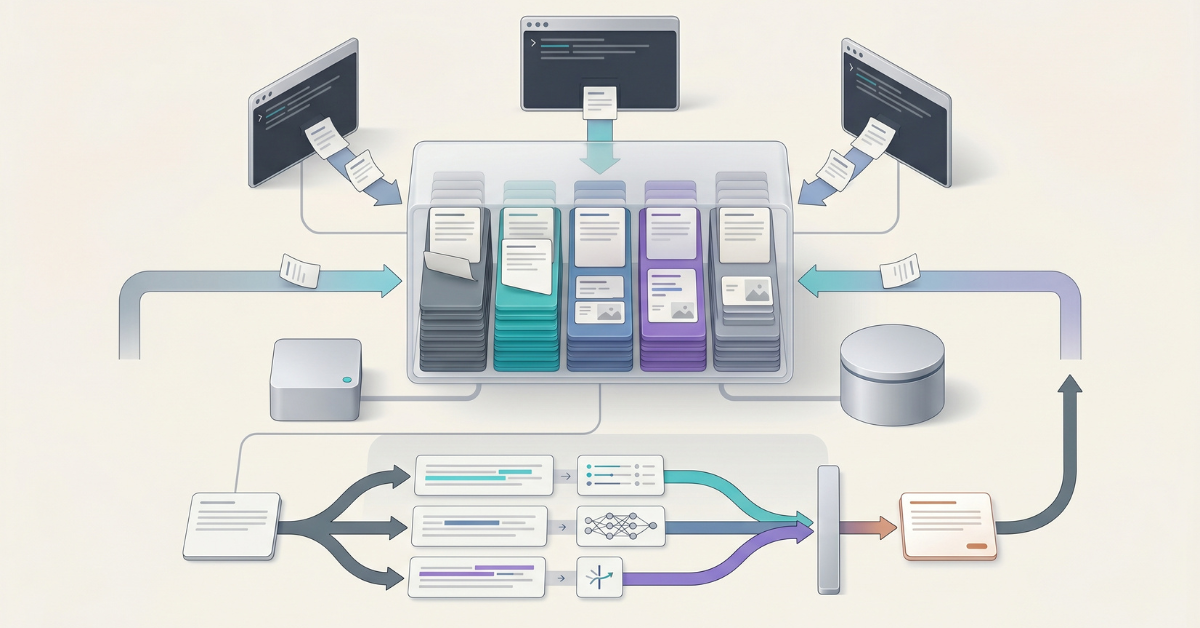




A high-performance Model Context Protocol (MCP) server providing persistent multimodal context storage for LLM agents. Built with FastMCP, this server enables seamless context sharing across multiple agents working on the same task through thread-based scoping.
[!WARNING] Upgrading from v2.x? Version 3.x.x uses a new database schema with UUIDv7 primary keys. Existing v2.x databases require a one-time data migration before they can be used with v3.x.x. The opt-in CLI
mcp-context-server-migrateships with the server.See the Migration Guide before upgrading. Fresh installations are unaffected.
Key Features
- Multimodal Context Storage: Store and retrieve both text and images
- UUIDv7 Context Identifiers: Every context entry is identified by a 32-character lowercase hex UUIDv7 value, providing time-ordered, globally unique IDs with a stable lex-string ordering
- Thread-Based Scoping: Agents working on the same task share context through thread IDs
- Flexible Metadata Filtering: Store custom structured data with any JSON-serializable fields and filter using 16 powerful operators
- Date Range Filtering: Filter context entries by creation timestamp using ISO 8601 format
- Tag-Based Organization: Efficient context retrieval with normalized, indexed tags
- Summary Generation: Optional automatic LLM-based summarization returned alongside truncated
text_contentin all search tool results for better agent context efficiency (enabled by default with Ollama) - Full-Text Search: Linguistic search with stemming, ranking, boolean queries (FTS5/tsvector), and cross-encoder reranking. Auto-enabled by default (
ENABLE_FTS=auto); needs no extra dependencies - Semantic Search: Vector similarity search for meaning-based retrieval with cross-encoder reranking. Auto-enabled by default (
ENABLE_SEMANTIC_SEARCH=auto) whenever an embedding provider is available (embedding generation is on by default) - Hybrid Search: Combined FTS + semantic search using Reciprocal Rank Fusion (RRF) with cross-encoder reranking. Auto-enabled by default (
ENABLE_HYBRID_SEARCH=auto) whenever at least one of full-text or semantic search is available - Server-Side Grep: Literal/regex, line-oriented, unranked pattern matching over stored records (
grep_context) — the precise-locate complement to full-text/semantic search, with ripgrep-style output modes and bounded results. Auto-enabled by default (ENABLE_GREP_CONTEXT=auto), pure-Python so it behaves identically on SQLite and PostgreSQL - Record Navigation (index_tree):
navigate_contextbuilds an on-demand Markdown-heading table of contents per record, with the entry summary as the root node; optional per-node LLM summaries (on by default) enrich each section. Pair withread_context_rangeto extract any section - Partial Reads:
read_context_rangereturns a slice of one record by character range, line range, or outlinenode_id— so an agent can read only the relevant span of a long record instead of the whole thing - Cross-Encoder Reranking: Automatic result refinement using FlashRank cross-encoder models for improved search precision (enabled by default)
- Embedding Compression (default ON): Reduces embedding storage by approximately 8x out of the box in v3.0.0. Bit-packed compressed vectors keep semantic and hybrid search working without changes to the tool surface, and the read path bypasses the pgvector >2000-dimension HNSW limit. Set
ENABLE_EMBEDDING_COMPRESSION=falseto opt out and keep fp32 storage. See the Embedding Compression Guide - Multiple Database Backends: Choose between SQLite (default, zero-config) or PostgreSQL (high-concurrency, production-grade)
- High Performance: WAL mode (SQLite) / MVCC (PostgreSQL), strategic indexing, and async operations
- MCP Standard Compliance: Works with Claude Code, LangGraph, and any MCP-compatible client
- Production Ready: Comprehensive test coverage, type safety, and robust error handling
Connecting to Your AI Assistant
The fastest way to connect the MCP Context Server to Claude Code is the one-command Docker bootstrap.
For step-by-step instructions, prerequisites, troubleshooting, and update/uninstall commands, see the Connecting to Your AI Assistant Guide.
Environment Configuration
The server is fully configured via environment variables, supporting core settings, transport, authentication, embedding providers, summary generation, search features, database tuning, and more. Variables can be set in your MCP client configuration, in a .env file, or directly in the shell.
For the complete reference of all environment variables with types, defaults, constraints, and descriptions, see the Environment Variables Reference.
Summary Generation
Summary generation automatically creates concise LLM-based summaries for each stored context entry. Summaries are returned in the summary field of all search tool results alongside truncated text_content, providing dense, informative summaries that help agents determine relevance without fetching full entries.
For detailed instructions including all providers (Ollama, OpenAI, Anthropic), model selection, and custom prompt configuration, see the Summary Generation Guide.
Semantic Search
Semantic search is auto-enabled by default (ENABLE_SEMANTIC_SEARCH=auto): the semantic_search_context tool registers automatically whenever an embedding provider is available (embedding generation is on by default), and skips quietly otherwise. For detailed instructions on the multiple embedding providers (Ollama, OpenAI, Azure, HuggingFace, Voyage) and how to control the toggle explicitly, see the Semantic Search Guide.
Full-Text Search
Full-text search is auto-enabled by default (ENABLE_FTS=auto) and needs no extra dependencies, using the built-in database FTS engine (FTS5 on SQLite, tsvector on PostgreSQL). For linguistic processing, stemming, ranking, and boolean queries, see the Full-Text Search Guide.
Hybrid Search
Hybrid search is auto-enabled by default (ENABLE_HYBRID_SEARCH=auto): the hybrid_search_context tool registers automatically whenever at least one of full-text or semantic search is available. For combined FTS + semantic search using Reciprocal Rank Fusion (RRF), see the Hybrid Search Guide.
Metadata Filtering
For comprehensive metadata filtering including 16 operators, nested JSON paths, and performance optimization, see the Metadata Guide.
Database Backends
The server supports multiple database backends, selectable via the STORAGE_BACKEND environment variable. SQLite (default) provides zero-configuration local storage perfect for single-user deployments. PostgreSQL offers high-performance capabilities with 10x+ write throughput for multi-user and high-traffic deployments.
For detailed configuration instructions including PostgreSQL setup with Docker, Supabase integration, connection methods, and troubleshooting, see the Database Backends Guide.
API Reference
The MCP Context Server exposes 16 MCP tools for context management:
Core Operations: store_context, search_context, get_context_by_ids, delete_context, update_context, list_threads, get_statistics
Search Tools: semantic_search_context, fts_search_context, hybrid_search_context
Navigation Tools (locate / navigate / extract): grep_context, navigate_context, read_context_range
Batch Operations: store_context_batch, update_context_batch, delete_context_batch
For complete tool documentation including parameters, return values, filtering options, and examples, see the API Reference. For when to use grep vs full-text vs semantic search, the index_tree, and partial reads, see Grep, Navigation & Partial Reads.
Docker Deployment
For production deployments with HTTP transport and container orchestration, Docker Compose configurations are available for SQLite, PostgreSQL, and external PostgreSQL (Supabase). See the Docker Deployment Guide for setup instructions and client connection details.
Kubernetes Deployment
For Kubernetes deployments, a Helm chart is provided with configurable values for different environments. See the Helm Deployment Guide for installation instructions, or the Kubernetes Deployment Guide for general Kubernetes concepts.
Authentication
For HTTP transport deployments requiring authentication, see the Authentication Guide for bearer token and IdP-issued JWT configuration.
Getting Help
Related MCP Servers
Adoption & maintenance
Factual signals from GitHub, npm, and our automated checks — not a rating.
GitHub stars
9
Stargazers on the source repository.
npm downloads
36
Package downloads in the last 30 days.
Last commit
16d ago
Most recent push to the default branch.
Directory activity
1 views
Config copies, upvotes, and views on AllMCPs.
Reviews
No reviews yet — be the first to share how this listing worked for you.
Frequently Asked Questions about MCP Context Server
AllMCPs Directory Badge
Showcase your server listing on GitHub or your project documentation. Embed this dynamic SVG badge to highlight official listing status and live engagement.
Badge Style:
Live Dynamic SVG Preview
Markdown (GitHub README)
[](https://allmcps.com/mcp/mcp-context-server)HTML Embed
<a href="https://allmcps.com/mcp/mcp-context-server"><img src="https://allmcps.com/api/badge/mcp-context-server?style=directory" alt="MCP Context Server on AllMCPs" /></a>