A digital audio workstation MCP App with sequencing, mixing, effects, automation, and rendering.
Quick Install
Automated & IDE SetupCopy the AI prompt to install this server into Claude Code, Cursor, or another agent — or use 1-click editor setup below.
Not yet automatically verified
We haven't yet run this listing's install command through our automated sandbox check. This isn't a red flag — we're steadily working through the catalog.
Manual Client & Custom JSON ConfigExpand JSON ▾
Client Config & Setup
Choose your client or environment
Target File:
💡 Paste the JSON block into your client's configuration file under mcpServers, then restart the application.
Documentation Overview
MCP Audio Studio
An interactive digital audio workstation delivered as an MCP server and MCP App. It combines an FL-style channel rack, piano roll, playlist, mixer, effects, automation, plugin slots, audio-file tracks, microphone recording, and offline WAV rendering in one package.
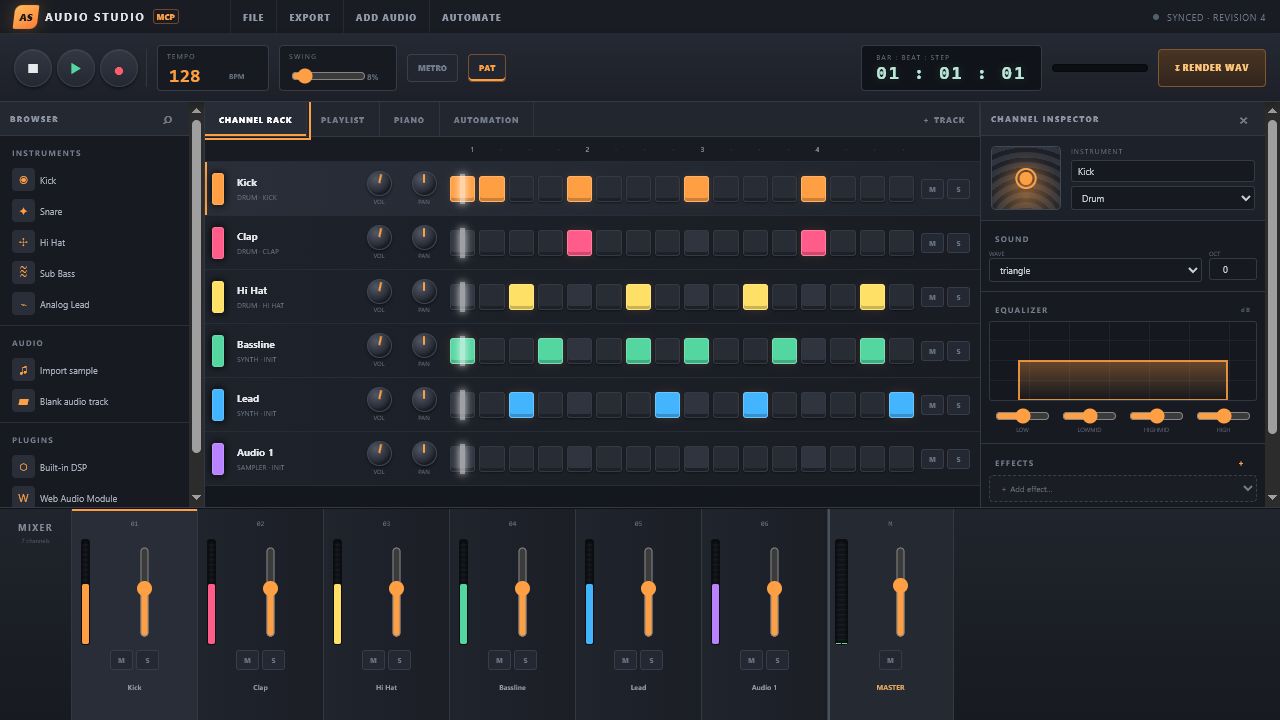
The model and the person use the same authoritative project. Every UI action calls an MCP tool; every model-side edit becomes visible in an open studio through revision polling.
What works
- Tempo, time signature, swing, metronome, loop, play/stop, and microphone record controls.
- Instrument and audio tracks with a 16-step channel rack and chromatic piano roll.
- Audio file import, clip placement, gain/trim metadata, and browser playback.
- Per-channel and master volume, pan, mute, solo, sends, and animated meters.
- Four-band equalizer and filter, delay, reverb, distortion, compressor, chorus, and limiter slots.
- Playback and render automation for master/track mixing, EQ, sends, built-in effects, instrument parameters, and numeric plugin parameters, with linear, hold, and smooth control points.
- Built-in DSP slots, browser-safe Web Audio Module (WAM) slots, and VST3 control/state slots.
- Pure-JavaScript stereo WAV rendering, returned as playable MCP audio content.
- Project persistence, import, and export.
- stdio, Streamable HTTP, and HTTPS transports.
- Standalone browser mode at the HTTP/HTTPS server root.
Run it
npm via npx (recommended)
The package is published on npm. With Node.js 18 or newer, run it without installing or cloning the repository:
The HTTP studio opens at http://127.0.0.1:3100/; the MCP endpoint is http://127.0.0.1:3100/mcp.
One standalone executable
Download the executable for Windows, macOS, or Linux from GitHub Releases. It contains the server, MCP App, runtime, and JavaScript dependencies.
Without configured certificates, HTTPS mode creates an ephemeral self-signed localhost certificate. For a trusted certificate, set MCP_AUDIO_STUDIO_TLS_CERT and MCP_AUDIO_STUDIO_TLS_KEY.
From source
For local development from a checked-out repository:
MCP client configuration
Use the npm package in an MCP client without a separate installation:
For a checked-out repository instead:
For a downloaded executable, replace command with its absolute path and use ["--stdio"] for args.
Call studio_ui to render the studio. The tool declares _meta.ui.resourceUri = "ui://audio-studio/studio-v1.html", and the resource uses the portable text/html;profile=mcp-app MIME type and MCP Apps bridge.
MCP tools
| Area | Tools |
|---|---|
| Studio and project | studio_ui, get_project, new_project, set_project, import_project, export_project |
| Transport | set_transport |
| Tracks and notes | add_track, update_track, remove_track, set_steps |
| Audio clips | add_audio_clip, update_audio_clip, remove_audio_clip |
| Mixing | set_mixer, set_equalizer |
| Effects | add_effect, update_effect, remove_effect |
| Plugins | add_plugin, update_plugin, remove_plugin |
| Automation | upsert_automation, remove_automation |
| Rendering | render_audio, get_render |
All data tools work without a UI and return model-readable text plus structured content. studio_ui is the dedicated render tool, avoiding unnecessary iframe remounts.
VST3 and WAM support
MCP Apps run in a sandboxed browser iframe, which cannot load native .dll, .so, or .vst3 binaries. This release therefore provides:
- WAM URL slots for browser-safe plugin modules.
- VST3 slots with paths, enable/bypass, parameters, opaque state, and automation targets.
- A stable project/tool representation intended for a future native plugin-host bridge.
The bundled Web Audio and offline render engines process built-in instruments/effects. Native VST3 DSP is not executed in this release; representing it otherwise would be unsafe and technically inaccurate. A native bridge should isolate each plugin in its own process and use licensed VST3 hosting APIs.
Persistence and audio files
Pass --data ./studio-project.json or set MCP_AUDIO_STUDIO_DATA to persist every revision. Imported audio is stored as a data URL inside the project. Browser imports and microphone recordings are normalized to PCM WAV so browser playback and offline rendering use the same asset; direct MCP imports should provide PCM/float WAV data. Offline rendering always emits 16-bit stereo WAV.
Recent renders are kept in memory (up to eight) and are accessible with get_render or, in web mode, GET /renders/:id.
Development
npm run build produces a single ./dist/index.js with the entire minified React MCP App embedded as a string. Tests use the official MCP SDK’s linked in-memory transport to verify tool and UI resource discovery.
Publishing to npm
To publish the current version:
The release command signs in through npm when necessary, runs the complete check suite, publishes the package publicly, and confirms that npm serves the version. It is safe to rerun: if that exact version is already published, it verifies the project and skips the duplicate publish.
Run npm run release:check to validate the release helper without publishing.
Security
- The web server disables identifying headers and uses a 64 MB JSON limit for embedded audio.
- MCP App permissions request microphone and clipboard-write; hosts may deny either capability.
- The app declares inline, fullscreen, and picture-in-picture (
pip) display-mode support; the host chooses which declared modes are available. - Remote WAM and audio URLs are represented in project state but are not allowed by the embedded MCP App CSP in this release.
- VST3 paths are metadata only and are never executed.
See SECURITY.md for reporting vulnerabilities.
License
MIT
Related MCP Servers
Reviews
No reviews yet — be the first to share how this listing worked for you.
Frequently Asked Questions about MCP Audio Studio
AllMCPs Directory Badge
Showcase your server listing on GitHub or your project documentation. Embed this dynamic SVG badge to highlight official listing status and live engagement.
Badge Style:
Live Dynamic SVG Preview
Markdown (GitHub README)
[](https://allmcps.com/mcp/mcp-audio-studio)HTML Embed
<a href="https://allmcps.com/mcp/mcp-audio-studio"><img src="https://allmcps.com/api/badge/mcp-audio-studio?style=directory" alt="MCP Audio Studio on AllMCPs" /></a>