AllMCPs
BrowseBestCategoriesStackCompareToolsGuidesBlog Log in Submit MCP

Stay in the loop

Get new MCP servers and top picks in your inbox.

AllMCPs

The open directory for discovering and installing Model Context Protocol servers.

Explore

  • Browse servers
  • Best MCP servers
  • Categories
  • MCP clients
  • Agent prompts
  • Stack Builder
  • Compare servers
  • Tags index
  • Submit a server
  • Pricing

Learn

  • Guides hub
  • What is MCP?
  • Install guide
  • Troubleshooting
  • Security
  • Blog
  • Blog RSS

Tools

  • All tools
  • Config generator
  • Config validator
  • MCP playground
  • OpenAPI β†’ MCP
  • Badge generator

For agents

  • API docs
  • Trust & traffic
  • llms.txt β†— (opens in a new tab)
  • Catalog JSON β†— (opens in a new tab)
  • Remote MCP β†— (opens in a new tab)

Company

  • About
  • Contact
  • X (@AllMCPs) β†— (opens in a new tab)
  • GitHub β†— (opens in a new tab)
  • Terms
  • Privacy
AllMCPs VerifiedAllMCPs VerifiedFeatured on Nick LaunchesFeatured on Nick LaunchesLaunch Llama NewsletterLaunch Llama NewsletterVerified DR - allmcps.comVerified DR - allmcps.comFeatured on SaaSGrowFeatured on SaaSGrowFeatured on Twelve ToolsFeatured on Twelve ToolsFeatured on Saaspa.geFeatured on Saaspa.geFeatured on Findly.toolsFeatured on Findly.toolsFeatured on Startup FameFeatured on Startup FameFeatured on LaunchKiwiFeatured on LaunchKiwiFeatured on ScrollLaunchFeatured on ScrollLaunchFeatured on DailyPingsFeatured on DailyPingsFazier badgeFazier badgeFeatured on NewTool.siteFeatured on NewTool.siteFeatured on saasfame.comFeatured on saasfame.comDR Checker - Domain RatingDR Checker - Domain RatingListed on Turbo0Listed on Turbo0Launched on LaunchBoard - Product Launch PlatformLaunched on LaunchBoard - Product Launch PlatformList on SimilarlabsList on Similarlabshttps://codetrendy.comhttps://codetrendy.comListed on DevTool.ioFeatured on BuildlistFeatured on BuildlistAllMCPs VerifiedAllMCPs VerifiedFeatured on Nick LaunchesFeatured on Nick LaunchesLaunch Llama NewsletterLaunch Llama NewsletterVerified DR - allmcps.comVerified DR - allmcps.comFeatured on SaaSGrowFeatured on SaaSGrowFeatured on Twelve ToolsFeatured on Twelve ToolsFeatured on Saaspa.geFeatured on Saaspa.geFeatured on Findly.toolsFeatured on Findly.toolsFeatured on Startup FameFeatured on Startup FameFeatured on LaunchKiwiFeatured on LaunchKiwiFeatured on ScrollLaunchFeatured on ScrollLaunchFeatured on DailyPingsFeatured on DailyPingsFazier badgeFazier badgeFeatured on NewTool.siteFeatured on NewTool.siteFeatured on saasfame.comFeatured on saasfame.comDR Checker - Domain RatingDR Checker - Domain RatingListed on Turbo0Listed on Turbo0Launched on LaunchBoard - Product Launch PlatformLaunched on LaunchBoard - Product Launch PlatformList on SimilarlabsList on Similarlabshttps://codetrendy.comhttps://codetrendy.comListed on DevTool.ioFeatured on BuildlistFeatured on Buildlist
Β© 2026 Jackalope Digital LLC. All rights reserved.
  1. Home
  2. πŸ’» Developer Tools
  3. Mcp Arr
M
Health: Not checked yetWe have not completed a health check for this listing yet.Last checked 8/11/2026, 12:27:04 AM

Mcp Arr

Enrichment pendingWe haven’t run our AI enrichment pass on this listing yet, so the overview, use cases, and FAQ below may be sparse or missing. We work through the catalog over time β€” check back soon.
View Repository

MCP server for *arr media suite - Sonarr, Radarr, Lidarr, Readarr, Prowlarr

Quick Install

Automated & IDE Setup

Copy the AI prompt to install this server into Claude Code, Cursor, or another agent β€” or use 1-click editor setup below.

Add to CursorAdd to VS Code
Manual Client & Custom JSON ConfigExpand JSON β–Ύ

Install Config Generator

Choose your client
claude_desktop_config.json
{
  "mcpServers": {
    "mcp-arr": {
      "command": "npx",
      "args": [
        "-y",
        "mcp-arr"
      ]
    }
  }
}

πŸ’‘ Paste into ~/Library/Application Support/Claude/claude_desktop_config.json (macOS) or %APPDATA%\Claude\claude_desktop_config.json (Windows)

Install Directory Badge Claim listing AlternativesπŸ’» More in Developer Tools

Documentation Overview

MCP *arr Server
Architecture

Oathe Security npm version CI License: MIT MCP

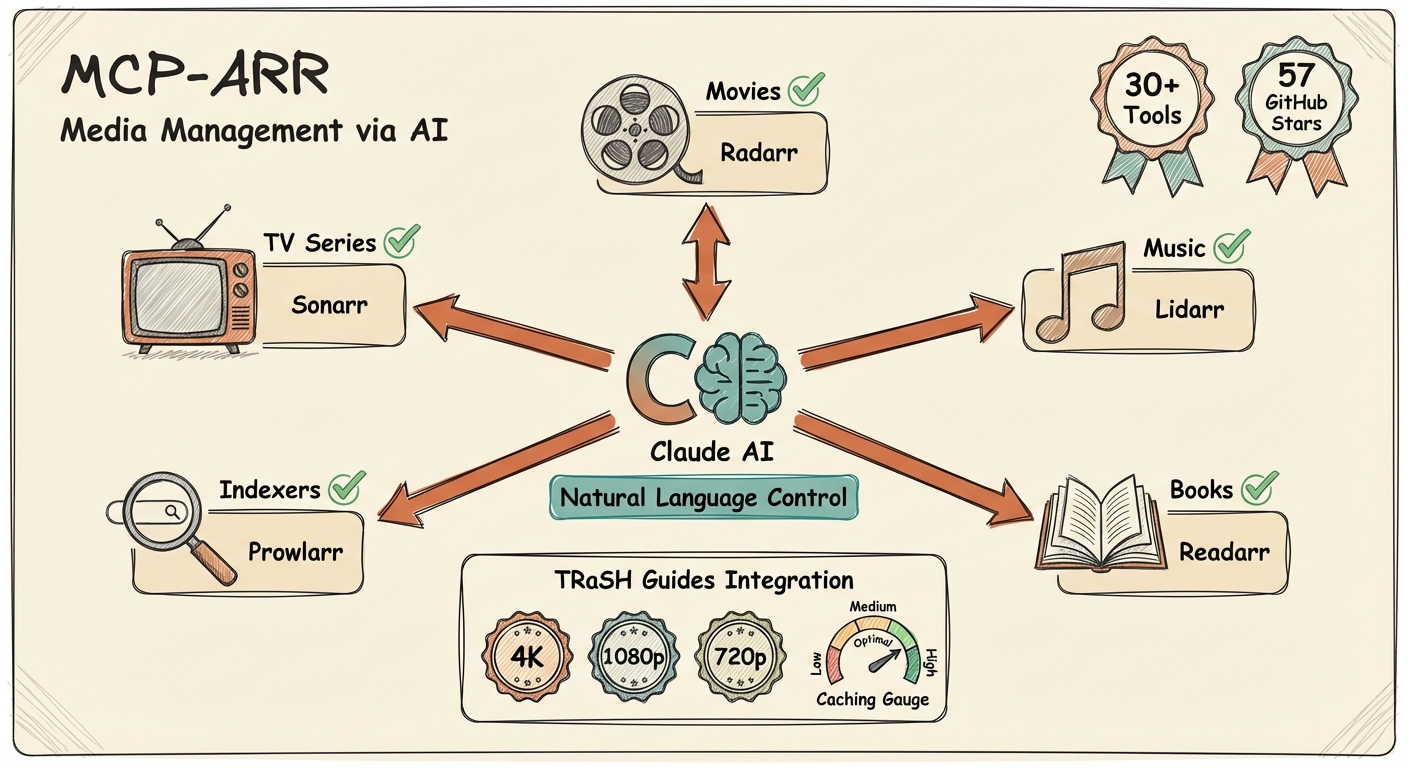
MCP server for the *arr media management suite - Sonarr, Radarr, Lidarr, and Prowlarr.

Supports both local stdio mode for Claude/Codex-style clients and remote HTTP mode for hosted MCP clients such as ChatGPT connectors.

Why Use This?

  • Unified media management - Control all your *arr applications from one interface
  • Natural language queries - Ask about your library in plain English
  • Cross-service search - Find content across TV, movies, and music simultaneously
  • Download monitoring - Check queue status and progress across all services
  • Calendar integration - See upcoming releases for all media types
  • Configuration review - Get AI-powered suggestions for optimizing your setup
  • Flexible configuration - Enable only the services you use

Features

CategoryCapabilities
Sonarr (TV)List series, view episodes, search shows, trigger downloads, check queue, view calendar, review setup
Radarr (Movies)List movies, search films, trigger downloads, check queue, view releases, review setup
Lidarr (Music)List artists, view albums, search musicians, trigger downloads, check queue, view calendar, review setup
Prowlarr (Indexers)List indexers, search across all trackers, test health, view statistics
Cross-ServiceStatus check, unified search across all configured services
ConfigurationQuality profiles, download clients, naming conventions, health checks, storage info
TRaSH GuidesReference quality profiles, custom formats, naming conventions, compare against recommendations

Prerequisites

  • Node.js 18+
  • At least one *arr application running with API access:
    • Sonarr for TV series
    • Radarr for movies
    • Lidarr for music
    • Prowlarr for indexer management

Installation

Using npm (Recommended)

Terminal
npx mcp-arr-server

Remote HTTP Mode

bash
MCP_TRANSPORT=http PORT=3000 npx mcp-arr-server

By default the remote server listens on 127.0.0.1:3000 and serves MCP on /mcp.

Environment variables for remote mode:

  • MCP_TRANSPORT=http to enable remote Streamable HTTP transport
  • HOST to override the bind host (default 127.0.0.1)
  • PORT to override the port (default 3000)
  • MCP_PATH to override the MCP endpoint path (default /mcp)

Docker

Prebuilt images are published to GitHub Container Registry on every release. You do not need to build anything:

Terminal
docker pull ghcr.io/aplaceforallmystuff/mcp-arr:latest

Tags follow the release version β€” latest, 1, 1.7, and each exact version such as 1.7.3. Pin to a major or minor tag if you want updates without surprises.

Run in local stdio mode:

Terminal
docker run --rm -i \
  -e SONARR_URL=http://host.docker.internal:8989 \
  -e SONARR_API_KEY=your-sonarr-api-key \
  ghcr.io/aplaceforallmystuff/mcp-arr:latest

Run in remote HTTP mode:

Terminal
docker run --rm -p 3000:3000 \
  -e MCP_TRANSPORT=http \
  -e HOST=0.0.0.0 \
  -e PORT=3000 \
  -e SONARR_URL=http://host.docker.internal:8989 \
  -e SONARR_API_KEY=your-sonarr-api-key \
  ghcr.io/aplaceforallmystuff/mcp-arr:latest

Minimal docker-compose.yml:

docker-compose.yml
services:
  mcp-arr:
    image: ghcr.io/aplaceforallmystuff/mcp-arr:latest
    ports:
      - "3000:3000"
    environment:
      MCP_TRANSPORT: http
      HOST: 0.0.0.0
      PORT: 3000
      SONARR_URL: http://host.docker.internal:8989
      SONARR_API_KEY: your-sonarr-api-key
      RADARR_URL: http://host.docker.internal:7878
      RADARR_API_KEY: your-radarr-api-key

Building it yourself

Only needed if you are developing against a change that is not released yet:

Terminal
docker build -t mcp-arr .

From Source

bash
git clone https://github.com/aplaceforallmystuff/mcp-arr.git
cd mcp-arr
npm install
npm run build

Configuration

Getting API Keys

Each *arr application has an API key in Settings > General > Security:

  1. Open your *arr application's web interface
  2. Go to Settings > General
  3. Find the API Key under the Security section
  4. Copy the API key for use in configuration

For Claude Desktop

Add to your Claude Desktop config file:

macOS: ~/Library/Application Support/Claude/claude_desktop_config.json

Windows: %APPDATA%\Claude\claude_desktop_config.json

config.json
{
  "mcpServers": {
    "arr": {
      "command": "npx",
      "args": ["-y", "mcp-arr-server"],
      "env": {
        "SONARR_URL": "http://localhost:8989",
        "SONARR_API_KEY": "your-sonarr-api-key",
        "RADARR_URL": "http://localhost:7878",
        "RADARR_API_KEY": "your-radarr-api-key",
        "LIDARR_URL": "http://localhost:8686",
        "LIDARR_API_KEY": "your-lidarr-api-key",
        "PROWLARR_URL": "http://localhost:9696",
        "PROWLARR_API_KEY": "your-prowlarr-api-key"
      }
    }
  }
}

For Claude Code

Add to ~/.claude.json:

config.json
{
  "mcpServers": {
    "arr": {
      "command": "npx",
      "args": ["-y", "mcp-arr-server"],
      "env": {
        "SONARR_URL": "http://localhost:8989",
        "SONARR_API_KEY": "your-sonarr-api-key",
        "RADARR_URL": "http://localhost:7878",
        "RADARR_API_KEY": "your-radarr-api-key"
      }
    }
  }
}

Note: Only configure the services you have running. The server automatically detects which services are available based on the environment variables you provide.

TRaSH-only mode: if you don’t configure any *arr services, the server still starts and exposes the TRaSH Guides reference tools plus generic search and fetch.

ChatGPT / Remote MCP

To use mcp-arr with ChatGPT, run the server in remote HTTP mode on a reachable host and connect ChatGPT to the /mcp endpoint.

The server now exposes the generic search and fetch tools expected by ChatGPT-style remote MCP integrations:

  • search discovers matching *arr media and TRaSH profiles
  • fetch returns structured detail for a selected search result

The existing service-specific tools remain available for richer local or power-user workflows.

Usage Examples

Library Management

  • "Show me all my TV series"
  • "What movies do I have in Radarr?"
  • "List all artists in my music library"

Searching & Adding Content

  • "Search for sci-fi shows on Sonarr"
  • "Find action movies from the 90s"
  • "Add this show to my TV library"
  • "Add that movie to Radarr"
  • "Search for jazz albums and add this artist"
  • "Add this movie with my '4k' tag"
  • "What tags do I have in Sonarr?"

Download Queue

  • "What's downloading right now?"
  • "Check the Sonarr queue"
  • "Show Radarr download progress"

Upcoming Releases

  • "What TV episodes are coming this week?"
  • "Show upcoming movie releases"
  • "Any new albums coming out this month?"

Downloading Content

  • "What episodes of this show am I missing?"
  • "Download the missing episodes for that series"
  • "Search for this specific movie"
  • "Grab that album I'm missing"

Indexer Management

  • "Are my indexers healthy?"
  • "How are my indexers performing?"
  • "Test all my Prowlarr indexers"

Configuration Review

  • "Review my Sonarr setup and suggest improvements"
  • "Show me my quality profiles in Radarr"
  • "Are there any health issues with my Lidarr?"
  • "What naming convention am I using for TV shows?"
  • "Help me understand my quality profiles - why am I not getting 4K?"
  • "Check my download client configuration"
  • "How much free space do I have on my root folders?"

Cross-Service

  • "Check status of all my *arr services"
  • "Search for 'comedy' across all services"

Available Tools

General Tools

ToolDescription
arr_statusGet connection status for all configured *arr services
arr_search_allSearch across all configured services simultaneously
searchGeneric discovery tool for remote MCP clients such as ChatGPT
fetchGeneric detail-fetch tool for items returned by search

Sonarr Tools (TV)

ToolDescription
sonarr_get_seriesList all TV series in your library
sonarr_searchSearch for TV series by name (returns tvdbId for adding)
sonarr_add_seriesAdd a TV series to Sonarr (supports tags)
sonarr_get_root_foldersGet available root folders for adding series
sonarr_get_quality_profilesGet available quality profiles for adding series
sonarr_get_queueView current download queue with limit and offset pagination
sonarr_get_calendarSee upcoming episodes
sonarr_get_episodesList episodes for a series (shows missing vs available)
sonarr_search_missingTrigger search for all missing episodes in a series
sonarr_search_episodeTrigger search for specific episode(s)
sonarr_refresh_seriesTrigger a metadata refresh for a specific series in Sonarr

Radarr Tools (Movies)

ToolDescription
radarr_get_moviesList all movies in your library
radarr_searchSearch for movies by name (returns tmdbId for adding)
radarr_add_movieAdd a movie to Radarr (supports tags)
radarr_get_root_foldersGet available root folders for adding movies
radarr_get_quality_profilesGet available quality profiles for adding movies
radarr_get_queueView current download queue with limit and offset pagination
radarr_get_calendarSee upcoming releases
radarr_search_movieTrigger search to download a movie in your library
radarr_search_moviesBulk-trigger searches for multiple movie IDs at once
radarr_update_movieUpdate a movie's quality profile, monitored status, minimum availability, tags, or path
radarr_delete_queue_itemRemove an item from the download queue (optionally blocklist the release)
radarr_refresh_movieTrigger a metadata refresh for a specific movie in Radarr

Lidarr Tools (Music)

ToolDescription
lidarr_get_artistsList all artists in your library
lidarr_searchSearch for artists by name (returns foreignArtistId for adding)
lidarr_add_artistAdd an artist to Lidarr (supports tags)
lidarr_get_root_foldersGet available root folders for adding artists
lidarr_get_quality_profilesGet available quality profiles for adding artists
lidarr_get_metadata_profilesGet available metadata profiles for adding artists
lidarr_get_queueView current download queue with limit and offset pagination
lidarr_get_albumsList albums for an artist (shows missing vs available)
lidarr_search_albumTrigger search for a specific album
lidarr_search_missingTrigger search for all missing albums for an artist
lidarr_get_calendarSee upcoming album releases

Prowlarr Tools (Indexers)

ToolDescription
prowlarr_get_indexersList all configured indexers
prowlarr_searchSearch across all indexers
prowlarr_test_indexersTest all indexers and return health status
prowlarr_get_statsGet indexer statistics (queries, grabs, failures)

Configuration Review Tools

These tools are available for Sonarr, Radarr, and Lidarr. Replace {service} with the service name (e.g., sonarr_get_quality_profiles).

ToolDescription
{service}_get_quality_profilesDetailed quality profile information with allowed qualities and custom format scores
{service}_get_healthHealth check warnings and issues detected by the application
{service}_get_root_foldersStorage paths, free space, and accessibility status
{service}_get_download_clientsDownload client configurations and settings
{service}_get_namingFile and folder naming conventions
{service}_get_tagsTag definitions for content organization
{service}_review_setupComprehensive configuration dump for AI-assisted setup analysis

The {service}_review_setup tool returns all configuration in a single call, enabling natural language conversations about optimizing your setup. Claude can analyze your quality profiles, suggest improvements, explain why certain content isn't being grabbed, and help configure complex settings like custom formats.

⚠️ Disclaimer: The configuration review tools provide read-only access to your *arr settings. Any changes to your configuration must be made directly in the *arr application interfaces. The AI's suggestions are recommendations only - always back up your configuration before making significant changes. The maintainers are not responsible for any configuration changes, data loss, or other issues that may arise from following AI-generated recommendations.

TRaSH Guides Tools

Access community-curated quality profiles, custom formats, and naming conventions from TRaSH Guides directly through Claude or ChatGPT. These tools work without any *arr configuration - they fetch reference data from the TRaSH Guides GitHub repository.

ToolDescription
trash_list_profilesList available TRaSH quality profiles for Radarr or Sonarr
trash_get_profileGet detailed profile with custom formats, scores, and quality settings
trash_list_custom_formatsList custom formats with optional category filter (hdr, audio, resolution, etc.)
trash_get_namingGet recommended naming conventions for Plex, Emby, Jellyfin, or standard
trash_get_quality_sizesGet recommended min/max/preferred sizes for each quality level
trash_compare_profileCompare your profile against TRaSH recommendations (requires *arr configured)
trash_compare_namingCompare your naming config against TRaSH recommendations (requires *arr configured)

Example usage:

  • "What quality profiles does TRaSH recommend for 4K movies?"
  • "Show me the remux-web-1080p profile details"
  • "Compare my Radarr profile 4 against the TRaSH uhd-bluray-web profile"
  • "What naming convention should I use for Plex?"
  • "List HDR-related custom formats for Radarr"

Data is cached for 1 hour to minimize GitHub API calls.

Development

bash
# Watch mode for development
npm run watch

# Build TypeScript
npm run build

# Run locally
SONARR_URL="http://localhost:8989" SONARR_API_KEY="your-key" node dist/index.js

Troubleshooting

"No *arr services configured"

Ensure you have set at least one pair of URL and API_KEY environment variables:

bash
SONARR_URL="http://localhost:8989"
SONARR_API_KEY="your-api-key"

"API error: 401 Unauthorized"

The API key is incorrect. Verify it in your *arr application under Settings > General > Security.

"fetch failed" or "ECONNREFUSED"

The *arr application is not running or the URL is incorrect. Verify:

  • The application is running
  • The URL and port are correct
  • There's no firewall blocking the connection

"Sonarr/Radarr/etc not configured"

You tried to use a tool for a service that isn't configured. Add the corresponding URL and API_KEY environment variables.

License

MIT - see LICENSE for details.

Links

  • Servarr Wiki - Documentation for all *arr applications
  • TRaSH Guides - Quality profiles, custom formats, and setup guides
  • Sonarr API Docs
  • Model Context Protocol
  • GitHub Repository

Related MCP Servers

View all in Developer Tools View all alternatives
  • Y
    Yarr MCP

    Rust MCP and CLI server for Sonarr, Radarr, Prowlarr, Plex, Jellyfin, and download clients.

    πŸ’» Developer Tools0 views
    Compare vs Yarr MCP β†’
  • Y
    Yarr MCP

    Self-hosted media fleet operations across Sonarr, Radarr, Plex, and related apps over MCP and CLI.

    πŸ’» Developer Tools0 views
    Compare vs Yarr MCP β†’
  • A
    Ai Netcafe

    Compare LLM cost & latency on one prompt, translate PDF keeping layout, cited research, make PPTX

    πŸ’» Developer Tools0 views
    Compare vs Ai Netcafe β†’
  • Claude Task Master logoClaude Task Master

    AI-powered task management system for AI-driven development. Features PRD parsing, task expansion, multi-provider support (Claude, OpenAI, Gemini, Perplexity, xAI), and selective tool loading for optimized context usage.

    πŸ’» Developer Tools7 views
    Compare vs Claude Task Master β†’

Frequently Asked Questions about Mcp Arr

Add the following block to your claude_desktop_config.json under mcpServers: "mcpServers": { "mcp-arr": { "command": "npx", "args": ["-y", "mcp-arr"] } }

AllMCPs Directory Badge

Full Badge Customizer

Showcase your server listing on GitHub or your project documentation. Embed this dynamic SVG badge to highlight official listing status and live engagement.

Badge Style:
Live Dynamic SVG PreviewMcp Arr AllMCPs Directory Badge

Markdown (GitHub README)
[![AllMCPs](https://allmcps.com/api/badge/mcp-arr?style=directory)](https://allmcps.com/mcp/mcp-arr)
HTML Embed
<a href="https://allmcps.com/mcp/mcp-arr"><img src="https://allmcps.com/api/badge/mcp-arr?style=directory" alt="Mcp Arr on AllMCPs" /></a>

Technical Specs & Signals

CategoryπŸ’»Developer Tools
More technical detailsExpand β–Ύ
TransportSTDIO
RuntimeNode.js
0/4 checks healthy over the last 6h
Views0
Unique ViewsTotal visits recorded for this listing page on AllMCPs.
Installs0
Installs & Copy ActionsTotal times users copied install commands or configuration snippets for this server.
27Quality signal: Emerging Β· 27/100How this signal is calculated β–Ύ
Server availabilityNot measured

Not scored for repo-hosted servers β€” we can't reach the running server, only its GitHub page. Hosted MCP endpoints are health-checked live.

Verified ownership8/20
Documentation & tools11/30
Adoption & activity1/15
Community engagement0/10

A guidance signal from public completeness & health data β€” not a user rating. New listings start lower and rise as they add docs, get verified, and grow adoption. Signals we can't observe for a listing are skipped, not counted against it.

β˜… FeaturedAllMCPs Server logo

AllMCPs Server

The official MCP server for AllMCPs.com - submit and manage tools directly from your AI. The open directory for MCP servers. Connect Claude, Cursor, Windsurf, and AI agents to databases, tools, files, and APIs. Explore 3,181+ servers. AllMCPs is the premier, open directory for discovering, evaluating, and installing Model Context Protocol (MCP) servers to equip AI agents and LLMs with real-world superpowers.

Explore Server β†’

Own this project?

This directory is pre-filled from public sources. Claim via GitHub README, site badge, or DNS TXT to get the verified badge and attach your website.

Free dofollow backlink: after claiming, verify your product site and place a dofollow AllMCPs badge β€” we recheck it stays live.

Claim & get free dofollow

Share & Embed

Add our SVG badge (dark/light directory styles) or embeddable widget to your site.

Explore more

More in πŸ’» Developer Tools β†’Best MCP servers for Developers β†’Alternatives to Mcp Arr β†’Install in Claude DesktopInstall in CursorInstall in VS Code


