Local-first visual regression for AI agents: verdicts, diff images, explain_snapshot. No API key.
Quick Install
Automated & IDE SetupCopy the AI prompt to install this server into Claude Code, Cursor, or another agent — or use 1-click editor setup below.
Not yet automatically verified
We haven't yet run this listing's install command through our automated sandbox check. This isn't a red flag — we're steadily working through the catalog.
Manual Client & Custom JSON ConfigExpand JSON ▾
Client Config & Setup
Choose your client or environment
Target File:
💡 Paste the JSON block into your client's configuration file under mcpServers, then restart the application.
Documentation Overview
TestivAI Open Source




Local-first visual regression testing SDKs for modern web applications.
This is the home of TestivAI. It contains everything you need to capture, diff, and report visual regressions fully locally — MIT-licensed, no account, no server.
See a live report → — a real TestivAI OSS report rendered in your browser, straight from CI. No install, no signup.
Why TestivAI?
Pixel-only visual testing drowns you in false positives — a font re-hint or an anti-aliasing shift across machines lights up as a "change," and you spend your time re-approving noise.
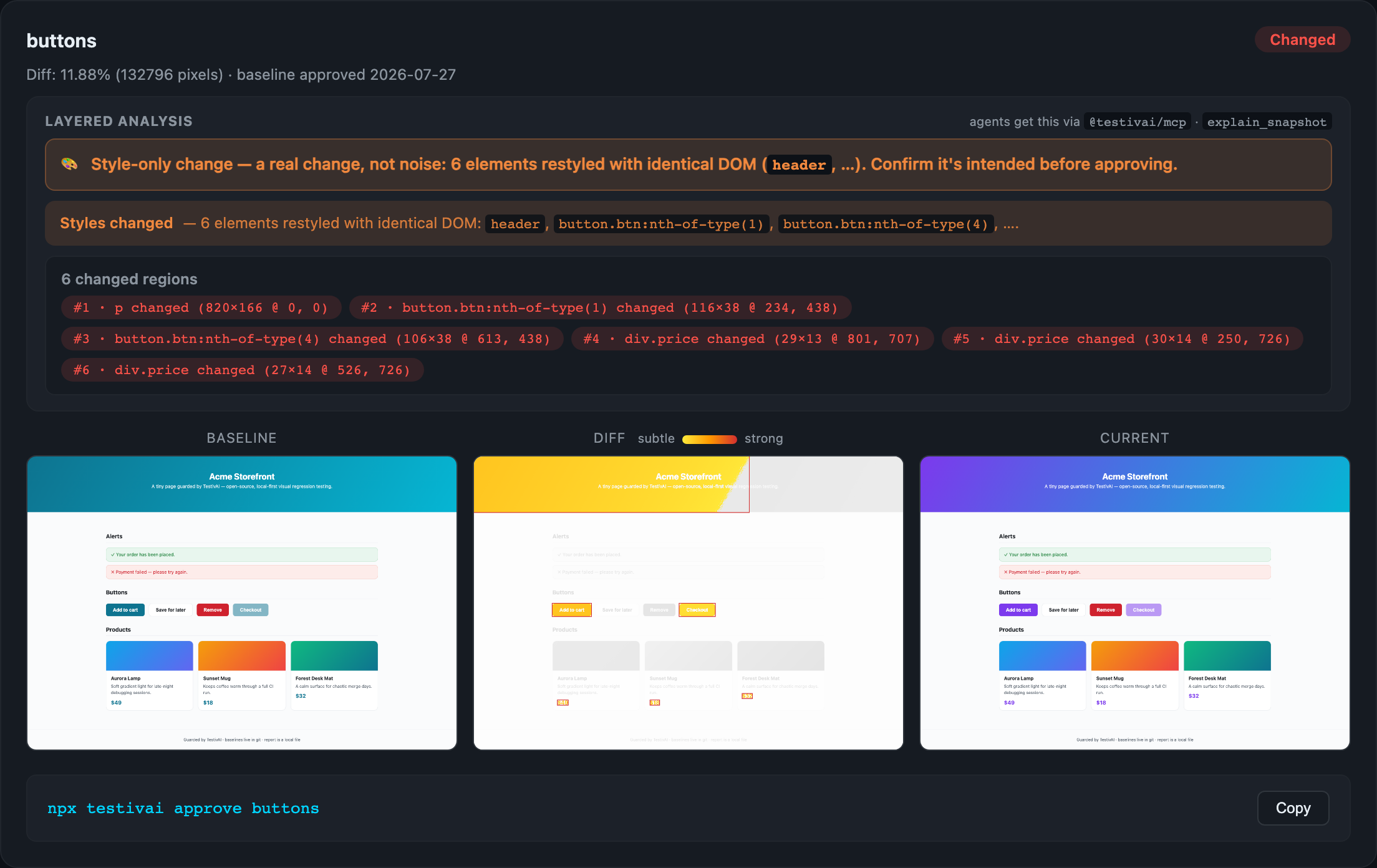
TestivAI pairs every screenshot with a snapshot of the page DOM. When pixels differ but the DOM is structurally identical, the report flags the diff as likely render noise instead of crying wolf. When the DOM actually changed, you see exactly what (2 added, 1 removed). That single signal is the difference between a flaky test wall and a report you trust.
- Fully local, no account — captures, diffs, and a self-contained HTML report all stay on your machine.
- DOM + style-aware noise hint — separates real changes from render jitter, and catches the stylesheet-only case: identical DOM with changed computed styles reads as "Styles changed on
button.cta", never as noise. - Auditable masks & region-level diffs — exclude dynamic areas (selectors or coordinates) with the masked region hatched in the diff, and get "3 changed regions" with bounding boxes instead of a raw pixel percentage.
- Element attribution & exact shift detection — the report names which element changed ("
div.card:nth-of-type(2)shifted +8px vertically — content unchanged") and spots the injected-banner case ("everything below y=80 moved +24px"), derived from layout, not pixel guesswork. No local-first tool does this. - First-class adapters — Playwright (TS/JS and Python, Java experimental) and WebdriverIO, using each framework's native APIs; every language shares one set of baselines and one report.
- Mobile web, no extra package — Playwright device emulation works through the same
witness()call: one project per device profile, baselines keyed per device automatically, and the DOM and computed-style attribution survives emulation, so a change behind a@mediaquery is caught on mobile and correctly passes on desktop. See the mobile web guide. - PR-native workflow — a GitHub Action posts the diff and approves baselines from a
/testivai approvecomment. - No lock-in — MIT license, baselines live in your git, and
results.jsonis a semver-governed public contract.
Evaluating this for a team? Maintenance & roadmap covers who builds it, the release cadence, and what happens to your setup if maintenance ever stops.
Already using Playwright's
toHaveScreenshot()? It's good, and if a pixel diff answers your question you should keep using it. Here's an honest look at what TestivAI adds and when it isn't worth the dependency.
Eyes for your coding agent
If an AI agent (Claude Code, Cursor, Copilot, …) writes your UI code, someone still has to check what the UI looks like — and it shouldn't be you, one screenshot at a time. TestivAI is built to be that check:
- No account, no API key, no network — an agent can run it inside any sandbox without you provisioning secrets.
- Machine-readable output — every run writes
visual-report/results.json(a semver-governed schema) with per-snapshot diff percentages and DOM change summaries, so an agent can read the result and self-correct. - Noise-aware verdicts — the DOM hint tells the agent whether a pixel diff is likely render noise or a real structural change (
2 added, 1 removed), so it doesn't chase anti-aliasing ghosts. - Explanations, bring-your-own-model — the MCP
explain_snapshottool hands your agent layered evidence (which selectors shifted vs changed, whole-page shift detection, style-only changes) and your model writes the narrative: "card #2 shifted +24px — likely the banner injected above it." No hosted AI service in the loop. - Human approval stays in the PR — the agent iterates locally; you approve baselines with one
/testivai approvecomment.
Paste this into your project's AGENTS.md / CLAUDE.md to wire it up (full guide with MCP setup, a real agent transcript, and the approval rule: docs/guides/ai-agents.md):
Packages
Live versions are shown by the badges at the top of this README.
| Package | Description |
|---|---|
@testivai/witness | Core SDK: CLI, local diffing, baselines, HTML report generator |
@testivai/witness-playwright | Playwright reporter/adapter built on top of @testivai/witness |
@testivai/witness-webdriverio | WebdriverIO service + capture function (local mode) |
@testivai/witness-selenium | Selenium WebDriver capture adapter (Python/Java Selenium live in python/ and java/) |
@testivai/mcp | MCP server — visual results + diff images for AI coding agents |
testivai (PyPI) | Python adapter for playwright-python + pytest plugin — same baselines & report |
ai.testiv:testivai | Java adapter for playwright-java + JUnit 5 extension (experimental) |
testivai (RubyGems) | Ruby adapter for Capybara / RSpec / Cucumber — same baselines & report |
Plus:
action/— GitHub Action for PR-based visual approvalsexamples/— minimal real-world example projectsdocs/— public documentatione2e/— OSS smoke E2E test suite
No test suite? One command.
AI-built and vibe-coded apps (Lovable, Bolt, v0, ...) usually ship with zero tests. You still get the full safety net:
TestivAI launches a headless Chrome, discovers your pages (or takes
--pages "/,/pricing"), and captures each one — baselines, diffs, noise
hints, HTML report, and PR approvals all work exactly as below, no test
framework required. See the vibe-coded apps guide.
Quick Start (Playwright, Local Mode)
First run: baselines are written to .testivai/baselines/.
Later runs: screenshots are diffed and a self-contained HTML report is written to ./visual-report/.
What you get out of the box (free, no account)
Related MCP Servers
Adoption & maintenance
Factual signals from GitHub, npm, and our automated checks — not a rating.
GitHub stars
4
Stargazers on the source repository.
Last commit
11d ago
Most recent push to the default branch.
Reviews
No reviews yet — be the first to share how this listing worked for you.
Frequently Asked Questions about TestivAI Open Source
AllMCPs Directory Badge
Showcase your server listing on GitHub or your project documentation. Embed this dynamic SVG badge to highlight official listing status and live engagement.
Badge Style:
Live Dynamic SVG Preview
Markdown (GitHub README)
[](https://allmcps.com/mcp/mcp-33)HTML Embed
<a href="https://allmcps.com/mcp/mcp-33"><img src="https://allmcps.com/api/badge/mcp-33?style=directory" alt="TestivAI Open Source on AllMCPs" /></a>