AllMCPs
BrowseBestCategoriesStackCompareToolsGuidesBlog
Log in Submit MCP

Stay in the loop

Get new MCP servers and top picks in your inbox.

AllMCPs

The open directory for discovering and installing Model Context Protocol servers.

AllMCPs on GitHub (opens in a new tab)
Launched onTiny Startupstinystartups.com
Explore
  • Browse servers
  • Best MCP servers
  • Categories
  • MCP clients
  • Agent prompts
  • Stack Builder
  • Compare servers
  • Random discovery New
  • Submit a server
  • Pricing & Boost Boost
Learn
  • Guides hub
  • What is MCP?
  • Install guide
  • Build an MCP server
  • Deploy an MCP server
  • Security guide
  • Troubleshooting
  • MCP for SEO & AEO
  • Protocol versioning
  • Blog & updates
Tools
  • All developer tools
  • Config generator
  • Config validator
  • Config auditor
  • MCP playground
  • Token calculator
  • OpenAPI β†’ MCP
  • Badge generator
For agents
  • REST API docs
  • Trust & traffic Live
  • Remote MCP server SSE β†— (opens in a new tab)
  • llms.txt β†— (opens in a new tab)
  • Catalog JSON β†— (opens in a new tab)
Company
  • About
  • Advertise Sponsor
  • Contact
  • GitHub β†— (opens in a new tab)
  • Terms
  • Privacy
AllMCPs VerifiedAllMCPs VerifiedFeatured on Nick LaunchesFeatured on Nick LaunchesLaunch Llama NewsletterLaunch Llama NewsletterVerified DR - allmcps.comVerified DR - allmcps.comFeatured on SaaSGrowFeatured on SaaSGrowFeatured on Twelve ToolsFeatured on Twelve ToolsFeatured on Saaspa.geFeatured on Saaspa.geFeatured on Findly.toolsFeatured on Findly.toolsFeatured on Startup FameFeatured on Startup FameFeatured on LaunchKiwiFeatured on LaunchKiwiFeatured on ScrollLaunchFeatured on ScrollLaunchFeatured on DailyPingsFeatured on DailyPingsFazier badgeFazier badgeFeatured on NewTool.siteFeatured on NewTool.siteFeatured on saasfame.comFeatured on saasfame.comDR Checker - Domain RatingDR Checker - Domain RatingListed on Turbo0Listed on Turbo0Launched on LaunchBoard - Product Launch PlatformLaunched on LaunchBoard - Product Launch PlatformList on SimilarlabsList on Similarlabshttps://codetrendy.comhttps://codetrendy.comListed on DevTool.ioFeatured on BuildlistFeatured on BuildlistLaunched on Tiny StartupsFeatured on ShowMeBestAIFeatured on ShowMeBestAIFind us on LaunchZoneFind us on LaunchZoneAllMCPs VerifiedAllMCPs VerifiedFeatured on Nick LaunchesFeatured on Nick LaunchesLaunch Llama NewsletterLaunch Llama NewsletterVerified DR - allmcps.comVerified DR - allmcps.comFeatured on SaaSGrowFeatured on SaaSGrowFeatured on Twelve ToolsFeatured on Twelve ToolsFeatured on Saaspa.geFeatured on Saaspa.geFeatured on Findly.toolsFeatured on Findly.toolsFeatured on Startup FameFeatured on Startup FameFeatured on LaunchKiwiFeatured on LaunchKiwiFeatured on ScrollLaunchFeatured on ScrollLaunchFeatured on DailyPingsFeatured on DailyPingsFazier badgeFazier badgeFeatured on NewTool.siteFeatured on NewTool.siteFeatured on saasfame.comFeatured on saasfame.comDR Checker - Domain RatingDR Checker - Domain RatingListed on Turbo0Listed on Turbo0Launched on LaunchBoard - Product Launch PlatformLaunched on LaunchBoard - Product Launch PlatformList on SimilarlabsList on Similarlabshttps://codetrendy.comhttps://codetrendy.comListed on DevTool.ioFeatured on BuildlistFeatured on BuildlistLaunched on Tiny StartupsFeatured on ShowMeBestAIFeatured on ShowMeBestAIFind us on LaunchZoneFind us on LaunchZone
Β© 2026 Jackalope Digital LLC. All rights reserved.
  1. Home
  2. πŸ’¬ Communication
  3. Openagentemail
Openagentemail logo
Health: ActiveRecent health check succeeded.Last checked 9/7/2026, 11:47:50 PM

Openagentemail

User RatingsBe the first to rate and review this MCP server! Enrichment pendingWe haven’t run our AI enrichment pass on this listing yet, so the overview, use cases, and FAQ below may be sparse or missing. We work through the catalog over time β€” check back soon.
View Repository17 GitHub StarsTotal stargazers on GitHub for the source repository (17 stars).Visit Website

Unlimited agent mailboxes β€” create identities, read/wait for mail, extract OTPs, send email.

Quick Install

Automated & IDE Setup

Copy the AI prompt to install this server into Claude Code, Cursor, or another agent β€” or use 1-click editor setup below.

Add to CursorAdd to VS Code
Not yet automatically verified

We haven't yet run this listing's install command through our automated sandbox check. This isn't a red flag β€” we're steadily working through the catalog.

Manual Client & Custom JSON ConfigExpand JSON β–Ύ

Client Config & Setup

Choose your client or environment
Target File:~/Library/Application Support/Claude/claude_desktop_config.json
claude_desktop_config.json
{
  "mcpServers": {
    "mcp-314": {
      "command": "npx",
      "args": [
        "-y",
        "@openagentemail/setup"
      ]
    }
  }
}

πŸ’‘ Paste the JSON block into your client's configuration file under mcpServers, then restart the application.

Install Directory Badge Claim listing AlternativesπŸ’¬ More in Communication

Documentation Overview

openagent.email

Self-hosted email for AI agents. The open-source alternative to AgentMail.

openagent.email Β· website: openagentemail/website

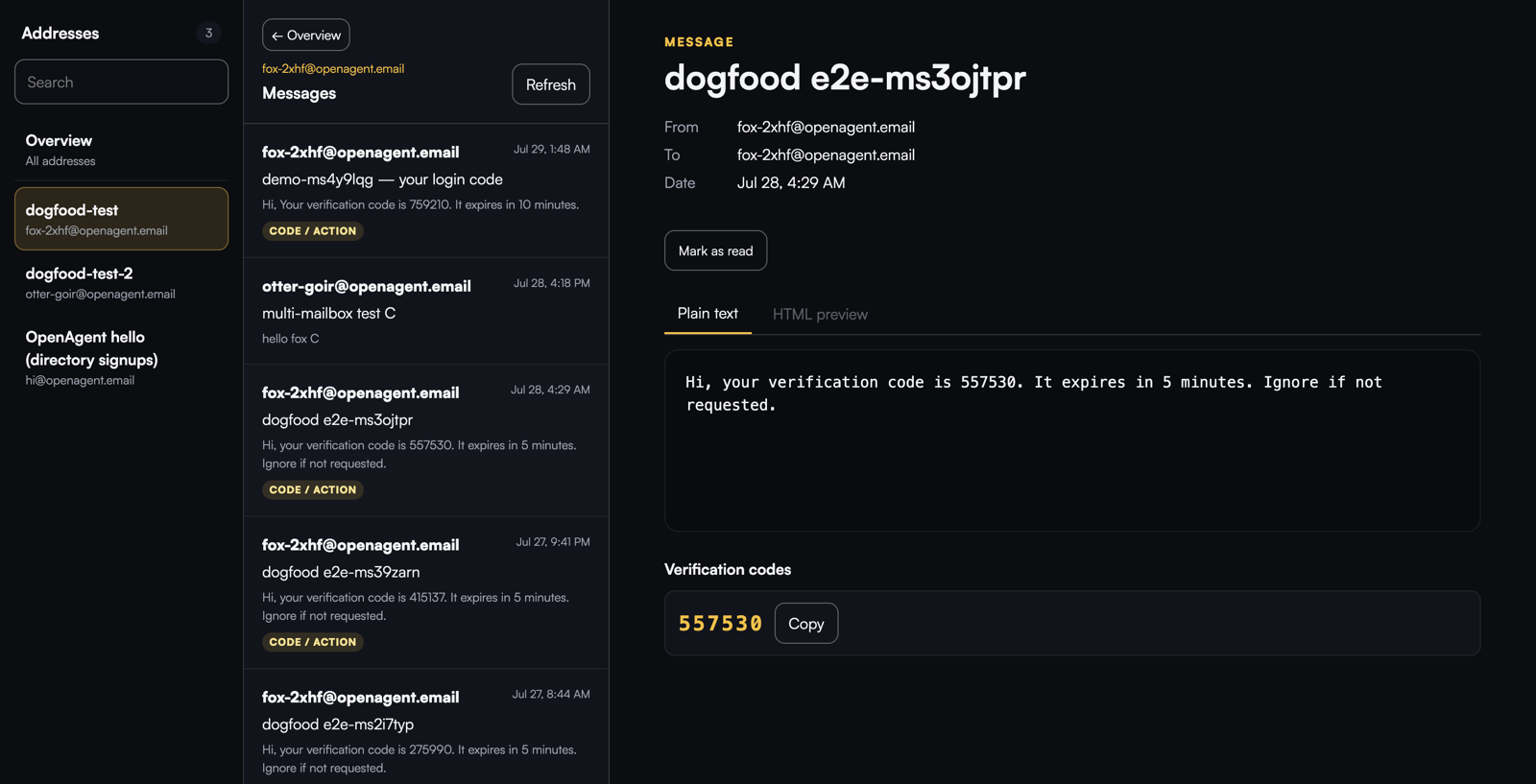
Web dashboard: a message with its extracted verification code

License: Apache-2.0 npm release Glama Smithery GitHub stars

One docker compose up on your own VPS gives every agent you run unlimited real mailboxes on your own domain β€” over REST and MCP β€” with OTP and verification-link extraction built in. No per-inbox pricing, no third party ever seeing your mail.

Quickstart

Terminal
npx -y @openagentemail/setup

A guided wizard: it checks what you already have, helps you pick a VPS and a domain if you're missing either, and connects your agent clients (Claude Code, Cursor, Kimi Code…) once the server is up.

The manual path needs a VPS with outbound/inbound port 25 open and a domain you control:

bash
git clone https://github.com/openagentemail/openagentemail.git && cd openagentemail
cp .env.example .env   # set DOMAIN, API_KEYS, mailbox password, and NTFY_ADMIN_PASSWORD
docker compose up -d
sudo ./deploy/dns-records.sh   # prints the exact DNS records to create

Then verify everything end to end:

bash
sudo ./deploy/doctor.sh

doctor.sh checks .env permissions; MX, A, SPF, DKIM, and DMARC; PTR; outbound port 25; DNS blocklists; TLS certificates on 465 and 993; and the server-side ntfy verification endpoint. It does not log in over IMAP/SMTP or send a round-trip test. Docker Mailserver can create docker-data/ as root, so use sudo for these two scripts; an EACCES failure prints the same retry instruction instead of pretending the DKIM key is missing.

If no SMTP relay is configured and outbound port 25 is blocked, API queued:true only means the local mailserver accepted the message. It does not mean the recipient received it: Postfix can retain the message in its queue. Treat doctor's outbound-port-25 result as the delivery prerequisite, or configure a relay before relying on direct delivery.

Public TLS with Let's Encrypt (opt-in)

The default docker compose up -d path remains self-signed: it does not start or pull Certbot and does not publish TCP 80. To use a publicly trusted mail certificate, opt in only after mail.$DOMAIN has an A (and, if used, AAAA) record pointing at this host and the firewall permits inbound TCP 80. HTTP-01 cannot create those DNS or firewall prerequisites for you.

In .env, set the following (use a reachable contact address outside this mailserver when possible):

dotenv
SSL_TYPE=letsencrypt
SSL_DOMAIN=mail.example.com       # exactly mail.$DOMAIN
LETSENCRYPT_EMAIL=admin@example.net  # optional, but recommended

First issue the certificate with the explicitly enabled sidecar; do not start the mailserver in letsencrypt mode before this succeeds:

Terminal
docker compose --profile letsencrypt-bootstrap up -d certbot-bootstrap
docker compose logs -f certbot-bootstrap
# Wait for β€œSuccessfully received certificate”, then confirm:
docker compose --profile letsencrypt-bootstrap run --rm --no-deps \
  --entrypoint ls certbot-bootstrap -l \
  /etc/letsencrypt/live/mail.example.com/fullchain.pem \
  /etc/letsencrypt/live/mail.example.com/privkey.pem

This temporary container reads the shared certificate volume, so confirmation still works after the one-shot bootstrap has stopped.

If first issuance fails, Certbot stops instead of retrying the ACME request in a tight loop. Correct the DNS/port-80/domain prerequisite, then explicitly run the same docker compose --profile letsencrypt-bootstrap up -d certbot-bootstrap command again.

The entire /etc/letsencrypt tree is a persistent named volume shared with the mailserver read-only: Certbot's live/ files are symlinks into archive/, so mounting only live/ is incorrect. Once the first certificate exists, start the full opt-in stack and verify the public endpoints. Do not enable letsencrypt-bootstrap and letsencrypt together: both publish host TCP 80.

Terminal
docker compose --profile letsencrypt up -d
./deploy/doctor.sh
openssl s_client -connect mail.example.com:465 -servername mail.example.com </dev/null \
  2>/dev/null | openssl x509 -noout -issuer -subject -dates
openssl s_client -connect mail.example.com:993 -servername mail.example.com </dev/null \
  2>/dev/null | openssl x509 -noout -issuer -subject -dates

After bootstrap, the renewal sidecar runs renew every 12 hours and restarts with Docker. docker-mailserver's change-detection service watches SSL_TYPE=letsencrypt certificate updates and reloads Postfix and Dovecot, so renewed certificates take effect on 465/993 without a manual container restart. Keep the letsencrypt profile enabled for normal operation. If it is omitted, the sidecars and TCP 80 are absent and the original self-signed path is unchanged.

Create an identity and hand your agent its scoped token (shown once):

Terminal
curl -X POST http://localhost:3100/v1/identities \
  -H "Authorization: Bearer $API_KEY" -H "Content-Type: application/json" \
  -d '{"name":"signup-bot","scopes":["read:messages"]}'
# β†’ 201 {"address":"fox-k7d2@example.com","name":"signup-bot","token":"oa_…","scopes":["read:messages"]}

The API binds to 127.0.0.1 by default β€” reach it from other hosts over an SSH tunnel or a TLS proxy: docs/security.md.

Paths are exact: call /v1/notify, not /v1/notify/ β€” a trailing slash returns a plain 404 rather than the API error format.

Using your own mail server

Already have a mail provider for your domain? Run the API by itself with compose.api-only.yaml, connected to that provider's catch-all mailbox. The external mail server guide covers the required catch-all setup, Portainer deployment, SMTP sender limits, and TLS certificate verification.

The standalone default project name is openagentemail. If the full compose.yaml stack also runs on the same host, the API-only stack must not share that default project: give it an explicitly different -p value or COMPOSE_PROJECT_NAME so the two stacks cannot adopt each other's resources.

To run multiple API-only instances on one host, give every instance its own environment file, unique Compose project, and host API_PORT. The API always listens on port 3100 inside its container; API_PORT changes only the host-side mapping. For example:

bash
mkdir -p ../oae-api-only-env
cp .env.api-only.example ../oae-api-only-env/alpha.env
cp .env.api-only.example ../oae-api-only-env/beta.env
chmod 600 ../oae-api-only-env/*.env
# Set API_PORT=3100 in alpha.env and API_PORT=3101 in beta.env.
# Generate separate API_KEYS and TASK_SIGNING_SECRET values in each file.

docker compose -p oae-alpha --env-file ../oae-api-only-env/alpha.env -f compose.api-only.yaml up -d
docker compose -p oae-beta  --env-file ../oae-api-only-env/beta.env  -f compose.api-only.yaml up -d

You may set a unique COMPOSE_PROJECT_NAME for each command instead of using -p. The project names make Compose generate distinct container names and project-scoped named volumes (for example oae-alpha_api-data and oae-beta_api-data). Do not reuse a project name or API_PORT between the two instances. Each instance must have independently generated API_KEYS and TASK_SIGNING_SECRET values; configure its IMAP and SMTP credentials for that instance's intended mailbox/provider boundary as well. Keep these populated environment files outside the repository, as in the example above.

Read mail in a browser

Open http://localhost:3100/ui and paste an admin or identity API token. The built-in dashboard lists the addresses the token may access, shows Inbox / All Mail (IMAP) and Sent (API/MCP send audit for 30 days; direct SMTP is not listed) with cursor paging, extracts verification codes and links at the top of a message, offers Rendered (isolated HTML iframe), Plain text, or Source views, and can mark messages read or unread. Source is fetched on demand from a size-capped no-store endpoint and never injected as HTML. Scheduled and Trash are omitted until the backend can serve them. Admin sessions can also create identities (with custom address prefixes), rotate tokens, and delete identities directly from the overview table.

Read the full README β†’View source on GitHub β†’

Related MCP Servers

View all in Communication View all alternatives
  • Line Bot MCP Server logoLine Bot MCP Server
    Verified

    MCP Server for Integrating LINE Official Account

    πŸ’¬ Communication3 views
    Compare vs Line Bot MCP Server β†’
  • Postfleet logoPostfleet

    Give an AI agent its own email address: send, reply, read, and wait for mail.

    πŸ’¬ Communication0 views
    Compare vs Postfleet β†’
  • Microsoft Outlook MCP logoMicrosoft Outlook MCP

    Microsoft Outlook (mail) MCP server β€” read, search, and send email through Microsoft Graph.

    πŸ’¬ Communication1 views
    Compare vs Microsoft Outlook MCP β†’
  • UnCorreoTemporal logoUnCorreoTemporal

    Temporary email for AI agents: create inboxes, wait for emails, extract OTPs, verify signups.

    πŸ’¬ Communication0 views
    Compare vs UnCorreoTemporal β†’

Reviews

No reviews yet β€” be the first to share how this listing worked for you.

Frequently Asked Questions about Openagentemail

Add the following block to your claude_desktop_config.json under mcpServers: "mcpServers": { "openagentemail": { "command": "npx", "args": ["-y", "openagentemail/openagentemail"] } }

AllMCPs Directory Badge

Full Badge Customizer

Showcase your server listing on GitHub or your project documentation. Embed this dynamic SVG badge to highlight official listing status and live engagement.

Badge Style:
Live Dynamic SVG PreviewOpenagentemail AllMCPs Directory Badge

Markdown (GitHub README)
[![AllMCPs](https://allmcps.com/api/badge/mcp-314?style=directory)](https://allmcps.com/mcp/mcp-314)
HTML Embed
<a href="https://allmcps.com/mcp/mcp-314"><img src="https://allmcps.com/api/badge/mcp-314?style=directory" alt="Openagentemail on AllMCPs" /></a>

Technical Specs & Signals

CategoryπŸ’¬Communication
More technical detailsExpand β–Ύ
TransportSTDIO
RuntimeNode.js
Last updatedSep 7, 2026
Views0
Unique ViewsTotal visits recorded for this listing page on AllMCPs.
Installs0
Installs & Copy ActionsTotal times users copied install commands or configuration snippets for this server.
GitHub stars17
GitHub Star CountTotal stargazers on GitHub representing community popularity (17 stars).
39Quality signal: Fair Β· 39/100How this signal is calculated β–Ύ
Server availabilityNot measured

Not scored for repo-hosted servers β€” we can't reach the running server, only its GitHub page. Hosted MCP endpoints are health-checked live.

Verified ownership10/20
Documentation & tools16/30
Adoption & activity3/15
Community engagement0/10

A guidance signal from public completeness & health data β€” not a user rating. New listings start lower and rise as they add docs, get verified, and grow adoption. Signals we can't observe for a listing are skipped, not counted against it.

β˜… FeaturedAllMCPs Server logo

AllMCPs Server

The official MCP server for AllMCPs.com - submit and manage tools directly from your AI. The open directory for MCP servers. Connect Claude, Cursor, Windsurf, and AI agents to databases, tools, files, and APIs. Explore 10,000+ servers. AllMCPs is the premier, open directory for discovering, evaluating, and installing Model Context Protocol (MCP) servers to equip AI agents and LLMs with real-world superpowers.

Explore Server β†’

Own this project?

This directory is pre-filled from public sources. Claim via GitHub README, site badge, or DNS TXT to unlock edit access and the Official badge β€” proof is checked automatically, then reviewed by our team.

Free dofollow backlink: add your website and place the AllMCPs badge on it β€” no claim needed. We detect it automatically and keep it verified as long as the badge stays live.

Claim & get free dofollow

Share & Embed

Add our SVG badge (dark/light directory styles) or embeddable widget to your site.

Explore more

More in πŸ’¬ Communication β†’Best MCP servers for Slack & Communication β†’Alternatives to Openagentemail β†’Install in Claude DesktopInstall in CursorInstall in VS Code